
SenseFlow SF101S
SenseFlow SF101S Smart Wi-Fi Waterless Ultrasonic Essential Oil Diffuser User Manual
Model: SF101S | Brand: SenseFlow
Introduction
The SenseFlow SF101S Smart Wi-Fi Waterless Ultrasonic Essential Oil Diffuser utilizes PureMist Patented Natural Health Fragrance Technology to atomize essential oils directly, preserving their natural scent without the need for water or heat. This diffuser is designed to provide a pure, long-lasting aroma experience, covering up to 1000 sq. ft. It offers smart control via a mobile application, allowing for customized scent intensity and scheduling.

Figure 1: SenseFlow SF101S Diffuser and App Interface. This image shows the compact white diffuser unit with a Bergamot essential oil bottle attached, alongside a smartphone screen demonstrating the intuitive control application.
Important Safety Information
Please read and understand all safety instructions before using this product. Failure to follow these instructions may result in electric shock, fire, or serious injury.
- Avoid direct skin contact with undiluted essential oils.
- Keep the device and essential oils out of reach of children and pets.
- Ensure proper ventilation in the area where the diffuser is used.
- Do not immerse the device in water or any other liquid.
- Use only the specified essential oil refills designed for this diffuser.
- Unplug the device from the power outlet when not in use or before cleaning.
Package Contents
Verify that all items are present in your package:
- SenseFlow SF101S Smart Wi-Fi Diffuser Unit
- 30ml Essential Oil Refill (Bergamot scent included with this model)
- Power Adapter (Corded Electric)
- User Manual (this document)
Setup Guide
- Unpack the Diffuser: Carefully remove the diffuser unit and essential oil refill from the packaging.
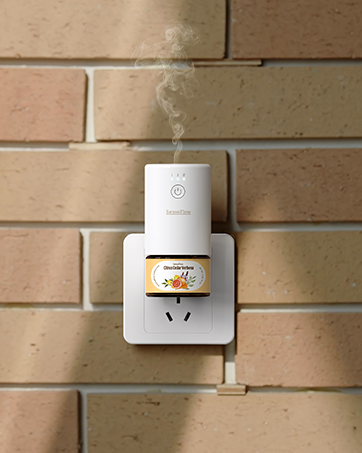
Figure 2: SenseFlow SF101S Diffuser Unit. This image displays the main diffuser unit, ready for essential oil insertion.
- Insert Essential Oil Refill: Unscrew the cap from the essential oil bottle. Gently screw the essential oil bottle into the bottom of the diffuser unit until secure. Do not overtighten.

Figure 3: Inserting Essential Oil. This image illustrates the process of attaching the essential oil refill bottle to the diffuser unit.
- Plug In the Diffuser: Connect the power adapter to the diffuser and then plug it into a standard electrical outlet. The device will power on automatically.

Figure 4: Diffuser Plugged In. The diffuser is shown connected to a wall outlet, ready for operation.
- Download the SenseFlow App: Scan the QR code provided in the packaging or search for "SenseFlow" in your mobile device's app store (iOS or Android).
- Connect to Wi-Fi: Follow the in-app instructions to connect your SenseFlow diffuser to your home Wi-Fi network. Ensure your Wi-Fi is 2.4GHz for optimal compatibility.
Operating Instructions
The SenseFlow SF101S offers both manual and app-controlled operation.
Manual Operation
- Press the power button on the front of the diffuser to turn it on or off.
- Repeatedly press the power button to cycle through the four scent intensity levels (L1, L2, L3, L4). The indicator lights will show the current level.
- The diffuser also features a built-in ambient night light. Press the light button (if available, or long-press power button) to toggle it on/off.
App Control (Recommended)
The SenseFlow app provides comprehensive control over your diffuser's settings.
- Power On/Off: Control the diffuser's power directly from the app.
- Adjust Scent Intensity: Select from four adjustable scent intensity levels (L1-L4) to suit your preference and room size.

Figure 5: Scent Coverage and Intensity. This diagram illustrates how different scent intensity levels (L1-L4) correspond to various room sizes, from 100-250 sq. ft. to 650-1000 sq. ft., with recommended spray intervals.
- Set Spray Intervals: Customize spray intervals to 1, 2, 6, or 10 minutes for personalized fragrance delivery.
- Scheduling: Create custom schedules for the diffuser to operate automatically throughout the day or week. This allows for timed fragrance release, for example, to welcome you home or prepare for sleep.

Figure 6: Perfectly Timed Scents for Every Space. This image demonstrates the versatility of the SenseFlow diffuser across different environments, from bathrooms to retail stores, highlighting the app's scheduling feature for tailored ambiance.
- Ambient Night Light Control: Turn the integrated LED night light on or off via the app.

Figure 7: Natural & Safe for Any Space with Ambient Night Light. This image shows the diffuser in a bedroom setting, illustrating its discreet presence and the soft glow of its built-in ambient night light, enhancing relaxation.
Official Product Video
Video 1: SenseFlow Timed Aroma Diffuser. This video demonstrates the SenseFlow diffuser in action, highlighting its timed aroma release feature and ease of use in a home environment.
Maintenance
Replacing Essential Oil Refill
The 30ml essential oil refill provides up to 120 days of continuous freshness, depending on usage intensity and frequency.
- Unplug the diffuser from the power outlet.
- Gently unscrew the empty essential oil bottle from the bottom of the diffuser unit.
- Dispose of the empty bottle responsibly.
- Unscrew the cap from a new SenseFlow 30ml essential oil refill.
- Screw the new bottle into the diffuser unit until secure. Do not overtighten.
- Plug the diffuser back into the power outlet.

Figure 8: Essential Oil Refill Collections. This image displays a variety of SenseFlow essential oil bottles and their packaging, highlighting the extensive range of pure, plant-based fragrances available for refill.
Cleaning the Diffuser
The waterless design of the SenseFlow diffuser minimizes cleaning requirements. However, occasional cleaning of the exterior may be necessary.
- Ensure the diffuser is unplugged before cleaning.
- Wipe the exterior of the diffuser with a soft, dry, or slightly damp cloth.
- Do not use abrasive cleaners, solvents, or immerse the unit in water.
- Do not attempt to clean the internal atomization components.
Troubleshooting
| Problem | Possible Cause | Solution |
|---|---|---|
| Diffuser not turning on. | Not plugged in correctly; Power outlet issue; Device malfunction. | Ensure the power adapter is securely plugged into both the diffuser and the wall outlet. Test the outlet with another device. If the issue persists, contact customer support. |
| No scent or weak scent. | Essential oil bottle empty; Incorrect scent intensity setting; Diffuser placed in too large an area. | Check if the essential oil bottle is empty and replace if necessary. Increase the scent intensity level via the app or manual button. Consider placing the diffuser in a smaller area or using multiple units for larger spaces. |
| App cannot connect to diffuser. | Incorrect Wi-Fi password; Diffuser out of Wi-Fi range; Router issue; App outdated. | Ensure correct Wi-Fi password. Move diffuser closer to the Wi-Fi router. Restart your router. Update the SenseFlow app to the latest version. Re-pair the device if necessary following in-app instructions. |
| Diffuser making unusual noise. | Loose essential oil bottle; Internal component issue. | Ensure the essential oil bottle is screwed in tightly. If the noise persists, unplug the device and contact customer support. |
Specifications
| Feature | Detail |
|---|---|
| Brand | SenseFlow |
| Model Name | SF101S |
| Color | White |
| Scent (Included) | Bergamot |
| Recommended Uses | Home |
| Material | Plastic |
| Special Features | 100% Plant-Based, Pet-Friendly, No Fillers, No Additives, Replaceable 30ml refill, 120 Days of Continuous Freshness, Up to 1000 sq. ft. Fragrance Coverage, PureMist™ Patented Fragrance Technology |
| Power Source | Corded Electric |
| Capacity | 30 Milliliters |
| Coverage Area | Up to 1000 sq. ft. |
| Product Dimensions | 3.93"L x 3.66"W x 1.96"H |
| Light Source Type | LED |
| Runtime | 960 hours (approx. 40 days continuous, up to 120 days with intermittent use) |
| Wattage | 10 watts |
| Auto Shutoff | Yes |
| Item Weight | 10.5 ounces |
| Country of Origin | China |
Warranty and Support
For warranty information, technical support, or any inquiries regarding your SenseFlow SF101S diffuser, please contact SenseFlow customer service directly. You can find contact details on the official SenseFlow website or through your purchase platform.
Visit the official SenseFlow Store for more information and to explore additional products and essential oil refills: SenseFlow Amazon Store
Related documentsSF101S

Ask a question about this manual
Ask about setup, troubleshooting, compatibility, parts, safety, or missing instructions. Manuals+ will review the question and use this page’s manual context to help answer it.