
1. Introduction
This manual provides detailed instructions for the assembly, operation, and maintenance of your Bellemave Metal Full XL Loft Bed with Desk and Wardrobe. Please read this manual thoroughly before assembly and use to ensure safe and proper operation. Keep this manual for future reference.
The Bellemave Full XL Loft Bed is designed to maximize space, featuring an integrated desk, a wardrobe, storage stairs, and LED lighting. It is suitable for kids, teens, and adults.
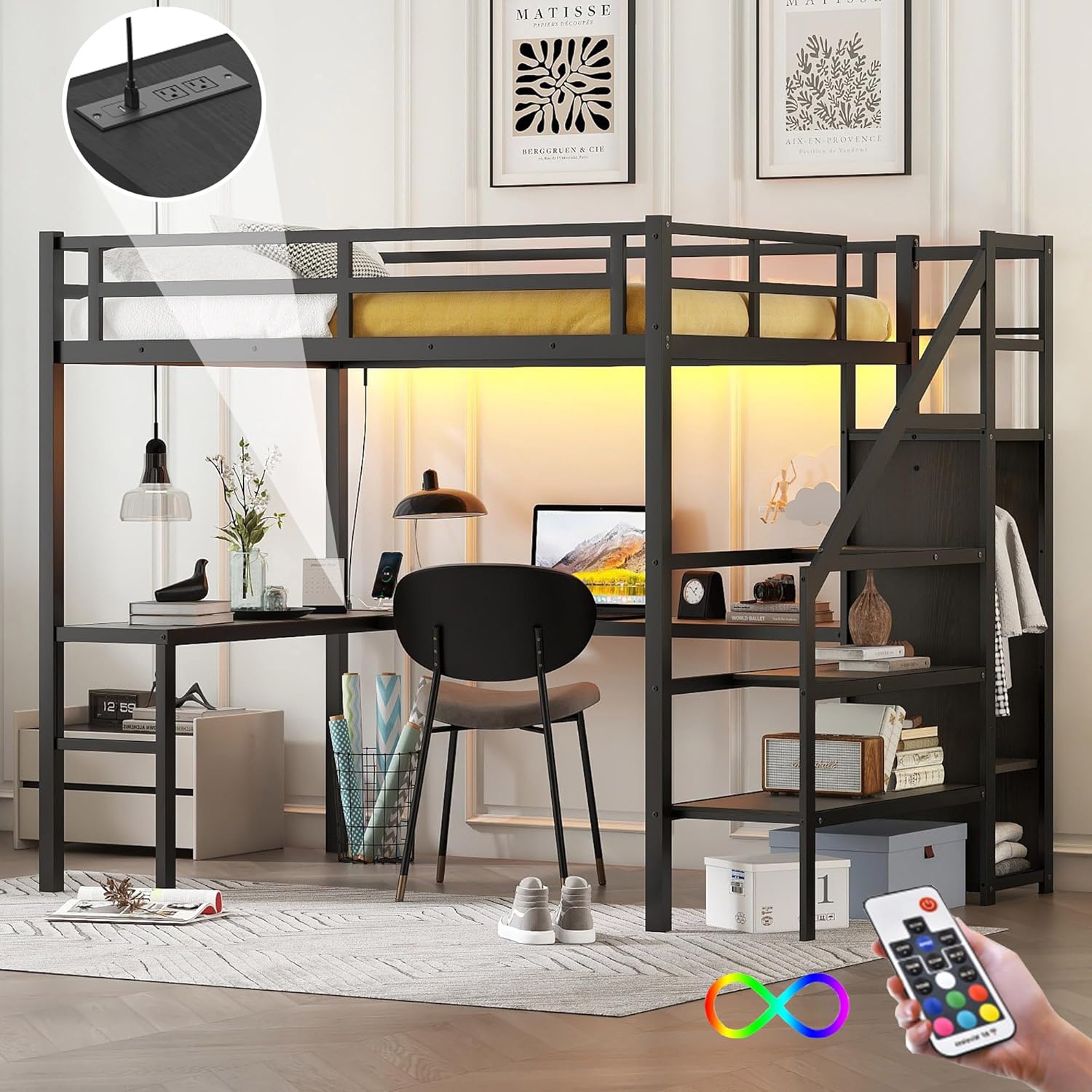
Figure 1: Bellemave Metal Full XL Loft Bed with Desk and Wardrobe, showcasing the integrated desk, wardrobe, and sleeping area.
2. Safety Information
WARNING: Failure to follow these safety instructions could result in serious injury or death.
- Ensure proper assembly by following all steps in this manual.
- Do not overload the bed. The maximum weight capacity for this bed frame is 350 LBS.
- Regularly check for loose or damaged parts. Tighten all connections and replace any damaged components immediately.
- Keep the area around the bed free from obstructions to prevent falls.
- The bed includes a 13-inch full-length guardrail for security. Ensure it is properly installed and maintained.
- Only use mattresses that comply with the recommended size for a Full XL bed.
- Do not allow children to play unsupervised on or around the loft bed.
3. Package Contents
Before beginning assembly, verify that all components are present and undamaged. Two packages are typically shipped for this product, and they may arrive at different times. Refer to the packing list provided with your product for a complete inventory.
Common components include:
- Metal frame components (legs, side rails, guardrails, bed slats)
- Desk panels
- Wardrobe panels and clothes rack
- Staircase panels
- LED light strip with remote control
- USB charging station (USB ports and outlets)
- Hardware pack (screws, bolts, nuts, Allen wrench)
- Illustrated installation manual
4. Setup and Assembly
Assembly requires two adults and approximately 4 hours. All necessary hardware and tools are included. Follow the illustrated installation manual provided in the package for step-by-step instructions.
4.1 Assembly Overview Video
Video 1: This video provides a visual guide to the assembly process of the Bellemave Loft Bed with Stairs, demonstrating key steps and component placement.
4.2 Key Assembly Steps
- Frame Construction: Begin by assembling the main metal frame components. Ensure all connections are secure.
- Desk Installation: Attach the L-shaped desk panels to the frame. The USB charging station should be integrated into the designated desk area.
- Staircase and Wardrobe Assembly: Assemble the staircase, noting that it can be fitted on either the left or right side as required. Integrate the built-in wardrobe components.
- Bed Slat Placement: Install the heavy-duty metal slats onto the bed frame to support the mattress.
- LED Light Installation: Attach the LED light strip under the bed frame. Connect it to the power source, often through the USB charging station.

Figure 2: An illustration of the loft bed frame during the assembly process, showing the metal structure before adding desk and storage components.

Figure 3: Demonstrates the convertible nature of the stairs, which can be positioned on either side of the bed to suit room layout.
5. Operating Instructions
5.1 LED Lighting System
The integrated LED light strip provides ambient lighting with 16 color options. Use the included remote control to adjust brightness and color settings.
- Power On/Off: Press the power button on the remote.
- Color Selection: Use the color buttons to choose from 16 different colors.
- Brightness Adjustment: Use the brightness up/down buttons to increase or decrease light intensity.
- Mode Selection: Cycle through various lighting modes (e.g., flash, strobe, fade, smooth) using the mode buttons.
Video 2: This video demonstrates the LED lighting features of the Bellemave Loft Bed, showing color changes and ambient effects.

Figure 4: The LED light strip under the loft bed, illustrating its various color options and remote control functionality.
5.2 USB Charging Station
The integrated USB charging station includes USB ports and standard outlets for convenient charging of electronic devices. Simply plug your devices into the available ports on the desk surface.

Figure 5: Close-up view of the L-shaped desk, highlighting the integrated USB ports and power outlets for charging devices.
6. Maintenance
- Cleaning: Wipe down metal and wood surfaces with a soft, damp cloth. Avoid abrasive cleaners.
- Hardware Check: Periodically inspect all bolts, screws, and connections. Tighten any loose hardware to maintain stability and safety.
- Weight Distribution: Ensure weight is evenly distributed on the bed and desk surfaces.
- LED Lights: If LED lights malfunction, check connections. If issues persist, contact customer support.
7. Troubleshooting
This section addresses common issues you might encounter with your loft bed.
- Bed feels wobbly:
Ensure all assembly hardware is securely tightened. Re-check all bolts and screws. If the issue persists, disassemble and reassemble, paying close attention to the alignment of parts.
- LED lights not working:
Verify that the LED strip is properly plugged into the power source (e.g., USB charging station). Check the remote control battery. Ensure the remote is pointed directly at the receiver. If still not working, check for any visible damage to the LED strip or wiring.
- Missing parts during assembly:
Refer to the package contents list and contact Bellemave customer support with details of the missing components. Provide your model number and purchase information.
- USB charging station not functioning:
Ensure the charging station is properly connected to a power outlet. Test with different devices and cables to rule out device-specific issues.
8. Specifications
| Feature | Detail |
|---|---|
| Brand | Bellemave |
| Model Number | TH-00271-FXL |
| Size | Full XL |
| Product Dimensions | 98.62"L x 57.48"W x 69.13"H |
| Color | Black |
| Material | Heavy-duty Metal Frame |
| Weight Capacity | 350 LBS |
| Special Features | Integrated Desk, Wardrobe, Storage Stairs, LED Lights (16 colors), USB Charging Station (USB ports & outlets), No Box Spring Needed |
| Guardrail Height | 13 inches (full-length) |
| Assembly Required | Yes |
| UPC | 733805185435 |

Figure 6: Detailed dimensions of the Bellemave Full XL Loft Bed, including length, width, and height measurements.
9. Warranty and Support
For warranty information, missing parts, or technical assistance, please refer to the warranty card included with your product or contact Bellemave customer support directly. Ensure you have your model number (TH-00271-FXL) and proof of purchase available when contacting support.
You can often find support contact information on the manufacturer's official website or through your retailer.


