
1. Introduction
This instruction manual provides detailed guidance for the assembly, operation, and maintenance of your Bellemave Full Size Metal Loft Bed with Desk and Wardrobe. Please read this manual thoroughly before beginning assembly or use to ensure safe and proper functionality.
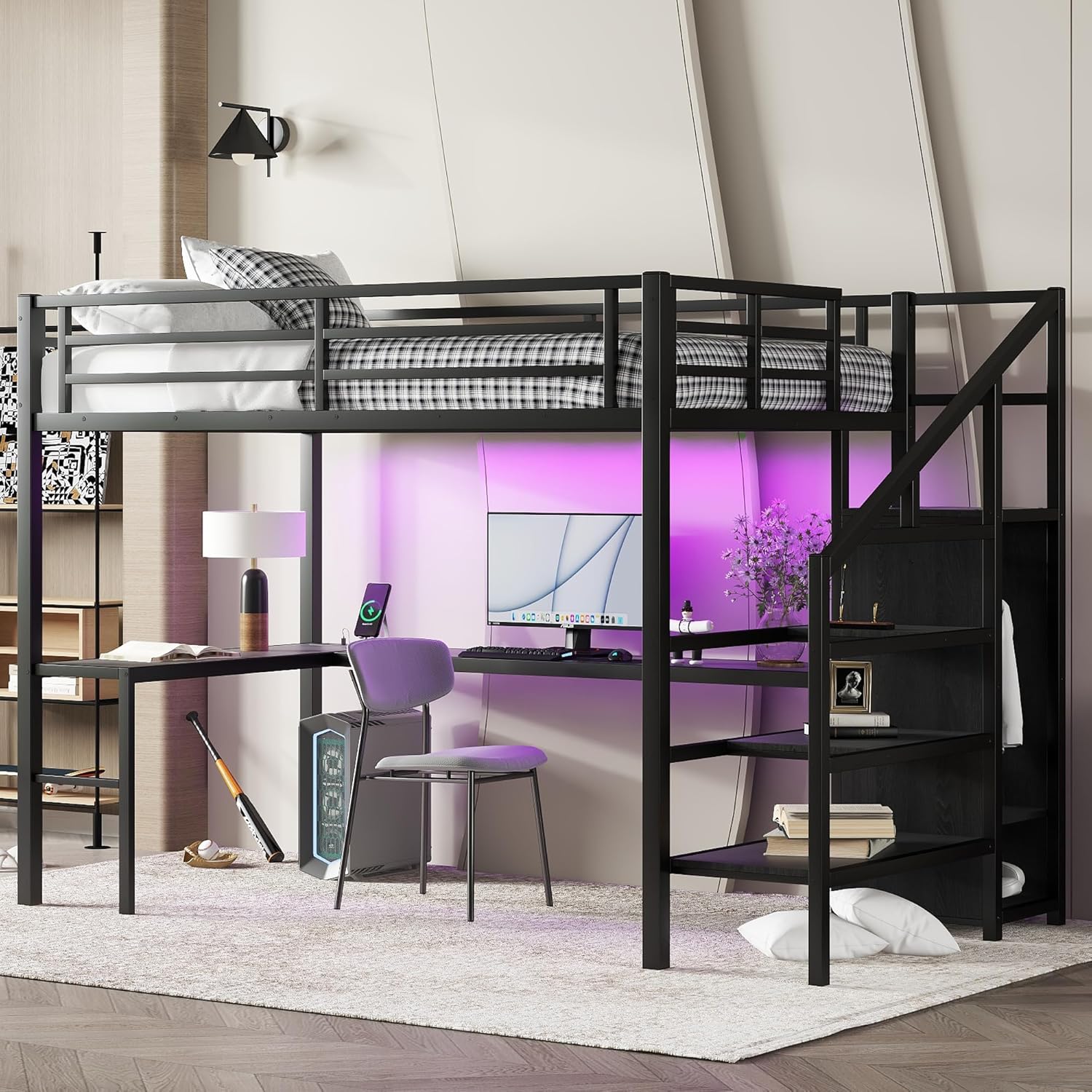
Image 1.1: Overview of the Bellemave Full Size Metal Loft Bed with Desk and Wardrobe.
2. Safety Information
Your safety is paramount. Please adhere to the following guidelines:
- Maximum Weight Capacity: This product has a maximum weight capacity of 350 LBS. Do not exceed this limit.
- Proper Assembly: Ensure all components are correctly assembled and tightened according to the instructions. Loose parts can lead to instability and injury.
- Guardrails: The 13-inch full-length guardrail is designed for security. Ensure it is properly installed and maintained.
- Avoid Climbing: Do not climb on the bed frame or any parts not intended for climbing.
- Heat and Water: Keep the bed away from heat sources and water to prevent damage or electrical hazards (for LED lights and charging station).
- Pinch Points: During assembly and use, be aware of potential pinch points or sharp edges.
- Mattress Compatibility: Use a full-size mattress that fits securely within the bed frame.
3. Package Contents
The Bellemave Full Size Metal Loft Bed is shipped in two separate boxes. Please ensure you have received both packages before beginning assembly. The packages contain all necessary hardware, tools, and an illustrated installation manual.
- Metal bed frame components
- Desk and wardrobe panels
- Storage stairs components
- LED light strip with remote control
- USB charging station (USB ports and outlets)
- Assembly hardware (screws, bolts, nuts)
- Assembly tools (Allen wrench, etc.)
- Illustrated installation manual
4. Setup (Assembly)
Assembly is required for this loft bed. It is recommended to have at least two adults for assembly. Follow the step-by-step instructions provided in the included manual. The staircase can be fitted on either the left or right side as required.
4.1. Assembly Overview Video
For a visual guide to the assembly process, please refer to the official installation video:
Video 4.1: Installation guide for the Bellemave Loft Bed with Stairs. This video demonstrates the step-by-step assembly of the bed frame, desk, and storage stairs.
4.2. General Assembly Steps
- Unpack Components: Carefully unpack all parts from both boxes and verify against the parts list in your manual.
- Assemble Main Frame: Begin by assembling the main metal frame structure. Ensure all bolts are finger-tight initially.
- Install Desk: Attach the L-shaped desk components to the main frame.
- Construct Stairs and Wardrobe: Assemble the storage stairs and integrated wardrobe. Decide on the desired left or right orientation before securing.
- Secure Bed Slats: Install the metal bed slats onto the upper bunk frame.
- Final Tightening: Once all components are in place, systematically tighten all bolts using the provided tools. Do not overtighten.
- Install Accessories: Attach the LED light strip and connect the USB charging station.

Image 4.2: The metal loft bed frame structure during initial assembly, showing the basic components before adding the desk and stairs.
5. Operating Instructions
5.1. Loft Bed Usage
The upper bunk is designed for sleeping. Ensure a full-size mattress is placed securely within the frame. The 13-inch guardrail provides safety; always ensure it is unobstructed.
5.2. Desk Area
The integrated L-shaped desk provides a dedicated space for studying, working, or leisure activities. Position your computer, books, and other items as desired.

Image 5.2: The spacious L-shaped desk area beneath the loft bed, configured for a computer workstation.
5.3. Storage Stairs and Wardrobe
The built-in staircase features storage compartments within each step, ideal for books, toys, or other daily necessities. The small wardrobe at the bottom includes a clothes rack for hanging garments and additional shelving for shoes or folded items. An adjustable divider is located at the bottom of the wardrobe for flexible storage.

Image 5.3: Close-up view of the integrated storage stairs and the built-in wardrobe with shelving and a hanging rod.
5.4. LED Lights
The LED light strip under the bed provides ambient lighting. It offers 16 color options and adjustable brightness, controlled via the included remote. Ensure the LED strip is securely attached and the power cable is connected to a suitable outlet.
Video 5.4: Demonstration of the LED lighting feature of the Full Size Loft Bed, showcasing color options and ambient effects.
5.5. USB Charging Station
The metal loft bed includes a USB charging station with USB ports and standard outlets, conveniently located on the desk surface. Use this station to charge electronic devices such as phones, tablets, or laptops.

Image 5.5: Detailed view of the integrated USB charging station, featuring USB ports and electrical outlets for convenient device charging.
6. Maintenance
Regular maintenance helps prolong the life and ensure the safety of your loft bed.
- Cleaning: Wipe the metal frame and wooden surfaces with a damp cloth. Avoid harsh chemicals or abrasive cleaners that may damage the finish.
- Hardware Check: Periodically check all bolts and screws to ensure they remain tight. Retighten as necessary to maintain stability.
- LED Lights: Ensure the LED strip remains securely attached. If the adhesive weakens, use appropriate double-sided tape or clips to re-secure it.
- Charging Station: Keep the charging station free from dust and debris. Do not expose it to liquids.
7. Troubleshooting
If you encounter any issues with your loft bed, refer to the following common solutions:
- Bed Squeaks: Check and tighten all assembly bolts. Squeaking often indicates loose connections.
- LED Lights Not Working: Ensure the power adapter is securely plugged into both the LED strip and a working wall outlet. Check the remote control battery; it may not be included or may need replacement (typically a coin cell battery).
- Charging Station Not Functioning: Verify the power cable for the charging station is properly connected to a live electrical outlet.
- Missing or Damaged Parts: If you received damaged or missing parts, please contact customer support immediately with your purchase details.
- Difficulty with Assembly: Review the illustrated manual and the installation video carefully. Ensure all parts are oriented correctly before tightening.
8. Specifications
| Feature | Specification |
|---|---|
| Model Number | TH-00271-F |
| Size | Full |
| Product Dimensions | 93.5"L x 57.5"W x 69.13"H |
| Material | Metal |
| Color | Black |
| Weight Capacity | 350 LBS |
| Special Features | Integrated Desk, Wardrobe, Storage Stairs, LED Lights, USB Charging Station, 13" Guardrail |
| Assembly Required | Yes |
| Product Care | Wipe with Damp Cloth |

Image 8.1: Diagram illustrating the key dimensions of the Bellemave Full Size Metal Loft Bed.
9. Warranty and Support
Bellemave is committed to providing quality products. For any questions, concerns, or support needs, please contact our customer service team.
- Returns: This product is eligible for 90-day easy returns. Please refer to your purchase platform for specific return policies.
- Customer Support: For assistance, please contact us via email at service@bellemave.com.


