
Alpicool C12PT
Alpicool C12PT 12L Portable Car Refrigerator User Manual
Model: C12PT
Introduction
This user manual provides detailed instructions for the safe and efficient operation, maintenance, and troubleshooting of your Alpicool C12PT 12L Portable Car Refrigerator. Please read this manual thoroughly before using the appliance to ensure proper function and longevity. This portable refrigerator is designed for cooling and freezing items, suitable for various applications such as car travel, camping, picnics, and dormitory use.
Safety Information
To prevent injury to yourself and others or damage to your appliance, please observe the following safety precautions:
- Ensure the power supply voltage matches the appliance's requirements (12/24V DC).
- Do not operate the appliance if the power cord is damaged or if the appliance is visibly damaged.
- Keep the appliance away from heat sources and direct sunlight.
- Ensure adequate ventilation around the appliance. Do not block the ventilation openings.
- Do not immerse the appliance in water or expose it to heavy rain.
- Do not store explosive substances such as aerosol cans with a flammable propellant in this appliance.
- Always disconnect the power supply before cleaning or performing maintenance.
- This appliance can be used by children aged 8 years and above and persons with reduced physical, sensory or mental capabilities or lack of experience and knowledge if they have been given supervision or instruction concerning use of the appliance in a safe way and understand the hazards involved.
Product Overview
The Alpicool C12PT is a compact and efficient portable car refrigerator/freezer. Below are key features and components.

Figure 1: Alpicool C12PT Portable Car Refrigerator, showing its compact design and control panel.

Figure 2: Detailed view of the Alpicool C12PT components, including the door hinge system, LED display, charging port, heat dissipation cover, inner compartment, and door latch.

Figure 3: Illustration of the 12-liter internal capacity, showing space for 12 standard 355ml cans or 9 standard 500ml bottles. Also highlights the control panel with temperature increase/decrease buttons, LED display, on/off switch, and display panel.
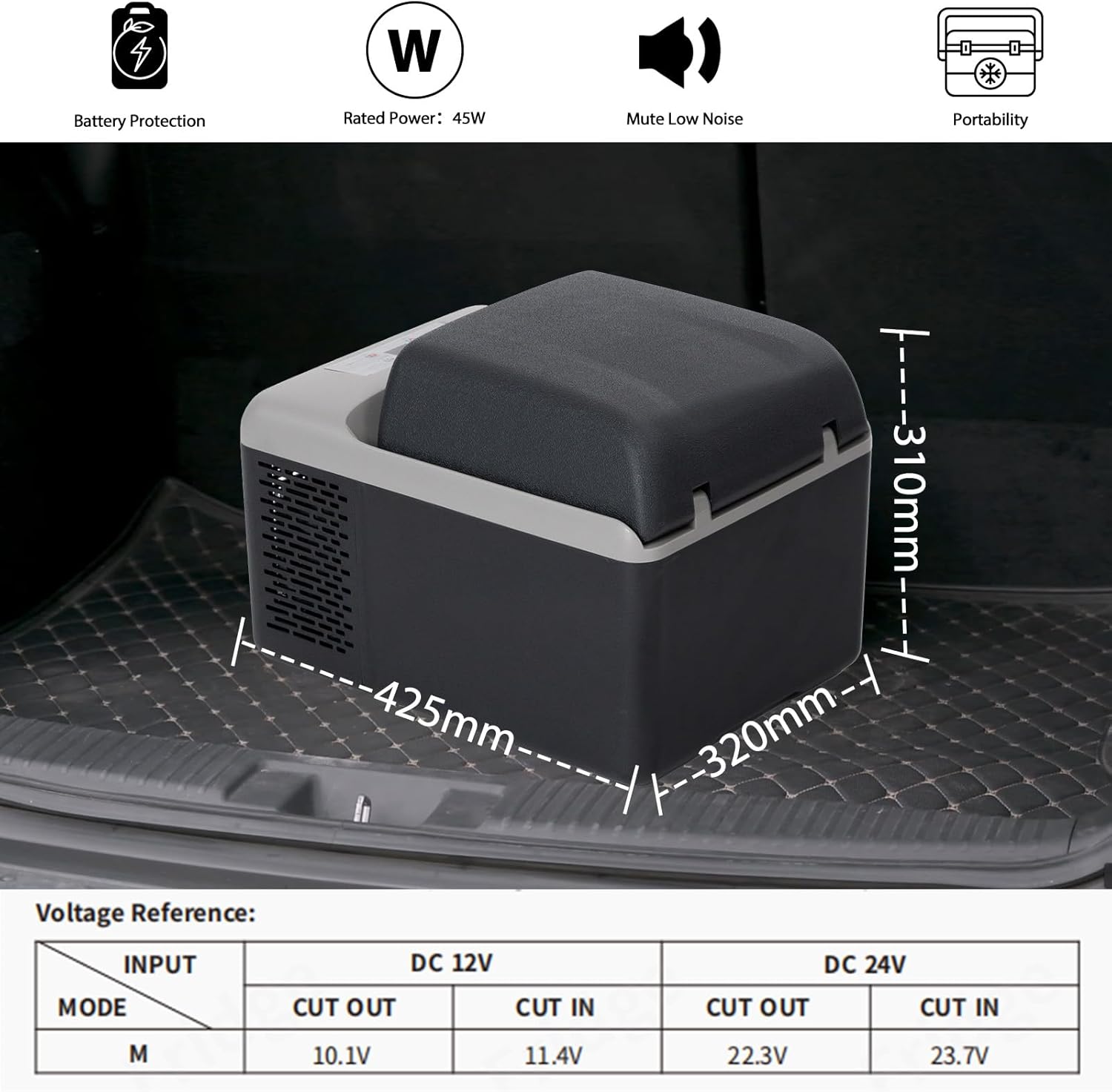
Figure 4: Product dimensions (425mm length, 320mm width, 310mm height) and a voltage reference table for DC 12V and DC 24V, indicating cut-out and cut-in voltages for battery protection modes.

Figure 5: Demonstrates the adjustable temperature range from -20°C to 20°C (-4°F to 68°F) and the rugged, shockproof design capable of operating at up to a 45° angle for short periods, suitable for rocky roads.

Figure 6: Shows the lightweight and durable design, featuring a notched bottom for easy lifting and portability.

Figure 7: Contents of the product packaging, including the C12PT Car Refrigerator unit, a DC cable for car use, an AC cable with adapter for home use, and the user manual.
Setup
1. Unpacking and Initial Placement
Carefully remove the refrigerator from its packaging. It is recommended to let the appliance stand upright for at least 6 hours before first use, especially if it was transported horizontally. This allows the refrigerant to settle. Place the refrigerator on a flat, stable surface, ensuring adequate ventilation around all sides. Avoid placing it in direct sunlight or near heat sources.
2. Power Connection
The Alpicool C12PT can be powered by both DC (12V/24V) and AC (100-240V) power sources.
- DC Power (Car/Vehicle): Connect the DC power cable to the refrigerator's DC input port and then to your vehicle's 12V or 24V cigarette lighter socket. Ensure the connection is secure.
- AC Power (Home/Wall Outlet): Use the provided AC adapter and cable. Connect the AC cable to the adapter, then plug the adapter into a standard wall outlet (100-240V). Connect the other end of the AC cable to the refrigerator's AC input port.
Ensure the power source is stable and provides sufficient current for the refrigerator's operation.
Operating Instructions
1. Control Panel Overview
The control panel features an LED display and several buttons for operation.
- LED Display: Shows the current internal temperature and settings.
- Power Button: Press and hold to turn the unit ON/OFF.
- SET Button: Press to cycle through settings (e.g., battery protection mode, ECO/MAX mode).
- Temperature Up (▲) / Down (▼) Buttons: Adjust the desired temperature.
2. Setting the Temperature
With the refrigerator powered on, press the ▲ or ▼ buttons to set your desired temperature. The display will flash the set temperature and then return to showing the current internal temperature. The unit will automatically adjust to reach and maintain the set temperature. The temperature range is from -20°C to 20°C (-4°F to 68°F).
Recommended Temperatures:
- Drinks: 5°C (41°F)
- Fruits: 5-8°C (41-46°F)
- Vegetables: 3-10°C (37-50°F)
- Milk: 10°C (50°F)
- Ice Cream: -10°C (14°F)
- Meat (Frozen): -18°C (0°F)
3. Battery Protection Mode
The unit features a 3-level battery protection system to prevent your vehicle's battery from draining.
- H1 (High): Highest protection, cuts off at higher voltage. Ideal for starting batteries.
- H2 (Medium): Moderate protection.
- H3 (Low): Lowest protection, cuts off at lower voltage. Ideal for deep cycle batteries or when connected to a separate power bank.
To change the battery protection mode, press the SET button repeatedly until the battery icon flashes on the display. Then use the ▲ or ▼ buttons to select H1, H2, or H3. The setting will be saved automatically after a few seconds.

Figure 8: Visual representation of the 3-stage battery protection modes (Low, Medium, High) and their corresponding cut-out and cut-in voltages for both 12V and 24V DC inputs.
4. ECO and MAX Modes
The refrigerator offers two operating modes:
- ECO Mode: Energy-saving mode, suitable for maintaining temperature over longer periods with lower power consumption.
- MAX Mode: Maximum cooling performance, ideal for rapid cooling of contents.
To switch between modes, press the SET button until the mode indicator flashes, then use the ▲ or ▼ buttons to select ECO or MAX.
Maintenance
1. Cleaning
Regular cleaning helps maintain the efficiency and hygiene of your refrigerator.
- Always disconnect the power supply before cleaning.
- Clean the interior and exterior surfaces with a soft cloth dampened with mild detergent and warm water.
- Do not use abrasive cleaners, harsh chemicals, or sharp objects, as these can damage the surfaces.
- Ensure the unit is completely dry before reconnecting power.
- Periodically clean the ventilation grilles to ensure proper airflow and prevent overheating. Use a soft brush or vacuum cleaner to remove dust and debris.
2. Defrosting
The Alpicool C12PT features automatic defrosting. However, if a significant layer of ice builds up, manually defrost the unit:
- Turn off the refrigerator and disconnect it from the power supply.
- Remove all contents.
- Leave the lid open to allow the ice to melt naturally.
- Wipe away melted water with a clean cloth. Do not use sharp objects to remove ice.
- Ensure the interior is completely dry before restarting the unit.
3. Storage
When storing the refrigerator for an extended period:
- Clean and dry the unit thoroughly.
- Leave the lid slightly ajar to prevent odors and mold growth.
- Store in a dry, well-ventilated area, away from extreme temperatures.
Troubleshooting
If you encounter issues with your Alpicool C12PT, refer to the following common problems and solutions.
1. Refrigerator Not Turning On
- Check Power Connection: Ensure the power cable is securely plugged into both the refrigerator and the power source (vehicle socket or wall outlet).
- Check Power Source: Verify that the vehicle's cigarette lighter socket or wall outlet is functioning correctly. Test with another appliance if possible.
- Vehicle Battery Voltage: If using DC power, check your vehicle's battery voltage. If it's too low, the battery protection system might have shut off the unit. Try adjusting the battery protection mode (H1, H2, H3) to a lower setting (e.g., H3) or connect to a fully charged battery.
- Fuse Check: Check the fuse in the cigarette lighter plug. Replace if blown.
2. Refrigerator Not Cooling Effectively
- Temperature Setting: Ensure the temperature is set correctly to your desired cooling level.
- Ventilation: Check that the ventilation openings are not blocked and there is sufficient airflow around the unit.
- Ambient Temperature: In very high ambient temperatures, it may take longer for the unit to reach the set temperature.
- Lid Seal: Ensure the lid is properly closed and the seal is intact to prevent cold air from escaping.
- Overload: Avoid overloading the refrigerator with too many warm items at once.
- ECO/MAX Mode: If in ECO mode, switch to MAX mode for faster cooling.
3. Displaying Error Codes (e.g., F2)
- F2 Error (Compressor Overload): This error typically indicates that the compressor is working too hard or is experiencing an issue.
- Ensure proper ventilation around the unit.
- Check if the ambient temperature is excessively high.
- Disconnect power, wait a few minutes, and reconnect.
- If the error persists, contact customer support.
- Other Error Codes: Refer to the specific error code in the full user manual (if provided by manufacturer) or contact customer support with the error code displayed.
4. Unusual Noise
- Normal Operation: A slight humming or gurgling sound from the compressor and refrigerant flow is normal. The fan also produces a low noise.
- Vibrations: Ensure the unit is on a stable, flat surface. If placed in a vehicle, ensure it is secured to minimize movement.
- Excessive Noise: If the noise is unusually loud or grinding, disconnect power and contact customer support.
Specifications
| Feature | Specification |
|---|---|
| Brand | Alpicool |
| Model Number | C12PT |
| Capacity | 12 Liters |
| Dimensions (L x W x H) | 42.5 cm x 32 cm x 31 cm (16.7 x 12.6 x 12.2 inches) |
| Weight | 6.4 Kilograms (14.1 lbs) |
| Temperature Range | -20°C to 20°C (-4°F to 68°F) |
| Rated Power | 45W |
| Input Voltage | DC 12V/24V, AC 100-240V |
| Noise Level | 45 dB |
| Defrost System | Automatic |
| Battery Protection | 3-level (H1, H2, H3) |
Warranty and Support
Warranty Information
Your Alpicool C12PT Portable Car Refrigerator comes with a standard manufacturer's warranty. Please refer to the warranty card included in your product packaging for specific terms, conditions, and duration. Keep your purchase receipt as proof of purchase for warranty claims.
Customer Support
For technical assistance, troubleshooting beyond this manual, or warranty inquiries, please contact Alpicool customer support.
- Online Support: Visit the official Alpicool website for FAQs and support resources.
- Seller Contact: If purchased through an online marketplace, you may contact the seller directly for assistance.
Official Product Videos
No official product videos from the seller were found in the provided data.
Related documentsC12PT


Ask a question about this manual
Ask about setup, troubleshooting, compatibility, parts, safety, or missing instructions. Manuals+ will review the question and use this page’s manual context to help answer it.