
Wireless Express WE-BLING-MIC
Sing-Along Bluetooth Karaoke Microphone and Bluetooth Stereo Speaker
User Manual
Model: WE-BLING-MIC | Brand: Wireless Express
Introduction
Welcome to the user manual for your new Wireless Express Sing-Along Bluetooth Karaoke Microphone and Bluetooth Stereo Speaker. This all-in-one device combines a high-quality microphone with a powerful Bluetooth speaker, designed to provide an immersive karaoke experience. This manual will guide you through the setup, operation, maintenance, and troubleshooting of your device to ensure optimal performance and enjoyment.
Safety Information
- Do not expose the device to water or excessive moisture.
- Avoid extreme temperatures. Store in a cool, dry place.
- Do not attempt to disassemble or modify the device. This will void the warranty and may cause damage.
- Use only the provided charging cable or a certified equivalent.
- Keep out of reach of small children to prevent accidental ingestion of small parts.
- Do not operate the device near flammable materials.
- Dispose of the device and its battery responsibly according to local regulations.
Package Contents
Please check the package to ensure all items are present:
- 1 x Sing-Along Bluetooth Karaoke Microphone and Bluetooth Stereo Speaker (Swirl Blue)
- 1 x Charging Cable
Product Overview
Familiarize yourself with the components and controls of your karaoke microphone.
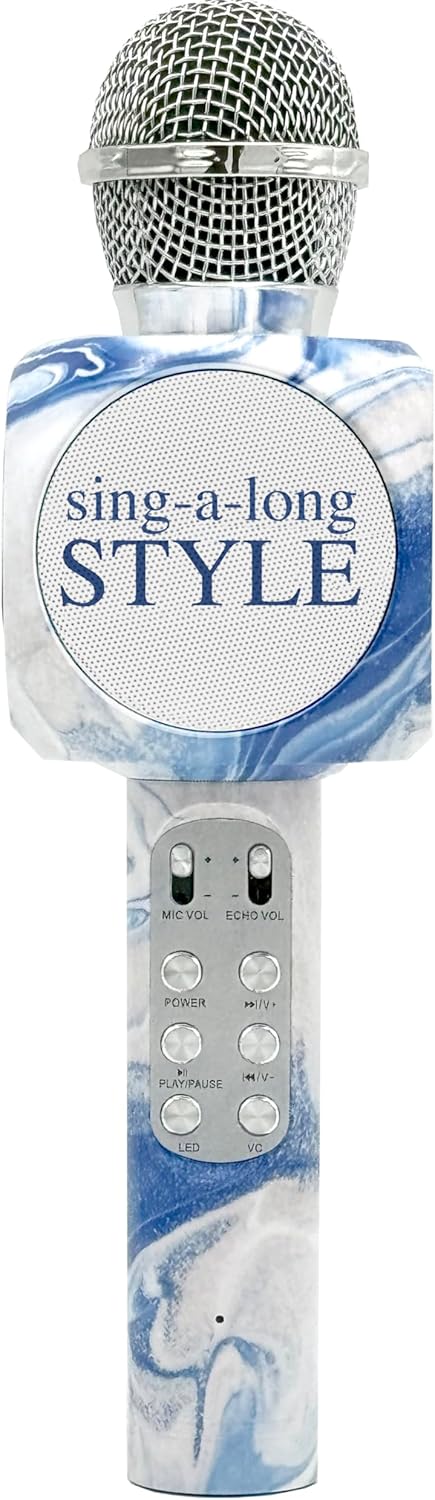
Figure 1: Front view of the Sing-Along Bluetooth Karaoke Microphone, highlighting the main speaker and control buttons.

Figure 2: Key features of the microphone, including Bluetooth connectivity, voice changer, LED lights, track controls, portability, rechargeable battery, and charging cable.

Figure 3: Detailed front view, emphasizing the dual speaker design for stereo sound output.
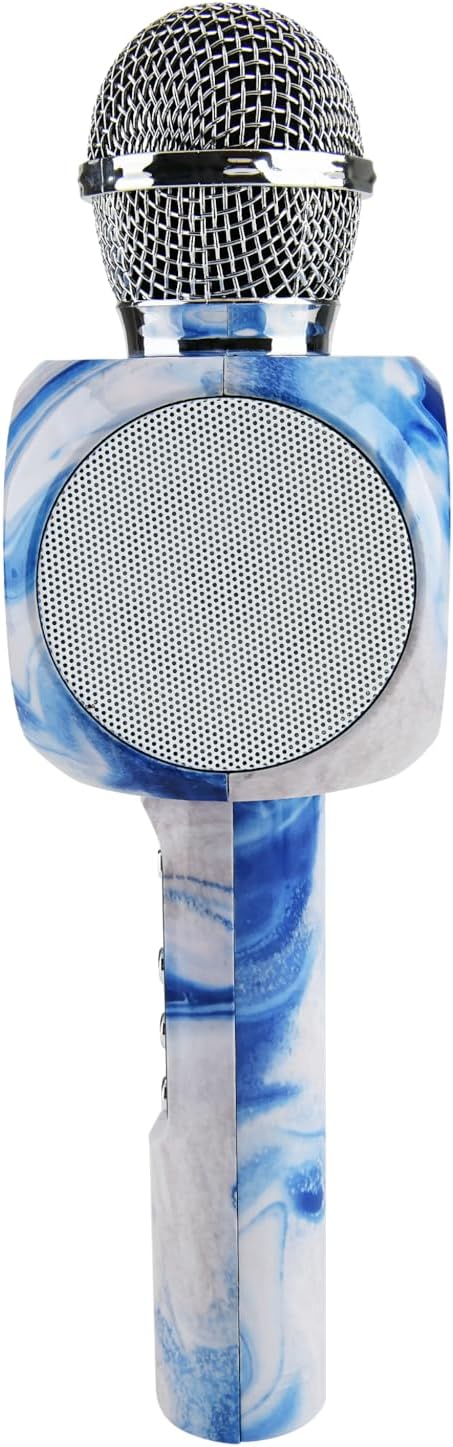
Figure 4: Side profile of the microphone, illustrating its ergonomic design and the integrated control panel.
Control Panel Layout:
- MIC VOL: Adjusts the volume of your voice through the microphone.
- ECHO VOL: Adjusts the echo effect applied to your voice.
- POWER: Press and hold to turn the device On/Off.
- PLAY/PAUSE: Press to play or pause music.
- Previous Track / Volume Down: Press to go to the previous track. Press and hold to decrease music volume.
- Next Track / Volume Up: Press to go to the next track. Press and hold to increase music volume.
- LED: Toggles the LED lights On/Off.
- VC (Voice Changer): Cycles through different voice effects.
- SD Card Slot: For playing music directly from an SD card.
- Earphone Jack: For private listening.
- Micro USB Charging Port: For charging the device.
Setup
1. Charging the Device:
- Connect the provided Micro USB charging cable to the charging port on the microphone.
- Connect the other end of the cable to a USB power adapter (not included) or a computer's USB port.
- The LED indicator will show charging status (e.g., red for charging, off when fully charged).
- Allow approximately 2-3 hours for a full charge before first use.
2. Powering On:
- Press and hold the POWER button for 2-3 seconds until you hear a power-on prompt or see the indicator light up.
3. Bluetooth Pairing:
- Ensure the microphone is powered on and in Bluetooth pairing mode (it will usually announce "Bluetooth mode" or similar).
- On your smartphone, tablet, or computer, enable Bluetooth and search for available devices.
- Select "Sing-Along Bling" or a similar name from the list of devices.
- Once paired, the microphone will indicate a successful connection (e.g., "Connected").
- You can now play music from your connected device through the microphone's speaker.
Operating Instructions
Playing Music:
- Via Bluetooth: After successful pairing, open your favorite music or karaoke app on your connected device and start playing.
- Via SD Card: Insert a formatted SD card with MP3 audio files into the SD card slot. The microphone will automatically switch to SD card mode and begin playing.
Microphone Usage:
- Microphone Volume: Use the MIC VOL slider to adjust how loud your voice is.
- Echo Effect: Use the ECHO VOL slider to add or reduce the echo effect on your voice.
- Voice Changer: Press the VC button repeatedly to cycle through different voice modulation effects.
Music Controls:
- Play/Pause: Press the PLAY/PAUSE button to toggle playback.
- Volume Up/Down: Press and hold the Next Track / Volume Up or Previous Track / Volume Down buttons to adjust the music volume.
- Next/Previous Track: Press the Next Track / Volume Up or Previous Track / Volume Down buttons briefly to skip tracks.
LED Lights:
- Press the LED button to turn the colorful LED lights On or Off.
Earphone Connection:
- Insert 3.5mm earphones (not included) into the earphone jack for private listening.
Maintenance
- Cleaning: Wipe the microphone with a soft, dry cloth. Do not use abrasive cleaners or solvents.
- Storage: Store the device in a cool, dry place away from direct sunlight and extreme temperatures.
- Battery Care: To prolong battery life, charge the device regularly, even if not in frequent use. Avoid fully discharging the battery for extended periods.
Troubleshooting
| Problem | Possible Solution |
|---|---|
| Device does not power on. | Ensure the device is fully charged. Press and hold the POWER button for a few seconds. |
| Cannot connect via Bluetooth. | Ensure Bluetooth is enabled on your device. Make sure the microphone is in pairing mode. Forget the device from your Bluetooth list and try pairing again. Move closer to the microphone. |
| No sound from speaker. | Check the volume levels on both the microphone and your connected device. Ensure the device is properly paired. |
| Microphone not picking up voice. | Increase the MIC VOL slider. Ensure you are speaking directly into the microphone head. |
| Echo effect is too strong/weak. | Adjust the ECHO VOL slider to your preference. |
Specifications
| Feature | Detail |
|---|---|
| Model Number | WE-BLING-MIC |
| Power Source | Battery Powered |
| Hardware Platform | Karaoke Machine, Smartphone, Tablet |
| Frequency Response | 10 KHz |
| Item Weight | 1.41 pounds |
| Package Dimensions | 12.52 x 5.43 x 3.82 inches |
| Connectivity Technology | Bluetooth |
| Connector Type | Micro USB |
| Special Feature | Volume Control |
| Compatible Devices | Smartphone |
| Included Components | Charging Cable |
| Polar Pattern | Unidirectional |
| Microphone Form Factor | Handheld |
| Color | Swirl Blue |
Warranty and Support
For warranty information or technical support, please contact Wireless Express customer service. You can find more information and contact details on the official Wireless Express website or through the retailer where you purchased the product.
Visit the Wireless Express Store on Amazon for additional product information and support resources.
Related documentsWE-BLING-MIC


Ask a question about this manual
Ask about setup, troubleshooting, compatibility, parts, safety, or missing instructions. Manuals+ will review the question and use this page’s manual context to help answer it.