
1. Introduction
This manual provides detailed instructions for the assembly, operation, and maintenance of your Lufeiya 55-Inch Reversible Computer Desk with Fabric File Drawers Cabinet. Please read this manual thoroughly before assembly and use to ensure proper function and longevity of your product.

Image 1.1: The Lufeiya 55-Inch Reversible Computer Desk with Fabric File Drawers Cabinet.
2. Safety Information
Adherence to the following safety guidelines is crucial for preventing injury and damage to the product:
- Ensure the desk is placed on a flat, stable, and level surface to prevent tipping.
- Do not exceed the maximum weight limit of 100 lbs on the desktop.
- Follow all assembly instructions carefully. Incorrect assembly can lead to instability and potential hazards.
- Keep small parts and packaging materials away from children to avoid choking hazards.
- Avoid standing or sitting on the desk.
3. Package Contents
Before beginning assembly, verify that all components are present and undamaged. If any parts are missing or damaged, please contact customer support.
- Desktop panels (P2 Particle wood board)
- Metal frame components
- 3 Fabric Drawers (2 small, 1 large for filing)
- Adjustable leg pads
- Assembly hardware (screws, bolts, etc.)
- Assembly tool (e.g., Allen wrench)
- Detailed instruction manual
4. Assembly Instructions
Assembly is designed to be quick and straightforward, typically taking approximately 20 minutes. No additional tools are required beyond those provided.
- Unpack and Identify: Carefully unpack all components and lay them out on a clean, soft surface to prevent scratches. Refer to the included parts list to identify each piece.
- Assemble the Frame: Attach the metal frame components according to the diagrams in the separate detailed instruction manual. Ensure all screws are tightened securely.
- Attach Desktop Panels: Secure the desktop panels to the assembled metal frame.
- Install Fabric Drawers: Insert the fabric drawers into their designated slots. The filing drawer includes an adjustable rod for hanging files.
- Configure Reversible Storage: The desk features a reversible design, allowing the drawer unit and side storage bag to be installed on either the left or right side to suit your preference and space. Follow the specific instructions in the detailed manual for your desired configuration.
- Adjust Leg Pads: Once assembled, adjust the leg pads to ensure the desk is level and stable on uneven ground.

Image 4.1: Illustration of the reversible storage shelf feature.

Image 4.2: Detail of the adjustable file drawer and smaller fabric drawers.
5. Features and Usage Guidelines
Your Lufeiya computer desk is designed with several features to enhance your workspace:
- Vintage Style Design: The splice board desktop, made of thick P2 Particle wood, offers a rustic aesthetic. It is scratch-resistant, anti-collision, and waterproof, protecting the surface from daily wear.
- Versatile Fabric File Cabinet: The desk includes three fabric drawers. The bottom drawer is adjustable and suitable for hanging legal size or letter size files. The two smaller drawers provide additional storage for office supplies. The fabric construction contributes to the desk's lightweight nature.
- Reversible Configuration: The drawer unit and side storage bag can be installed on either the left or right side of the desk, offering flexibility to adapt to your room layout.
- Sturdy Structure: Extra fixed steel brackets and adjustable leg pads ensure stability. Non-slip and anti-scratch protectors under the legs protect your floor and reduce noise during movement.
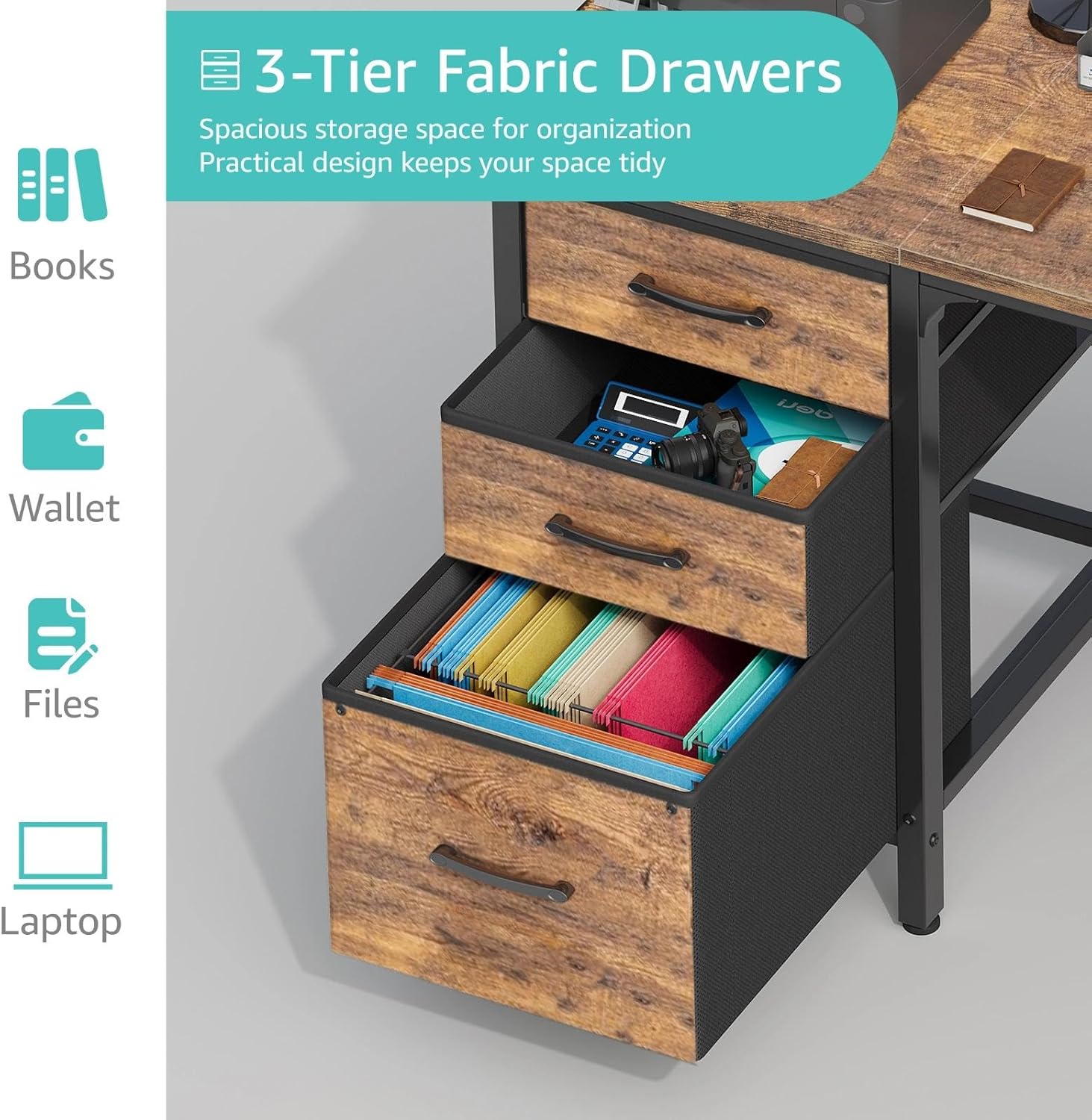
Image 5.1: Capacity illustration for the 3-tier fabric drawers.

Image 5.2: Details on desktop waterproofing, structural enhancements, and adjustable leg pads.
6. Maintenance
To maintain the appearance and functionality of your desk:
- Cleaning: Wipe the desktop and metal frame with a soft, damp cloth. Avoid harsh chemicals or abrasive cleaners. For fabric drawers, spot clean with a mild detergent and allow to air dry.
- Inspection: Periodically check all screws and connections to ensure they remain tight. Retighten if necessary.
- Avoid Overloading: Do not overload the fabric drawers or the side storage bag, as this can cause sagging or damage over time.
- Heat Protection: Use coasters or protective pads under hot items to prevent damage to the desktop surface.
7. Troubleshooting
If you encounter any issues with your desk, refer to the following common solutions:
| Problem | Possible Cause | Solution |
|---|---|---|
| Desk is wobbly or unstable. | Uneven floor; loose connections. | Adjust the leg pads until the desk is level. Check and tighten all assembly screws. |
| Fabric drawers sag or are difficult to open/close. | Overloaded drawers; improper installation. | Reduce the weight in the drawers. Ensure drawers are correctly seated on their supports. |
| Side storage bag detaches. | Overloaded bag; loose fasteners. | Avoid placing excessively heavy items in the bag. Ensure fasteners are securely attached. |
8. Specifications
| Specification | Detail |
|---|---|
| Brand | Lufeiya |
| Model Number | LFY-JC3D55-Brown |
| Product Dimensions (D x W x H) | 19.7"D x 54.5"W x 29.5"H |
| Working Surface Diagonal Length | 55 Inches |
| Color | Rustic Brown (Top), Black (Base) |
| Style | Rustic |
| Top Material Type | P2 Particle wood board (FSC-Certified Wood) |
| Base Material | Metal |
| Finish Type | Powder Coated |
| Number of Drawers | 3 (Fabric) |
| Storage Options | 3 Fabric Drawers, Side Storage Bag |
| Item Weight | 30.9 Pounds |
| Required Assembly | Yes (All tools included) |
| Special Feature | Compact, Reversible Configuration |
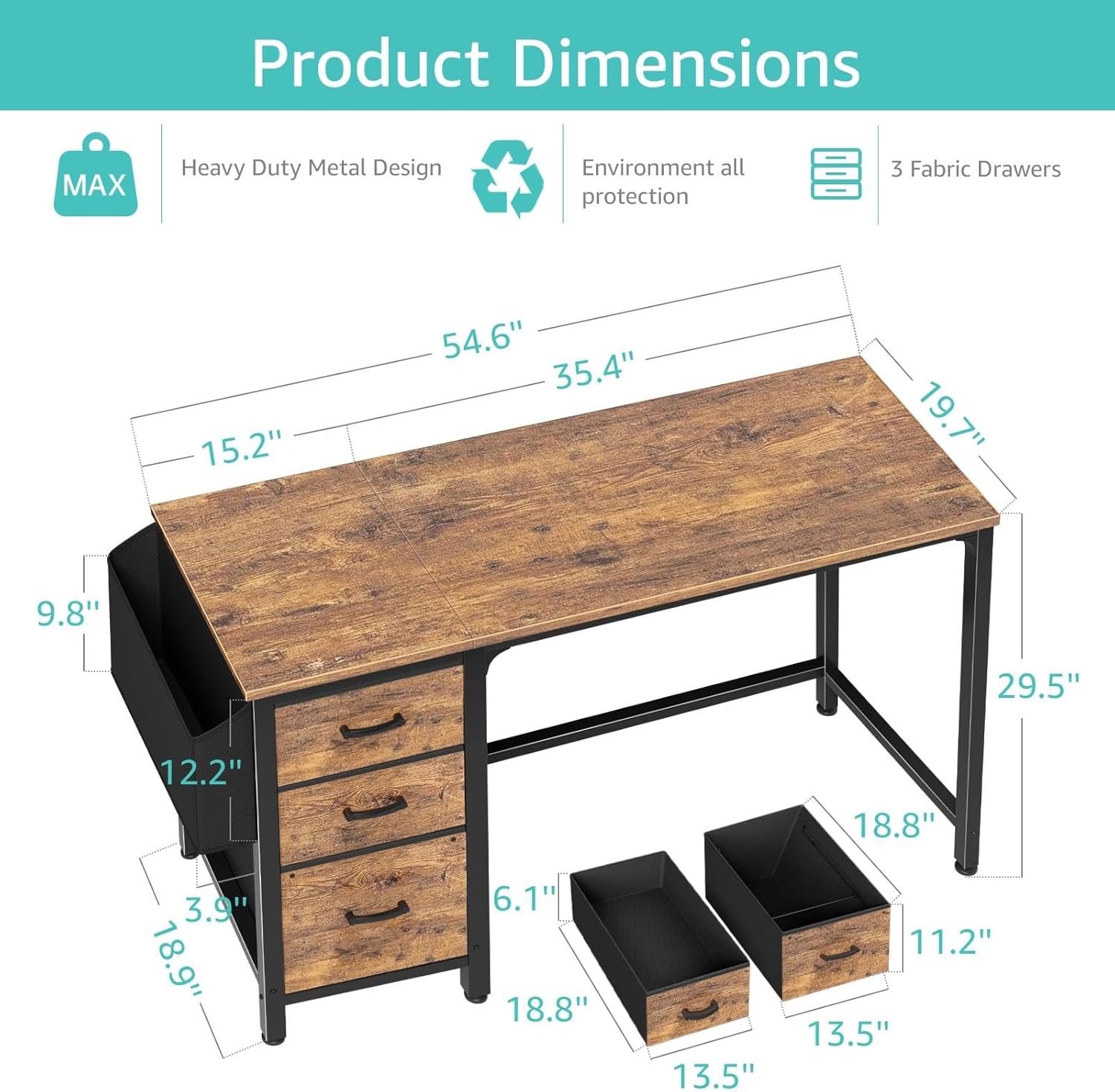
Image 8.1: Detailed product dimensions.
9. Warranty and Support
Lufeiya is committed to providing high-quality products and customer satisfaction.
- Warranty: This product comes with a Limited Warranty. Please refer to the product packaging or original purchase documentation for specific warranty terms and conditions.
- Customer Support: We provide professional customer support and efficient replacement services. If you experience any quality issues with the desk or require assistance, our team is ready to assist you promptly.
To contact customer support, please refer to the seller information on your purchase platform (e.g., Amazon.com) or visit the official Lufeiya store page. Look for options such as "Ask a question" or "Contact Seller."

Image 9.1: Lufeiya Brand Logo.


