
1. Introduction
This manual provides essential information for the safe and efficient operation, maintenance, and troubleshooting of your SEVERIN TO 9579 Bake & Fry Toaster Oven. Please read these instructions thoroughly before first use and keep them for future reference.
The SEVERIN TO 9579 is a versatile 25-liter appliance designed for baking, frying, and toasting, offering a compact solution for various cooking needs.
2. Safety Instructions
- Always ensure the appliance is placed on a stable, heat-resistant surface, away from walls and other heat sources.
- Do not immerse the appliance, cord, or plug in water or other liquids.
- Supervise children closely when the appliance is in use.
- Do not operate the appliance with a damaged cord or plug, or after it malfunctions or has been damaged in any manner.
- Use only accessories recommended by the manufacturer.
- Exercise extreme caution when removing hot oil or other hot liquids.
- Unplug from the outlet when not in use and before cleaning. Allow to cool before putting on or taking off parts.
- Do not cover the air vents during operation.
- The appliance is for household use only.
3. Product Overview
3.1 Components
The SEVERIN TO 9579 Bake & Fry Toaster Oven comes with the following components:
- Main Oven Unit
- Frying Basket
- Cooking Grate / Grill Grate
- Rotisserie Skewer
- Baking Tray
- Crumb Tray
- Handle for easy removal of accessories

Figure 1: Included accessories, featuring the frying basket, grill grate, rotisserie skewer, baking tray, crumb tray, and accessory handle.
3.2 Control Panel
The appliance features a clear touch display for easy selection of automatic programs and manual settings.

Figure 2: Detailed view of the touch control panel, showing temperature, time, and various function icons.
4. Setup
- Unpacking: Carefully remove all packaging materials and any promotional labels from the appliance and accessories.
- Initial Cleaning: Before first use, wash all removable accessories (frying basket, cooking grate, baking tray, crumb tray, rotisserie skewer, handle) in warm, soapy water. Wipe the interior and exterior of the oven with a damp cloth. Ensure all parts are completely dry before assembly.
- Placement: Place the oven on a flat, stable, heat-resistant surface. Ensure there is adequate clearance (at least 10 cm) on all sides and above the oven for proper ventilation. Do not place it near flammable materials.
- First Use Burn-off: It is recommended to run the oven empty for approximately 15 minutes at 200°C (390°F) to burn off any manufacturing residues. A slight odor or smoke may be present during this process; ensure the area is well-ventilated.
5. Operating Instructions
5.1 Basic Operation
- Power On: Plug the appliance into a suitable electrical outlet. The display will illuminate.
- Select Function: Use the touch display to select your desired cooking function (e.g., Bake, Air Fry, Toast, Rotisserie).
- Adjust Settings: Adjust the temperature and cooking time using the dedicated controls on the touch panel.
- Preheat (Optional): For some recipes, preheating may be required. The oven heats up quickly.
- Start Cooking: Press the Start button to begin the cooking process.
5.2 Cooking Modes
The SEVERIN TO 9579 offers various cooking modes:
- Bake: Ideal for cakes, casseroles, and general oven cooking. Use the baking tray or an oven-safe dish.
- Air Fry: For crispy results with minimal oil, such as fries, chicken wings, or vegetables. Use the frying basket.
- Toast: For bread, bagels, and similar items. Use the cooking grate.
- Rotisserie: Perfect for roasting whole chickens or larger cuts of meat. Use the rotisserie skewer.

Figure 3: The oven in use, baking a pizza on the baking tray.
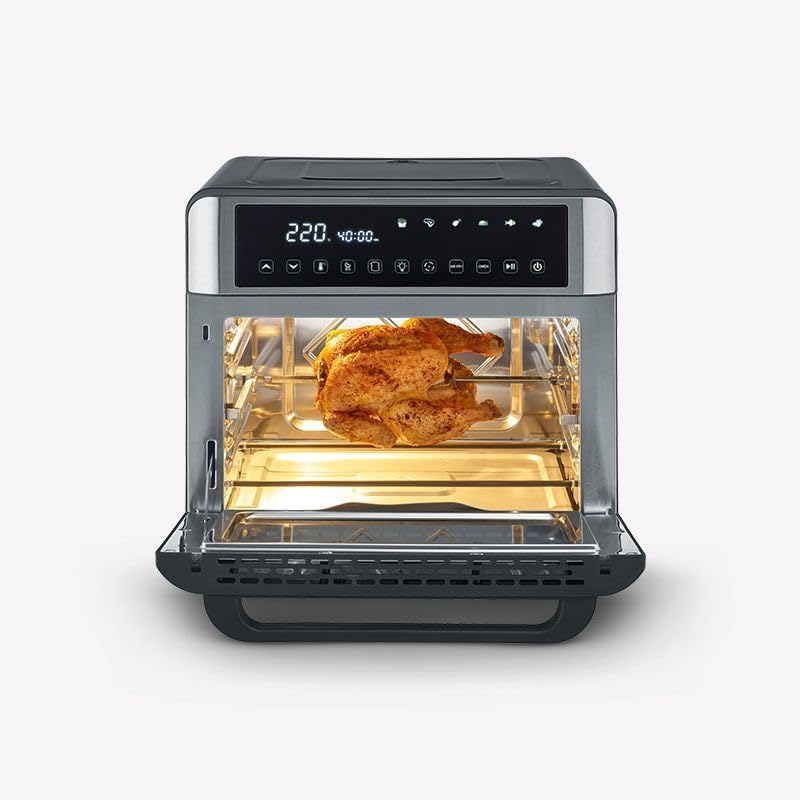
Figure 4: A whole chicken being roasted using the rotisserie function.

Figure 5: French fries being air-fried in the frying basket.

Figure 6: Bread slices being toasted on the cooking grate.

Figure 7: Small food items cooking on a rack, demonstrating versatile use.
6. Maintenance and Cleaning
- Before Cleaning: Always unplug the oven and allow it to cool completely before cleaning.
- Interior Cleaning: Wipe the interior with a damp cloth and mild detergent. For stubborn stains, a non-abrasive cleaner can be used. Avoid harsh chemicals or abrasive sponges.
- Exterior Cleaning: Wipe the exterior with a soft, damp cloth. Do not use abrasive cleaners.
- Accessories: The frying basket, cooking grate, rotisserie skewer, baking tray, and crumb tray are dishwasher-safe for convenient cleaning. For manual cleaning, use warm, soapy water and a non-abrasive sponge.
- Crumb Tray: Regularly remove and empty the crumb tray to prevent grease buildup and potential fire hazards.
7. Troubleshooting
| Problem | Possible Cause | Solution |
|---|---|---|
| Appliance does not turn on. | Not plugged in; power outlet malfunction; appliance fault. | Ensure the plug is securely inserted. Test the outlet with another appliance. If the issue persists, contact customer support. |
| Food not cooking evenly. | Overcrowding; incorrect temperature/time; food placement. | Avoid overcrowding the oven. Adjust temperature and time as per recipe. Ensure food is placed centrally or rotated if necessary. |
| Smoke or unusual odor during operation. | Food residue; first use burn-off; excessive grease. | Ensure the oven and crumb tray are clean. This may be normal during first use. If excessive or persistent, unplug and contact support. |
| Touch display unresponsive. | Temporary glitch; power interruption. | Unplug the appliance for a few minutes, then plug it back in. If the problem continues, contact customer support. |
8. Specifications
| Feature | Detail |
|---|---|
| Brand | Severin |
| Model Number | TO 9579 |
| Capacity | 25 Liters |
| Power / Wattage | 2200 watts |
| Voltage | 220 Volts |
| Material | Stainless Steel |
| Product Dimensions (L x W x H) | 44.7 x 49.3 x 42 cm |
| Item Weight | 10.3 Kilograms |
| Special Features | Dishwasher-safe accessories, Timer function |
| Control Type | Touch |
| Door Style | Dropdown Door |
| Included Components | Frying basket, cooking grate, rotisserie skewer, baking tray, crumb tray, handle |
9. Warranty and Support
For warranty information and customer support, please refer to the warranty card included with your product or contact Severin customer service directly. Keep your proof of purchase for any warranty claims.
For further assistance or inquiries, please visit the official Severin website or contact their authorized service centers.
