
Introduction
This manual provides detailed instructions for the installation, operation, and maintenance of your MekedeTech Android Car Radio Stereo. This unit is specifically designed for Alfa Romeo 159 models manufactured before 2008. Please read this manual thoroughly before installation and use to ensure proper function and to maximize your experience with the device.
Safety Information
- Always ensure the vehicle is turned off and the battery is disconnected before performing any installation or wiring.
- Consult a professional installer if you are unsure about any part of the installation process.
- Do not operate the device in a way that distracts you from driving. Always prioritize road safety.
- Avoid exposing the unit to extreme temperatures, direct sunlight for prolonged periods, or excessive moisture.
- Use only specified power cables and accessories to prevent damage or fire.
Product Overview
The MekedeTech Android Car Radio Stereo is an advanced head unit designed to upgrade your vehicle's infotainment system. It features a high-resolution touch screen, powerful processing capabilities, and extensive connectivity options.
Key Features:
- Operating System: Android 12 OS
- Processor: 8-Core A53 1.8GHz CPU
- Memory: 8GB RAM, 256GB ROM
- Display: 9-inch IPS touch screen with 1280x720 resolution
- Connectivity: Built-in 4G LTE, WiFi, Bluetooth 5.0
- Integration: Wireless CarPlay and Wired Android Auto support
- Audio: Built-in DSP sound system for enhanced audio quality
- Navigation: Built-in GPS navigation with pre-installed maps
- Power Output: 4*50W
Setup and Installation
This Android touch screen radio upgrade is designed for a plug-and-play fit for Alfa Romeo 159 models before 2008. It includes all necessary accessories for installation.
Before Installation:
- Verify Dashboard Size: Before ordering, confirm your dashboard size matches 193mm x 116mm. If your dashboard dimensions are different, this unit may not fit.
- Package Contents: Ensure all accessories are present, including the dash kit, power cable, RCA cable, reversing camera cable, and USB cables.
- Disconnect Battery: Always disconnect the vehicle's battery before beginning any electrical work.
Installation Steps:
The installation process involves removing your existing head unit and installing the new MekedeTech unit using the provided dash kit and wiring harnesses. The unit is designed to integrate seamlessly with your vehicle's existing systems.

Image: Comparison of the car dashboard before and after installation, illustrating the seamless integration of the new head unit.

Image: Important note on dashboard dimensions (193mm x 116mm) for compatibility, with visual examples of compatible and incompatible Alfa Romeo 159 dashboards.
Cooling Fan Setup:
The unit includes a cooling fan to manage temperature, especially during prolonged use or in hot climates. Ensure the cooling fan is properly connected during installation.

Image: Visual guide for connecting the cooling fan and its role in maintaining optimal operating temperature for the CPU.
Wheel Control Integration:
The unit is designed to retain all original steering wheel control functions, allowing you to switch songs, channels, and adjust volume without removing your hands from the steering wheel. This enhances convenience and safety.
Operating Instructions
Once installed, power on the unit. The Android operating system will boot up, providing access to various features and applications.
Wireless CarPlay and Android Auto:
The unit supports both wireless CarPlay (for iOS devices) and wired Android Auto (for Android devices), providing seamless smartphone integration.

Image: User interface examples for Wireless CarPlay and Android Auto, including connection steps.
Wireless CarPlay (iOS System) Connection Steps:
- Connect your iPhone to the unit via Bluetooth.
- Open the "Car Link" application on the head unit.
- Wait for the connection to establish. (CarPlay can also be connected via USB cable).
Wireless Android Auto (Android System) Connection Steps:
- Connect your Android phone to the unit via Bluetooth.
- Open the "Car Link" application on the head unit.
- Wait for the connection to establish. (Android Auto can also be connected via USB cable).
4G LTE and WiFi Connectivity:
The unit features built-in 4G LTE and WiFi modules, allowing you to connect to the internet anytime, anywhere.
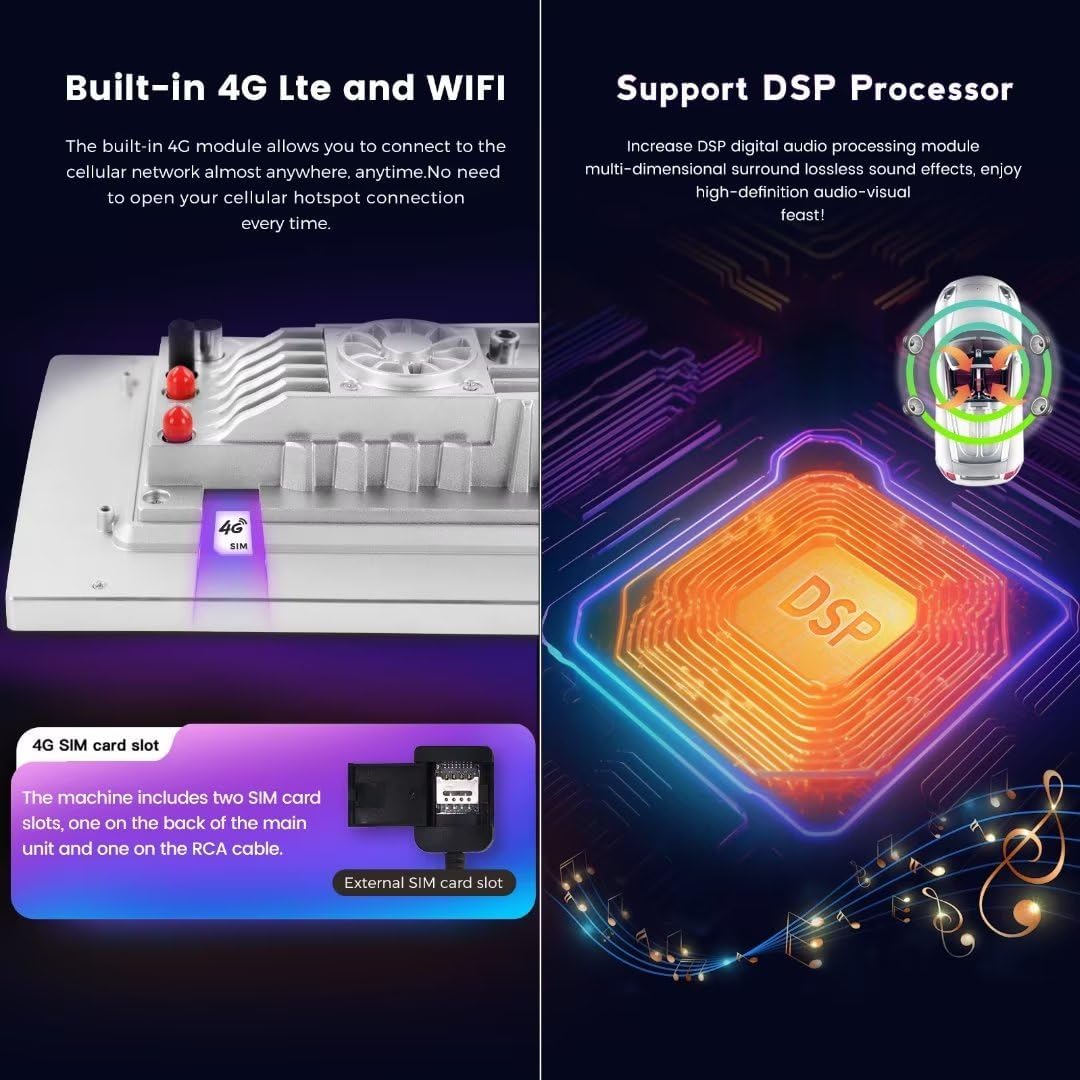
Image: Illustration of the 4G SIM card slot and the DSP processor for enhanced audio.
- 4G LTE: Insert a 4G SIM card into the designated slot to access cellular data. The machine includes two SIM card slots: one on the back of the main unit and one on the RCA cable.
- WiFi: Connect to available WiFi hotspots to access the internet.
Bluetooth 5.0:
Utilize Bluetooth 5.0 for high-quality hands-free calls and audio streaming from your mobile device.
GPS Navigation:
The built-in GPS module and pre-installed maps provide reliable navigation. You can also download additional navigation apps from the Google Play Store.
DSP Sound System:
The integrated Digital Signal Processor (DSP) enhances audio quality, offering multi-dimensional surround sound effects for an immersive listening experience.
Maintenance
- Cleaning: Use a soft, dry cloth to clean the screen and unit. Avoid abrasive cleaners or solvents.
- Software Updates: Periodically check for software updates to ensure optimal performance and access to new features. Updates can typically be found in the system settings or on the manufacturer's website.
- Temperature: Avoid leaving the unit in direct sunlight or extreme temperatures for extended periods when the vehicle is parked.
Troubleshooting
If you encounter issues with your MekedeTech Android Car Radio Stereo, refer to the following common problems and solutions:
- No Power:
- Check all power connections and fuses.
- Ensure the vehicle's ignition is on.
- No Sound:
- Verify speaker connections.
- Check volume levels and mute settings.
- Ensure the correct audio source is selected.
- GPS Signal Issues:
- Ensure the GPS antenna is properly installed and has a clear view of the sky.
- Move the vehicle to an open area away from tall buildings or dense foliage.
- Bluetooth/CarPlay/Android Auto Connectivity Problems:
- Ensure Bluetooth is enabled on both the head unit and your smartphone.
- Delete previous pairings and re-pair the devices.
- For wired connections, try a different USB cable.
- Restart both the head unit and your smartphone.
- Touch Screen Unresponsive:
- Perform a soft reset of the unit (refer to system settings for reset options).
- Ensure the screen is clean and free of debris.
If problems persist, contact customer support for further assistance.
Specifications
| Brand | MekedeTech |
| Operating System | Android 12 |
| CPU | 8-Core A53 1.8GHz |
| Memory Storage Capacity | 256 GB (ROM) |
| RAM | 8 GB |
| Screen Size | 9 Inches |
| Display Resolution | 1280x720 |
| Display Type | LCD |
| Touch Screen Type | Capacitive |
| Connectivity Technology | Wireless (4G LTE, WiFi, Bluetooth) |
| Special Features | 4G LTE, Bluetooth, Touchscreen, Wireless Android Auto, Wireless CarPlay, DSP |
| Map Type | Worldwide |
| Human Interface Input | Buttons, Keyboard, Touchscreen |
Warranty Information
This MekedeTech Android Car Radio Stereo comes with a 1-Year Warranty from the date of purchase. This warranty covers manufacturing defects and malfunctions under normal use. Please retain your proof of purchase for warranty claims. The warranty does not cover damage caused by improper installation, misuse, accidents, or unauthorized modifications.
Support
For technical assistance, troubleshooting not covered in this manual, or warranty claims, please contact MekedeTech customer support. You can often find support contact information on the official MekedeTech website or through the retailer where you purchased the product.
Visit the MekedeTech Store on Amazon for more information and support resources.
