
1. Introduction
This manual provides detailed instructions for the assembly, operation, and maintenance of your FUSOU Vanity Desk Model VD003-BR. Please read this manual thoroughly before assembly and use to ensure proper function and safety. Keep this manual for future reference.
Important Safety Information
- Assembly: This product requires assembly. Follow all instructions carefully. Two people are recommended for assembly due to the size and weight of components.
- Electrical Safety: The vanity desk includes a built-in power outlet. Ensure all electrical connections are secure and follow local electrical safety guidelines. Do not overload the outlets.
- Weight Limit: Do not place excessively heavy items on the vanity desk or in the drawers.
- Stability: Ensure the vanity desk is placed on a flat, stable surface to prevent tipping.
- Glass Components: Handle glass components with care to prevent breakage and injury.
2. Package Contents
Your FUSOU Vanity Desk VD003-BR is shipped in two separate boxes. Please verify that all components and hardware are present before beginning assembly. Refer to the detailed parts list included in your physical instruction manual.

Image: The FUSOU Vanity Desk is delivered in two distinct packages, which may arrive separately.
Typical Components Include:
- Vanity desk panels (top, side, back, drawer components)
- Mirror with integrated LED lights
- Vanity stool components
- Hardware kit (screws, dowels, cam locks, drawer slides, handles)
- Power outlet unit with USB ports and hair dryer holder
- Glass panel for top drawers
- Instruction manual
3. Setup and Assembly
Assembly of the FUSOU Vanity Desk requires careful attention to the provided step-by-step instructions. It is recommended to have two adults for assembly. An electric drill can expedite the process, but manual tools are sufficient.
Assembly Steps Overview:
- Unpack and Identify Parts: Lay out all components and hardware. Compare them against the parts list in your manual to ensure nothing is missing.
- Assemble the Base Units: Begin by constructing the main desk frame and the two side drawer units.
- Install Drawers: Assemble each of the 11 drawers and install the drawer slides. Insert the drawers into their respective compartments.
- Attach Mirror: Securely attach the mirror unit to the top of the vanity desk. Ensure all electrical connections for the LED lights are properly routed and connected.
- Install Power Outlet: Mount the built-in power outlet unit, including the hair dryer holder, to the designated side of the vanity desk.
- Place Glass Top: Carefully position the tempered glass panel over the central drawers.
- Assemble Stool: Construct the vanity stool according to its specific instructions.
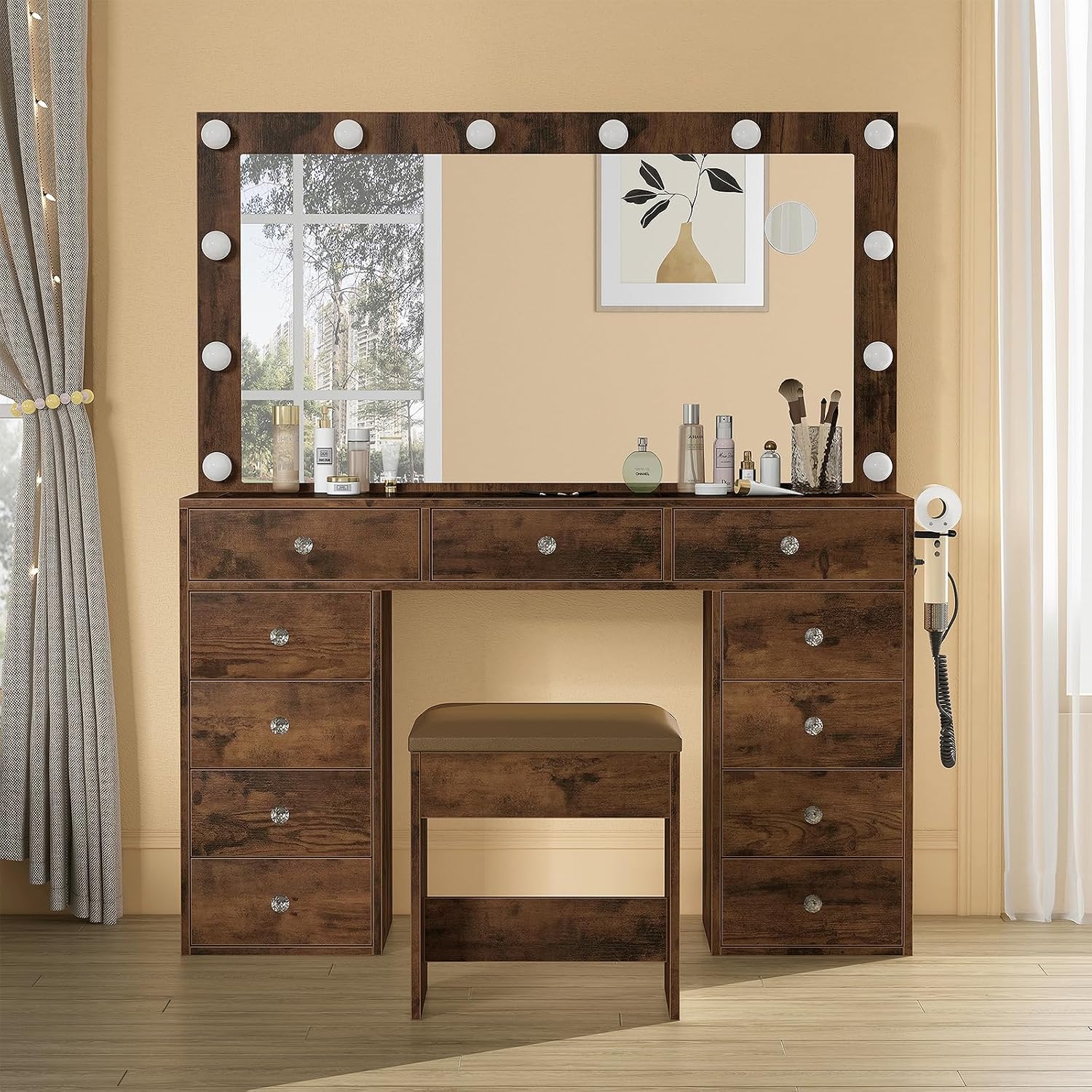
Image: The fully assembled FUSOU Vanity Desk, showcasing its mirror, LED lights, and accompanying stool.
4. Operating Instructions
4.1 LED Mirror Lights
The vanity mirror is equipped with 12 LED bulbs offering three adjustable lighting modes to suit various makeup needs and environments.
- Power On/Off: Locate the touch switch on the mirror surface. A short press will turn the lights on or off.
- Change Lighting Mode: With the lights on, short press the touch switch to cycle through the three modes:
- Cold Light: Bright, cool white illumination.
- Natural Light: Balanced, daylight-like illumination.
- Warm Light: Soft, warm yellow illumination.
- Adjust Brightness: To adjust the brightness within any mode, long press the touch switch. The brightness will gradually increase or decrease. Release the switch when the desired brightness is reached.

Image: Visual representation of the three adjustable lighting modes (Cold, Natural, Warm) and brightness control for the vanity mirror.
4.2 Built-in Charging Station
The vanity desk features a convenient built-in charging station on the side, designed to power various electronic devices.
- AC Outlets: Two standard 125V/12A AC plug sockets are available for appliances such as hair dryers, curling irons, or laptops.
- USB Ports: Two 5V/2A USB ports are provided for charging mobile phones, tablets, or other USB-powered devices.
- Hair Dryer Holder: A dedicated holder is integrated next to the power strip for convenient storage of your hair dryer.

Image: Detail of the integrated power strip, showing two AC outlets, two USB ports, and a hair dryer stand.
4.3 Drawer Storage
The vanity desk offers extensive storage with 11 drawers, including three main drawers with a clear glass top for easy visibility of contents.
- Glass Top Drawers: Utilize the three central drawers with the transparent glass top for organizing frequently used cosmetics, jewelry, or accessories, allowing for quick identification.
- Deep Drawers: The eight additional deep drawers provide ample space for larger items such as skincare products, hair accessories, or other personal belongings.

Image: The vanity desk with multiple drawers open, highlighting the glass-top compartments for visible storage of items.
4.4 Vanity Stool
The included vanity stool features a soft sponge cushion upholstered in PU fabric, designed for comfortable use. It can be stored neatly under the desk when not in use.

Image: A detailed view of the vanity stool's cushioned seat, emphasizing its soft sponge and PU leather material.
5. Maintenance and Care
Proper care will extend the life and appearance of your FUSOU Vanity Desk.
- Cleaning Surfaces: Wipe all surfaces with a soft, damp cloth. Avoid abrasive cleaners or harsh chemicals that may damage the finish.
- Glass Top: Clean the glass top with a glass cleaner and a lint-free cloth.
- Stool Upholstery: The PU leather upholstery can be cleaned with a damp cloth. For stubborn stains, use a mild soap solution and wipe dry immediately.
- Electrical Components: Ensure the power outlet and LED lights are dry before use. Do not spray liquids directly onto electrical components.
- Hardware: Periodically check all screws and fasteners to ensure they are tight. Retighten as necessary to maintain stability.
6. Troubleshooting
If you encounter issues with your vanity desk, refer to the following common problems and solutions.
- Problem: LED lights do not turn on.
- Solution: Check if the power cord is securely plugged into a working wall outlet. Ensure all internal electrical connections for the mirror are properly seated. Try pressing the touch switch firmly.
- Problem: Power outlets or USB ports are not working.
- Solution: Verify the main power cord of the vanity desk is plugged in. Check if the wall outlet itself is functional by testing with another device. Avoid overloading the power strip.
- Problem: Drawers are difficult to open or close.
- Solution: Ensure the drawer slides are correctly installed and aligned. Check for any obstructions within the drawer tracks. Verify that the drawer components were assembled correctly and are not warped.
- Problem: Vanity desk feels unstable.
- Solution: Confirm that all assembly screws and fasteners are tightened. Ensure the desk is placed on a level surface.
7. Product Specifications
| Brand | FUSOU |
| Model Number | VD003-BR |
| Product Dimensions (L x W x H) | 15.8"D x 46"W x 55"H (40.1cm D x 116.8cm W x 139.7cm H) |
| Item Weight | 140 pounds (63.5 kg) |
| Frame Material | Engineered Wood |
| Drawer Count | 11 |
| Lighting Modes | 3 (Cold Light, Natural Light, Warm Light) |
| Power Outlet | 2 x 125V/12A AC outlets, 2 x 5V/2A USB ports |
| Assembly Required | Yes |

Image: A detailed diagram illustrating the overall dimensions of the vanity desk and its accompanying stool.
8. Warranty and Customer Support
FUSOU is committed to providing quality products and customer satisfaction. For any questions regarding assembly, missing parts, product defects, or operational issues, please contact our customer support team.
Please refer to your purchase documentation or the FUSOU official website for specific warranty details and contact information.
Contact Information:
- Email: support@fusou.com (Example, please check actual contact details)
- Website: FUSOU Official Store on Amazon