
1. Introduction
Thank you for choosing the FUSOU 11-Drawer Vanity Desk. This manual provides detailed instructions for the assembly, operation, and maintenance of your new vanity desk. Please read this manual thoroughly before beginning assembly or use to ensure safe and correct operation.
This vanity desk features a large mirror with 12 LED lights offering 3 adjustable lighting modes, a built-in power outlet with USB ports, a tempered glass top for visible storage, and ample storage with 11 drawers. A comfortable makeup stool is also included.
2. Safety Information
Please observe the following safety precautions to prevent injury or damage to the product.
- Assembly Safety: Assembly may require two people due to the size and weight of components.
- Electrical Safety: Always unplug electrical components (lights, power outlet) before cleaning, maintenance, or when not in use. Do not overload the power outlet.
- Stability: Ensure the vanity desk is placed on a flat, stable surface.
- Movement: Be cautious when moving the vanity desk due to its weight (approximately 68 pounds). It is recommended to empty all drawers and remove the mirror before moving.
- Material Care: The vanity is constructed from engineered wood. Avoid excessive moisture or harsh chemicals.
- Glass Top: Handle the tempered glass top with care to prevent breakage.
3. Package Contents
Your FUSOU Vanity Desk will arrive in two separate boxes, which may not arrive simultaneously. Please ensure you have received both packages before beginning assembly.
Carefully unpack all components and verify against the parts list provided in the separate installation instructions. Do not discard packaging materials until assembly is complete and you have confirmed all parts are present and undamaged.

Figure 3.1: Illustration of the vanity desk and its packaging, indicating delivery in two boxes.
4. Assembly Instructions
A detailed installation instruction manual with diagrams and a parts list is included in your package. Please follow these instructions carefully, step-by-step, to ensure correct and safe assembly.
- Preparation: Clear a spacious area for assembly. It is recommended to have a second person assist with assembly, especially for larger components like the mirror and main desk sections.
- Tools: Ensure you have the necessary tools as specified in the assembly manual.
- Part Identification: All parts are labeled with letters and numbers. Match these labels to the assembly instructions.
- Hardware: Extra screws and hardware are often included. Do not be concerned if you have a few pieces left over.
- Mirror and Lights: Install the mirror and LED lights according to the specific instructions provided.
- Drawers: Assemble and install all 11 drawers, ensuring they slide smoothly and align correctly.
- Stool Assembly: Assemble the accompanying makeup stool as per its dedicated instructions.

Figure 4.1: The FUSOU 11-Drawer Vanity Desk fully assembled.
5. Operating Instructions
5.1 LED Lighting System
The vanity mirror is equipped with 12 Hollywood-style LED light bulbs offering three adjustable lighting modes.
- Power On/Off: Press the touch switch on the mirror to turn the lights on or off.
- Change Lighting Mode: Short press the touch switch to cycle through the three lighting modes:
- Cold Light: Bright, cool white light for detailed tasks.
- Natural Light: Balanced, daylight-like illumination.
- Warm Light: Soft, warm yellow light for a relaxed ambiance.
- Adjust Brightness: Long press the touch switch to continuously adjust the brightness level within the selected lighting mode. Release when the desired brightness is achieved.

Figure 5.1: LED lighting modes and brightness adjustment.
5.2 Built-in Power Outlet
The vanity desk includes a built-in charging station with a hair dryer stand, providing convenient access to power.
- AC Outlets: Two standard 125V/12A AC plug sockets are available for devices such as hair dryers, curling irons, or laptops.
- USB Ports: Two 5V/2A USB ports are provided for charging mobile phones, tablets, and other USB-powered devices.
- Power Cord: The power strip is connected via a 5.0-foot power cord. Ensure it is plugged into a suitable wall outlet.
- Hair Dryer Stand: Utilize the integrated stand to securely hold your hair dryer.

Figure 5.2: Built-in power strip and hair dryer stand.
5.3 Storage Features
The vanity desk offers extensive storage solutions to keep your items organized.
- 11 Drawers: Utilize the various drawers for cosmetics, skincare products, jewelry, hair accessories, and other personal items.
- Glass Top Drawers: The central drawers feature a tempered glass top, allowing you to view and easily access items stored within.
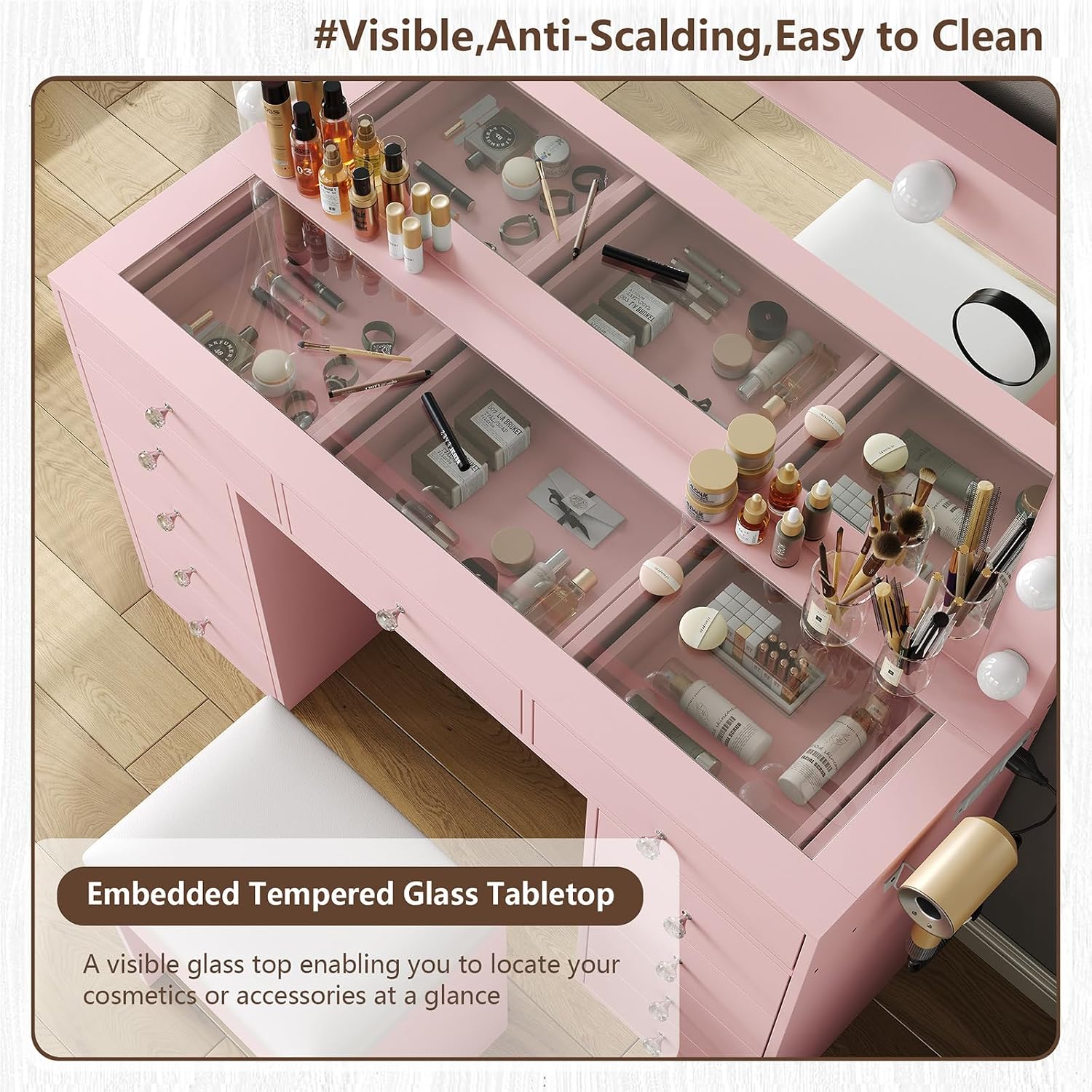
Figure 5.3: Tempered glass tabletop for visible storage.
6. Maintenance
Proper care and maintenance will extend the life and appearance of your vanity desk.
- Cleaning Surfaces: Wipe down all surfaces with a soft, damp cloth. Avoid abrasive cleaners or harsh chemicals that could damage the finish.
- Glass Top: Clean the tempered glass top with a glass cleaner and a soft cloth.
- Stool Cushion: The PU fabric cushion can be easily cleaned with a wet cloth.
- Electrical Components: Ensure the vanity is unplugged before cleaning any electrical parts. Use a dry cloth to wipe the mirror and light bulbs.
- Drawer Slides: Periodically check drawer slides for smooth operation. If needed, a small amount of silicone lubricant can be applied.
- Tighten Fasteners: Over time, fasteners may loosen. Periodically check and tighten all screws and bolts to maintain stability.

Figure 6.1: Makeup stool with easy-to-clean PU leather.
7. Troubleshooting
If you encounter issues with your FUSOU Vanity Desk, please refer to the following common solutions.
- Lights Not Working:
- Ensure the power cord is securely plugged into a functional wall outlet.
- Check if the touch switch on the mirror is pressed correctly.
- Verify that all light bulbs are securely screwed into their sockets.
- If a bulb is faulty, replace it with a compatible spare (if provided) or contact customer support.
- Power Outlet Not Functioning:
- Confirm the main power cord is plugged in.
- Test the wall outlet with another device to ensure it is working.
- Avoid overloading the power strip with too many high-power devices.
- Drawers Not Aligning or Sticking:
- Review the assembly instructions for the specific drawer to ensure all slides and components are installed correctly.
- Check for any obstructions in the drawer slides.
- Ensure all screws securing the drawer slides to the desk frame and drawer box are tight.
- Verify that the desk itself is on a level surface, as uneven flooring can affect drawer alignment.
- Missing Parts During Assembly:
- Double-check all packaging materials. Small parts can sometimes be overlooked.
- Refer to the parts list in your assembly manual. If parts are genuinely missing, contact FUSOU customer service immediately with your product model and a description of the missing parts.
- Difficulty with Assembly:
- Re-read the instructions carefully, paying close attention to diagrams.
- Ensure you are using the correct hardware for each step.
- If a step is particularly challenging, consider seeking assistance from another person.
8. Specifications
| Feature | Detail |
|---|---|
| Brand | FUSOU |
| Model Number | VD003-PK |
| Color | Pink |
| Size | 11 Drawers |
| Product Dimensions (Overall) | 15.8"D x 46"W x 55"H (40.1cm D x 116.8cm W x 139.7cm H) |
| Item Weight | 68 pounds (30.8 kg) |
| Frame Material | Engineered Wood |
| Mirror Lights | 12 LED Bulbs, 3 Lighting Modes (Cold, Natural, Warm), Dimmable |
| Power Outlet | 2x 125V/12A AC Outlets, 2x 5V/2A USB Ports, 5.0 ft Power Cord |
| Assembly Required | Yes |
| Stool Cushion Material | PU Fabric, Soft Sponge |

Figure 8.1: Product dimensions overview.
9. Warranty and Customer Support
FUSOU is committed to providing excellent service. If you have any questions about your product, assembly, or require assistance, please do not hesitate to contact our customer support team.
Please refer to your purchase documentation or the FUSOU official website for specific warranty details and contact information. When contacting support, please have your product model number (VD003-PK) and purchase date available.
Contact Information:
- For support inquiries, please visit the FUSOU Store on Amazon or refer to the contact details provided in your product packaging.


