1. Introduction
Thank you for choosing the CNBRO YX30 Touch Screen ANC Wireless Earbuds. This manual provides detailed instructions on how to set up, operate, and maintain your new earbuds. Please read this manual carefully before use to ensure optimal performance and longevity of your device. Keep this manual for future reference.
Important Note: If you receive a defective product or have any questions during use, please contact customer support for assistance.
2. Package Contents
Ensure all items are present in the packaging:
- 1 Pair of CNBRO YX30 Active Noise Cancelling Earbuds with Touch Screen Charging Case
- 1 TYPE-C Charging Cable
- 1 User Manual (this document)
- 1 Exquisite Packaging Box
3. Product Overview
The CNBRO YX30 earbuds feature advanced Active Noise Cancellation (ANC) and Environmental Noise Cancellation (ENC) technology, paired with a unique touch screen charging case for intuitive control and enhanced functionality.
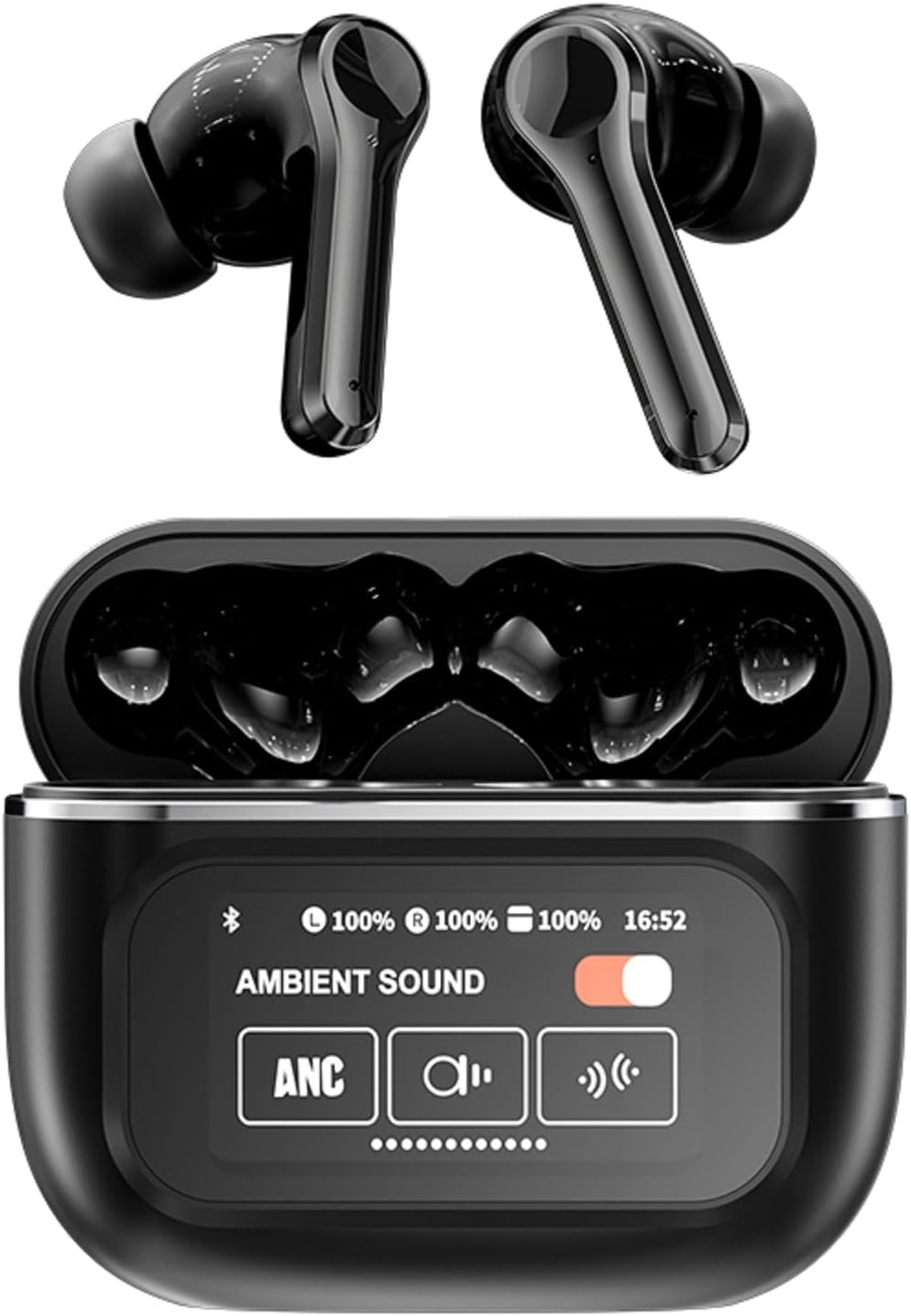
This image displays the CNBRO YX30 wireless earbuds in black, placed within their open charging case, revealing the earbuds and its integrated touch screen interface, which shows battery levels and ambient sound settings.

This image presents both the black and white color variants of the CNBRO YX30 earbuds and their charging cases. It emphasizes the sleek design and the full-color LED touch screen on the charging case.

A close-up view of the CNBRO YX30 charging case's touch screen, illustrating its diverse functionalities. Icons and text indicate features such as music playback control, volume adjustment, equalizer settings, timer alarm, screen brightness, language switching, wallpaper customization, 'Find my headphones' feature, Bluetooth camera control, and short video playback.
4. Setup
4.1 Charging the Earbuds and Case
Before first use, fully charge the earbuds and the charging case.
- Connect the provided TYPE-C cable to the charging port on the case and to a USB power source.
- The touch screen on the case will display the charging status.
- Place the earbuds into the charging case. They will begin charging automatically.
- A full charge for the case and earbuds typically takes approximately 1 hour.

The earbuds offer up to 5 hours of single playtime, with the charging case extending total usage to 24 hours.
4.2 Pairing with a Device
The earbuds use Bluetooth 5.4 for a stable and efficient connection.
- Ensure the earbuds are charged and placed in the charging case.
- Open the charging case. The earbuds will automatically enter pairing mode.
- On your mobile phone or Bluetooth-enabled device, go to Bluetooth settings.
- Search for available devices and select "CNBRO YX30" from the list.
- Once connected, the touch screen on the case will indicate a successful connection, and you will hear an audio prompt.
- The earbuds support all devices and mobile phones that support Bluetooth.
5. Operating Instructions
5.1 Earbud Touch Controls
The earbuds feature touch-sensitive areas for various functions:
- Single Tap: Play/Pause music, Answer/End call.
- Double Tap (Left Earbud): Previous track.
- Double Tap (Right Earbud): Next track.
- Triple Tap (Left Earbud): Volume down.
- Triple Tap (Right Earbud): Volume up.
- Long Press (2 seconds): Reject call, Activate voice assistant.
5.2 Active Noise Cancellation (ANC) and Environmental Noise Cancellation (ENC)
The CNBRO YX30 earbuds feature dual noise cancellation technology to enhance your listening experience.

This diagram visually explains the Active Noise Cancellation (ANC) and Environmental Noise Cancellation (ENC) technology of the earbuds, highlighting microphones and ear caps for noise reduction up to -35dB.
- ANC Mode: Blocks out external noise, ideal for travel or noisy environments.
- ENC Mode: Enhances call clarity by reducing background noise during phone conversations.
- Transparency Mode: Allows you to hear your surroundings while listening to audio.
You can switch between ANC, ENC, and Transparency modes directly from the touch screen on the charging case or via the earbud touch controls (refer to the touch control section on the case screen for specific gestures).

The CNBRO YX30 earbuds are designed for versatility, suitable for various settings including indoor use, commuting, and outdoor activities.
5.3 Touch Screen Case Functions
The smart LED full-color touch screen on the charging case provides access to multiple functions:
- Music Playback: Control play/pause, skip tracks.
- Volume Adjustment: Increase or decrease audio volume.
- EQ Modes: Select from various equalizer presets for different audio experiences.
- Timer Alarm Clock: Set alarms directly from the case.
- Screen Brightness: Adjust the display brightness of the touch screen.
- Language Switching: Change the interface language.
- Change Wallpaper: Customize the touch screen background.
- Find My Headphones: Locate misplaced earbuds (if supported by the feature).
- Bluetooth Camera: Remotely trigger your phone's camera shutter.
- Watch Short Videos: Play short video clips directly on the case screen.
- Time Setting: Adjust the displayed time.
6. Maintenance
Proper maintenance ensures the longevity and performance of your earbuds:
- Cleaning: Regularly clean the earbuds and charging case with a soft, dry, lint-free cloth. Do not use harsh chemicals or abrasive materials.
- Ear Tips: Remove ear tips and clean them with water and mild soap if necessary. Ensure they are completely dry before reattaching.
- Charging Ports: Keep the TYPE-C charging port free of dust and debris.
- Storage: When not in use, store the earbuds in their charging case to protect them and keep them charged.
- Water Resistance: The earbuds are rated IPX5 waterproof. This means they are resistant to splashes and sweat, but should not be submerged in water. Avoid exposure to heavy rain or extreme moisture.
7. Troubleshooting
If you encounter issues, try the following solutions:
- Earbuds not pairing:
- Ensure earbuds are charged.
- Turn off and on your device's Bluetooth.
- Forget "CNBRO YX30" in your device's Bluetooth settings and re-pair.
- Place earbuds back in the case, close, then open again to reset pairing mode.
- No sound from one earbud:
- Ensure both earbuds are charged.
- Try placing both earbuds back in the case and taking them out again.
- Clean the charging contacts on both earbuds and inside the case.
- Charging case not charging:
- Check the TYPE-C cable and power adapter.
- Ensure the charging port is clean and free of debris.
- Touch screen unresponsive:
- Ensure the case is charged.
- Restart the case by closing and reopening it.
If the issue persists, please refer to the warranty and support section.
8. Specifications
Key technical specifications for the CNBRO YX30 Earbuds:
| Bluetooth Version | 5.4 |
| Headphone Battery Capacity | 30mAh |
| Charging Case Battery Capacity | 400mAh |
| Transmission Distance | Approximately 15 meters |
| Single Playing Time | Up to 5 hours |
| Total Playtime (with case) | Up to 24 hours |
| Charging Time | Approximately 1 hour |
| Waterproof Level | IPX5 |
| Noise Control | Active Noise Cancellation (ANC) & Environmental Noise Cancellation (ENC) |
| Control Method | Touch (Earbuds) & Touch Screen (Case) |
| Compatible Devices | All Bluetooth-enabled devices and mobile phones |
| Audio Driver Type | Dynamic Driver with PU Composite Diaphragm |
| Item Weight | 0.64 ounces (earbuds) |

A cutaway diagram illustrating the internal structure of the earbud's speaker, focusing on the PU Composite Diaphragm, which contributes to the premium sound quality.
9. Warranty and Support
CNBRO is committed to providing high-quality products and customer satisfaction. Your CNBRO YX30 earbuds come with a standard manufacturer's warranty against defects in materials and workmanship.
Customer Support:
If you encounter any issues, have questions, or require assistance with your product, please do not hesitate to contact our customer support team. Details for contacting support are typically found on the product packaging or the official CNBRO website.
Please retain your proof of purchase for warranty claims.


