
1. Safety Information
Please read and understand this entire manual before attempting to assemble, operate, or install the product. Failure to follow these instructions could result in electric shock, fire, or serious personal injury.
- Ensure all electrical connections comply with local codes and ordinances, and the National Electrical Code (NEC).
- Consult a qualified electrician if you are unfamiliar with electrical wiring.
- Before installation, disconnect power by turning off the circuit breakers at the main fuse box.
- The fan must be mounted with a minimum of 7 feet (2.1 meters) clearance from the trailing edge of the blades to the floor.
- Do not operate the fan if any part is damaged. Contact customer support for assistance.
2. Package Contents
Verify that all components listed below are included in your package. If any parts are missing or damaged, contact ducrew customer service.
- Motor Housing Assembly
- Fan Blades (3x)
- Downrods (5-inch, 10-inch, 14-inch)
- Mounting Bracket
- Canopy
- LED Light Kit
- Remote Control with Wall Mount
- Hardware Pack (screws, washers, wire nuts)
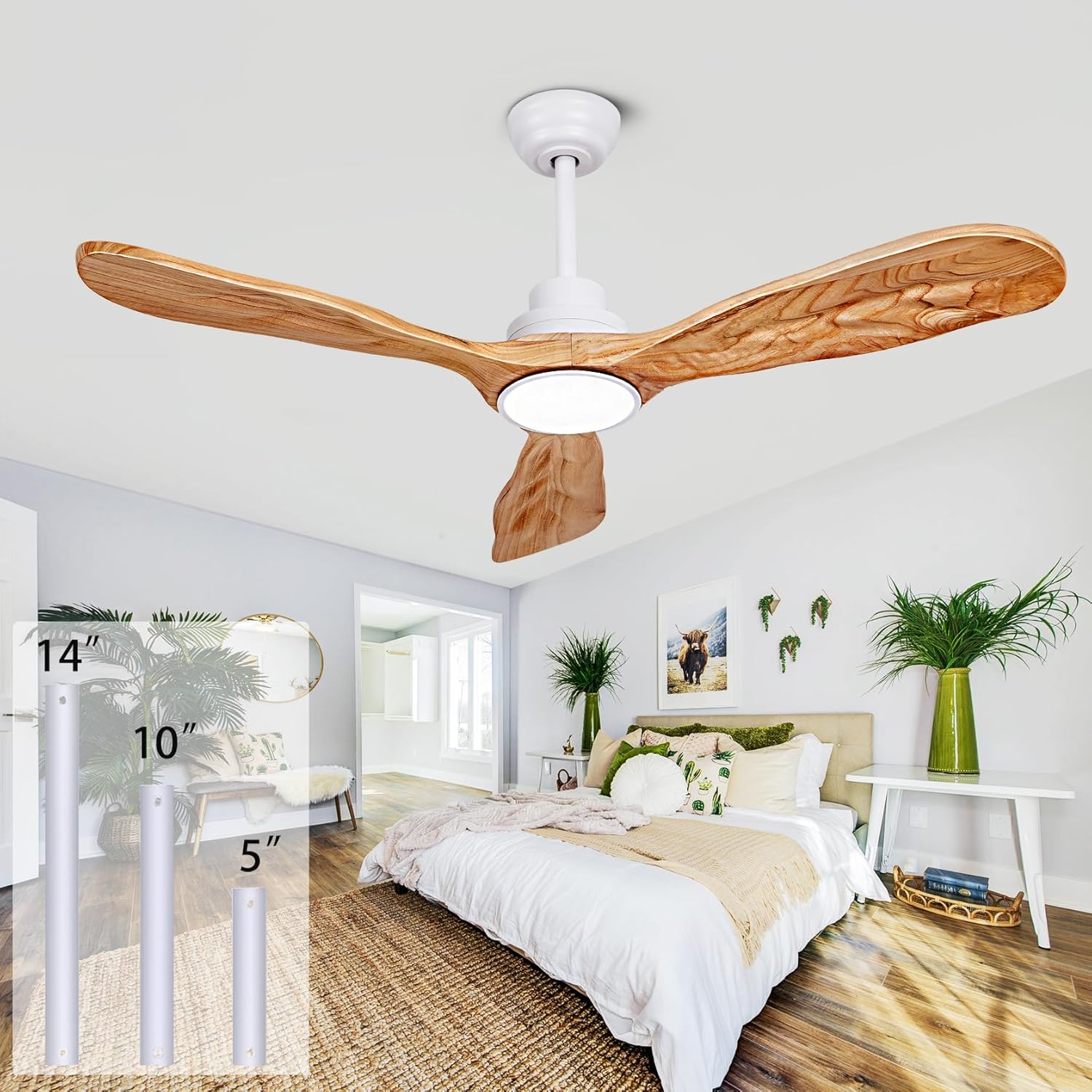
Image 2.1: Overview of the ducrew 52-inch Ceiling Fan with Lights and Remote.
3. Setup and Installation
3.1 Mounting the Fan
The fan can be installed on standard or sloped ceilings up to a 15-degree inclination. Choose the appropriate downrod length (5-inch, 10-inch, or 14-inch) based on your ceiling height and desired fan position.

Image 3.1: Detailed dimensions and available downrod lengths (5", 10", 14"). The image also illustrates installation on a sloped ceiling with an inclination angle of up to 15 degrees.
3.2 Blade Installation
The fan features three solid wood blades. Attach each blade securely to the motor housing using the provided hardware. Ensure all screws are tightened to prevent wobbling during operation.

Image 3.2: Close-up view highlighting the 1.6-inch thickness of the solid wood fan blades and the sloped ceiling mounting mechanism.

Image 3.3: Comparison showing the texture and appearance of a solid wood fan blade versus a plastic ABS fan blade, emphasizing the natural log and hand-carved quality of the solid wood.
3.3 Electrical Connection
Connect the fan's wiring to your household electrical system. This fan uses a DC motor and is ETL certified. Ensure the power is off at the circuit breaker before making any connections. Follow the wiring diagram provided in the separate installation guide for detailed steps. The remote control receiver must be properly integrated into the wiring.
4. Operating Instructions
Your ducrew ceiling fan is controlled by the included remote. Familiarize yourself with its functions for optimal use.
4.1 Remote Control Functions
- Power On/Off: Turns the fan and light on or off.
- Fan Speed: Adjusts fan speed through 6 levels.
- Timer: Sets the fan to turn off automatically after 1, 2, or 4 hours.
- Light Control:
- Color Temperature: Cycles through 3000K (Warm Light), 4500K (Natural Light), and 6000K (Cold Light).
- Brightness: Adjusts brightness from 20% to 100% (infinite dimming).
- Reversible Function: Changes the direction of blade rotation.

Image 4.1: Illustration of the fan's quiet operation (below 30dB) and remote control features including 6 speeds, timer settings (1H, 4H, 8H), and quiet function.
4.2 Reversible DC Motor
The fan features a reversible DC motor for year-round comfort.
- Downward Mode (Summer): Air circulates downward to create a cooling effect.
- Upward Mode (Winter): Air circulates upward to enhance air distribution and warmth in the room.

Image 4.2: Diagram illustrating the reversible function, showing downward airflow for cooling in summer and upward airflow for improved heat distribution in winter.
4.3 LED Lighting
The integrated 18W LED light offers adjustable color temperature and brightness.
- Color Temperatures: Choose between 3000K (Warm Light), 4500K (Natural Light), and 6000K (Cold Light).
- Brightness Adjustment: Adjust brightness from 20% to 100% to suit your preference.
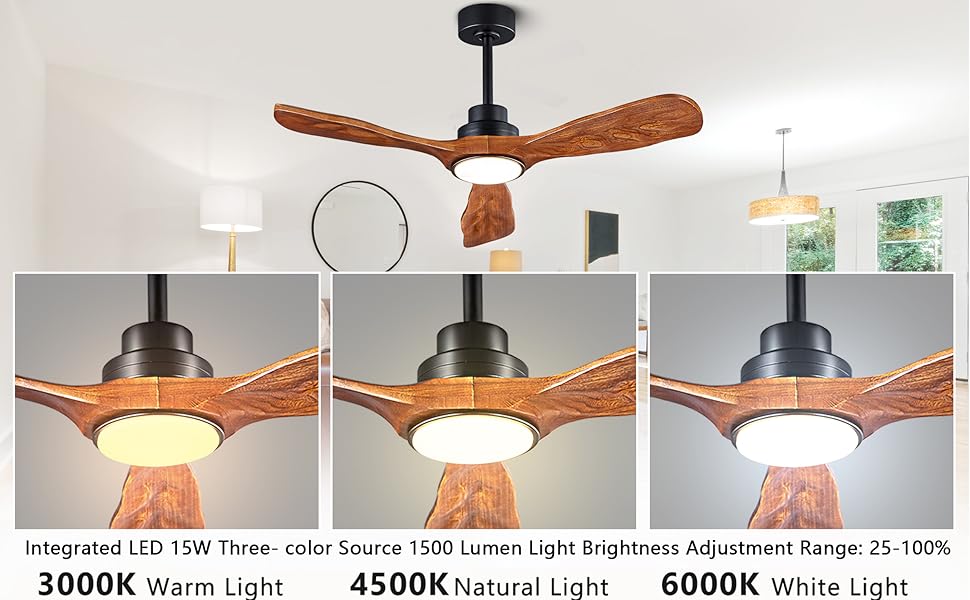
Image 4.3: Visual representation of the three LED light color temperature options: 3000K Warm Light, 4500K Natural Light, and 6000K White Light, with a brightness adjustment range of 25-100%.
4.4 Memory Function
The ceiling fan remembers and saves your last used light color temperature, brightness, and fan speed settings. When the fan is turned on again, it will automatically revert to these previously set preferences.
5. Maintenance
Regular maintenance ensures the longevity and optimal performance of your ceiling fan.
- Cleaning: Periodically wipe the fan blades and motor housing with a soft, damp cloth. Do not use abrasive cleaners or solvents.
- Blade Inspection: Check fan blades for any signs of damage or warping. Replace damaged blades immediately.
- Tighten Fasteners: Annually, check all screws and fasteners for tightness.
6. Troubleshooting
If you encounter issues with your fan, refer to the following common problems and solutions:
| Problem | Possible Cause | Solution |
|---|---|---|
| Fan does not start | No power to the fan; Loose wire connections; Remote control battery low. | Check circuit breaker; Ensure all wires are securely connected; Replace remote control battery. |
| Light does not work | Loose wire connection to light kit; LED driver issue. | Check light kit wiring; Contact customer support if LED driver is suspected. |
| Fan wobbles | Loose blade screws; Unbalanced blades; Loose mounting bracket. | Tighten all blade screws; Use balancing kit (not included) if necessary; Ensure mounting bracket is secure. |
| Remote control not responding | Low battery; Remote not paired; Obstruction. | Replace battery; Refer to remote pairing instructions (if applicable); Ensure clear line of sight to receiver. |
If the problem persists after attempting these solutions, please contact ducrew customer support.
7. Specifications
| Feature | Detail |
|---|---|
| Brand | ducrew |
| Model Name | 599-52WO |
| Product Dimensions | 52"D x 52"W x 17"H (with 10" downrod) |
| Electric Fan Design | Ceiling Fan |
| Color | White + Natural Wood |
| Power Source | DC |
| Wattage | 15 watts |
| Voltage | 24 Volts (DC) |
| Number of Power Levels | 6 (Fan Speeds) |
| Control Method | Remote |
| Included Components | Light Kit |
| Indoor/Outdoor Usage | Indoor, Outdoor |
| Special Features | Adjustable Height, Reversible Motor, Dimmable LED Light, Memory Function |
| Item Weight | 14.17 pounds |
8. Warranty and Support
ducrew stands behind the quality of its products.
- Motor Warranty: ducrew motors come with a 10-year warranty.
- Full Product Warranty: The entire unit is covered by a 2-year warranty.
- Remote Control Replacement: If the remote control is lost or damaged, a replacement will be provided free of charge.
For technical support, warranty claims, or any other inquiries, please contact ducrew customer service through the retailer where the product was purchased or visit the official ducrew website.