
1. Introduction
Thank you for choosing the IBELL CT 20-60 Cordless Tile Vibrator. This tool is designed to assist in the precise leveling and secure bonding of tiles, ensuring a professional finish for your tiling projects. Its cordless design offers flexibility and ease of use, powered by a 20V motor with a high vibration frequency and strong suction capacity.
This manual provides essential information for the safe operation, setup, maintenance, and troubleshooting of your tile vibrator. Please read it thoroughly before first use and keep it for future reference.
2. Safety Information
Always observe basic safety precautions when using electrical tools to reduce the risk of fire, electric shock, and personal injury.
- Work Area Safety: Keep your work area clean and well-lit. Cluttered or dark areas invite accidents. Do not operate power tools in explosive atmospheres, such as in the presence of flammable liquids, gases, or dust.
- Electrical Safety: Avoid body contact with earthed or grounded surfaces (e.g., pipes, radiators, ranges, refrigerators). Do not expose power tools to rain or wet conditions.
- Personal Safety: Always wear eye protection. Use respiratory protection if dust is created. Dress properly; avoid loose clothing or jewelry. Keep hair, clothing, and gloves away from moving parts.
- Tool Use and Care: Do not force the tool. Use the correct tool for your application. Disconnect the battery pack from the tool before making any adjustments, changing accessories, or storing power tools.
- Battery Pack Safety: Recharge only with the charger specified by the manufacturer. Do not disassemble the battery pack. Do not short-circuit the battery pack.
3. What's in the Box
Your IBELL CT 20-60 Cordless Tile Vibrator package includes the following components:
- IBELL CT 20-60 Tile Vibrator
- BMC Box (Blow Molded Case)
- 2AH Battery
- Charger
4. Product Features
The IBELL CT 20-60 Cordless Tile Vibrator is engineered for efficiency and precision in tile installation:
- Powerful Cordless Operation: Equipped with a 20V motor, providing freedom of movement without power cords.
- High Vibration Frequency: Delivers up to 15000 RPM for precise tile leveling and strong adhesive bonding.
- Strong Suction Capacity: Features a 150mm suction cup capable of lifting and handling tiles up to 60Kg.
- Wide Tile Compatibility: Suitable for large tiles up to 100 x 100 cm, including marble, ceramic, cement, and plasterboard surfaces.
- Air Gap Removal: Effectively removes air gaps beneath tiles, improving adhesive contact and preventing future issues.
- Ergonomic Design: Compact and user-friendly for comfortable handling and reduced fatigue during extended use.

Figure 4.1: Key features of the IBELL CT 20-60 Tile Vibrator, highlighting its 150mm suction cup and 0-15000 RPM vibration frequency.

Figure 4.2: The IBELL CT 20-60 is compatible with various materials including marble, cement walls, plasterboard, and ceramic tiles.
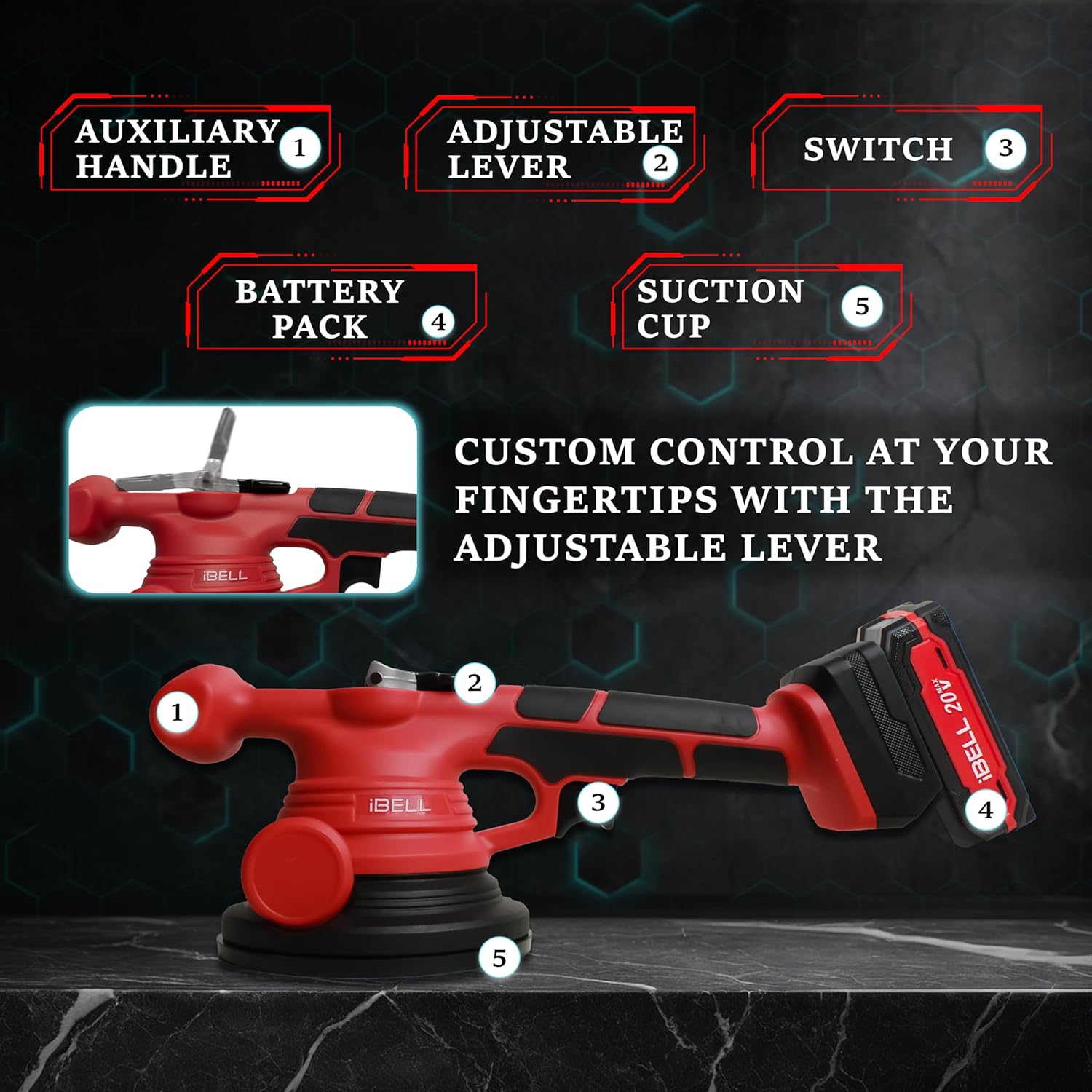
Figure 4.3: Labeled components of the IBELL CT 20-60 Tile Vibrator, including the auxiliary handle, adjustable lever, switch, battery pack, and suction cup.
5. Setup
Follow these steps to prepare your IBELL CT 20-60 Tile Vibrator for use:
- Charge the Battery: Before initial use, ensure the 2AH battery is fully charged using the provided charger. Connect the charger to a power outlet and then to the battery pack. The indicator light on the charger will show the charging status.
- Insert the Battery: Align the battery pack with the battery slot on the tile vibrator. Slide the battery into place until it clicks securely. Ensure it is firmly seated to prevent accidental disconnection during operation.

Figure 5.1: Visual guide for the initial setup and operation of the tile vibrator, starting with battery insertion.
6. Operating Instructions
Once the battery is installed, you can begin using your tile vibrator:
- Prepare the Tile: Apply adhesive to the surface where the tile will be placed, following the adhesive manufacturer's instructions.
- Position the Vibrator: To lift and position a tile, place the suction cup of the vibrator firmly onto the tile surface. Pull the adjustable lever (refer to Figure 4.3, item 2) into the up position to engage the suction.
- Place the Tile: Carefully place the tile onto the adhesive bed.
- Activate Vibration: Press the switch (refer to Figure 4.3, item 3) located on the left side of the housing. The device will start vibrating.
- Leveling and Air Removal: While the device is vibrating, gently move it across the tile surface. This action helps to settle the tile into the adhesive, remove air gaps, and ensure even bonding. Maintain a firm hold on the suction cup throughout this process.
- Release Suction: Once the tile is properly leveled and bonded, push the adjustable lever down to release the suction cup from the tile.
For optimal results, ensure the tile surface is clean and dry before applying the suction cup.

Figure 6.1: The tile vibrator in action, demonstrating its ability to achieve smooth results and simplify tile installation.

Figure 6.2: Examples of multiple usage scenarios for the IBELL CT 20-60, including wall tiles, marble floors, solid wood, and ceramic tiles.
7. Maintenance
Regular maintenance ensures the longevity and optimal performance of your tile vibrator:
- Cleaning: After each use, wipe down the tool with a clean, damp cloth. Pay special attention to the suction cup to ensure it is free of adhesive residue or debris, which can affect its suction capacity.
- Battery Care: Store batteries in a cool, dry place away from direct sunlight. Do not store fully discharged batteries for extended periods. Recharge them periodically if not in use.
- Storage: Store the tile vibrator and its accessories in the provided BMC box in a dry, secure location, out of reach of children.
- Inspection: Periodically inspect the tool for any signs of damage, loose parts, or wear. If any issues are found, contact customer support before further use.
8. Troubleshooting
If you encounter issues with your IBELL CT 20-60 Tile Vibrator, refer to the following common problems and solutions:
| Problem | Possible Cause | Solution |
|---|---|---|
| Tool does not turn on. | Battery not charged or improperly inserted. | Ensure battery is fully charged and correctly inserted until it clicks. |
| Weak or no suction. | Suction cup is dirty, damaged, or tile surface is uneven/porous. | Clean the suction cup. Ensure the tile surface is clean, smooth, and non-porous. Check for damage to the suction cup seal. |
| Vibration is weak or inconsistent. | Low battery charge or internal issue. | Recharge the battery. If the problem persists, contact customer support. |
| Battery not charging. | Charger not connected properly or faulty. | Check charger connection to power outlet and battery. Ensure charger is not damaged. |
If you cannot resolve the issue using the troubleshooting guide, please contact IBELL Customer Support.
9. Specifications
| Specification | Value |
|---|---|
| Model Number | CT20-60 |
| Rated Voltage | 20V DC |
| Vibration Frequency | 0-15000 RPM |
| Suction Cup Diameter | 150 mm |
| Max. Suction Capacity | 60 Kg |
| Tool Weight | 1.25 Kg |
| Included Components | Tile Vibrator, BMC Box, 2AH Battery, Charger |
| Country of Origin | China |
10. Warranty and Support
IBELL provides a 6-month service warranty limited to the motor only. Terms and conditions apply as specified in the warranty card. To ensure complete warranty coverage, it is mandatory to register your product within 10 days of purchase. In the absence of a warranty card, customers must contact IBELL Customer Support within this period.
For any warranty-related queries or assistance, please reach out to IBELL Customer Support:
- Toll-Free: 1800-1034-090
- Direct Line: +91-8589809292
- Email: icare@ibelltools.com