
1. Introduction
Thank you for choosing the GYMAX 48-Inch Wooden Billiard Table. This manual provides essential information for the safe assembly, operation, and maintenance of your new billiard table. Please read these instructions carefully before use and retain them for future reference.
This compact billiard table is designed for recreational play, offering a durable and stable platform for family fun and friendly competitions. Its versatile design makes it suitable for various indoor spaces.

Image 1.1: The GYMAX 48-Inch Wooden Billiard Table, complete with cue sticks, billiard balls, and a triangle rack.
2. Included Components
The package includes all necessary items to begin playing:
- 1 x Pool Table
- 2 x Cue Sticks
- 2 x Cue Chalks
- 1 x Table Brush
- 1 x Ball Triangle
- 15 x Colored Balls
- 1 x White Ball
- 1 x User’s Manual (this document)

Image 2.1: Visual representation of the billiard table and its complete set of accessories.
3. Safety Information
Please observe the following safety guidelines to ensure a safe playing environment:
- Adult Supervision: Children should be supervised by an adult during play.
- Stable Surface: Always place the table on a flat, stable surface to prevent tipping.
- Weight Limit: Do not sit or stand on the table. It is not designed to support human weight.
- Sharp Objects: Keep sharp objects away from the playing surface to avoid damage to the felt.
- Proper Use of Accessories: Use cue sticks and balls as intended for billiards. Do not throw or misuse them.
- Adjustable Foot Pads: Ensure the adjustable foot pads are properly set to stabilize the table and prevent wobbling.
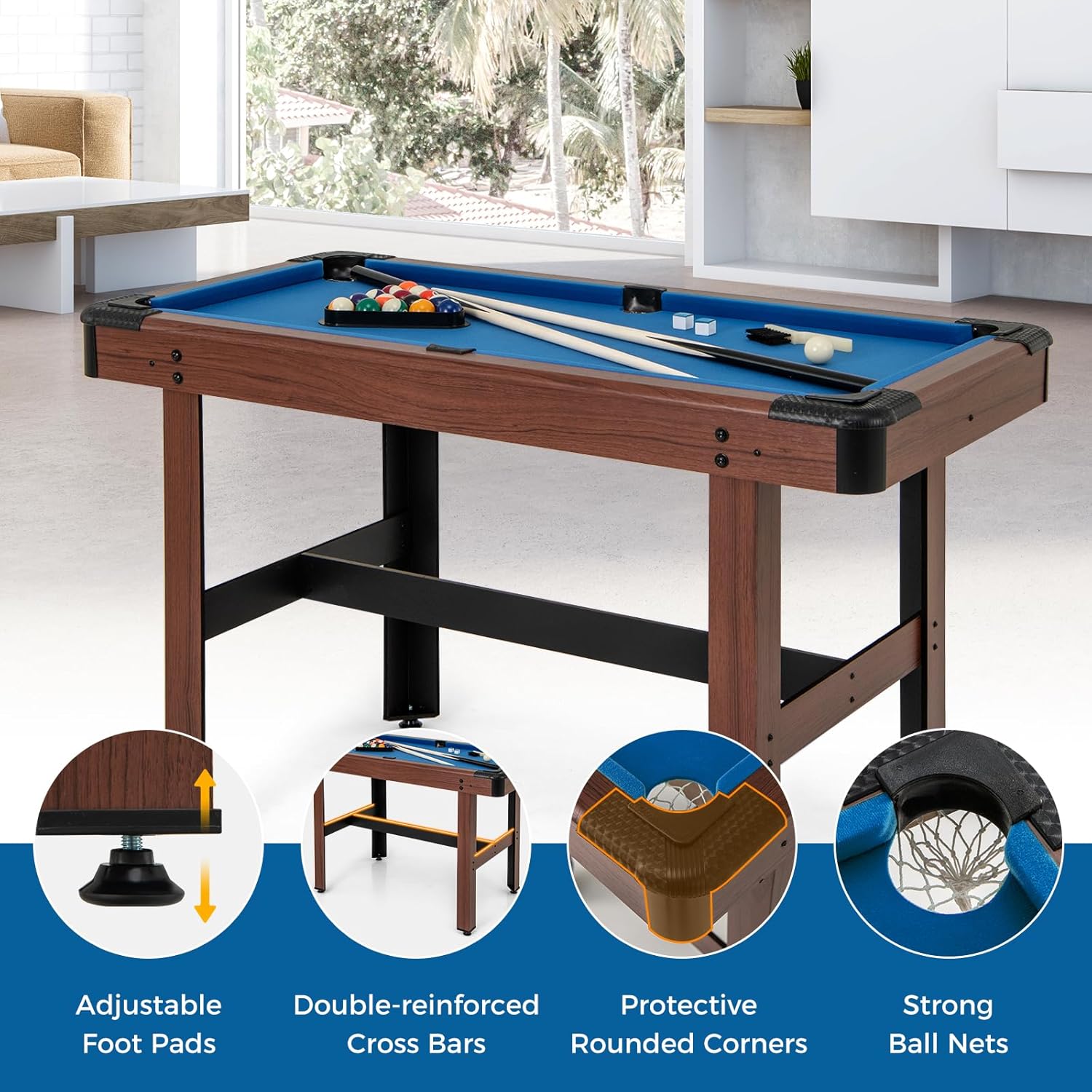
Image 3.1: Key safety and stability features of the table, including adjustable foot pads and reinforced crossbars.
4. Setup and Assembly
The GYMAX Billiard Table is designed for easy assembly. Follow these steps:
- Unpack Components: Carefully remove all parts from the packaging. Verify that all components listed in Section 2 are present.
- Attach Legs: Securely attach the legs to the main table body using the provided hardware. Ensure all screws are tightened.
- Install Crossbars: Connect the double-reinforced crossbars between the legs for added stability.
- Adjust Foot Pads: Place the table in its desired location. Adjust the foot pads at the bottom of each leg to ensure the table is level and stable on any surface.
- Final Check: Before playing, double-check all connections to ensure they are secure.

Image 4.1: Illustration of the table's construction, emphasizing the quality materials used for durability and performance.
5. Operating Instructions
To begin playing billiards:
- Rack the Balls: Use the triangle rack to arrange the 15 colored balls at one end of the table. The 8-ball is typically placed in the center of the third row.
- Position the Cue Ball: Place the white cue ball behind the head string (the imaginary line across the table's width, one-quarter of the way from the head end).
- Break: Use a cue stick to strike the cue ball, aiming to scatter the racked balls.
- Gameplay: Follow standard billiard rules for potting balls and taking turns. The scratch-resistant felt ensures a smooth playing surface, and the premium cushion bumpers provide consistent rebound.

Image 5.1: Individuals engaged in a game of billiards on the table.

Image 5.2: The table's versatility, suitable for game rooms, offices, or bars.

Image 5.3: A family enjoying the billiard table, highlighting its suitability for family interaction.
6. Maintenance
- Cleaning the Felt: Use the provided table brush to gently sweep dust and debris from the felt surface. For spills, blot immediately with a clean, damp cloth. Avoid harsh chemicals.
- Cue Stick Care: Store cue sticks in a dry place to prevent warping. Clean them with a soft cloth after use.
- Billiard Ball Care: Wipe billiard balls with a soft, damp cloth to remove chalk residue and dirt.
- Table Stability: Periodically check all screws and connections to ensure they remain tight. Re-adjust foot pads if the table becomes uneven.
- Storage: When not in use for extended periods, store the table in a dry, temperate environment.
7. Troubleshooting
| Issue | Possible Cause | Solution |
|---|---|---|
| Table is wobbly/uneven | Uneven floor surface; loose leg connections | Adjust the foot pads on each leg until stable. Tighten all leg assembly screws. |
| Balls do not roll smoothly | Debris on felt; damaged felt; table not level | Brush the felt surface. If felt is damaged, contact customer support. Ensure table is level using foot pads. |
| Cue stick feels warped | Improper storage; exposure to humidity/temperature changes | Store cue sticks vertically in a temperate, dry environment. Replacement cue sticks may be purchased if severely warped. |
8. Specifications
| Feature | Detail |
|---|---|
| Model Number | CA-GM2031/2 |
| Overall Dimensions (L x W x H) | 122 x 61 x 76 cm (48 x 24 x 30 inches) |
| Cue Stick Length | 90 cm (35.4 inches) |
| Ball Diameter | 38 mm (1.5 inches) |
| Net Weight | 13.5 kg (30 lbs) |
| Materials | MDF, Velvet, EVA |
| Frame Material | Engineered Wood |
| Color | Brown+Blue/Green (depending on variant) |

Image 8.1: Detailed product dimensions for the billiard table and accessories.
9. Warranty and Support
For warranty information or technical support, please refer to the contact details provided with your purchase documentation or visit the official GYMAX website. Please have your model number (CA-GM2031/2) ready when contacting support.
