
Introduction
Thank you for purchasing the Genérico XM-G3 LED Table Lamp. This versatile device combines an LED light projector, a high-fidelity Bluetooth speaker, an alarm clock, and a 15W wireless phone charger, designed to enhance your environment with light, sound, and convenience. Please read this manual carefully before use to ensure proper operation and to maximize your experience with the product.
Safety Information
- Do not expose the device to water or excessive moisture.
- Avoid dropping or subjecting the device to strong impacts.
- Do not attempt to disassemble or repair the device yourself. Contact qualified service personnel.
- Keep the device away from heat sources and direct sunlight.
- Use only the provided charging cable or a certified equivalent.
- Ensure proper ventilation when using the wireless charging function.
Package Contents
Verify that all items are present in the package:
- 1 x Genérico XM-G3 LED Table Lamp with Bluetooth Speaker
- 1 x USB Charging Cable
- 1 x User Manual (this document)
Product Overview
The Genérico XM-G3 is a multi-functional device designed to integrate seamlessly into your daily life. Key features include:
- Customizable LED Lighting: 6 adjustable light color modes to create various atmospheres.
- 15W Fast Wireless Charger: Conveniently charge compatible mobile phones without cables.
- High-Fidelity Bluetooth Speaker: Integrated wireless speaker for high-quality audio playback.
- Alarm Clock Function: Built-in alarm with gentle illumination for a natural wake-up experience.
- Long-Lasting Battery: 1200 mAh battery, providing hours of continuous use after a 2-3 hour USB charge.

Image: The Genérico XM-G3 LED Table Lamp in use, showcasing its wireless charging capability and vibrant RGB lighting.
Setup
- Unpacking: Carefully remove all components from the packaging.
- Initial Charge: Connect the provided USB charging cable to the lamp's charging port and a suitable USB power adapter (not included). Charge the device fully for 2-3 hours before first use. The charging indicator will show status.
- Placement: Place the lamp on a stable, flat surface. Ensure there is adequate space around the device for ventilation, especially for wireless charging.
Operating Instructions
Power On/Off
- Press and hold the Power button (usually marked with a power icon) to turn the device on or off.
LED Lighting Modes
The lamp features 6 adjustable light color modes.
- After powering on, short press the Light Mode button (often indicated by a light bulb icon or 'M') to cycle through the available light modes.
- Each press will change the color or lighting effect.

Image: The Genérico XM-G3 LED Table Lamp positioned on a desk, demonstrating its ambient lighting capabilities.
Bluetooth Speaker
- Pairing: When the device is powered on, it will automatically enter Bluetooth pairing mode. A voice prompt or indicator light will confirm this.
- Connect: On your mobile phone or other Bluetooth-enabled device, search for "XM-G3" (or similar name) in the Bluetooth settings and select it to connect.
- Playback: Once connected, you can play audio from your device through the lamp's speaker. Use the volume buttons on the lamp or your connected device to adjust the sound level.
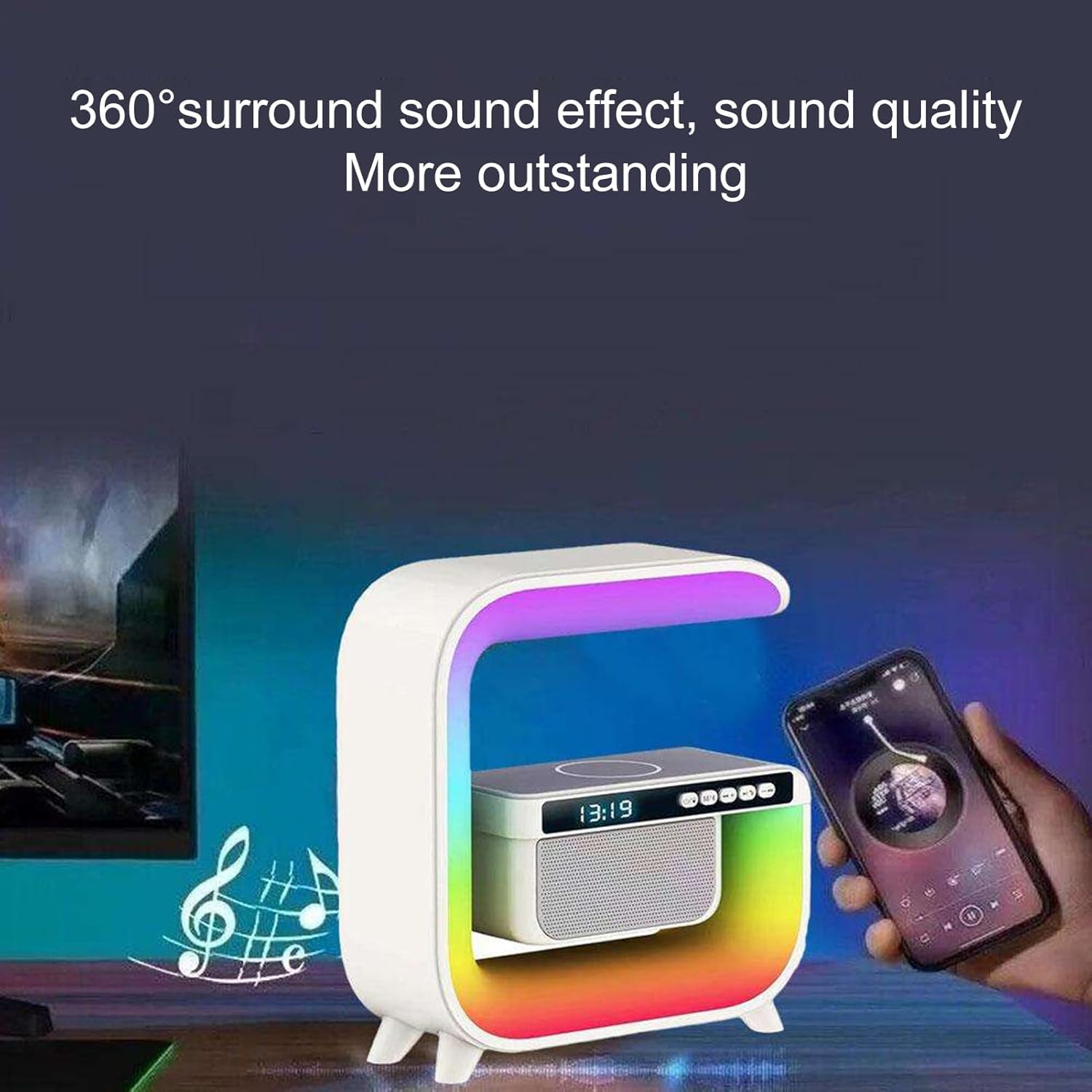
Image: The Genérico XM-G3 LED Table Lamp shown with a smartphone, illustrating its Bluetooth connectivity for audio playback.
15W Wireless Charging
The lamp is equipped with a 15W fast wireless charger for compatible devices.
- Ensure the lamp is powered on and connected to a power source.
- Place your Qi-compatible smartphone on the designated wireless charging pad located on top of the lamp.
- The phone's screen should indicate that charging has begun. If not, adjust the phone's position on the pad.

Image: A user placing a smartphone on the Genérico XM-G3 LED Table Lamp's charging pad to initiate wireless charging.
Alarm Clock Function
Set and manage your alarms using the control buttons on the device.
- Refer to the specific button layout on your device for alarm setting controls (typically involving a 'Set' or 'Clock' button and +/- buttons).
- The alarm can be set to wake you with a gentle light and sound.

Image: The Genérico XM-G3 LED Table Lamp displayed on a nightstand, with icons indicating its sleep, alarm, call, light, wireless charging, and color features.
Maintenance
- Cleaning: Use a soft, dry cloth to wipe the surface of the lamp. Do not use abrasive cleaners or solvents.
- Storage: When not in use for extended periods, store the device in a cool, dry place.
- Battery Care: To prolong battery life, avoid fully discharging the battery frequently. Charge the device regularly, even if not in constant use.
Troubleshooting
| Problem | Possible Cause | Solution |
|---|---|---|
| Device does not power on. | Low battery or no power connection. | Charge the device using the USB cable. Ensure the power adapter is working. |
| Bluetooth not connecting. | Device not in pairing mode, or already connected to another device. | Ensure the lamp is in pairing mode. Disconnect from other devices. Restart both the lamp and your phone's Bluetooth. |
| Wireless charging not working. | Phone not Qi-compatible, phone misaligned, or foreign objects on the pad. | Ensure your phone supports Qi wireless charging. Reposition the phone on the charging pad. Remove any metal objects or thick cases. |
| Light modes not changing. | Incorrect button pressed or device malfunction. | Ensure you are pressing the correct Light Mode button. Try restarting the device. |
Specifications
| Brand | Genérico |
| Model | XM-G3 (Product Model Number: Lampara_Bocina) |
| Manufacturer | PANDA HIIT |
| Part Number | Lampara_Bocina_1001 |
| Dimensions (L x W x H) | 9 x 25 x 25 cm (3.54 x 9.84 x 9.84 inches) |
| Weight | 500 g (1.1 lbs) |
| Material | Plastic (ABS + PC for screen) |
| Color | White (Multicolor RGB lighting) |
| Light Source | LED |
| Number of Light Modes | 6 |
| Wireless Charger Output | 15W |
| Battery Capacity | 1200 mAh |
| Charging Time | 2-3 hours (via USB) |
| Special Features | Bluetooth Speaker, Alarm Clock, Wireless Charger |

Image: A diagram illustrating the height, width, and depth dimensions of the Genérico XM-G3 LED Table Lamp.
Warranty and Support
For warranty information or technical support, please refer to the contact details provided by your retailer or the manufacturer, PANDA HIIT. Keep your purchase receipt as proof of purchase.