Introduction
This manual provides essential instructions for the safe and effective use of your KAER 8-12 Rifle and Pistol Gun Safe. Designed for secure storage of firearms and valuables, this safe features robust construction, multiple access options, and adjustable interior configurations. Please read this manual thoroughly before setup and operation to ensure proper functionality and safety.
Setup and Assembly
Your KAER gun safe requires assembly. Follow these steps carefully to ensure proper construction and stability. It is recommended to have assistance during assembly due to the weight of the components.
1. Unboxing and Component Identification
Carefully unpack all components from the packaging. Verify that all parts listed in the user manual are present. Refer to the assembly diagram for component identification.

Image: All components of the KAER 8-12 Gun Safe laid out for assembly, including side panels, door frame, shelves, and hardware.
2. Initial Assembly of the Safe Body
Begin by connecting the side panels to the back panel and the door frame using the provided self-tapping screws. Ensure all connections are secure but do not fully tighten until the entire frame is assembled to allow for minor adjustments.
Video: A step-by-step guide demonstrating the assembly process of the gun safe, including attaching panels and securing the frame.
3. Installing Shelves and Gun Racks
Insert the adjustable shelves and gun racks into their desired positions within the safe. The interior is designed for flexibility, allowing you to customize storage for rifles, pistols, and accessories. The foam gun racks protect firearms from scratches.

Image: The interior of the gun safe, showcasing the adjustable shelves and foam gun racks for organized storage of various firearms.
4. Securing the Safe
For maximum security, the safe must be anchored to a wall. Use the pre-drilled holes on the back and bottom of the safe. The package includes expansion bolts for concrete/cinderblock walls. For stud walls, appropriate fasteners must be sourced separately. Ensure the safe is level and securely fastened to prevent tipping.

Image: Examples of the gun safe securely installed in different home environments, such as a bedroom and a tool room, demonstrating its adaptability.
Operating Instructions
Your KAER gun safe offers multiple secure access methods:
1. Electronic Combination Lock
The safe is equipped with a stable and error-free numeric keypad. To operate, ensure 4 AA batteries (not included) are installed in the battery compartment located behind the keypad. The initial password is typically "1234". Follow the instructions in the user manual to set your personal combination.
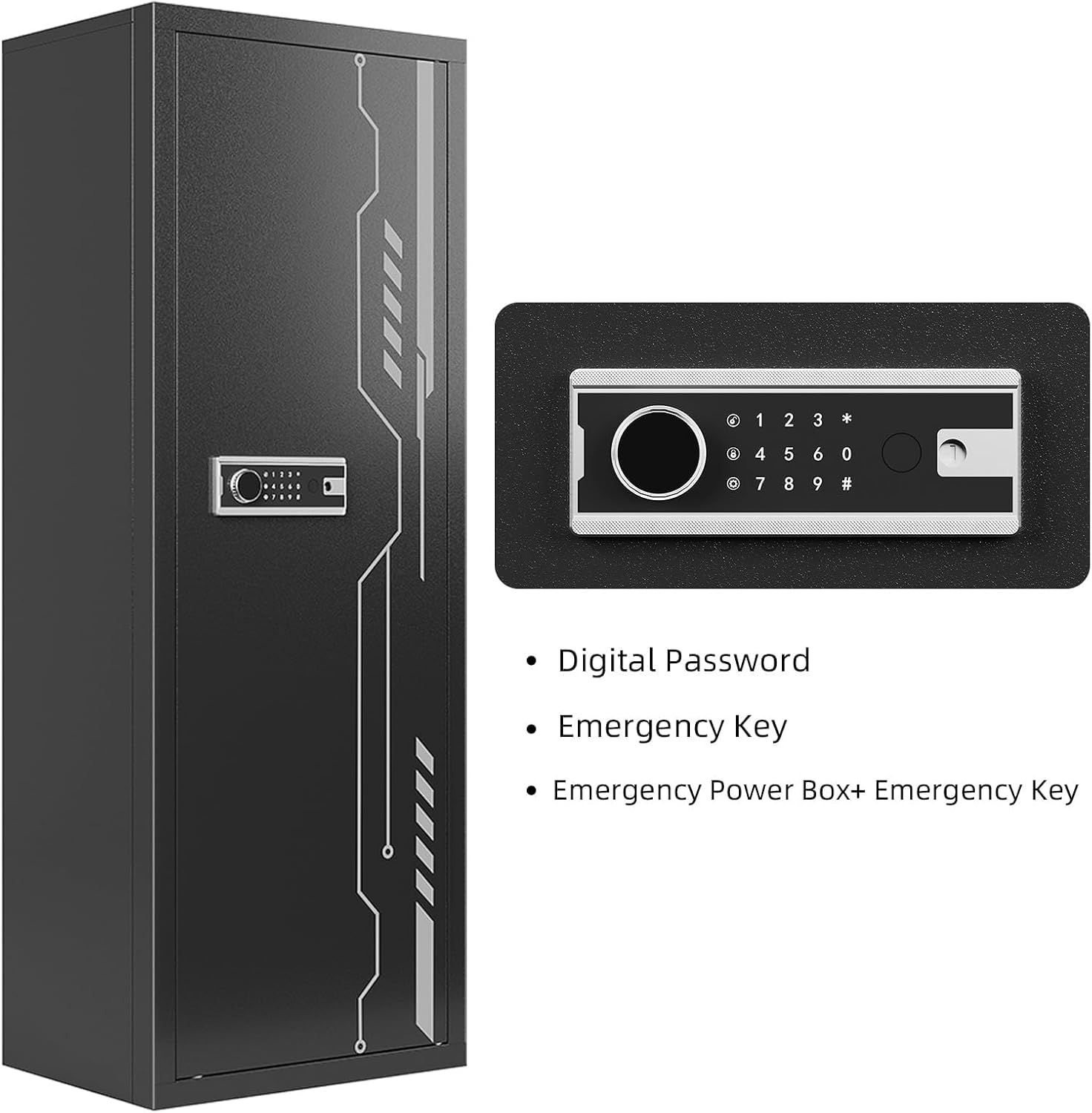
Image: A detailed view of the electronic combination lock and fingerprint scanner, highlighting the digital password input area.
Video: Demonstrates how to set up and use the electronic combination lock and fingerprint scanner for the gun safe.
2. Fingerprint Access
For quick access, the safe features a biometric fingerprint scanner. Follow the user manual to register your fingerprints. Up to 28 fingerprints can be stored. This allows for rapid entry in emergency situations.
3. Emergency Key Access
In case of battery failure or forgotten codes, two emergency keys are provided. These keys can manually override the electronic lock. Store these keys in a secure location away from the safe.
4. Emergency Power Box
If the internal batteries are discharged and the emergency keys are not accessible, an external emergency power box can be used to power the electronic lock temporarily, allowing you to open the safe with your code or fingerprint.
Features
- Large Storage Capacity: Measuring 57"H x 21"W x 15.1"D, this safe can store up to 12 rifles with or without scopes.
- Adjustable Interior: The safe includes adjustable shelves and foam gun racks, allowing for flexible organization of long guns, pistols, ammunition, and other accessories.
- Separate Locking Compartment: A dedicated, separately lockable storage space is located at the top for important documents or smaller valuables.
- Robust Construction: Made from alloy steel, the safe provides a sturdy and secure environment for your firearms.
- Alarm System: The electronic lock features an alarm that activates after 3 incorrect password attempts, deterring unauthorized access.

Image: A close-up of the interior, highlighting the small, separately lockable compartment at the top for additional security.
Maintenance
- Battery Replacement: Replace the 4 AA batteries in the electronic lock annually or when the low battery indicator appears. Use only alkaline batteries.
- Cleaning: Wipe the exterior and interior surfaces with a soft, dry cloth. Avoid abrasive cleaners that could damage the finish.
- Lock Mechanism: Periodically check the locking bolts and hinges for smooth operation. Do not lubricate the electronic lock mechanism.
Troubleshooting
| Problem | Solution |
|---|---|
| Electronic lock not responding. | Check battery levels and replace if necessary. Use the emergency key or external power box. |
| Forgotten combination. | Use the emergency key to open the safe. Refer to the user manual to reset the combination. |
| Fingerprint not recognized. | Ensure your finger is clean and dry. Try re-registering your fingerprint if the issue persists. |
| Alarm sounds unexpectedly. | This may indicate multiple incorrect password attempts. Enter the correct code or use the emergency key to disarm. |
Specifications
| Feature | Detail |
|---|---|
| Brand | KAER |
| Product Dimensions | 15.1"D x 21"W x 57"H |
| Lock Type | Electronic Combination Lock with Fingerprint and Key Access |
| Color | Black |
| Capacity | Up to 12 Rifles |
| Material | Alloy Steel |
| Mounting Type | Wall Mount (hardware included for concrete/cinderblock) |
| Alarm | Yes (after 3 wrong passwords) |
| Water Resistance Level | Not Water Resistant |
Warranty and Support
Warranty: This KAER gun safe comes with a 1-year warranty from the date of purchase.
Customer Support: If you encounter any problems during the use or assembly of the product, please contact our customer service team. We are committed to answering your questions and resolving your issues within 24 hours.


