
Introduction
The SINWE P300-MC98 All-in-One Podcast Equipment Bundle is designed to provide a comprehensive audio solution for podcasting, live broadcasting, streaming, and music recording. This bundle includes a studio-quality condenser microphone, an adjustable scissor arm stand, a shock mount, a windproof foam cap, a power cord, and a live sound card (mixer). This manual will guide you through the setup, operation, and maintenance of your equipment to ensure optimal performance.
Setup Instructions
1. Unpacking and Component Identification
Carefully unpack all components from the box. Verify that all items listed below are present:
- SINWE P300-MC98 Audio Mixer
- Condenser Microphone (MC-98)
- Adjustable Scissor Arm Stand
- Microphone Shock Mount
- Windproof Foam Cap
- XLR Cable
- USB Power/Data Cable
- 3.5mm Audio Cables

Image: All components included in the SINWE Podcast Equipment Bundle.
2. Assembling the Microphone and Stand
- Attach the adjustable scissor arm stand to a stable surface (e.g., a desk) using its clamp.
- Secure the shock mount to the end of the scissor arm stand.
- Gently place the condenser microphone into the shock mount. Ensure it is securely held.
- Place the windproof foam cap over the microphone to reduce plosives and breath noise.
3. Connecting the Equipment
The P300-MC98 mixer offers plug-and-play compatibility with various devices.
- Microphone Connection: Connect the XLR cable from the condenser microphone to the XLR input on the SINWE P300-MC98 mixer. The mixer supports 48V phantom power for condenser microphones.

Image: Illustration of connecting an XLR microphone to the mixer's input.
- Power and Data Connection: Connect the USB power/data cable from the mixer to your computer (PC/Mac) or a suitable USB power adapter. This provides power and enables data transfer for recording and streaming.
- Headphone/Monitor Connection: Connect your headphones to the 'Headset' or 'Earphone' jack on the mixer for real-time audio monitoring.
- Additional Microphones: The mixer supports two microphone inputs. You can connect a second condenser microphone via the 3.5mm input.
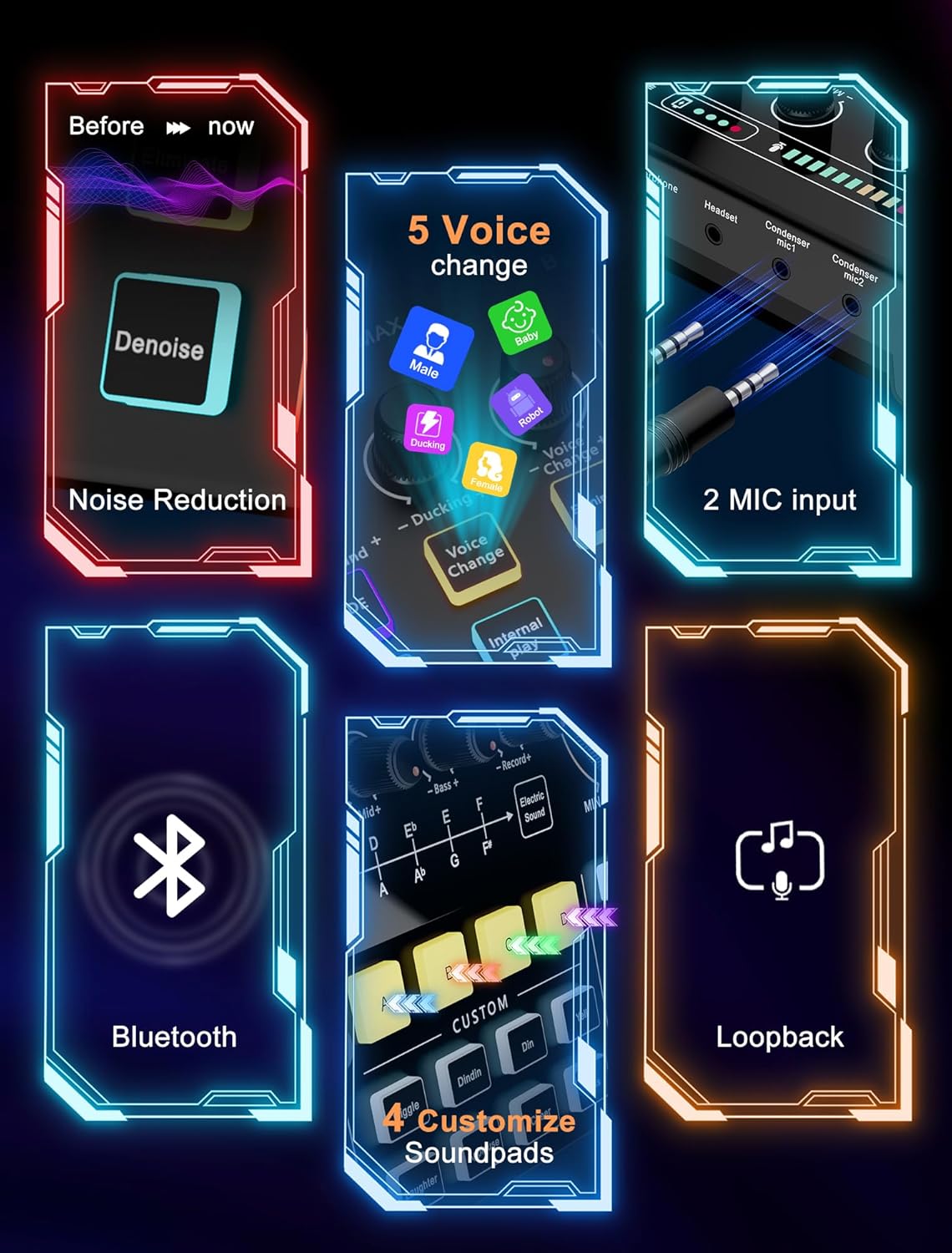
Image: The SINWE P300-MC98 mixer showing two microphone input options.
- Smartphone/Tablet Connection: Use the provided 3.5mm audio cables to connect your smartphone or tablet to the mixer for live streaming or recording.
- Bluetooth Connection (for backing tracks): Activate Bluetooth on your smartphone or PC and pair it with the P300-MC98 mixer. This connection is primarily for playing backing tracks or music into your stream/recording.

Image: Diagram illustrating wireless audio input via Bluetooth from a phone, pad, or PC/laptop to the mixer.
Operating Instructions
1. Microphone Usage and Polar Pattern
The included condenser microphone (MC-98) features a cardioid polar pattern. This means it primarily picks up sound from the front, minimizing noise from the sides and rear. For optimal sound capture, position the microphone with its front (labeled MC-98) directly facing your mouth.
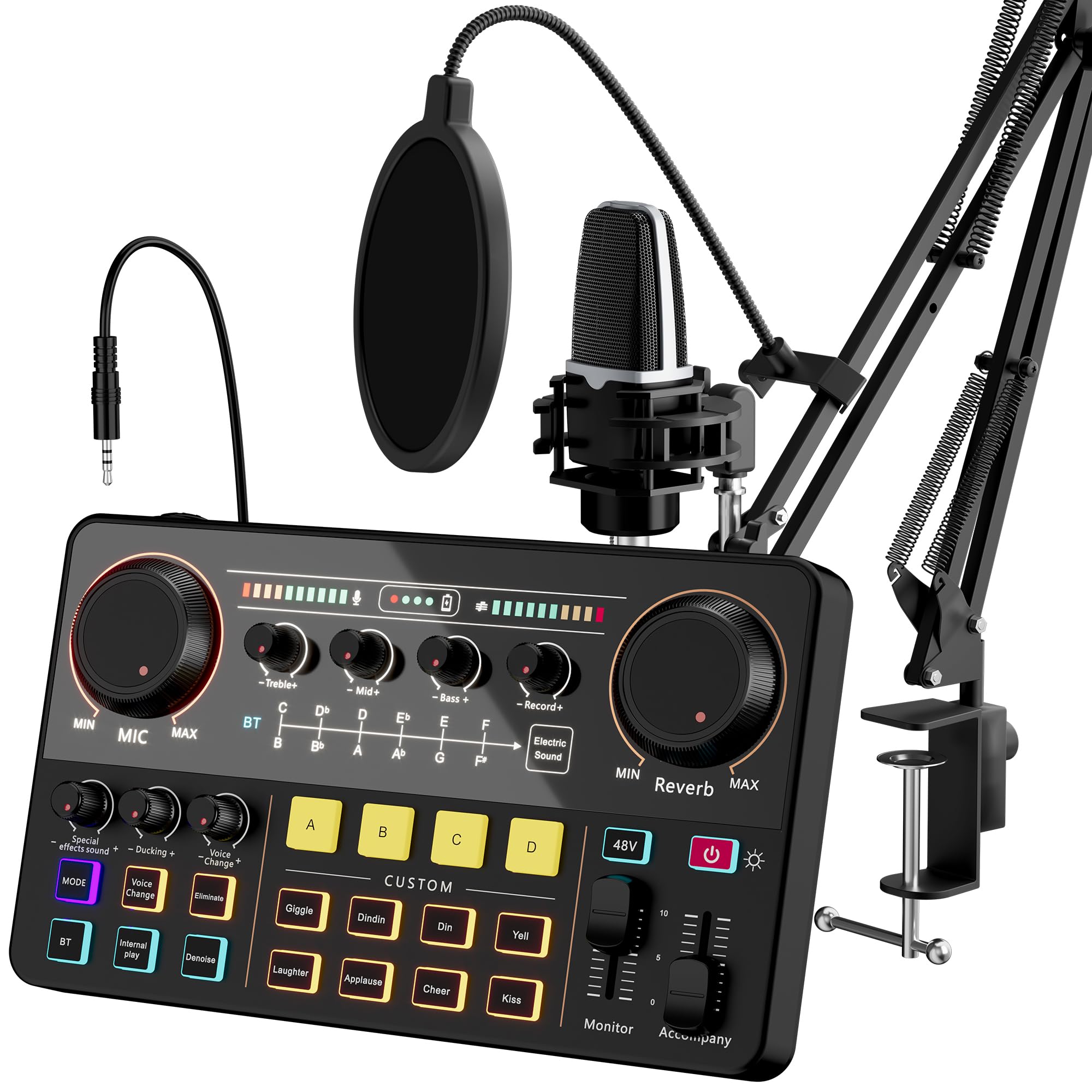
Image: Diagram showing the 16mm condenser microphone with its cardioid polar pattern, indicating optimal sound pickup from the front.
2. Mixer Controls and Features
The P300-MC98 mixer provides extensive control over your audio. Familiarize yourself with the following functions:
- Mic Gain Adjustment: Use the 'MIC MIN/MAX' knob to adjust the input sensitivity of your microphone. The mixer supports ultra-low noise gain up to 60dB.
- 48V Phantom Power: Activate the 48V phantom power switch for condenser microphones that require it. Ensure your microphone is connected before enabling phantom power.
- Reverb Modes: The mixer features 5 reverb modes. Use the 'MIN Reverb MAX' knob to adjust the intensity of the selected reverb effect.
- Auto-Tune: Utilize the 12-step auto-tune function for vocal pitch correction.
- Tone Adjustment: Adjust Treble, Mid-range, and Bass frequencies to fine-tune your audio output.
- Customizable Sound Pads: The mixer includes 4 customizable sound pads (A, B, C, D) and several pre-set sound effects (e.g., Giggle, Laughter, Applause, Cheer). You can upload your favorite audio clips to the custom pads via smartphone, PC, microphone, or Bluetooth.

Image: Overview of the mixer's customizable sound effects, including baby, loopback, robot, ducking, male, 48V mic, female, and Bluetooth options.

Image: Detailed view of the mixer's controls for microphone volume, pitch, auto-tune, and custom sound pads.
- Voice Change: Access 5 different voice change effects (Male, Baby, Robot, Ducking, Voice Change).
- Noise Reduction (DENOISE): The mixer features a DENOISE function to provide clearer sound by reducing background noise.
- Loopback Function: This feature allows you to route the audio output back into the input, useful for certain streaming or recording setups.
Image: Visual representation of the mixer's noise reduction, 5 voice change options, Bluetooth, 2 mic inputs, custom soundpads, and loopback features.
3. Software Compatibility
The SINWE P300-MC98 is compatible with a wide range of operating systems and software:
- Operating Systems: Android, Windows, iOS, macOS
- Supported Software: Adobe Audition, OBS, DISCORD, ZOOM, AUDACITY, TWITCH STUDIO, TIK TOK
Maintenance
Proper maintenance ensures the longevity and optimal performance of your SINWE Podcast Equipment Bundle.
- Cleaning: Use a soft, dry cloth to wipe down the mixer and microphone. Avoid using liquid cleaners or abrasive materials, as these can damage the components.
- Storage: When not in use, store the equipment in a clean, dry place away from direct sunlight and extreme temperatures.
- Cable Care: Avoid bending or crimping cables excessively. Store cables neatly to prevent damage.
- Microphone Protection: Always use the windproof foam cap to protect the microphone capsule from dust and moisture.
Troubleshooting
If you encounter issues with your SINWE P300-MC98 bundle, refer to the following common solutions:
| Problem | Possible Cause | Solution |
|---|---|---|
| No sound from microphone | Microphone not connected properly; 48V phantom power not enabled (for condenser mic); Mic gain too low; Incorrect input selected on computer/software. | Ensure XLR cable is fully inserted. Activate 48V phantom power on the mixer. Increase 'MIC MIN/MAX' gain. Verify correct audio input device is selected in your computer's sound settings and recording software. |
| Poor sound quality / Static / Hum | Loose cable connections; Interference; Microphone positioned incorrectly; High background noise. | Check all cable connections. Ensure microphone is facing the sound source directly. Activate the 'DENOISE' function on the mixer. Try to reduce environmental noise. |
| Bluetooth not connecting | Bluetooth not enabled on device; Mixer not in pairing mode; Device too far. | Ensure Bluetooth is active on your smartphone/PC. Put the mixer into Bluetooth pairing mode (refer to mixer controls). Keep devices within range. |
| Mixer not recognized by computer | USB cable issue; Driver issue (rare for plug-and-play); Computer port issue. | Try a different USB port or cable. Restart your computer. The mixer is generally plug-and-play, so specific drivers are usually not required. |
Specifications
Key technical specifications for the SINWE P300-MC98 All-in-One Podcast Equipment Bundle:
- Model Number: P300-MC98
- Item Weight: 1.82 Kilograms
- Package Dimensions: 44.1 x 25.7 x 7.5 cm
- Batteries: 1 Lithium Polymer battery (included)
- Compatible Devices: Headphone, Microphone, Personal Computer, Smartphone, Tablet
- Supported Software: Adobe Audition, OBS, DISCORD, ZOOM, AUDACITY, TWITCH STUDIO, TIK TOK
- Battery Type: Lithium Polymer
- Operating Systems: Android, Windows, iOS, macOS
- Connectivity Technology: USB, Bluetooth
- Number of Channels: 4
- Audio Input: Bluetooth, 1/4 Audio, 3.5mm Audio/XLR
- UPC: 707713548842
Warranty and Support
SINWE provides a 365-day no-reason replacement service for this product. For any questions or assistance, please contact SINWE customer support. Our team is available 24 hours to help you resolve any issues.