
AWEI H36
AWEI Smart Watch User Manual
Model: H36
Introduction
Thank you for choosing the AWEI Smart Watch H36. This smart watch is designed to enhance your daily life with its comprehensive features, including fitness tracking, call management, and health monitoring. This manual provides detailed instructions on how to set up, operate, and maintain your device to ensure optimal performance and longevity.
What's in the Box
- AWEI Smart Watch (H36)
- Charging Cable
- User Manual (this document)
Product Overview
The AWEI Smart Watch H36 features a 1.52-inch large display and a robust design suitable for various activities. It supports multiple sport modes, health monitoring, and smart notifications.
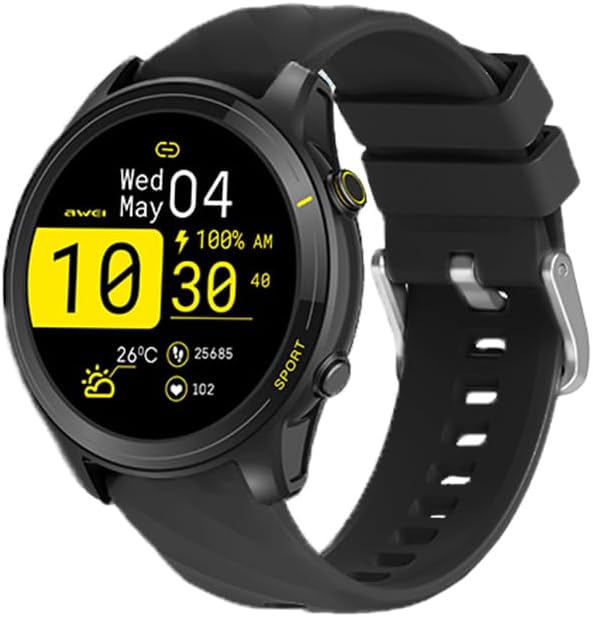
Figure 1: Front view of the AWEI Smart Watch H36, displaying its main interface with time, date, and activity data.

Figure 2: The AWEI Smart Watch H36 available in black and rose gold variants, showcasing its large display and sleek design.

Figure 3: The AWEI Smart Watch H36 worn on a wrist, illustrating its ergonomic design and suitability for daily wear.
Setup
1. Charging the Device
Before first use, fully charge your AWEI Smart Watch. Connect the magnetic charging cable to the charging points on the back of the watch and plug the USB end into a power adapter (not included) or a computer's USB port. A full charge typically takes 2.5-3 hours.
2. App Installation and Pairing
- Scan the QR code in the manual or search for the companion app (e.g., "AWEI Fit" or similar, check packaging for exact name) on the App Store (iOS) or Google Play Store (Android).
- Install the app on your smartphone.
- Open the app and follow the on-screen instructions to create an account or log in.
- Enable Bluetooth on your smartphone.
- In the app, navigate to "Device" or "Add Device" and select your AWEI Smart Watch (H36) from the list of available devices.
- Confirm the pairing request on both your watch and smartphone.
Ensure your smartphone's operating system is iOS 9.0 or above, or Android 6.0 or above for optimal compatibility.
Operating Instructions
Basic Navigation
- Power On/Off: Press and hold the side button to power on or off.
- Wake Screen: Raise your wrist or press the side button.
- Swipe Up/Down: Scroll through notifications or quick settings.
- Swipe Left/Right: Access different widgets like heart rate, activity data, weather, etc.
- Tap: Select an item or enter a menu.
- Side Button: Return to the main watch face or access the app menu.
Customizing Watch Faces
You can change your watch face directly on the watch by long-pressing the screen, or through the companion app. The app offers a variety of cloud-based watch faces and allows you to upload your own photos for a personalized look.

Figure 4: Examples of customizable watch faces available for the AWEI Smart Watch H36.
Making/Answering Calls
Once paired with your smartphone, the watch supports Bluetooth calls. You can answer incoming calls directly from your watch or dial numbers from your contacts/call history.
Sports Modes
The watch offers over 100 sports modes, including Running, Walking, Hiking, Basketball, Badminton, Boating, Climbing, Fitness, Cycling, Football, and Yoga. To start a workout:
- Navigate to the "Sports" or "Workout" menu on your watch.
- Select your desired activity.
- Tap to start. The watch will track duration, calories burned, and other relevant metrics.
- Tap again or press the side button to pause/end the workout.

Figure 5: The AWEI Smart Watch H36 displaying its extensive range of sports modes and applications.
Health Monitoring
The watch monitors various health metrics:
- Heart Rate: Provides real-time heart rate monitoring.
- Blood Oxygen: Measures blood oxygen saturation (SpO2).
- Sleep Tracking: Monitors sleep patterns and quality.
- Sedentary Reminder: Alerts you to move after periods of inactivity.
- Female Physiological Cycle: Tracks and predicts menstrual cycles (configurable in app).
Note: Health data provided by this device is for reference only and should not be used for medical diagnosis or treatment. Consult a medical professional for any health concerns.
Maintenance
Cleaning Your Watch
- Wipe the watch screen and body with a soft, lint-free cloth.
- For stubborn stains, dampen the cloth slightly with water. Do not use harsh chemicals or abrasive cleaners.
- Clean the charging contacts regularly to ensure good connection.
Water Resistance (IP65)
The AWEI Smart Watch H36 has an IP65 waterproof rating, meaning it is protected from dust and low-pressure water jets from any direction. It is suitable for daily activities like hand washing, face washing, and light rain. However, it is not recommended for use in hot water, seawater, swimming, or showering, as steam and high water pressure can damage the device.

Figure 6: The AWEI Smart Watch H36 demonstrating its IP65 water resistance.
Battery Life
The watch is equipped with a 300mAh battery, providing up to 7-10 days of daily usage and up to 30 days of standby time. Actual battery life may vary based on usage patterns and settings.

Figure 7: The AWEI Smart Watch H36 designed for extended use, highlighting its efficient battery management.
Troubleshooting
| Problem | Possible Solution |
|---|---|
| Watch not turning on | Ensure the watch is fully charged. Connect to the charger and wait a few minutes before attempting to power on. |
| Unable to pair with smartphone |
|
| Inaccurate health data | Ensure the watch is worn snugly on your wrist, about one finger's width above the wrist bone. Avoid excessive movement during measurements. Clean the sensor on the back of the watch. |
| Notifications not appearing |
|
Specifications
| Feature | Detail |
|---|---|
| Model Number | H36 |
| Screen Size | 1.52 Inches |
| Battery Capacity | 300 mAh Lithium Polymer |
| Battery Life | 7-10 days (typical use), 30 days (standby) |
| Charging Time | Approx. 2.5-3 hours |
| Connectivity | Bluetooth |
| Waterproof Rating | IP65 |
| Compatibility | iOS 9.0 and above, Android 6.0 and above |
| Health Monitoring | Heart Rate, Blood Oxygen, Sleep Tracking, Sedentary Reminder, Female Physiological Cycle |
| Sports Modes | 100+ (Running, Walking, Hiking, Basketball, etc.) |
| Manufacturer | AWEI |
| Country of Origin | China |
Warranty and Support
This product comes with a one-year warranty from the date of purchase. The warranty covers manufacturing defects and malfunctions under normal use. It does not cover damage caused by misuse, accidents, unauthorized repairs, or failure to follow the instructions in this manual.
For technical support, warranty claims, or any questions regarding your AWEI Smart Watch H36, please contact AWEI customer service. Refer to the product packaging or the official AWEI website for the most current contact information.
Contact Information:
- Email: (Refer to AWEI official website)
- Website: (Refer to AWEI official website)
Please have your purchase receipt and product model number (H36) ready when contacting support.
Related documentsH36

Ask a question about this manual
Ask about setup, troubleshooting, compatibility, parts, safety, or missing instructions. Manuals+ will review the question and use this page’s manual context to help answer it.