
Introduction
This manual provides essential information for the safe and effective use of the DMK Relfar FWH50-P10A Laser Cleaning Head. This device is designed for efficient removal of various contaminants such as paint, rust, oxide skin, and oil stains from different materials. It features a robust 300W laser output and an ergonomic design for comfortable handling.

Image: The DMK Relfar FWH50-P10A Laser Cleaning Head, showcasing its compact and ergonomic design.
Setup Instructions
Proper setup is crucial for the safe and optimal performance of the laser cleaning head. Follow these steps carefully:
- Gas Connection:
Connect the appropriate gas supply to the cleaning head. Commonly used gases include Argon, Nitrogen, and compressed air. If using compressed air, ensure that oil and water filtration systems are in place and functioning correctly to prevent contamination of the laser optics.
- Cooling Water Connection:
Connect the cooling water lines to the 6mm air pipe ports. The cooling system is vital for dissipating heat generated by the laser's light path within the cleaning head. Ensure the cooling water pipelines are connected in series (one inlet, one outlet) to facilitate continuous water circulation and effective heat removal. This ensures consistent cleaning performance and prevents overheating.
- Protective Gas Connection:
Connect the protective gas line to the designated 6mm air pipe port on the cleaning head. This gas provides protection for the internal components. The input pressure for the protective gas must be maintained within the range of 0.5 to 0.8 MPa.

Image: Visual representation of the FWH50-P10A and FWH50-P20A cleaning heads, illustrating connection points for gas and cooling lines.
Operating Instructions
Operating the Relfar FWH50-P10A Laser Cleaning Head requires adherence to safety protocols and proper technique. Always refer to the main laser system's user manual for comprehensive operating procedures and safety guidelines.
- Safety First: Always wear appropriate laser safety eyewear and ensure all personnel in the vicinity are protected. Follow all local and national laser safety regulations.
- Power On Sequence: Ensure all connections (gas, water, power) are secure before powering on the main laser system. Follow the manufacturer's recommended power-on sequence.
- Parameter Adjustment: Adjust laser parameters (power, pulse frequency, scanning speed) according to the material being cleaned and the type of contaminant. Start with lower settings and gradually increase as needed.
- Scanning Technique: Maintain a consistent distance between the cleaning head and the workpiece. Move the cleaning head smoothly and evenly across the surface to achieve uniform cleaning results.
- Monitoring: Continuously monitor the cleaning process and the temperature of the cleaning head. Ensure adequate cooling water flow throughout operation.

Image: The Relfar laser cleaning head in an operational setup, demonstrating its application for surface cleaning.
Maintenance
The Relfar FWH50-P10A Laser Cleaning Head is designed for easy maintenance to ensure consistent performance and longevity. Regular maintenance helps prevent issues and ensures optimal operation.
- Cooling System Check: Regularly inspect the cooling water pipelines for any leaks or blockages. Ensure the water circulates freely and the cooling system maintains the appropriate temperature for the cleaning head.
- Optics Inspection: Periodically inspect the laser optics for dust, debris, or damage. Clean optics according to manufacturer guidelines using appropriate cleaning materials to avoid scratching.
- Gas Filtration: If using compressed air, regularly check and replace filters in the oil and water filtration system to ensure clean air supply to the cleaning head.
- General Cleaning: Keep the exterior of the cleaning head clean and free from accumulated dust or residues.
Troubleshooting
This section addresses common issues that may arise during the operation of the Relfar FWH50-P10A Laser Cleaning Head. For complex problems, contact qualified service personnel.
| Problem | Possible Cause | Solution |
|---|---|---|
| Reduced Cleaning Efficiency |
|
|
| Overheating of Cleaning Head |
|
|
| No Laser Output |
|
|
Specifications
The following table outlines the key technical specifications for the Relfar FWH50-P10A Laser Cleaning Head, with a comparison to the FWH50-P20A model.
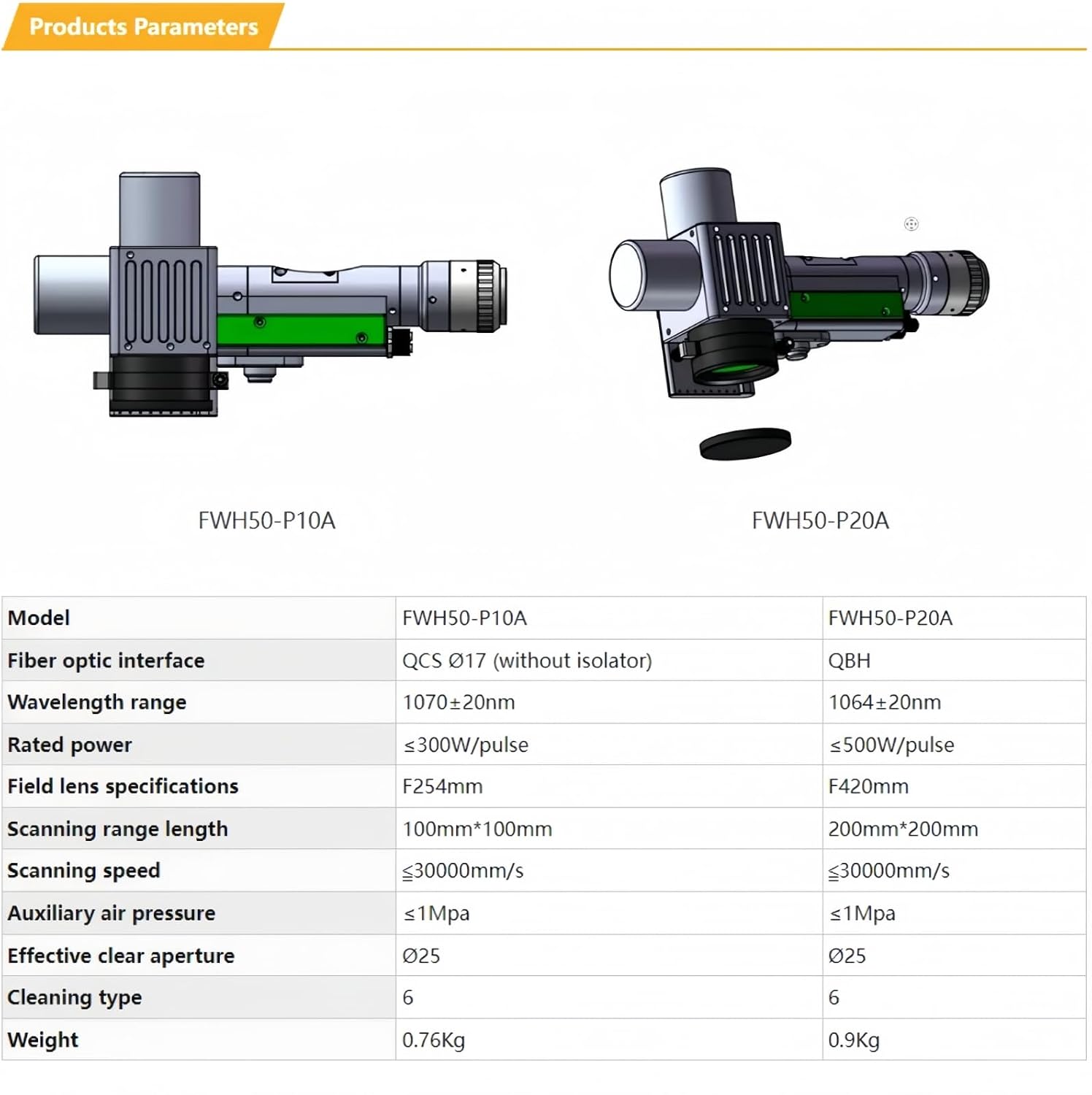
Image: Detailed specifications table comparing the FWH50-P10A and FWH50-P20A models.
| Parameter | FWH50-P10A | FWH50-P20A |
|---|---|---|
| Model | FWH50-P10A | FWH50-P20A |
| Fiber optic interface | QCS Ø17 (without isolator) | QBH |
| Wavelength range | 1070 ± 20nm | 1064 ± 20nm |
| Rated power | ≤300W/pulse | ≤500W/pulse |
| Field lens specifications | F254mm | F420mm |
| Scanning range length | 100mm*100mm | 200mm*200mm |
| Scanning speed | ≤30000mm/s | ≤30000mm/s |
| Auxiliary air pressure | ≤1Mpa | ≤1Mpa |
| Effective clear aperture | Ø25 | Ø25 |
| Cleaning type | 6 | 6 |
| Weight | 0.76Kg | 0.9Kg |
Additional Specifications:
- Manufacturer: DMK
- Item model number: Laser Cleaning Head
- Power Source: Laser Cleaning Head (Note: This refers to the component, not the power input type.)
- Included Components: Laser Cleaning Head
- Weight (FWH50-P10A): 0.76kg
- Weight (FWH50-P20A): 0.9kg
Warranty and Support
Information regarding specific warranty terms and customer support contact details for the DMK Relfar FWH50-P10A Laser Cleaning Head was not provided in the product data. For warranty claims, technical assistance, or service inquiries, please refer to the documentation included with your purchase or contact the manufacturer directly through their official channels.
You may also visit the DMK Laser Store on Amazon for potential support information.