
Introduction
This manual provides detailed instructions for the installation, operation, and maintenance of your Anona Aurora 4K Solar Security Camera. Please read this manual thoroughly before using the product to ensure proper function and safety. The Anona Aurora camera offers advanced surveillance features, including 4K resolution, color night vision, AI detection, and solar-powered operation, designed for outdoor use.

Image: Anona Aurora 4K Solar Security Camera with its solar panel and a smartphone displaying the camera's live view.
Package Contents
Verify that all components are present in the package:
- Anona Aurora 4K Security Camera Body
- Solar Panel
- Mounting Bracket and Screws
- USB Charging Cable
- User Manual (this document)
Setup and Installation
1. Mounting the Camera and Solar Panel
The Anona Aurora camera is designed for wall mounting. Choose a location that provides the desired viewing angle and ensures the solar panel receives at least 2 hours of direct sunlight daily for optimal charging.
- Select a Mounting Location: Identify a sturdy surface for mounting the camera and solar panel. Ensure the camera has a clear line of sight to the area you wish to monitor.
- Drill Pilot Holes: Use the provided mounting template (if included) or mark the positions for the screws. Drill pilot holes into the wall.
- Attach Mounting Bracket: Secure the camera's mounting bracket to the wall using the screws.
- Attach Camera: Slide the camera onto the mounting bracket. Adjust the camera angle as needed.
- Install Solar Panel: Mount the solar panel in a location with maximum sun exposure. Connect the solar panel cable to the camera's charging port.

Image: A hand securing the Anona Aurora camera onto its wall-mounted bracket, demonstrating easy installation.
2. Connecting to Wi-Fi and App Pairing
The Anona Aurora camera supports 2.4 GHz Wi-Fi networks only. 5 GHz Wi-Fi is not supported.
- Download the Anona App: Search for the 'Anona' app on your smartphone's app store (iOS or Android) and install it.
- Create an Account: Open the app and follow the on-screen instructions to create a new user account.
- Power On the Camera: Ensure the camera is powered on.
- Add Device: In the Anona app, select 'Add Device' or the '+' icon. The app will use Bluetooth for initial pairing to discover nearby devices.
- Connect to Wi-Fi: Follow the app's prompts to connect the camera to your 2.4 GHz Wi-Fi network. Enter your Wi-Fi password when requested.
- Complete Setup: Once connected, you can name your camera and configure initial settings.
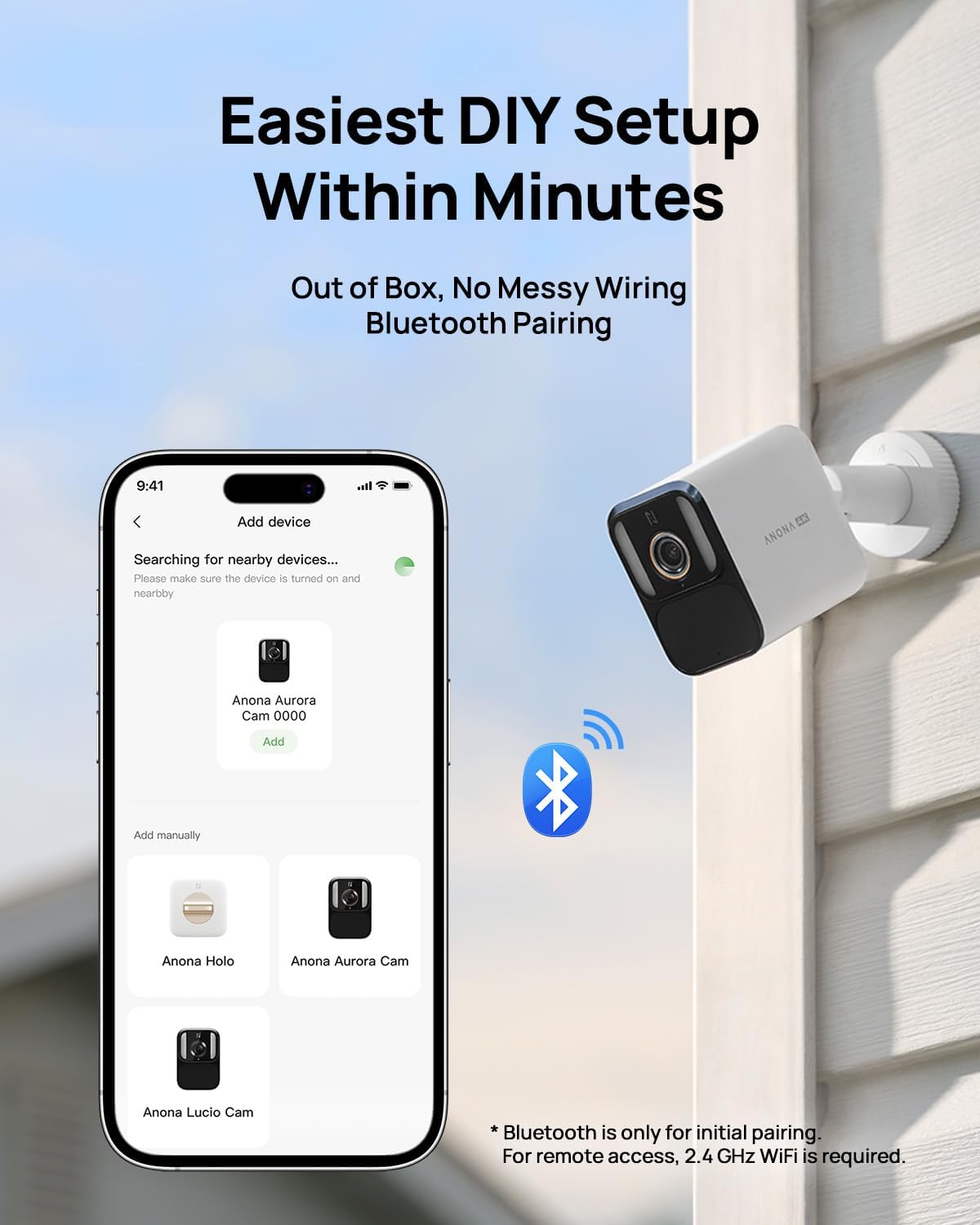
Image: A smartphone screen displaying the Anona app's device pairing interface, showing available Anona cameras for connection.
Operating Instructions
1. Video Recording and Quality
The Anona Aurora camera captures video in stunning 4K UHD resolution (8 megapixels). It features a starlight sensor and an F1.2 large aperture for enhanced image clarity.
- Color Night Vision: The camera provides vibrant color night vision even in low-light conditions, offering more detail than traditional infrared black-and-white footage.
- Always-On Video (AOV) Recording: The camera supports 24/7 continuous time-lapse recording without requiring external AC power. This feature allows for a complete overview of daily events.
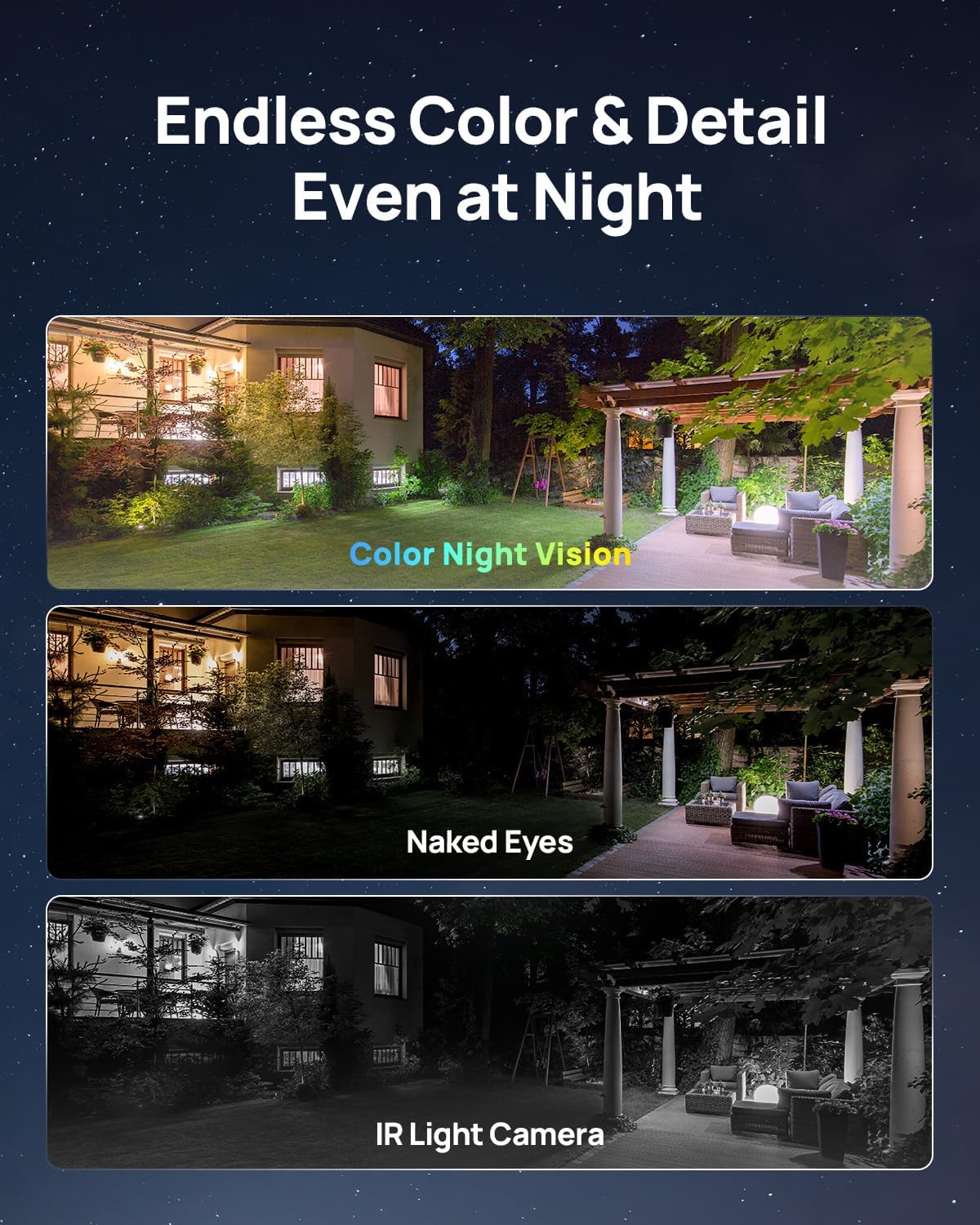
Image: A visual comparison demonstrating the clarity and detail of color night vision compared to what is visible to the naked eye and traditional IR night vision.
2. Power Management
The camera is equipped with a 10000mAh battery and a 4.8W solar panel for continuous power.
- Solar Charging: Ensure the solar panel is positioned to receive at least 2 hours of direct sunlight daily to maintain battery charge.
- Battery Life: The large capacity battery provides approximately 180 days of operation on a single charge without solar assistance. With adequate sunlight, the camera can operate continuously.
3. Smart Detection Features
The Anona Aurora utilizes AI-powered multi-object detection to provide accurate alerts.
- Object Recognition: The camera can identify humans, vehicles, pets, and packages.
- Customizable Motion Zones: Set specific areas within the camera's field of view to receive alerts only for relevant activity.
- Notifications: Receive timely notifications directly to your connected device without any subscription fees.

Image: The Anona Aurora camera's AI detection capabilities highlighting a person, a package, a vehicle, and a pet within its surveillance area.
4. Storage and Data Access
The camera includes built-in local storage.
- 32GB eMMC Storage: Provides ample space for recordings, capable of holding over 4 months of playback (based on 20s/video, 30 videos/day) or approximately 18 days of 24/7 AOV recording.
- No Monthly Fees: Access your recorded footage directly without the need for cloud subscriptions or additional SD cards.
5. Smart Home Integration
The Anona Aurora camera is compatible with popular smart home platforms.
- Amazon Alexa: Integrate with Alexa-enabled devices to view live feeds using voice commands (e.g., "Alexa, show the backyard camera.").
- Google Home: Compatible with Google Home for similar voice control and viewing capabilities.
Image: A person using a smart speaker to control or view the camera feed, illustrating smart home compatibility.
6. Two-Way Audio
The camera features two-way audio communication.
- Communicate Remotely: Use the Anona app to speak through the camera's speaker and listen through its microphone, allowing for interaction with visitors or deterrence of unwanted guests.
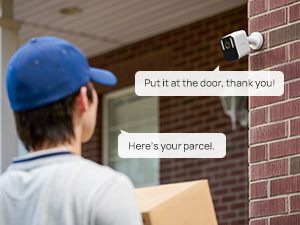
Image: A delivery person at a door, with speech bubbles indicating two-way audio communication through the Anona camera.
Maintenance
1. Weather Resistance
The Anona Aurora camera has an IP67 waterproof rating, ensuring durability in various weather conditions.
- All-Year-Round Protection: The camera is built to withstand rain, snow, dust, and extreme temperatures (operating range: -20°C to 55°C / -4°F to 131°F). Note: Battery charging is recommended between -5°C and 55°C.
- Cleaning: Periodically wipe the camera lens and solar panel with a soft, damp cloth to remove dirt and debris that may obstruct vision or charging efficiency.

Image: The Anona Aurora camera depicted enduring different weather conditions, including rain, sun, and snow, highlighting its IP67 weather resistance.
2. Solar Panel Efficiency
The solar panel is designed for high efficiency and durability.
- Optimal Placement: Ensure the solar panel is positioned to receive maximum direct sunlight throughout the day. Avoid shaded areas.
- Layered Construction: The panel features an ETFE coating, 2-layer EVA, high-efficiency solar cells, and TPT anti-corrosion layers for long-term performance.
Troubleshooting
- Camera Not Connecting to Wi-Fi:
Ensure your Wi-Fi network is 2.4 GHz. The camera does not support 5 GHz Wi-Fi. Check your Wi-Fi password and router settings. Move the camera closer to the router during initial setup. - Frequent Disconnections:
Verify the camera has a strong Wi-Fi signal. Obstacles like thick walls can interfere. Consider a Wi-Fi extender if the camera is far from the router. If the issue persists, a physical reset of the camera might be necessary. - Poor Image Quality:
Ensure the camera lens is clean and free from dirt or condensation. Check for obstructions in the camera's field of view. - Solar Panel Not Charging:
Confirm the solar panel is receiving direct sunlight for at least 2 hours daily. Clean the surface of the solar panel to remove any dust or debris. Ensure the connection cable between the solar panel and camera is secure. - False Motion Alerts or Missed Detections:
Adjust the AI detection sensitivity in the Anona app. Refine custom motion zones to focus on critical areas. Ensure the camera is mounted at an appropriate height and angle for optimal detection. - Mounting Instability:
Ensure the mounting surface is solid and the screws are tightened securely. If the camera mount feels loose, reinforce the mounting point or consider alternative mounting hardware.
Product Specifications
| Model Name | Aurora |
| Item Model Number | HM1009-01 |
| Indoor/Outdoor Usage | Outdoor |
| Video Capture Resolution | 4K (8 MP Effective Still Resolution) |
| Connectivity Technology | Wireless (2.4 GHz Wi-Fi) |
| Power Source | Solar Powered (10000 mAh Battery) |
| Special Features | 2-Way Audio, HD Resolution, Color Night Vision, Weather Proof (IP67), AI Detection |
| Viewing Angle | 136 Degrees |
| Night Vision Range | 33 Feet |
| Local Storage | 32GB eMMC |
| Compatible Devices | Smartphone, Amazon Alexa, Google Home |
| Dimensions (L x W x H) | 7.2 x 6.8 x 3.5 inches |
| Item Weight | 2.31 pounds |
Warranty and Support
For warranty information and technical support, please refer to the official Anona website or contact Anona customer service directly. Keep your purchase receipt as proof of purchase for any warranty claims.
Anona Customer Service: Please visit the Anona Store on Amazon or refer to the contact information provided in your product packaging.


