
Introduction
Thank you for choosing the ALFORDSON Vogler Series Massage Gaming Chair. This chair is designed to provide optimal comfort and support for extended periods of sitting, whether for gaming or office work. It features an ergonomic S-shaped design, adjustable recline, a retractable footrest, and a 2-point massage function. Please read this manual carefully before assembly and use to ensure proper operation and safety.
Safety Warnings
- Maximum Weight Capacity: Do not exceed the maximum weight capacity of 180 kg (396 lbs). Exceeding this limit may cause damage to the chair or personal injury.
- Backrest Recline: When tilting the backrest, ensure the chair is properly placed and stable to prevent tipping.
- Gas Spring: Follow the correct assembly and operating instructions for the gas spring. Improper handling can lead to malfunction or injury.
- Assembly: Ensure all components are securely fastened before use. Regularly check all screws and bolts for tightness.
- Children: Keep children away from moving parts during adjustment. This chair is intended for adult use.
Setup and Assembly
Assembly is required for this product. A detailed assembly manual is included in the packaging. Please follow the step-by-step instructions provided in the separate assembly guide for safe and correct setup. Ensure all parts are present before beginning assembly.

Image: Key components of the chair, including the reinforced steel frame, safe SGS gas spring, and chrome base with quality wheels. These components ensure stability and durability.
Key Assembly Points:
- Attach the chrome swivel base to the seat.
- Insert the Class 3 heavy-duty gas lift into the base.
- Secure the backrest to the seat mechanism.
- Install the armrests and ensure they are firm.
- Attach the retractable footrest.
- Place the removable headrest and lumbar cushions. It is recommended to install these cushions before use for optimal comfort.
Operating Instructions
Chair Adjustments
- Height Adjustment: Use the lever located under the seat to adjust the seat height from 51 cm to 61 cm. Pull the lever up to raise the seat, or pull it up while seated to lower it.
- Backrest Recline (90° to 150°): Use the lever on the side of the chair to recline the backrest. Lean back to your desired angle (between 90° and 150°) and release the lever to lock it in place. Ensure the chair is stable before reclining.

Image: Illustration of the lever-operated backrest, demonstrating the recline range from 90° to 150°. This allows users to adjust the chair for various activities, from upright work to relaxed lounging.
- 360° Swivel: The chair features a 360-degree swivel function for easy movement and access around your workspace.
- Retractable Footrest: Pull out the padded footrest from under the seat for additional leg support, especially when reclining. Push it back in when not in use.
- Adjustable Cushions: The headrest and lumbar support cushions are removable and height-adjustable. Position them to provide optimal comfort and support for your neck and lower back, conforming to the S-shape design of the chair.
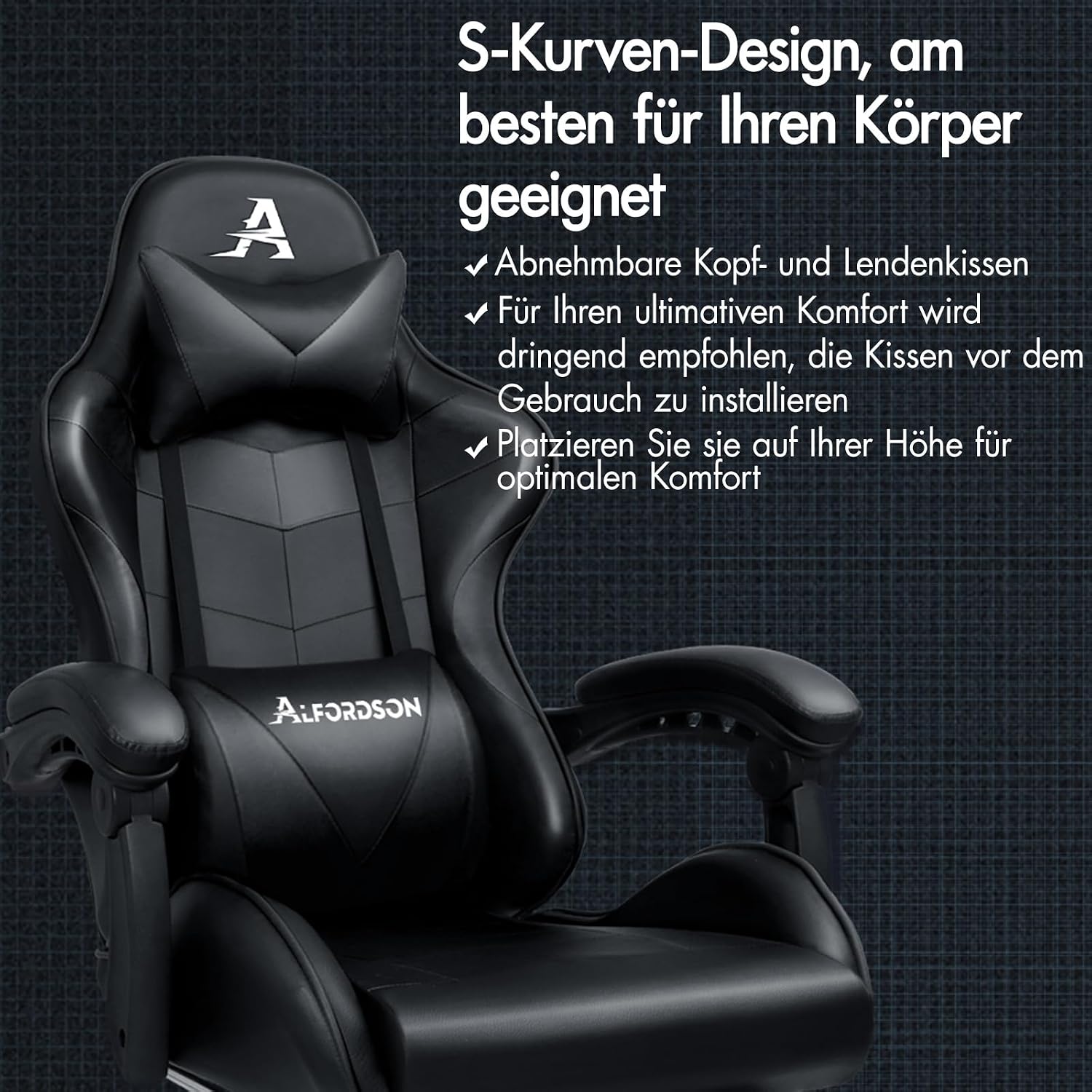
Image: The S-curve design of the chair, highlighting the removable head and lumbar cushions. These cushions can be adjusted to individual height for personalized ergonomic support.
2-Point Massage Function
The lumbar cushion includes a 2-point massage function for relaxation. Connect the USB cable from the lumbar cushion to a compatible USB power source (e.g., computer, power bank, or USB wall adapter). The massage function offers 5 different massage modes.

Image: Close-up of the lumbar cushion, illustrating the 2-point massage feature, control panel with 5 different massage modes, and the simple USB connection for power.
Maintenance
- Cleaning: Clean the PU leather upholstery with a damp cloth. Avoid using harsh chemicals or abrasive cleaners, as these can damage the material.
- Spills: The approved PU leather is resistant to coffee and water spills. Wipe up spills immediately with a clean, dry cloth.
- Hardware Check: Periodically check all screws, bolts, and connections to ensure they are tight. Re-tighten if necessary to maintain stability and safety.
- Wheel Care: Keep the wheels clean and free of debris to ensure smooth rolling.
Troubleshooting
If you encounter any issues with your ALFORDSON gaming chair, please refer to the following common solutions:
- Chair Squeaks: Check and tighten all bolts and screws. Applying a small amount of lubricant to moving parts may also help.
- Gas Lift Not Functioning: Ensure the gas lift is correctly installed and the lever mechanism is not obstructed. If the issue persists, contact customer support.
- Wheels Not Rolling Smoothly: Check for hair or debris caught in the wheels. Clean them thoroughly.
- Massage Function Not Working: Verify that the USB cable is securely connected to a working power source. Try a different USB port or power adapter.
For problems not listed here, please contact ALFORDSON customer support.
Specifications

Image: Detailed dimensions of the ALFORDSON Vogler Series Gaming Chair, including seat height, backrest height, and overall width and depth.
| Feature | Detail |
|---|---|
| Brand | ALFORDSON |
| Model Number | D-OCH-GM-L-BK-VAR-B |
| Color | Vogler - Black |
| Material (Upholstery) | PU Leather |
| Filling Material | Foam |
| Frame Material | Stainless Steel |
| Product Dimensions (D x W x H) | 74D x 62W x 147H cm |
| Item Weight | 19 Kilograms |
| Maximum Weight Recommendation | 180 Kilograms |
| Back Style | S-shaped backrest |
| Special Features | Ergonomic chair with massage, height and tilt adjustable |
| Seat Height | Adjustable from 51 cm to 61 cm |
| Seat Depth | 52 cm |
| Backrest Recline Angle | 90° to 150° |
| Base Movement | Swivel (360°) |
| Included Components | Footrest |
| Assembly Required | Yes |
| Recommended Use | Gaming |
| Country of Origin | China |
Warranty and Support
Your ALFORDSON Vogler Series Massage Gaming Chair comes with a 2-year warranty. This warranty covers manufacturing defects and material faults under normal use. Please retain your proof of purchase for warranty claims.
For technical support, warranty claims, or any questions regarding your product, please contact ALFORDSON customer service through the retailer where you purchased the chair or visit the official ALFORDSON website for contact information.