
1. Introduction
The Irfora PC102 is a portable digital water quality tester designed to quickly and accurately measure pH and chlorine (CL2) levels in swimming pools, spas, and other water sources. This manual provides essential information for the safe and effective use, maintenance, and troubleshooting of your device.
Key Features:
- Measures pH and CL2 levels.
- Large screen display for clear readings.
- Portable and handheld design.
- Recommended chlorine level for pools and spas: 1.2 ~ 1.7 ppm.
- Recommended pH level for pools and spas: 7.2 ~ 7.8 pH.
2. Safety Information
Important Safety Precautions:
- Do not immerse the main unit in water. The device is not waterproof.
- Probes are advised NOT to be immersed in any liquid other than pool or spa water.
- Keep the device out of reach of children.
- Handle the probes with care to avoid damage.
- Ensure the battery compartment is securely closed to prevent water ingress.
3. Package Contents
Verify that all items are present in the package:
- 1 x Irfora PC102 PH and CL2 Probe Tester
- 1 x Sheet of Sandpaper
- 1 x User Manual (English)
4. Product Overview
Familiarize yourself with the components of your PC102 Water Quality Tester.

Figure 4.1: Front view of the PC102 tester showing the pH and CL2 measurement scales.
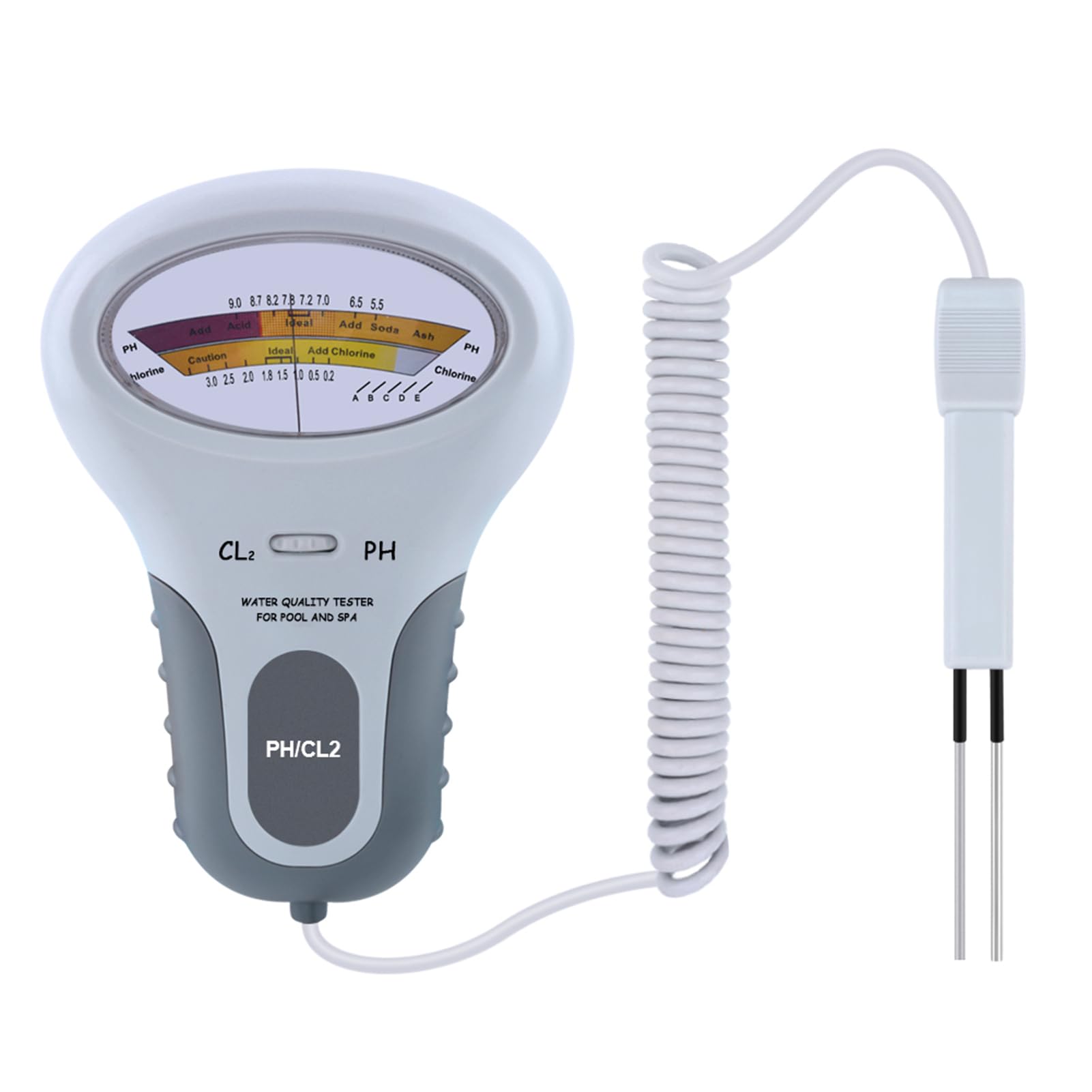
Figure 4.2: The PC102 main unit connected to its probe via a coiled cable.

Figure 4.3: Dimensions of the PC102 tester and probe, along with the battery compartment location and PH/CL2 conversion button.
- Main Unit: Contains the display, control buttons, and battery compartment.
- Probe: Connected to the main unit via a coiled cable, used for water immersion.
- PH/CL2 Conversion Button: Located on the main unit, used to switch between pH and CL2 measurement modes.
- Display Screen: Shows the measurement results.
5. Setup
5.1 Battery Installation
- Locate the battery compartment on the back of the main unit.
- Open the battery cover.
- Insert one 1.5V AA battery, ensuring correct polarity. (Battery not included)
- Close the battery cover securely.
Figure 5.1: Illustration of the battery compartment and battery type (1x AA battery).
5.2 Initial Calibration (Recommended)
For accurate results, it is recommended to calibrate the meter before first use and whenever accuracy is suspected. Refer to the specific calibration instructions provided with your calibration solution (not included) or consult a pool/spa professional.
Note: The provided sandpaper sheet can be used to gently clean the probe tips if they appear corroded or dirty, which can affect accuracy. Use sparingly and with care.
6. Operating Instructions
Follow these steps to measure water quality:
- Prepare the Tester:
- Ensure the probes are clean and dry.
- Turn on the device by pressing the "PH/CL2" button.
- Select Measurement Mode:
- Use the "CL2 / PH" switch on the main unit to select either Chlorine (CL2) or pH measurement mode.
- Immerse the Probe:
- Carefully immerse the probe into the water of the swimming pool or spa. Ensure the probe tips are fully submerged.
- Do not immerse the main unit.

Figure 6.1: The PC102 probe being used to measure water quality in a swimming pool.
- Read the Measurement:
- Wait for the reading on the large screen display to stabilize.
- Note the pH or CL2 level displayed.
- Compare to Recommended Levels:
- Recommended CL2 content for pools/spas: 1.2 ~ 1.7 ppm.
- Recommended pH value for pools/spas: 7.2 ~ 7.8.

Figure 6.2: Recommended CL2 and pH levels for swimming pools and spas, along with examples of use in various water environments.
- Remove and Clean:
- After measurement, remove the probe from the water.
- Rinse the probe with clean water and dry it thoroughly.
- Store the Tester:
- Turn off the device.
- Insert the probe into the designated slot on the main unit for convenient storage and portability.

Figure 6.3: The probe slot on the PC102 main unit for secure storage of the probe.
7. Maintenance
- Probe Cleaning: Always rinse the probe with clean water after each use and dry it thoroughly. If the probe tips become dirty or corroded, gently clean them with the provided sandpaper sheet.
- Storage: Store the PC102 in a cool, dry place away from direct sunlight and extreme temperatures. Utilize the probe slot for secure storage.
- Battery Replacement: Replace the AA battery when the display becomes dim or the device fails to power on.
8. Troubleshooting
| Problem | Possible Cause | Solution |
|---|---|---|
| Device does not power on. | Dead or incorrectly installed battery. | Check battery polarity; replace with a new 1.5V AA battery. |
| Inaccurate readings. |
|
|
| Display is dim or flickering. | Low battery power. | Replace the 1.5V AA battery. |
9. Specifications
| Feature | Detail |
|---|---|
| Model | PC102 |
| Color | White |
| Material | ABS |
| Power Supply | 1 x 1.5V AA Battery (not included) |
| Recommended CL2 Level (Pools & Spas) | 1.2 ~ 1.7 ppm |
| Recommended pH Level (Pools & Spas) | 7.2 ~ 7.8 pH |
| Probe with Handle Length | 150 mm / 5.91 inches |
| Item Size (Main Unit) | 180 x 125 mm / 7.09 x 4.92 inches |
| Item Weight | 193 g / 6.81 oz |
| Cable Length (Probe) | 2000 mm (2 meters) |
10. Warranty and Support
For warranty information or technical support, please refer to the retailer where the product was purchased or visit the official Irfora website. Keep your purchase receipt as proof of purchase.