
EarFun K3
EarFun K3 Kids Headphones User Manual
Model: K3 (USB Type C Version)
1. Introduction
Thank you for choosing the EarFun K3 Kids Headphones. These wired over-ear headphones are designed with children in mind, featuring an 85dBA volume limit for hearing protection, a comfortable fit, and durable construction. This manual provides essential information for setup, operation, and maintenance to ensure optimal use.
2. What's in the Box
- EarFun K3 Kids Headphones
- User Manual

Image: EarFun K3 Kids Headphones (Pink) and included USB-C cable.
3. Product Features
3.1 Immersive Hi-Fi Stereo Sound
Equipped with 40mm dynamic drivers, the EarFun K3 headphones deliver clear audio with deep bass and stereo sound, enhancing the listening experience for music and movies.

Image: Internal structure of the headphone earcup, highlighting the 40mm dynamic driver for stereo sound.
3.2 Comfortable and Safe Design
The headphones feature soft, cushioned ear pads and an adjustable headband for a comfortable fit during extended use. A built-in 85dBA volume limit protects children's hearing.

Image: A child comfortably wearing the EarFun K3 headphones, demonstrating the soft earcups and adjustable headband.

Image: A child wearing the headphones, with an overlay indicating the 85dBA volume limit for hearing protection.
3.3 Durable and Portable
Constructed from kid-friendly materials, these headphones are designed for durability. The foldable design allows for easy storage and portability.

Image: The headphones being twisted and folded, showcasing their durability and portable design.
3.4 USB-C Connectivity
The USB-C connector provides wide compatibility with various devices, including tablets, Chromebooks, and PCs. Note: Not compatible with USB-C charging ports.

Image: Close-up of the USB-C connector and icons representing compatible devices like mobile phones, laptops, tablets, and PCs.
4. Setup and Connection
To use your EarFun K3 Kids Headphones, simply connect the USB-C cable to a compatible device.
- Locate the USB-C port on your device (e.g., tablet, laptop, smartphone).
- Insert the USB-C connector of the headphone cable firmly into the device's USB-C port.
- Ensure the connection is secure for uninterrupted audio.
Video: Demonstration of connecting the EarFun K3 Kids Headphones to a device via the USB-C cable. This video shows the unboxing, features, and connection process.
5. Operating Instructions
5.1 Volume Control
The headphones feature an integrated volume limit of 85dBA to protect young ears. Adjust the volume directly on your connected device.
5.2 Adjusting the Fit
The headband is adjustable to fit various head sizes. Gently slide the earcups up or down along the headband until a comfortable and secure fit is achieved. The earcups are also detachable for cleaning or replacement.
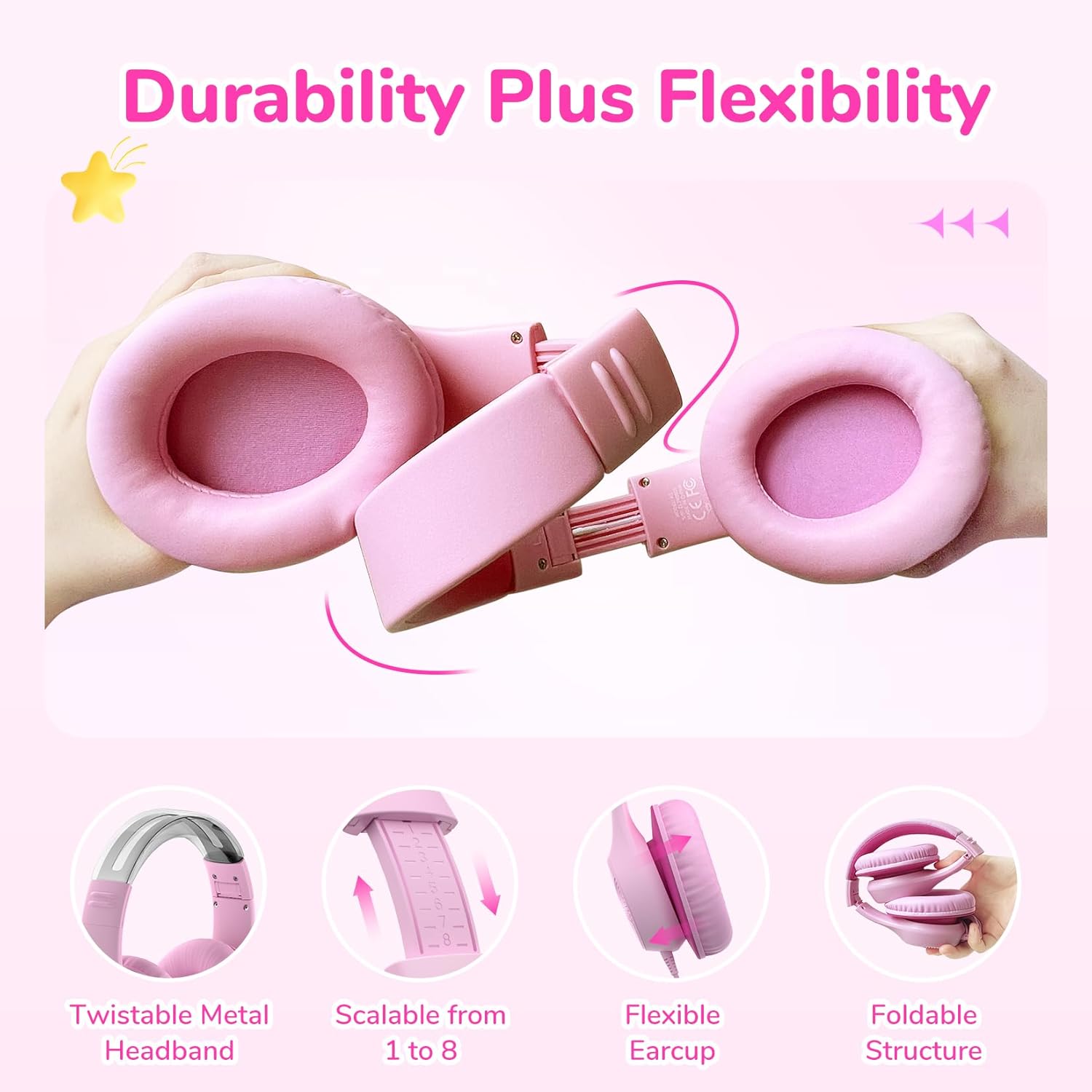
Image: Close-up showing the adjustable headband mechanism and how to detach the earcups for maintenance.
5.3 Folding for Storage
To fold the headphones for compact storage, rotate the earcups inwards towards the headband until they lie flat. This makes them easy to carry in a bag.
6. Maintenance and Care
- Clean the ear pads and headband with a soft, dry cloth.
- Avoid using harsh chemicals or abrasive materials.
- Store the headphones in a cool, dry place when not in use.
- Do not expose to extreme temperatures or moisture.
- The ear pads are detachable for easier cleaning or replacement.
7. Troubleshooting
| Problem | Possible Cause | Solution |
|---|---|---|
| No sound | Cable not fully inserted; device volume too low; incorrect audio output selected on device. | Ensure USB-C cable is securely connected. Increase device volume. Check device audio settings to confirm headphones are selected as output. |
| Sound is distorted | Volume too high on device; faulty cable or port. | Lower the volume on your device. Try connecting to a different device or using a different USB-C cable if available to rule out cable/port issues. |
| Headphones do not fit comfortably | Headband not adjusted correctly. | Adjust the headband by sliding the earcups up or down until a comfortable fit is achieved. |
8. Specifications
| Feature | Detail |
|---|---|
| Model Name | EaFun K3 |
| Connectivity Technology | Wired |
| Headphones Jack | USB-C Cable |
| Audio Driver Type | Dynamic Driver |
| Audio Driver Size | 40 mm |
| Frequency Response | 20 KHz |
| Sensitivity | 100 dB |
| Impedance | 32 Ohms |
| Noise Control | None |
| Volume Limit | 85dBA |
| Age Range (Description) | Kid & Teen |
| Material | Acrylonitrile Butadiene Styrene (ABS) |
| Item Weight | 207.9 Grams (7.3 ounces) |
| Water Resistance Level | Not Water Resistant |
| Special Feature | Adjustable Headband, Foldable |
| Compatible Devices | Tablets, Chromebooks, PCs, Gaming Consoles (USB-C), Telephones (USB-C) |
9. Warranty and Support
EarFun products come with an 18-month hassle-free protection. For any questions, technical support, or warranty claims, please contact EarFun customer service. You can find contact information on the official EarFun website or through your purchase platform.
Visit the official EarFun store for more information: EarFun Store
Related documentsK3


Ask a question about this manual
Ask about setup, troubleshooting, compatibility, parts, safety, or missing instructions. Manuals+ will review the question and use this page’s manual context to help answer it.