
1. Overview
The JJC TP-PA2 Wired Remote Shooting Grip and Mini Tripod is designed to enhance stability and control for your Panasonic Lumix DC-ZS99, G100D, and S9 cameras. This versatile accessory functions as both a comfortable hand grip and a stable mini tripod, offering integrated controls for video recording, shutter release, and camera sleep functions via a wired USB-C connection. It is an alternative to the Panasonic DMW-SHGR2 Tripod Grip.

Figure 1: JJC TP-PA2 Shooting Grip with Panasonic Lumix Camera.
2. What's in the Box
Please verify that all items are present in the package:
- Shooting Grip x 1
- Connecting Cable (USB-C) x 1
- Storage Pouch x 1
- Lanyard x 1
3. Setup Instructions
3.1 Attaching the Camera to the Grip
- Locate the 1/4"-20 mounting screw on the top of the shooting grip.
- Align the camera's tripod socket with the mounting screw.
- Secure the camera by rotating the thumbwheel on the grip until the camera is firmly attached. Ensure it is tight but do not overtighten.

Figure 2: Thumbwheel for secure camera attachment.
3.2 Connecting the USB-C Cable
- Connect one end of the provided USB-C cable to the USB-C port on the shooting grip.
- Connect the other end of the USB-C cable to the compatible USB-C port on your Panasonic Lumix camera (DC-ZS99, G100D, or S9).
- Ensure both connections are secure for proper remote control functionality.
Video 1: Demonstrates attaching the camera and connecting the USB-C cable to the shooting grip.
3.3 Switching Between Grip and Tripod Mode
The shooting grip can be used as a handheld grip or converted into a mini tripod.
- Handheld Grip Mode: Keep the legs folded together to use the device as a comfortable grip for stable handheld shooting.
- Mini Tripod Mode: Spread the three legs outwards to form a stable tripod base for tabletop or ground-level shooting.

Figure 3: The 2-in-1 Shooting Grip and Mini Tripod functionality.
4. Operating Instructions
The grip features integrated buttons for remote control of your camera's functions.

Figure 4: Control buttons on the JJC TP-PA2 grip.
- Shutter Release Button: Press this button to take still photographs.
- Video Recording Button: Press this button to start and stop video recording. A red indicator light will typically illuminate when recording is active.
- Sleep Button: Press this button to put your camera into sleep mode, conserving battery life. Press again to wake the camera.
Ensure your camera is powered on and properly connected via the USB-C cable for these controls to function.
5. Key Features
- 2-in-1 Design: Functions as both a comfortable handheld shooting grip and a stable mini tripod.
- Wired Remote Control: Integrated buttons for shutter release, video recording, and sleep functions via USB-C connection.
- Flexible Positioning: The camera can rotate 360° horizontally (left or right) and tilt 90° forward and 90° backward, allowing for diverse shooting angles, including selfie mode.
- Secure Mounting: Features a thumbwheel design for quick and secure attachment and removal of the camera.
- Enhanced Stability: Non-slip pads on each leg of the tripod enhance grip and improve overall stability on various surfaces.
- High Load Capacity: Supports a maximum payload of 1.2 kg (2.6 lbs).
- Portability: Compact design with an included storage pouch and lanyard for convenient carrying.

Figure 5: Pan and Tilt functionality for flexible camera positioning.

Figure 6: Detailed view of the thumbwheel, non-slip pads, and lanyard hole.
6. Specifications
| Attribute | Value |
|---|---|
| Model Number | TP-PA2 |
| Brand | JJC |
| Compatible Devices | Panasonic Lumix DC-ZS99, G100D, S9 |
| Connection Type | Wired USB-C |
| Max Payload | 1.2 kg (2.6 lbs) |
| Pan Range | 360° |
| Tilt Range | 90° forward, 90° backward |
| Height (Hand Grip Mode, Max) | 193.5 mm (7.6 inches) |
| Height (Mini Tripod Mode, Max) | 143.5 mm (5.6 inches) |
| Item Weight | 9.2 ounces |
| Color | Black |
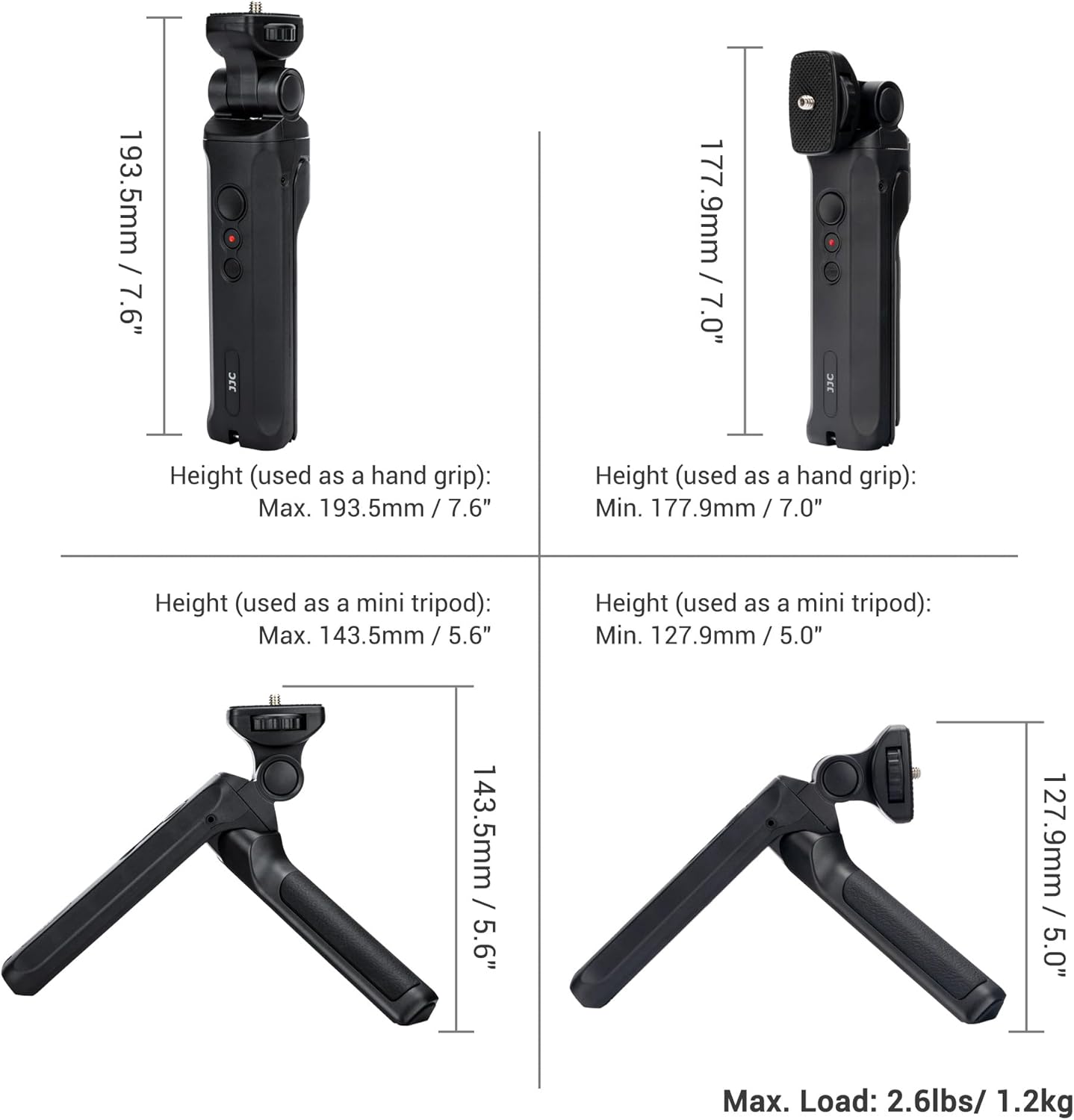
Figure 7: Dimensions of the JJC TP-PA2 in various configurations.
7. Troubleshooting
- Controls Not Responding:
- Ensure the USB-C cable is securely connected to both the grip and the camera.
- Verify that your camera is powered on and not in sleep mode.
- Confirm that your camera model (Panasonic Lumix DC-ZS99, G100D, S9) is compatible with the wired remote control functions.
- Camera Not Sitting Level on Tripod:
- Ensure the camera is securely tightened to the grip using the thumbwheel.
- Check that the tripod legs are fully extended and placed on a flat, stable surface.
- Adjust the camera's position on the ball head to achieve balance.
- Difficulty Attaching/Removing Camera:
- Ensure the thumbwheel is fully loosened before attempting to remove the camera.
- Do not force the camera onto the screw; align it carefully before tightening.
8. Warranty and Support
JJC products are manufactured to high quality standards. For information regarding warranty coverage, technical support, or service inquiries, please refer to the warranty card included with your product or visit the official JJC website. Keep your purchase receipt as proof of purchase.
For further assistance, you may contact JJC customer service through their official channels.
