
Varstrom TSDZ8
Varstrom TSDZ8 48V750W Mid Drive Ebike Conversion Kit Instruction Manual (Sw2m58 Display)
Comprehensive guide for installation, operation, maintenance, and troubleshooting.
1. Introduction
Thank you for choosing the Varstrom TSDZ8 48V750W Mid Drive Ebike Conversion Kit. This kit is designed to transform your standard bicycle into a powerful electric bike, offering enhanced riding experiences across various terrains. The TSDZ8 motor features a torque-sensing pedal assist system, providing a natural and responsive feel to your ride. This manual provides essential information for the safe and correct installation, operation, and maintenance of your new ebike conversion kit.
The TSDZ8 motor is an upgraded design compared to the TSDZ2, featuring a seamless one-piece reduction gear assembly and a bidirectional freewheeling clutch for reduced motor resistance. It is compatible with a range of digital displays, including the Sw2m58 display provided with this kit.
2. Safety Information
- Always wear a helmet and appropriate safety gear when riding your ebike.
- Ensure all components are securely fastened before each ride.
- Familiarize yourself with local ebike regulations and traffic laws.
- Do not attempt to modify the motor or battery system beyond the manufacturer's specifications.
- Keep the battery and electrical connections dry.
- Regularly inspect brakes, tires, and all electrical connections for wear or damage.
3. Components Checklist
Please verify that all the following components are included in your Varstrom TSDZ8 48V750W Mid Drive Ebike Conversion Kit:

Figure 1: Overview of the TSDZ8 Mid Drive Ebike Conversion Kit components.
- TSDZ8 48V750W Mid Drive Motor
- Sw2m58 Digital Display
- Chainring (typically 44T, 46T, 48T, or 52T)
- Crank Arms
- Speed Sensor and Magnets
- Brake Levers (with motor cut-off sensors)
- Thumb Throttle
- Wiring Harness and Cables
- Mounting Hardware (nuts, bolts, washers, motor mounting plate)
- Installation Tools (specialized wrench)
- User Manual (this document)
Note: The battery is not included with the kit and must be ordered separately.
4. Installation Guide
This section provides step-by-step instructions for installing your Varstrom TSDZ8 Mid Drive Ebike Conversion Kit. Ensure your bicycle is clean and stable before beginning the installation process.
4.1. Compatibility Check
The TSDZ8 motor is designed for bicycles with a bottom bracket shell length of 68mm or 73mm and an inner diameter of 34mm or 36mm. It is compatible with most mountain bikes, city bikes, and tricycles. It is generally not compatible with belt drive chainrings or coaster bikes.

Figure 2: Bottom bracket compatibility and incompatible bike types.
4.2. Motor Installation
- Remove Existing Components: Remove the existing crank arms, chainring, and bottom bracket from your bicycle. Clean the bottom bracket shell thoroughly.
- Install Motor: Slide the TSDZ8 motor into the bottom bracket shell. Ensure the motor is fully seated and aligned correctly.
- Secure Motor: Attach the motor mounting plate and tighten the fixing nut with a torque of 40Nm. Secure the motor to the frame using the provided bolts and washers.
- Install Chainring: Attach the new chainring to the motor spindle.
Video 1: Installation overview of the Tongsheng Mid Drive Motor kit, demonstrating the process of mounting the motor to the bicycle frame.
Video 2: Detailed installation steps for a mid drive motor kit, including securing the motor and attaching the chainring.
4.3. Speed Sensor Installation
Mount the speed sensor on the chainstay near the rear wheel. Attach the magnet to a spoke on the rear wheel. Ensure the gap between the sensor and the magnet is 10-15mm for proper detection. Secure the sensor cable along the frame using zip ties.
4.4. Display Installation (Sw2m58)
Mount the Sw2m58 digital display on your handlebar in a position that is easily visible and accessible. Secure it using the provided clamps and tighten the screws. Connect the display cable to the main wiring harness.

Figure 3: Sw2m58 Digital Display showing various functions.
4.5. Crank Arms & Pedals Installation
Install the new crank arms onto the motor spindle. Attach your pedals to the crank arms, ensuring they are tightened securely.
4.6. Brake Levers & Throttle Installation
Replace your existing brake levers with the new ones provided in the kit. These levers include motor cut-off sensors for safety. Install the thumb throttle on the handlebar next to the grip. Connect the brake lever and throttle cables to the main wiring harness.
4.7. Battery Installation
Mount your chosen 48V battery (sold separately) securely to your bicycle frame, typically using the water bottle cage mounts. Connect the battery to the main wiring harness.
4.8. Wiring Connections
Connect all cables from the motor, display, speed sensor, brake levers, and throttle to the main wiring harness. Ensure all connections are secure and waterproof. Use zip ties to neatly organize and secure all cables along the bicycle frame.
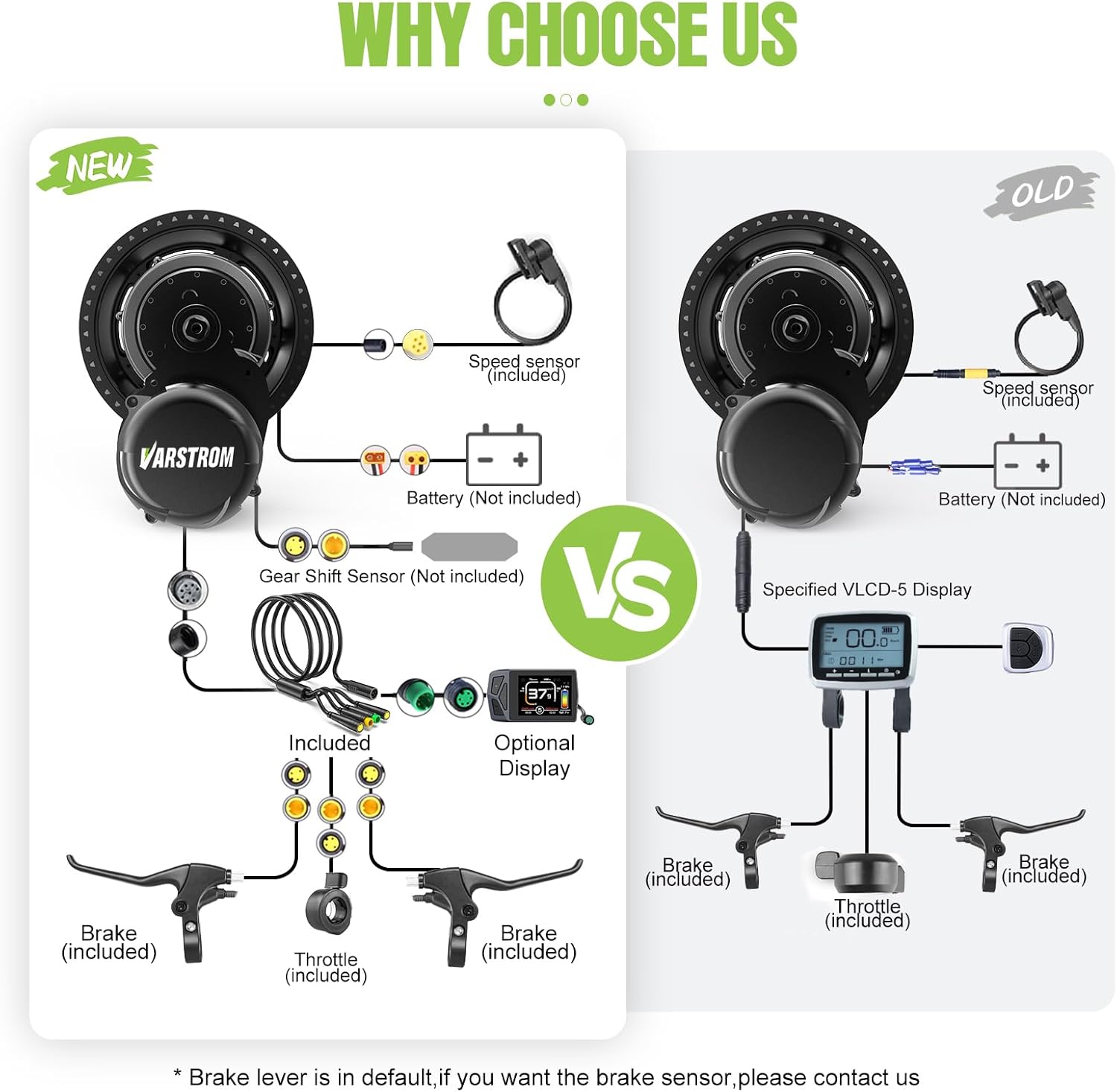
Figure 4: Wiring diagram for the TSDZ8 Mid Drive Kit.
5. Operating Instructions
5.1. Power On/Off
- Power On: Press and hold the power button on the Sw2m58 display for a few seconds until the display illuminates.
- Power Off: Press and hold the power button again until the display turns off.
5.2. Riding Modes
The TSDZ8 kit offers three adaptable riding modes:
- Pedal Assist Mode (PAS): The motor provides assistance based on your pedaling effort, detected by the precision torque sensor. Use the '+' and '-' buttons on the display to adjust the assist level (typically 0-5).
- Throttle Mode: Engage the thumb throttle to receive motor power without pedaling. This mode is ideal for quick acceleration or maintaining speed without effort.
- Bike Mode: The motor provides no assistance, and the bicycle operates as a traditional pedal bike.
- Walk Assist Mode: Press and hold the '-' button (or specific walk assist button if available) to engage a low-speed motor assist (e.g., 6 KM/H) for walking the bike.
5.3. Sw2m58 Display Functions
The Sw2m58 display provides real-time information about your ride:
- Real Speed: Current riding speed.
- PAS Level: Current pedal assist level.
- Battery Percent/Voltage: Remaining battery charge.
- Total Mileage: Accumulated distance traveled.
- Single Mileage: Distance traveled during the current trip.
- Max Speed: Highest speed achieved during the current trip.
- Average Speed: Average speed during the current trip.
- Error Code: Displays codes for system malfunctions.
- Low Voltage Warning: Indicates when the battery charge is critically low.
6. Maintenance
- Regular Cleaning: Keep the motor, battery, and display clean and free from dirt and debris. Use a damp cloth; avoid high-pressure washing directly on electrical components.
- Battery Care: Charge the battery regularly, even when not in use, to maintain its lifespan. Store the battery in a cool, dry place.
- Chain and Drivetrain: Lubricate the chain regularly and ensure the drivetrain components are clean and functioning smoothly.
- Brake System: Check brake pads and cables regularly. Ensure brake levers activate the motor cut-off function correctly.
- Fasteners: Periodically check all bolts and screws, especially those on the motor and handlebars, to ensure they are tight.
- Wiring: Inspect all wiring for any signs of wear, fraying, or damage. Ensure connections are secure.
7. Troubleshooting
| Problem | Possible Cause | Solution |
|---|---|---|
| Motor not providing assist | Low battery, loose connection, PAS level 0, brake lever engaged. | Charge battery, check all connections, increase PAS level, release brake lever. |
| Display not turning on | Battery off, loose display cable, damaged display. | Ensure battery is on, check display cable connection, contact support if damaged. |
| Inaccurate speed reading | Speed sensor/magnet misalignment, incorrect wheel size setting. | Adjust speed sensor/magnet gap (10-15mm), verify wheel size setting in display menu. |
| Unusual noises from motor | Loose motor mounting, internal component issue. | Check motor mounting bolts, contact support if noise persists. |
For specific error codes displayed on the Sw2m58, refer to the display's dedicated manual or contact Varstrom technical support.
8. Specifications
| Feature | Detail |
|---|---|
| Brand | Varstrom |
| Model Name | TSDZ8 |
| Motor Type | Mid-drive, Torque-sensing |
| Rated Power | 750W (48V) |
| Peak Power | Upgraded 1056W |
| Max Torque | 140 N.m |
| Max Speed | Up to 55 KM/H |
| Bottom Bracket Compatibility | Length: 68-73mm; Inner Diameter: 34-36mm |
| Electric Assist Type | Pedal Assist (Torque Sensor) & Throttle |
| Display Type | Sw2m58 Digital Display (LCD) |
| Waterproof Rating | IP65 (Motor) |
| Weight | 5.8 KG (Motor) |
| Frame Material Compatibility | Aluminum (and other common frame materials) |
| Bicycle Drivetrain Type | Mid-drive |
9. Warranty and Support
Varstrom offers the following warranty and support for your TSDZ8 Mid Drive Ebike Conversion Kit:
- Return Policy: 30 Days return time.
- Warranty Service: 365 days warranty service.
- Technical Guidance: Lifelong technical guidance service.
For any technical assistance, warranty claims, or further inquiries, please contact Varstrom customer support through the retailer where you purchased the product or visit the official Varstrom store on Amazon.
Related documentsTSDZ8


Ask a question about this manual
Ask about setup, troubleshooting, compatibility, parts, safety, or missing instructions. Manuals+ will review the question and use this page’s manual context to help answer it.