
1. Important Safety Instructions
Read all instructions carefully before operating the appliance. Failure to follow these instructions may result in electric shock, fire, or serious injury.
- Electrical Safety: Ensure the popcorn maker is connected to a grounded 110/120V AC outlet with a NEMA 5-15P plug configuration. Do not operate with a damaged cord or plug.
- Hot Surfaces: The kettle and surrounding areas become extremely hot during operation. Avoid direct contact. Use handles and knobs provided.
- Supervision: Close supervision is necessary when the appliance is used by or near children.
- Ventilation: Ensure adequate ventilation around the unit during operation to prevent overheating.
- Cleaning: Always unplug the unit and allow it to cool completely before cleaning. Do not immerse the electrical components in water.
- Intended Use: Use this appliance only for its intended purpose of popping popcorn. Do not use for other food preparation.
2. Product Overview
The Global Solutions GS1736 Popcorn Maker is a commercial-grade appliance designed for efficient popcorn production. It features a stainless-steel kettle, temperature-safe glass panels, and a stirring function for consistent popping results. This unit is suitable for high-demand environments, capable of producing up to 360 ounces of popcorn per hour.
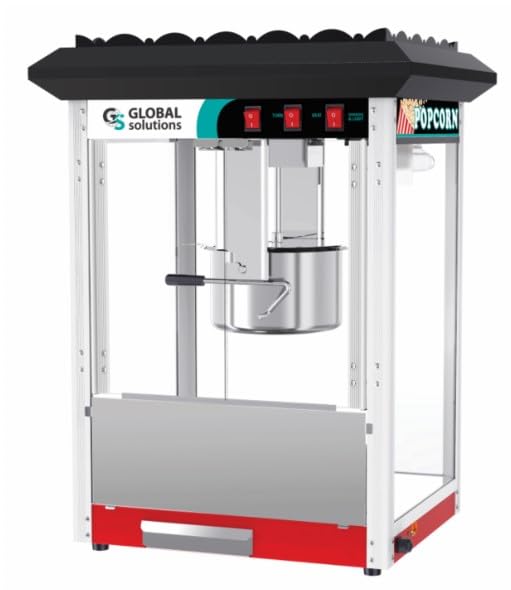
Image: The Global Solutions GS1736 Popcorn Maker, showcasing its glass enclosure and stainless steel kettle. The unit features a red base and top, with clear glass panels allowing visibility of the popping process. A handle for the kettle is visible on the right side.
Key Features:
- 12 oz. stainless steel kettle for optimal popping.
- Integrated stirring function for even kernel distribution and popping.
- Temperature-safe tempered glass panels for safe viewing.
- Built-in heating elements to keep popcorn warm and fresh.
- Durable aluminum alloy frame construction.
- Compact countertop design for versatile placement.
3. Setup and Assembly
Follow these steps to set up your popcorn maker for first use:
- Unpack: Carefully remove all components from the packaging. Retain packaging for future transport or storage.
- Placement: Place the popcorn maker on a stable, level, heat-resistant surface. Ensure there is adequate clearance around the unit for ventilation.
- Initial Cleaning: Before first use, wipe down the interior and exterior surfaces with a damp cloth. Clean the kettle according to the 'Cleaning and Maintenance' section.
- Power Connection: Plug the power cord into a grounded 110/120V AC outlet.
4. Operating Instructions
This section details the steps for operating your GS1736 Popcorn Maker to produce fresh popcorn.
- Preheat Kettle: Turn on the 'Kettle Heat' switch. Allow the kettle to preheat for approximately 3-5 minutes.
- Add Oil: Carefully add the recommended amount of popcorn oil (typically 1/3 cup for a 12 oz kettle) to the preheated kettle.
- Add Kernels: Add 12 ounces of popcorn kernels to the kettle. Close the kettle lid.
- Activate Stirrer: Turn on the 'Stirrer' switch to ensure even popping.
- Popping Process: Popcorn will begin to pop within 2-3 minutes. The stirring mechanism will ensure kernels are evenly cooked.
- Dispense Popcorn: Once popping slows significantly (approximately 90% of kernels popped), turn off the 'Kettle Heat' and 'Stirrer' switches. Carefully tilt the kettle to empty the popped corn into the warming deck below.
- Keep Warm: Turn on the 'Warmer' switch to keep the popcorn warm and fresh.
- Repeat: For subsequent batches, repeat steps 1-7. Allow a brief cooling period between batches if continuous operation is not required.
5. Cleaning and Maintenance
Regular cleaning and maintenance ensure optimal performance and longevity of your popcorn maker.
Daily Cleaning:
- Unplug and Cool: Always unplug the unit from the power outlet and allow it to cool completely before cleaning.
- Empty Crumb Tray: Remove and empty the crumb tray located at the bottom of the unit. Wipe it clean with a damp cloth.
- Clean Kettle: Wipe the interior and exterior of the kettle with a damp cloth. For stubborn residue, use a mild detergent solution and a non-abrasive sponge. Rinse thoroughly with a clean, damp cloth. Do not immerse the kettle in water.
- Wipe Surfaces: Wipe down all glass panels and stainless steel surfaces with a clean, damp cloth. For streaks, use a glass cleaner on the exterior glass only.
Periodic Maintenance:
- Inspect the power cord for any signs of damage.
- Ensure all screws and fasteners are secure.
- Check the stirring mechanism for free movement.
6. Troubleshooting
Refer to this section for common issues and their potential solutions.
| Problem | Possible Cause | Solution |
|---|---|---|
| Popcorn not popping or popping poorly. | Kettle not preheated sufficiently. Insufficient oil. Old or dry kernels. | Allow kettle to preheat for 3-5 minutes. Ensure correct amount of fresh oil is used. Use fresh popcorn kernels. |
| Machine does not turn on. | Power cord not plugged in. Outlet not functioning. Blown fuse/tripped breaker. | Ensure power cord is securely plugged into a working outlet. Check circuit breaker or fuse box. |
| Stirrer not rotating. | Stirrer switch off. Obstruction in kettle. | Ensure 'Stirrer' switch is on. Check kettle for any obstructions and clean if necessary (after cooling). |
7. Specifications
| Attribute | Value |
|---|---|
| Brand | Global Solutions |
| Model Number | GS1736 |
| Capacity | 12 ounces |
| Dimensions (W x D x H) | 23 1/4" x 19 3/4" x 31 1/8" |
| Equipment Weight | 60 lbs |
| Voltage | 110/120 Volts |
| Wattage | 1760 Watts |
| Amperage | 15.3 Amps |
| Plug Configuration | NEMA 5-15P |
| Material | Stainless Steel, Tempered Glass, Aluminum Alloy |
| Popping Time | 2 min per batch (up to 360 oz/hour) |
| UPC | 674651200609 |
8. Warranty and Support
This Global Solutions GS1736 Popcorn Maker comes with a standard manufacturer's warranty. Please refer to the warranty card included with your purchase for specific terms and conditions, including coverage duration and limitations.
For technical assistance, troubleshooting beyond this manual, or warranty claims, please contact Global Solutions customer support. Contact information can typically be found on the product packaging or the official Global Solutions website.
Online Resources: For additional support and product information, visit the official Global Solutions website.

