
1. Introduction
This instruction manual provides essential information for the safe and effective use of your BoxWave Wall Charger Direct (15W). This charger is specifically designed to provide rapid charging for your Sky Devices Elite A65. Please read this manual thoroughly before use and retain it for future reference.
2. Safety Information
To ensure safe operation and prevent damage, please observe the following precautions:
- Use the charger only indoors and in dry conditions.
- Do not expose the charger to water, moisture, or extreme temperatures.
- Do not attempt to disassemble, modify, or repair the charger. Refer all servicing to qualified personnel.
- Avoid dropping or subjecting the charger to strong impacts.
- Ensure the wall outlet voltage matches the charger's specifications (100-240V).
- Keep out of reach of children.
3. Product Overview
The BoxWave Wall Charger Direct (15W) is a compact and efficient charging solution featuring a built-in 3-foot Micro USB cable. It is designed for direct wall outlet connection, eliminating the need for separate cables.

Image of the BoxWave Wall Charger Direct (15W) alongside a Sky Devices Elite A65 smartphone, illustrating the product's compatibility and design.
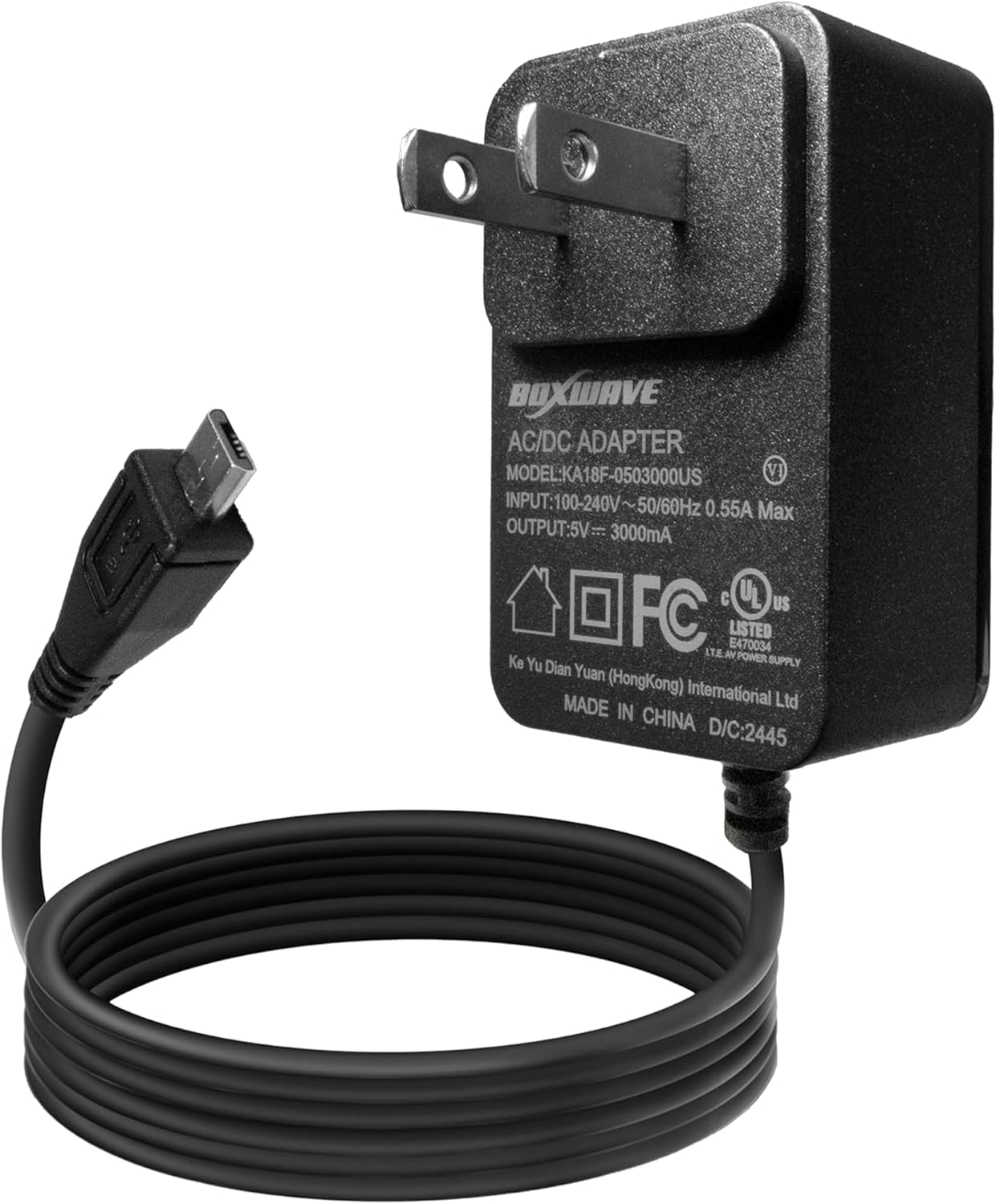
Close-up view of the BoxWave Wall Charger Direct (15W) showing the AC adapter unit with its specifications label and the attached Micro USB cable.

Overhead view of the BoxWave Wall Charger Direct (15W) with a magnified inset showing the Micro USB connector, highlighting its specific port type.
4. Setup
Setting up your BoxWave Wall Charger Direct (15W) is a straightforward process:
- Plug into Wall Outlet: Insert the charger's prongs into a standard AC wall outlet (100-240V).
- Connect to Device: Plug the Micro USB connector of the built-in cable into the charging port of your Sky Devices Elite A65.
The device should indicate that it is charging. No additional adapters or cables are required.

Image demonstrating the simple plug-and-play functionality of the BoxWave Wall Charger Direct (15W), showing the charger plugged into a wall outlet.
5. Operating Instructions
Once connected, the BoxWave Wall Charger Direct (15W) will begin charging your Sky Devices Elite A65. This charger delivers 15W of power for rapid charging.
- Charging Indication: Your Sky Devices Elite A65 will typically display a charging icon (e.g., a lightning bolt or battery animation) on its screen to confirm that it is receiving power.
- Rapid Charging: The 15W output ensures your device charges quickly and efficiently. Charging times may vary based on your device's battery level and usage during charging.
- Full Charge: Disconnect the charger once your device indicates a full charge to conserve energy.

Image depicting a smartphone screen displaying a 95% charge level and a lightning bolt icon, indicating the 15W fast charging capability of the BoxWave Wall Charger Direct.
6. Maintenance and Care
Proper care will extend the life of your charger:
- Cleaning: Disconnect the charger from the power outlet before cleaning. Use a soft, dry cloth to wipe the surface. Do not use liquid cleaners or aerosols.
- Cable Care: Avoid sharp bends, kinks, or excessive pulling on the cable, especially near the connectors. The charger features reinforced strain relief to minimize damage, but careful handling is still recommended.
- Storage: When not in use, store the charger in a cool, dry place, away from direct sunlight and extreme temperatures.

Image illustrating the reinforced strain relief design at the base of the Micro USB connector, designed to prevent kinking and tearing of the cable.
7. Troubleshooting
If you encounter issues with your charger, refer to the following common solutions:
- Device Not Charging:
- Ensure the charger is securely plugged into a working wall outlet.
- Verify that the Micro USB connector is fully inserted into your Sky Devices Elite A65's charging port.
- Try plugging the charger into a different wall outlet.
- Check the cable and connectors for any visible damage.
- Slow Charging:
- Confirm that your device is not running power-intensive applications during charging.
- Ensure the charger is connected directly to a wall outlet, not a USB hub or extension cord that may limit power delivery.
- Charger Overheating:
- It is normal for chargers to become slightly warm during use. However, if the charger becomes excessively hot, disconnect it immediately from the wall outlet and your device. Allow it to cool down. If overheating persists, discontinue use and contact customer support.
8. Specifications
| Feature | Detail |
|---|---|
| Model Number | KA18F-0503000US |
| Input | 100-240V ~ 50/60Hz 0.55A Max |
| Output | 5V === 3000mA (3A) |
| Power Output | 15W |
| Cable Type | Built-in Micro USB |
| Cable Length | 3 feet |
| Material | Polycarbonate |
| Item Weight | 2.3 ounces |
9. Customer Support
For any questions, concerns, or technical assistance regarding your BoxWave Wall Charger Direct (15W), please contact BoxWave customer support through their official website or the retailer where the product was purchased.