
Introduction
This manual provides detailed instructions for the installation, operation, and maintenance of your STINGER Audio MT15001 Monoblock Class D Amplifier and MT-600.4 4-Channel Car Audio Amplifier. Please read this manual thoroughly before attempting installation or operation to ensure proper use and to prevent damage to the units or your vehicle's audio system.
The STINGER MT15001 is a digital Class-D monoblock amplifier designed for driving subwoofers, offering high efficiency and a compact footprint. The STINGER MT-600.4 is a 4-channel amplifier suitable for powering full-range speakers or bridging for higher power output to subwoofers.
Safety Precautions
- Always disconnect the vehicle's battery negative terminal before starting any installation.
- Ensure all wiring is properly routed and secured to prevent damage from sharp edges or moving parts.
- Use appropriate gauge wiring for power, ground, and speaker connections as specified in this manual.
- Avoid mounting the amplifier in areas exposed to direct sunlight, excessive heat, moisture, or dust.
- Do not operate the amplifier if it is damaged or malfunctioning. Refer to the troubleshooting section or contact support.
Setup and Installation
Mounting the Amplifiers
Select a mounting location that provides adequate ventilation and protection from moisture. Ensure the surface is sturdy enough to support the amplifier's weight. Common locations include under seats, in the trunk, or on an amplifier rack.
Wiring Connections
Proper wiring is crucial for performance and safety. Refer to the diagrams below for connection points.
MT15001 Monoblock Amplifier Connections

This diagram illustrates the various controls and connection points on the STINGER MT-1500.1 Monoblock Amplifier, including the remote level controller input, RCA inputs, gain control, low pass filter, high pass crossover, select boost frequency, and bass boost.
- Power (B+): Connect to the positive terminal of the vehicle's battery using a 4-gauge power cable. Install an appropriate fuse (refer to specifications) within 18 inches of the battery.
- Ground (GND): Connect to a clean, unpainted metal surface of the vehicle chassis using a 4-gauge ground cable. The ground point should be as short as possible.
- Remote (REM): Connect to the remote turn-on output of your head unit. This wire turns the amplifier on and off with your stereo.
- Speaker Output: Connect your subwoofer(s) to the speaker terminals. The MT15001 is designed for 1 Ohm loads. Use 8-gauge speaker wire for optimal performance.
- RCA Input: Connect the RCA output from your head unit or signal processor to the amplifier's RCA input.
- Remote Level Controller: Connect the included remote bass controller to the dedicated port.
MT-600.4 4-Channel Amplifier Connections

This image displays the input and output connections for the STINGER MT-600.4 4-Channel Amplifier, including power, ground, remote, speaker terminals, RCA inputs, and various adjustment controls for gain, crossover, and input mode.
- Power (B+): Connect to the positive terminal of the vehicle's battery using a 4-gauge power cable. Install an appropriate fuse (refer to specifications) within 18 inches of the battery.
- Ground (GND): Connect to a clean, unpainted metal surface of the vehicle chassis using a 4-gauge ground cable. The ground point should be as short as possible.
- Remote (REM): Connect to the remote turn-on output of your head unit.
- Speaker Output: Connect your speakers to the CH1/CH2 and CH3/CH4 speaker terminals. The MT-600.4 supports stereo and bridged configurations. Use 12AWG speaker wire.
- RCA Input: Connect the RCA outputs from your head unit or signal processor to the amplifier's CH1/CH2 and CH3/CH4 RCA inputs.
Initial Settings (MT15001)
- Gain Control: Start with the gain control set to minimum. Gradually increase it until the desired volume is achieved without distortion.
- Low Pass Filter (LPF): Adjust the LPF to filter out high frequencies from the subwoofer. A common range is 80Hz-120Hz.
- High Pass Crossover (HPF): If used in a full-range system, adjust the HPF to filter out low frequencies from your main speakers.
- Subsonic Filter: Set this to protect your subwoofer from playing frequencies below its resonant frequency, which can cause damage.
- Bass Boost: Use sparingly. Excessive bass boost can cause distortion and damage to your subwoofer.
Initial Settings (MT-600.4)
- Gain Control: Set to minimum initially. Adjust for balanced sound without distortion.
- Input Mode: Select 2CH or 4CH depending on your head unit's RCA outputs.
- Crossover (LPF/HPF/FULL): Set the crossover mode for each channel pair (CH1/CH2 and CH3/CH4) according to your speaker type. Use LPF for subwoofers, HPF for full-range speakers, and FULL for full-range signal.
- Crossover Frequency: Adjust the frequency knob to the desired crossover point.
Operating the Amplifiers
Power Indicators
- PWR (Power): Illuminates when the amplifier is powered on and operating normally.
- PRT (Protection): Illuminates when the amplifier enters protection mode due to a fault (e.g., short circuit, overheating, low voltage). Refer to the troubleshooting section.
- CLIP (MT-600.4): Indicates signal clipping or distortion. Reduce the gain or input level if this light illuminates frequently.
Remote Bass Control (MT15001)

The included remote bass controller allows for convenient adjustment of bass levels from the listening position. It features a flush-mount knob for easy installation and precise control.
The remote bass controller allows you to adjust the subwoofer output level from your listening position. Turn the knob clockwise to increase bass and counter-clockwise to decrease it. Ensure the amplifier's gain is set correctly before relying solely on the remote control for level adjustments.
Maintenance
- Cleaning: Periodically wipe the amplifier's exterior with a soft, dry cloth. Do not use harsh chemicals or abrasive cleaners.
- Ventilation: Ensure that the amplifier's cooling fins are free from obstructions to allow for proper heat dissipation.
- Wiring Inspection: Regularly check all power, ground, remote, and speaker connections for tightness and signs of corrosion or damage.
Troubleshooting
| Problem | Possible Cause | Solution |
|---|---|---|
| Amplifier does not power on (PWR light off) | No power, ground, or remote signal; Blown fuse | Check power, ground, and remote connections. Verify fuse at battery and amplifier. |
| Amplifier goes into protection mode (PRT light on) | Overheating; Speaker short circuit; Low voltage | Allow amplifier to cool. Check speaker wiring for shorts. Verify vehicle's charging system. |
| No sound output | No input signal; Incorrect gain setting; Muted head unit | Check RCA connections. Adjust gain. Ensure head unit is not muted. |
| Distorted sound | Gain set too high; Improper crossover settings; Speaker impedance mismatch | Reduce gain. Adjust crossover frequencies. Verify speaker impedance matches amplifier's capabilities. |
| Weak bass (MT15001) | Low pass filter set too high; Subsonic filter set too high; Incorrect phase | Adjust LPF to a lower frequency. Adjust subsonic filter. Check subwoofer phase setting. |
Specifications
STINGER MT15001 Monoblock Amplifier

This graphic highlights key features of the STINGER MT-1500.1 Monoblock Amplifier, such as its Class-D mono block design, suitability for 1 Ohm loads, small and compact design, 4 gauge power terminal, and operating voltage range of 9V to 16V.
| Feature | Specification |
|---|---|
| Amplifier Type | Digital Class-D Monoblock |
| RMS Power Output | 1500 Watts (Speaker Maximum Output Power) |
| Minimum Impedance | 1 Ohm Load (Designed for) |
| Power Supply | Robust Unregulated Power Supplies, Advanced HEXFET Power MOSFET |
| Operating Voltage | 9V to 16V (DC) |
| Power Terminal | 4 Gauge |
| Speaker Terminal | 8 Gauge |
| Control Method | Remote (Remote Bass Controller Included) |
| Material | Metal |
| Dimensions (L x W x H) | 10.16 in / 258 mm (Length) x 6.1 in / 155 mm (Width) x 2.09 in / 53 mm (Height) |

This image provides the physical dimensions of the STINGER MT-1500.1 Monoblock Amplifier, showing its length, width, and height in both inches and millimeters.
STINGER MT-600.4 4-Channel Amplifier
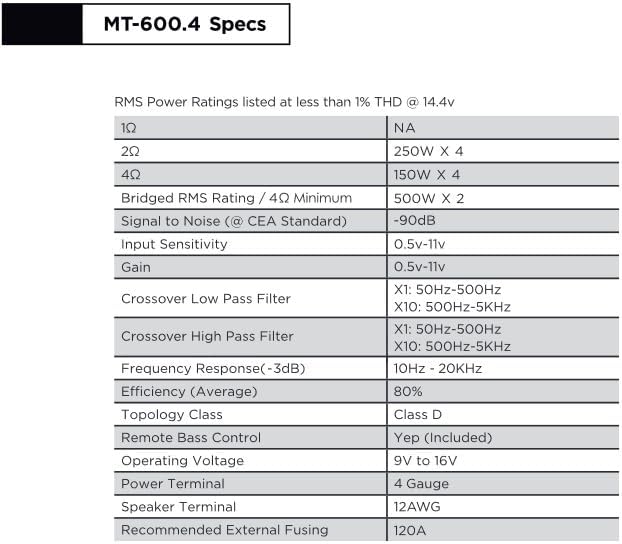
A detailed table outlining the technical specifications for the STINGER MT-600.4 4-Channel Amplifier, including RMS power ratings, signal-to-noise ratio, input sensitivity, crossover frequencies, frequency response, efficiency, and power terminal gauge.
| Feature | Specification |
|---|---|
| Amplifier Type | Class D |
| RMS Power Rating (4Ω) | 150W x 4 |
| RMS Power Rating (2Ω) | 250W x 4 |
| Bridged RMS Rating (4Ω Minimum) | 500W x 2 |
| Signal to Noise (CEA Standard) | -90dB |
| Input Sensitivity | 0.5V-11V |
| Gain | 0.5V-11V |
| Crossover Low Pass Filter (LPF) | X1: 50Hz-500Hz, X10: 50Hz-5KHz |
| Crossover High Pass Filter (HPF) | X1: 50Hz-500Hz, X10: 50Hz-5KHz |
| Frequency Response (-3dB) | 10Hz - 20KHz |
| Efficiency (Average) | 80% |
| Operating Voltage | 9V to 16V |
| Power Terminal | 4 Gauge |
| Speaker Terminal | 12AWG |
| Recommended External Fusing | 120A |
Warranty Information
STINGER Audio products are covered by a Limited Warranty. Please refer to the warranty card included with your product or visit the official STINGER website for detailed terms and conditions regarding coverage, duration, and claim procedures. Keep your proof of purchase for warranty service.
Customer Support
If you encounter any issues not covered in this manual or require further assistance, please contact STINGER Audio customer support. You can find contact information on the official STINGER website or through your authorized dealer.


