
FOHERE HU-500
FOHERE 6L Warm and Cool Mist Humidifier User Manual
Model: HU-500
Welcome
Thank you for choosing the FOHERE 6L Warm and Cool Mist Humidifier. This advanced ultrasonic humidifier is designed to provide optimal humidity levels in your home, offering both warm and cool mist options for year-round comfort. With its large capacity, smart humidity control, quiet operation, and convenient features like a remote control and aroma tray, it creates a healthier and more comfortable environment for you, your family, and even your plants. Please read this manual thoroughly before use to ensure proper operation and maintenance.
Important Safety Instructions
To reduce the risk of fire, electric shock, or injury, please observe the following safety precautions:
- Always place the humidifier on a firm, flat, waterproof surface at least 12 inches (30 cm) away from walls and appliances.
- Do not place the humidifier directly on carpet, wood floors, or surfaces that may be damaged by water or moisture.
- Ensure the power cord is not pinched or placed under heavy objects.
- Do not operate the humidifier if the cord or plug is damaged.
- Unplug the humidifier before filling, cleaning, or moving it.
- Do not add essential oils directly into the water tank. Use only the designated aroma tray.
- Keep the mist nozzle clear and unobstructed.
- Do not immerse the base unit in water or other liquids.
- This appliance is not intended for use by persons (including children) with reduced physical, sensory or mental capabilities, or lack of experience and knowledge, unless they have been given supervision or instruction concerning use of the appliance by a person responsible for their safety.
- Children should be supervised to ensure that they do not play with the appliance.
- Use only clean, cool tap water. Distilled or demineralized water is recommended to prevent white dust.
- Do not touch the heating element when using warm mist mode, as it can reach high temperatures (up to 133°F).
What's in the Box
- 1 x FOHERE Humidifier (Model HU-500)
- 1 x User Manual
- 1 x Quick Start Guide
- 1 x Cleaning Brush
- 1 x Remote Control
- 1 x Aroma Pad
- 2 x Anti-scaling pad (1 pre-installed)
- 2 x Filter Sponge (1 pre-installed)
Product Overview
Product Diagram
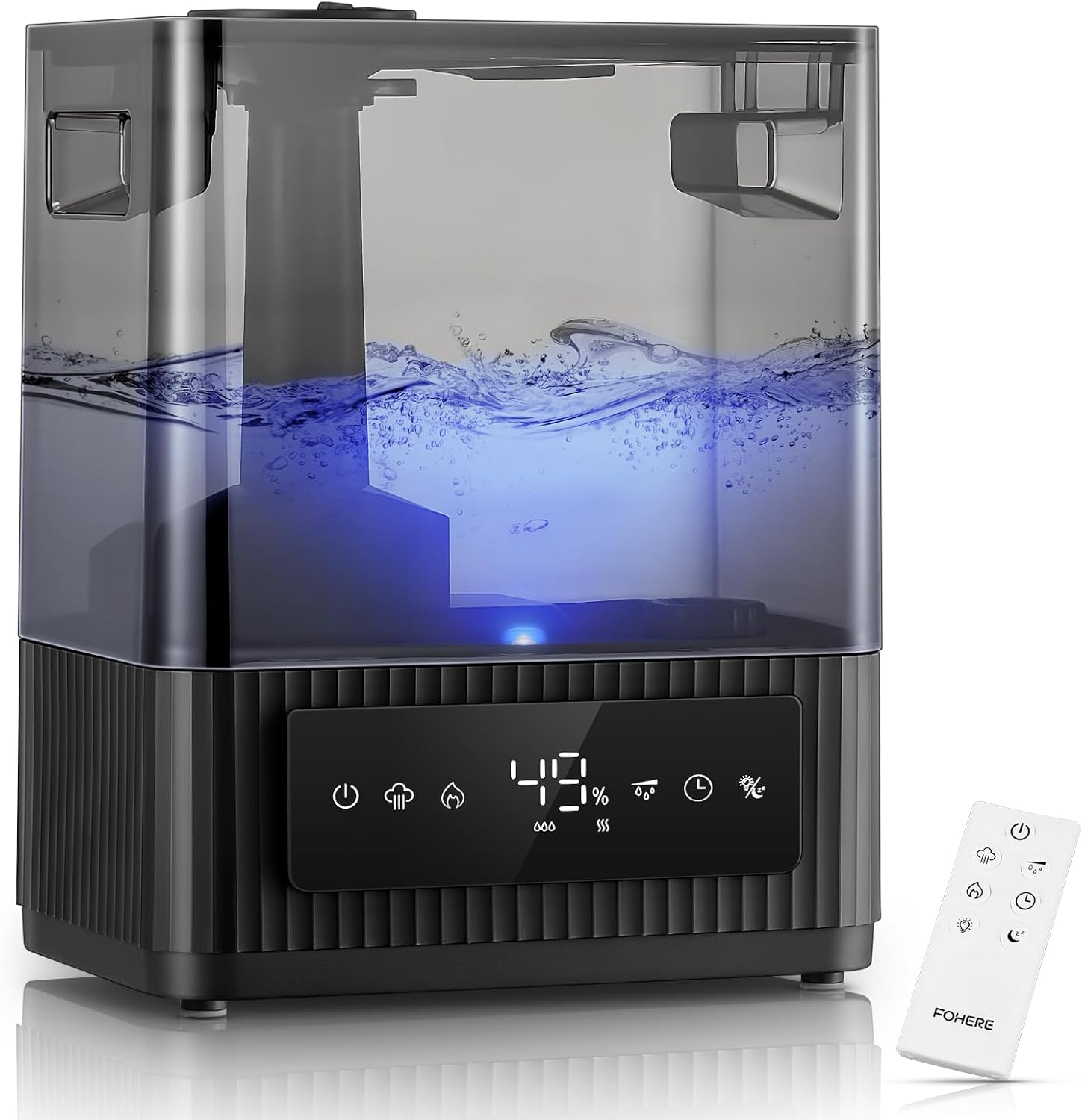
Image: The FOHERE 6L Warm and Cool Mist Humidifier, showcasing its sleek black design, digital display, and included remote control.
Parts Identification
- Mist Nozzle: Rotates 360 degrees for directional mist output.
- Water Tank: 6-liter capacity, transparent for easy water level monitoring.
- Base Unit: Contains the ultrasonic atomizer, heating element, and control circuitry.
- Control Panel: Digital display with touch-sensitive buttons for various functions.
- Water Inlet: Top-fill design for easy refilling.
- Aroma Tray: Small compartment for essential oils.
- Power Cord: For connecting to an electrical outlet.
- Remote Control: Allows convenient operation from a distance.
Getting Started: Setup
- Unpack the Humidifier: Carefully remove all packaging materials and ensure all components listed in the 'What's in the Box' section are present.
- Choose a Location: Place the humidifier on a flat, stable, and waterproof surface. Ensure it is at least 12 inches (30 cm) away from walls, furniture, and electronic devices to allow for proper mist dispersion and prevent moisture damage.
- Fill the Water Tank:

Image: A hand pouring water directly into the top opening of the humidifier, demonstrating the easy top-fill design.
The FOHERE humidifier features a convenient top-fill design. Simply open the top cover and pour clean, cool tap water directly into the water tank. For best results and to prevent mineral buildup (white dust), it is highly recommended to use distilled or demineralized water. Do not fill past the MAX water level indicator. - Connect Power: Plug the power cord into a standard electrical outlet. The humidifier will enter standby mode, and the digital display will illuminate briefly.
Operating Your Humidifier
Control Panel and Remote Control
The humidifier can be operated using the touch-sensitive control panel on the front of the unit or the included remote control. Both offer access to all functions.
Power On/Off
- Press the Power button (⏻) on the control panel or remote to turn the humidifier on or off.
Mist Mode Selection (Warm/Cool Mist)

Image: A visual comparison of warm mist and cool mist, highlighting benefits like faster humidification and quiet operation.

Image: Three humidifiers demonstrating different mist output levels for both cool and warm mist modes.
- Press the Mist Mode button (♨ / ❄) to switch between warm mist and cool mist modes.
- Warm Mist: Provides a sterilized mist up to 133°F, ideal for colder seasons and faster humidification (up to 750ml/h).
- Cool Mist: Operates quietly (under 26dB), perfect for continuous use, moisturizing skin, and supporting plant growth.
- Press the Mist Level button (☰) repeatedly to cycle through 3 adjustable mist output levels for both warm and cool mist modes.
Humidity Control

Image: A close-up diagram illustrating the humidifier's high-precision humidistat with a ±5% tolerance for accurate humidity control.
- Press the Humidity Setting button (%) to set your desired humidity level, adjustable from 30% to 80% in 5% increments.
- The humidifier will automatically turn on or off to maintain the set humidity level with a precision of ±5%.
Sleep Mode and Timer

Image: The humidifier operating quietly in a bedroom setting, with icons representing sleep mode, whisper quiet operation, 12-hour timer, and aromatherapy.
- Press the Sleep Mode button (☾) to activate sleep mode. In this mode, the LED display will turn off, and the humidifier will operate at its quietest setting (under 26dB in cool mist mode) for undisturbed sleep.
- Press the Timer button (◷) repeatedly to set an automatic shut-off timer from 1 to 12 hours. The humidifier will turn off once the set time has elapsed.
Aroma Tray Function

Image: A woman meditating in a serene room with the humidifier, highlighting the essential oil diffuser feature with a close-up of the aroma tray.
- Locate the aroma tray on the side or back of the base unit.
- Pull out the tray and add a few drops of your favorite essential oil onto the aroma pad.
- Slide the tray back into place. The mist will carry the aroma into the air.
- Note: Do not add essential oils directly into the water tank, as this can damage the unit.
Night Light

Image: The humidifier emitting a soft blue night light in a dimly lit room, creating a calming ambiance.
- Press the Light button (💡) to turn the blue night light on or off. This feature can enhance the ambiance of your room without disturbing sleep.
Care and Maintenance
Regular cleaning is essential for optimal performance and hygiene. Using hard water can lead to mineral buildup (white dust) on the transducer and water tank, which can affect the humidifier's efficiency.

Image: A multi-panel image demonstrating the detachable water tank, ease of cleaning, and the top-fill design of the humidifier.
Daily Maintenance
- Empty the water tank and wipe it dry if the humidifier will not be used for a day or more.
- Refill with fresh water daily.
Weekly Cleaning
- Unplug the Humidifier: Always ensure the unit is unplugged from the power outlet before cleaning.
- Empty Water: Remove the water tank and empty any remaining water from both the tank and the base unit.
- Clean the Water Tank: The detachable water tank design makes cleaning easy. Wipe the inside of the tank with a soft cloth. For mineral buildup, fill the tank with a mixture of white vinegar and water (1:1 ratio) and let it soak for 30 minutes. Rinse thoroughly with clean water.
- Clean the Base Unit: Gently wipe the surface of the base unit and the transducer (the small metal disc) with a soft, damp cloth. Use the provided cleaning brush to remove any mineral deposits from the transducer. Do not scrub the transducer aggressively.
- Clean the Aroma Tray: Remove the aroma pad and wash the tray with warm, soapy water. Rinse and dry thoroughly. Replace the aroma pad as needed.
- Rinse and Dry: Rinse all parts thoroughly with clean water and allow them to air dry completely before reassembling.
Storage
- When storing the humidifier for an extended period, ensure all parts are clean and completely dry.
- Store the humidifier in a cool, dry place, away from direct sunlight.
Troubleshooting Guide
| Problem | Possible Cause | Solution |
|---|---|---|
| No mist or low mist output |
|
|
| White dust around humidifier |
|
|
| Unusual odor from mist |
|
|
| Humidifier not turning on |
|
|
| Unit making loud noise |
|
|
Product Specifications
| Feature | Detail |
|---|---|
| Brand | FOHERE |
| Model Name | HU-500 |
| Operation Mode | Ultrasonic |
| Capacity | 6 Liters |
| Mist Output | Up to 750 ml/h (Max) |
| Runtime | Up to 60 hours (on lowest mist level) |
| Mist Type | Warm and Cool Mist |
| Noise Level | Under 26dB (Cool Mist Mode) |
| Humidity Control Range | 30% - 80% RH (±5% tolerance) |
| Timer | 1-12 Hours |
| Special Features | Night Light, Adjustable Humidity Control, Digital Display, Auto Shut Off, Aroma Diffuser, Remote Control, Top-Fill Design |
| Product Dimensions | 7.09"D x 10.04"W x 12.64"H |
| Item Weight | 6.01 pounds |
| Voltage | 240 Volts |
| Wattage | 340 Watts |
| Color | Black |
Warranty and Customer Support
FOHERE is committed to providing high-quality products. This humidifier comes with a standard manufacturer's warranty. Please refer to the warranty card included in your package for specific terms and conditions, including the warranty period.
If you encounter any issues with your humidifier, require technical assistance, or have questions not covered in this manual, please do not hesitate to contact our customer support team. Our dedicated team is ready to assist you.
For support, please visit the official FOHERE website or contact the seller through your purchase platform. Please have your model number (HU-500) and purchase details ready when contacting support.
Related documentsHU-500

Ask a question about this manual
Ask about setup, troubleshooting, compatibility, parts, safety, or missing instructions. Manuals+ will review the question and use this page’s manual context to help answer it.