
Waterdrop WD-C1SL
Contents
Waterdrop CoreRO Reverse Osmosis System User Manual
Model: WD-C1SL
Brand: Waterdrop
Product Overview
The Waterdrop CoreRO Reverse Osmosis System (Model WD-C1SL) is a 7-stage countertop water filter designed to provide pure, healthy, and alkaline water. It effectively reduces various contaminants and adds beneficial minerals, offering a convenient and installation-free solution for your daily drinking water needs.

The Waterdrop CoreRO Reverse Osmosis System, showcasing its sleek design and the water dispensing into a glass, highlighting the addition of beneficial minerals like K+, Ca2+, and Mg2+.
Important Safety Instructions
- Read all instructions thoroughly before operating the appliance.
- Do not operate the system with water sources exceeding 500 TDS (Total Dissolved Solids). This system is not designed for well water.
- Ensure the power cord is properly connected and avoid placing the unit in direct sunlight or near heat sources.
- Always empty the remaining concentrated wastewater from the raw water tank before refilling with fresh tap water to prevent contamination and maintain filter efficiency.
- Keep the appliance out of reach of children.
- Use only genuine Waterdrop replacement filters to ensure optimal performance and safety.
System Components
Your Waterdrop CoreRO system includes the main unit, a raw water tank, a pure water pitcher, and the composite filter.
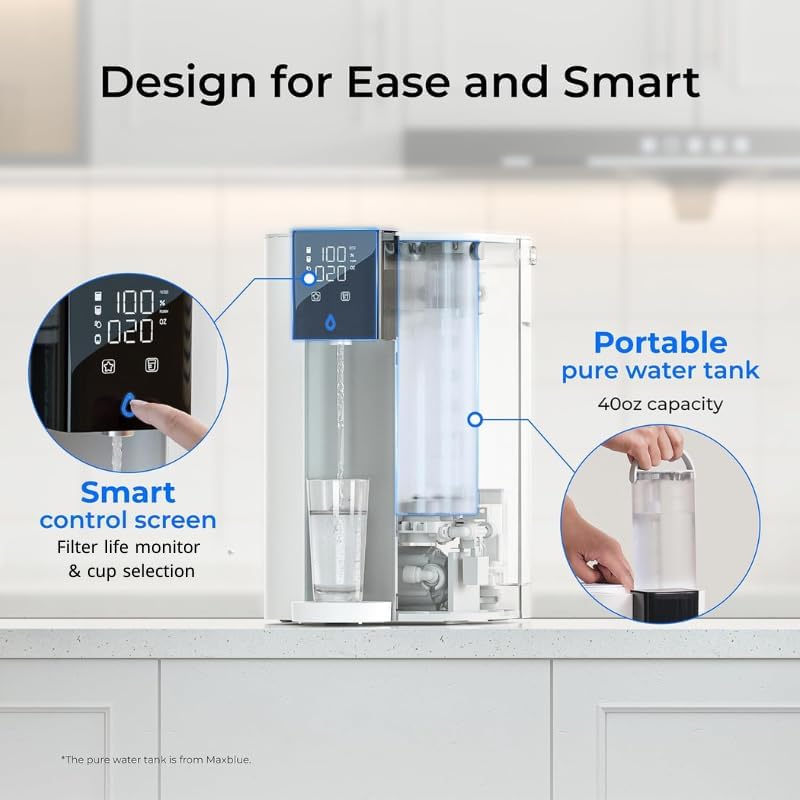
An illustration of the Waterdrop CoreRO system highlighting the smart control screen and the portable pure water tank, demonstrating its ease of use and design.

A detailed diagram illustrating the 7-stage filtration process, including PP cotton, scale inhibitor, carbon fiber, RO membrane, activated carbon layer, and pH+ mineral filter.
Initial Setup and Flushing Process
Follow these steps for the initial setup and to properly flush your new system:
- Unpack all components and place the system on a stable, flat surface.
- Ensure the raw water tank and pure water pitcher are clean before use.
- Install the composite filter according to the instructions provided in the filter packaging.
- Fill the raw water tank with tap water and place it securely into the system.
- Connect the power cord and power on the unit.
- The system will automatically begin the flushing process. The screen will display the flushing progress (e.g., 50%).
- When the screen indicates 50% and the water tank indicator lights up, empty the raw water tank of the concentrated wastewater and refill it with fresh tap water.
- Continue this process until the screen shows 100%, indicating the flushing process is complete. This ensures optimal filter performance and water quality.

An infographic showing the benefits of the Waterdrop CoreRO system, including 7-stage filtration, alkaline mineral addition, and the ease of enjoying pure, fresh water.
Operating Instructions
Dispensing Water
The smart control screen allows for easy operation and customization of water dispensing:
- Ensure the raw water tank is filled with tap water.
- Place a glass or container under the dispenser nozzle.
- Use the touch control screen to select your desired water volume (e.g., 4oz, 8oz, 16oz, 20oz, MAX, or Custom).
- Press the dispense button to start the water flow.
Portable Pure Water Pitcher
The system includes a portable pure water pitcher (40oz capacity) that can be easily removed and placed in your refrigerator for chilled water as desired.

An image demonstrating the various water volume options available on the control panel and how the portable pure water tank can be stored in a refrigerator.
Maintenance and Filter Replacement
Filter Lifespan and Replacement
The 7-in-1 composite filter provides approximately 12 months of protection. The smart control screen will provide a filter lifespan reminder when replacement is needed.
- When the filter replacement indicator appears on the screen, order a new filter (Model: C1RFG).
- Turn off and unplug the system from the power outlet.
- Remove the old filter by twisting it counter-clockwise until it detaches.
- Insert the new filter into the designated slot and twist clockwise until it is securely in place.
- Plug in and power on the system. Perform the initial flushing process as described in the "Initial Setup" section to prime the new filter.
Cleaning
Regularly clean the raw water tank and pure water pitcher with mild soap and water. Wipe the exterior of the unit with a damp cloth. Do not use abrasive cleaners or harsh chemicals, as these may damage the surface.
Troubleshooting Guide
| Problem | Possible Cause | Solution |
|---|---|---|
| Flushing process stuck at 50% | Wastewater not emptied from raw water tank | Ensure you empty the raw water tank of concentrated wastewater and refill with fresh tap water when the screen indicates 50% during the flushing process. Repeat until 100% is reached. |
| High TDS reading | Filter nearing end of life; improper flushing; source water TDS too high | Check filter lifespan indicator and replace if necessary. Ensure proper flushing was performed. Verify source water TDS is below 500 PPM. |
| No water dispensed | Raw water tank empty; power issue; system error | Refill raw water tank. Check power connection. Consult customer support if problem persists. |
| Water tastes unusual | New filter not fully flushed; filter needs replacement | Perform full flushing cycle for new filters. Replace filter if it's old. |
Product Specifications
- Brand: Waterdrop
- Model Name: WD-C1SL
- Product Dimensions: 8.3"L x 11.7"W x 13.7"H
- Installation Type: Countertop
- Power Source: Corded Electric
- Item Weight: 1.81 pounds (0.82 Kilograms)
- Supported Water TDS Level Maximum: 500 PPM
- Special Feature: Reduce TDS, Alkaline Minerals
- Color: Pure White - Alkaline
- First Available: July 4, 2023
Warranty and Customer Support
Waterdrop products come with a standard manufacturer's warranty. Please refer to the warranty card included with your product for specific terms and conditions regarding coverage and duration.
For technical assistance, troubleshooting, or replacement parts, please contact Waterdrop customer support. Our team is available to help you with any questions or concerns you may have.
Visit the official Waterdrop website for more information and support: www.waterdropfilter.com
Documents and downloads
Ask a question about this manual
Ask about setup, troubleshooting, compatibility, parts, safety, or missing instructions. Manuals+ will review the question and use this page’s manual context to help answer it.