1. Introduction
This manual provides essential information for the safe and efficient use of your new MP myPhone N23 Plus 5G Smartphone and myPhone Watch Elegant 2 Smartwatch bundle. This modern set combines an advanced smartphone with a functional smartwatch, designed to enhance your daily comfort and access to the latest innovations. Please read this manual thoroughly before operating your devices.
2. Safety Information
- Battery Safety: Do not disassemble, puncture, or modify the battery. Avoid exposure to extreme temperatures or direct sunlight.
- Water Resistance: The Watch Elegant 2 is IP67 certified for dust and water resistance. Avoid prolonged submersion or use in hot water. The N23 Plus 5G is not specified as water-resistant; avoid contact with liquids.
- Charging: Use only approved chargers and cables. Do not charge devices near flammable materials.
- Disposal: Dispose of devices and batteries according to local regulations. Do not dispose of with household waste.
- Driving Safety: Do not operate your smartphone or smartwatch in a manner that distracts you from driving or other activities requiring full attention.
3. Package Contents
Ensure all items are present in your package:
- myPhone N23 Plus 5G Smartphone
- myPhone Watch Elegant 2 Smartwatch
- USB Type-C Charging Cable (for Smartphone)
- Charging Cable (for Smartwatch)
- Interchangeable Silicone Strap (for Smartwatch)
- Quick Start Guide
- Warranty Card
4. Device Overview
4.1 myPhone N23 Plus 5G Smartphone
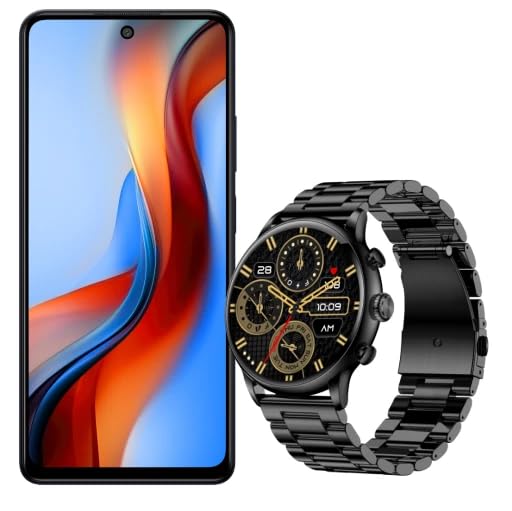
An image showing the myPhone N23 Plus 5G smartphone on the left with its screen displaying a colorful abstract wallpaper, and the myPhone Watch Elegant 2 smartwatch on the right, featuring a black metallic strap and a dark watch face with gold accents, displaying '10:09 AM'.
The myPhone N23 Plus 5G is an advanced smartphone featuring a large 6.78-inch FHD+ display with a 120 Hz refresh rate for smooth visuals. It is powered by a Mediatek D6020 processor and runs on the latest Android version, ensuring a clear and intuitive user experience. Key features include:
- Connectivity: 5G, NFC for digital payments, Bluetooth 5.2 for high-quality audio.
- Camera: Triple rear camera with a 50-megapixel main lens and AI support, plus an 8-megapixel front camera.
- Storage & RAM: 256 GB internal memory (expandable up to 1 TB with microSD) and 8 GB RAM (expandable up to 16 GB).
- Battery: 5,000 mAh battery for extended use.
4.2 myPhone Watch Elegant 2 Smartwatch
The myPhone Watch Elegant 2 is a versatile smartwatch designed for daily use and active lifestyles. It features an elegant metal casing and comes with an interchangeable silicone strap. Key features include:
- Display: 1.43-inch AMOLED screen with 466 x 466 pixels resolution, offering vibrant colors and an Always On Display function.
- Connectivity: Bluetooth Calling for making and receiving calls directly from the watch.
- Durability: IP67 certified for dust and water resistance.
- Notifications: Displays notifications from applications and messengers.
- Battery: 300 mAh battery, providing up to 7 days of battery life with energy-saving AMOLED technology.
- Features: Time display, GPS functionality.
5. Setup
5.1 Smartphone Setup (myPhone N23 Plus 5G)
- Insert SIM Card: Locate the SIM card tray on the side of the phone. Use the provided SIM ejector tool to open the tray. Insert your Nano-SIM card(s) and/or microSD card into the designated slots. Close the tray securely.
- Power On: Press and hold the Power button until the myPhone logo appears.
- Initial Configuration: Follow the on-screen prompts to select your language, connect to Wi-Fi, and set up your Google account.
- Charge Battery: Connect the USB Type-C cable to the phone's charging port and the other end to a power adapter. Charge the phone fully before first use.
5.2 Smartwatch Setup (myPhone Watch Elegant 2)
- Charge Battery: Connect the smartwatch to its charging cable. Ensure the charging pins align correctly. Charge the watch fully.
- Power On: The watch will typically power on automatically when removed from the charger or by pressing and holding the side button.
- Install Companion App: On your smartphone, download and install the official myPhone Watch companion application from the Google Play Store.
- Pair with Smartphone: Open the companion app on your smartphone. Follow the in-app instructions to pair your smartwatch via Bluetooth. Ensure Bluetooth is enabled on both devices.
- Strap Attachment: Attach the desired strap (metal or silicone) to the smartwatch body.
6. Operating Your Devices
6.1 Smartphone Operation
- Navigation: Use touch gestures (tap, swipe, pinch) to navigate the Android interface.
- Calls & Messaging: Use the Phone and Messages apps for communication.
- Camera: Open the Camera app to capture photos and videos with the 50 MP triple camera or 8 MP front camera.
- NFC Payments: Enable NFC in settings and configure your digital wallet app for contactless payments.
- 5G Connectivity: The phone automatically connects to 5G networks where available, providing faster data speeds.
6.2 Smartwatch Operation
- Bluetooth Calling: Once paired, you can answer incoming calls or dial numbers directly from your watch.
- Notifications: View incoming messages, app alerts, and calendar reminders on your watch screen.
- Health Tracking: Utilize the watch's sensors for activity tracking, heart rate monitoring, and other health-related features (specific features depend on the companion app).
- Always On Display: The AMOLED screen supports Always On Display, showing essential information without needing to wake the screen fully.
- GPS: Use the integrated GPS for location tracking during outdoor activities.
7. Maintenance
- Cleaning: Use a soft, lint-free cloth to clean the screens and bodies of both devices. Avoid abrasive materials or harsh chemicals.
- Software Updates: Regularly check for and install software updates for both your smartphone and the smartwatch companion app to ensure optimal performance and security.
- Battery Care: To prolong battery life, avoid fully discharging the devices frequently. Charge them before they run out completely.
- Strap Care: Clean the smartwatch strap regularly, especially the silicone one, to prevent skin irritation.
8. Troubleshooting
8.1 Common Smartphone Issues
- Device not turning on: Ensure the battery is charged. Press and hold the Power button for at least 10 seconds.
- Apps crashing: Clear the app's cache and data in settings, or reinstall the app. Ensure sufficient RAM is available.
- Poor network signal: Check SIM card insertion. Move to an area with better coverage. Restart the phone.
8.2 Common Smartwatch Issues
- Not pairing: Ensure Bluetooth is on for both devices. Restart both devices. Check the companion app for pairing instructions.
- Notifications not appearing: Check app notification settings on your smartphone and in the smartwatch companion app. Ensure the watch is connected.
- Inaccurate readings: Ensure the watch is worn snugly on your wrist. Clean the sensors.
9. Specifications
9.1 myPhone N23 Plus 5G Smartphone
| Feature | Specification |
|---|---|
| Model Name | N23 Plus 5G |
| Operating System | Android 14 |
| Processor | Mediatek D6020 |
| Display Size | 6.78 Inches FHD+ |
| Refresh Rate | 120 Hz |
| RAM | 8 GB (expandable up to 16 GB) |
| Internal Storage | 256 GB (expandable up to 1 TB with microSD) |
| Main Camera | 50 Megapixels (Triple Camera with AI) |
| Front Camera | 8 Megapixels |
| Battery Capacity | 5000 mAh |
| Connectivity | 5G, NFC, Bluetooth 5.2, USB Type-C |
| Color | Midnight Black |
9.2 myPhone Watch Elegant 2 Smartwatch
| Feature | Specification |
|---|---|
| Model Name | Watch Elegant 2 |
| Display Type | AMOLED |
| Display Size | 1.43 Inches |
| Resolution | 466 x 466 pixels |
| Connectivity | Bluetooth Calling |
| Water Resistance | IP67 Certified |
| Battery Capacity | 300 mAh |
| Battery Life | Up to 7 days (typical use) |
| Special Features | Always On Display, GPS, Interchangeable Strap |
10. Warranty and Support
Your MP myPhone N23 Plus 5G Smartphone and Watch Elegant 2 Smartwatch are covered by a manufacturer's warranty. Please refer to the warranty card included in your package for specific terms and conditions. For technical support, troubleshooting assistance, or warranty claims, please contact MP myPhone customer service through their official website or the contact information provided in your product documentation.
For the latest information and support resources, visit the official MP myPhone website.