
1. Introduction
Thank you for choosing the ExtreLife MagSafe Wallet. This innovative wallet combines secure card storage with advanced tracking features, an adjustable stand, and strong magnetic attachment, designed to enhance your iPhone experience. This manual will guide you through the setup, operation, and maintenance of your new wallet.
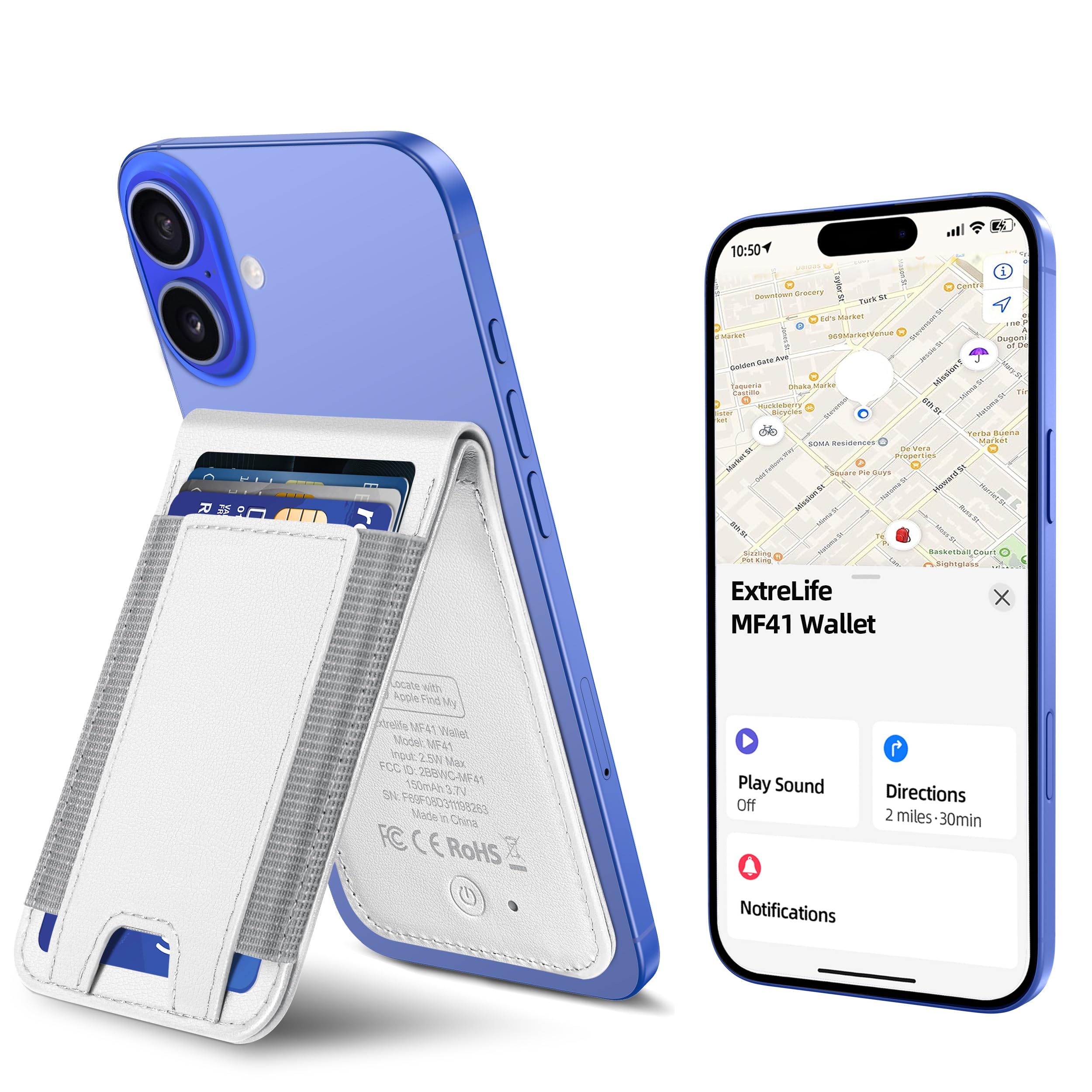
Image: ExtreLife MagSafe Wallet in White, attached to an iPhone, showcasing its sleek design.
2. Setup and Pairing with Apple Find My
The ExtreLife MagSafe Wallet integrates with Apple Find My technology, allowing you to track its location, play a sound, and receive 'Left Behind' notifications. Follow these steps to pair your wallet:
- Enable Two-Factor Authentication: Ensure Two-Factor Authentication is turned on for your Apple ID.
- Activate Bluetooth and Find My: On your iPhone, go to Settings and ensure both Bluetooth and the Find My app are enabled.
- Power On the Wallet: Short press the power button on the wallet once to turn it on.
- Add Item in Find My: Open the Find My app on your iPhone. Tap the "Items" tab, then tap the "+" icon to "Add New Item". Select "Other Supported Item" and follow the on-screen prompts to connect your ExtreLife wallet.
Note: Android devices are not supported for the Find My feature.

Image: Visual guide for pairing the ExtreLife MagSafe Wallet with the Apple Find My app.

Image: The wallet actively working with the Apple Find My Network.

Image: 'Left Behind' notification and 'Play Sound' alert feature in action.
3. Operating Instructions
Card Storage
The wallet is designed to hold up to 8 cards. It features 3 individual card slots for organized storage. The RFID-blocking technology helps protect your cards from unauthorized scanning.

Image: Demonstrating the smart card storage capacity of the wallet.

Image: Easy access to cards from the wallet's design.
Adjustable Stand Function
The wallet features a robust, adjustable hinge that allows it to function as a phone stand. You can position your iPhone in both portrait and landscape modes for comfortable viewing at various angles.

Image: The wallet functioning as an adjustable phone stand.
Magnetic Attachment
The ExtreLife wallet boasts a strong magnetic force of up to 4200 Gauss, ensuring a secure and reliable hold to your MagSafe-compatible iPhone or case. This prevents accidental detachment of your wallet and its contents.

Image: Illustration of the enhanced magnetic strength of the wallet.
Wireless Charging
The wallet is designed for convenient wireless charging using MagSafe or other wireless chargers. The internal battery provides up to 4 months of life on a single charge. A charger is not included.

Image: The wallet undergoing wireless charging, emphasizing its 4-month battery life.
4. Compatibility
The ExtreLife MagSafe Wallet is compatible with iPhone 12, 13, 14, 15, 16, and 17 series, including Pro, Pro Max, and Plus models. It is designed to work seamlessly with MagSafe cases or magnetic stickers. It is not compatible with iPhone 13/12 mini or non-magnetic cases.

Image: Compatibility chart for the ExtreLife MagSafe Wallet.
5. Maintenance
To ensure the longevity and optimal performance of your ExtreLife MagSafe Wallet, follow these maintenance guidelines:
- Cleaning: Wipe the wallet with a soft, damp cloth. Avoid harsh chemicals or abrasive cleaners.
- Storage: Store the wallet in a cool, dry place away from direct sunlight and extreme temperatures.
- Card Capacity: Do not overfill the card slots beyond the recommended 8 cards, as this can stretch the material and affect its magnetic closure.
- Magnetic Care: Keep the magnetic surface clean and free from debris to maintain strong attachment to your iPhone.
6. Troubleshooting
If you encounter issues with your ExtreLife MagSafe Wallet, refer to the following troubleshooting tips:
- Wallet Not Connecting to Find My:
- Ensure Bluetooth is enabled on your iPhone.
- Verify that the wallet is powered on (short press the power button).
- Check your iPhone's Find My settings to ensure item tracking is allowed.
- If the issue persists, try resetting the wallet by holding the power button for 10 seconds and then re-pairing.
- Weak Magnetic Attachment:
- Ensure your iPhone or case is MagSafe compatible.
- Clean the magnetic surfaces on both the wallet and your iPhone/case to remove any dust or debris.
- Avoid placing thick objects or non-magnetic materials between the wallet and your iPhone.
- Cards Difficult to Insert/Remove:
- Do not exceed the recommended card capacity (up to 8 cards).
- Ensure cards are inserted correctly into the designated slots.
- Battery Not Charging:
- Ensure you are using a compatible MagSafe or Qi-certified wireless charger.
- Verify the charger is properly connected to a power source.
- Reposition the wallet on the charging pad to ensure proper alignment.
7. Specifications
| Feature | Detail |
|---|---|
| Product Dimensions | 3.94 x 3.94 x 3.94 inches |
| Item Weight | 3.52 ounces (0.1 Kilograms) |
| Item Model Number | EL-MW-IF16-8C |
| Batteries | 1 Lithium Ion battery required (included) |
| Special Features | Adjustable Phone Stand, Max 8+ Cards Storage, Wireless Charging, Stronger Magnetic Force, Works with Apple Find My |
| Form Factor | Wallet |
| Color | White |
| What's in the Box | Magnetic Wallet Find My |
| Manufacturer | ExtreLife |
| Material | Polyurethane |
| Style | Minimalistic and Modern, With a Clean and Sleek White Faux Leather Aesthetic |
8. Warranty and Support
ExtreLife products are designed for durability and performance. This product typically comes with a manufacturer's warranty. For specific warranty details, support, or to address any issues, please contact ExtreLife Direct through the Amazon messaging system or refer to the official ExtreLife website. Please retain your proof of purchase for warranty claims.
9. Product Video Overview
Video: An official overview of the ExtreLife MagSafe Wallet, demonstrating its Apple Find My integration, 8-card holder, and other key features. This video is provided by ExtreLife Direct.