
SMALLRIG Standard Version 4893 (without battery)
SmallRig RC 100B COB Video Light User Manual
Model: Standard Version 4893
1. Introduction
The SmallRig RC 100B COB Video Light is a compact and powerful bi-color lighting solution designed for photography and video production. It features a 100W output, adjustable color temperature from 2700K to 6500K, and high color rendering capabilities (CRI 97+, TLCI 98+). This manual provides essential information for the safe and effective operation of your RC 100B video light.
2. Package Contents
Verify that all items are present in your package:
- RC 100B COB Video Light x 1
- Mini Reflector x 1
- Light Stand Adaptor x 1
- Silicone Diffuser x 1
- 3m USB-C to USB-C Cable x 1
- User Manual x 1

Figure 2.1: Contents of the SmallRig RC 100B Standard Version package.
3. Product Overview
The RC 100B is designed for portability and ease of use, featuring a compact form factor and intuitive controls.

Figure 3.1: Front view of the SmallRig RC 100B COB Video Light with reflector.

Figure 3.2: The compact and lightweight design of the RC 100B, weighing only 700 grams.
4. Setup
4.1 Attaching the Mini Reflector
- Align the three tabs on the mini reflector with the corresponding slots on the front of the RC 100B light.
- Twist the reflector clockwise until it locks securely into place.
4.2 Mounting the Light
- Attach the light stand adaptor to the bottom of the RC 100B.
- Secure the light stand adaptor onto a compatible light stand.
- Adjust the angle of the light using the tilt mechanism on the adaptor.
4.3 Powering the Device
The RC 100B offers versatile power options:
- V-mount Battery: Directly mount a V-mount battery (recommended capacity > 98Wh, output power > 120W, voltage ≤ 35V) to the built-in battery plate on the rear of the unit.
- USB-C PD Fast Charging: Connect a USB-C PD power bank or PD 140W charger to the USB-C port. Supports up to 110W USB-C PD input.
- DC Power Adapter: Use a compatible DC power adapter (not included in this standard version package) to power the unit.
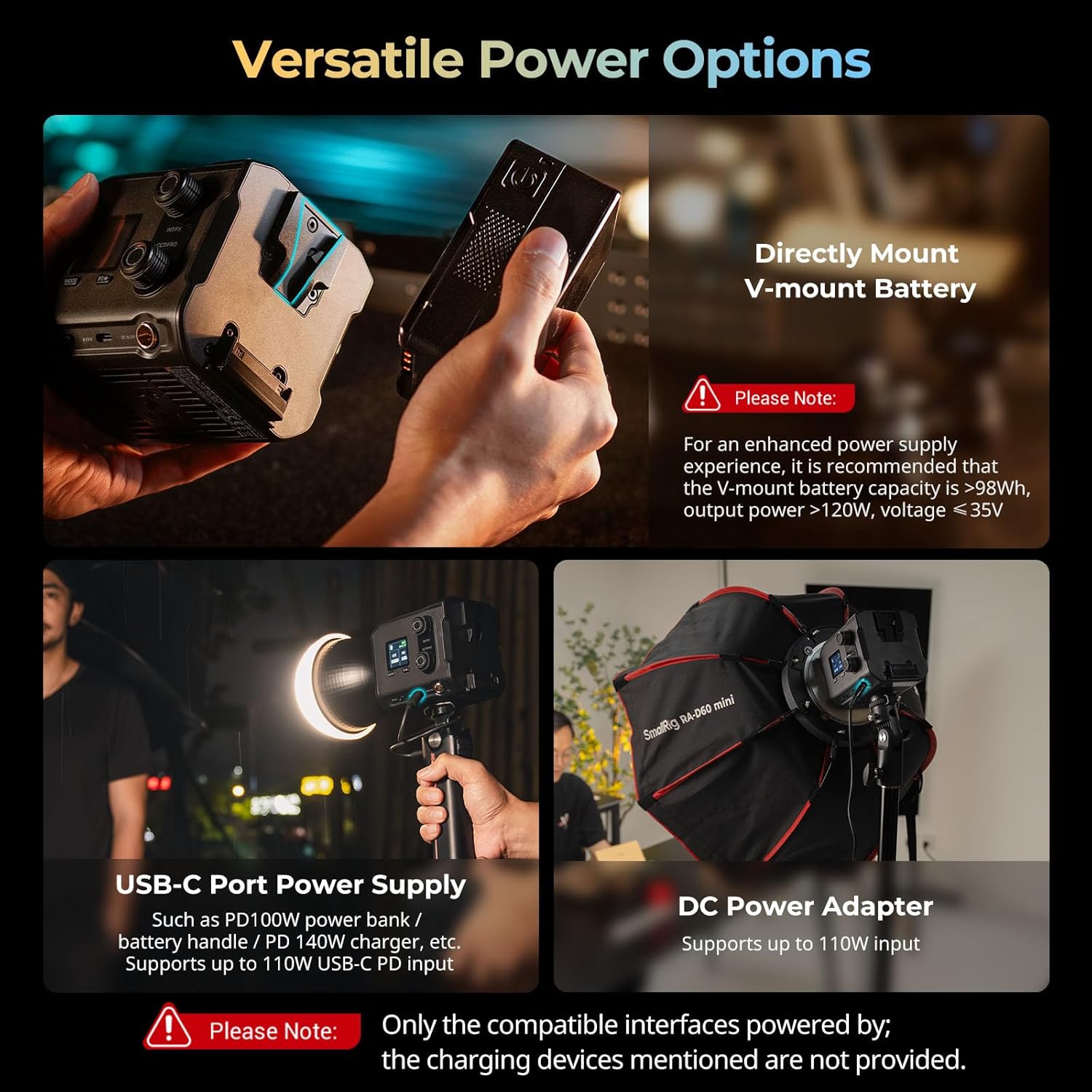
Figure 4.1: Versatile power options for the RC 100B.
5. Operating Instructions
5.1 Onboard Control
The 1.3-inch LCD color screen provides detailed lighting information. Use the control knobs for precise parameter adjustments:
- INT/FX Knob: Adjusts intensity (brightness) or cycles through special effects. Press to switch between intensity and effects modes.
- CCT/FREQ Knob: Adjusts color temperature (CCT) from 2700K to 6500K or frequency in effects mode. Press to switch between CCT and frequency.
- MODE Button: Cycles through different operating modes.
5.2 App Control
Manage the RC 100B wirelessly using the SmallRig GOGO app. Download the app from your device's app store and follow the in-app instructions for pairing and control.

Figure 5.1: Multiple control modes: Onboard and App Control.
5.3 Special Effects
The RC 100B includes 12 common special effects for creative lighting scenarios. These can be accessed and adjusted via the onboard controls or the SmallRig GOGO app.
Video 5.1: Official SmallRig video demonstrating the features of the RC 100B COB Video Light, including its various light effects and controls.
6. Specifications
| Feature | Detail |
|---|---|
| Model | Standard Version 4893 |
| Product Dimensions | 115 x 95 x 95mm (4.53 x 3.74 x 3.74 inches) |
| Item Weight | 700g (1.54 pounds) |
| Color Temperature Range | 2700K-6500K |
| CRI | 97+ |
| TLCI | 98+ |
| Illumination (bare, 1m/5600K) | 4,610 lux |
| Illumination (hyper reflector, 1m/5600K) | 20,100 lux |
| Fan Noise (Normal Mode) | ~26dB (at 1 meter) |
| Fan Noise (ECO Mode) | ~18dB (at 1 meter) |
| Connectivity | USB Type C, Bluetooth (App Control) |
| Material | PC+ABS, Silicone, Aluminum Alloy |
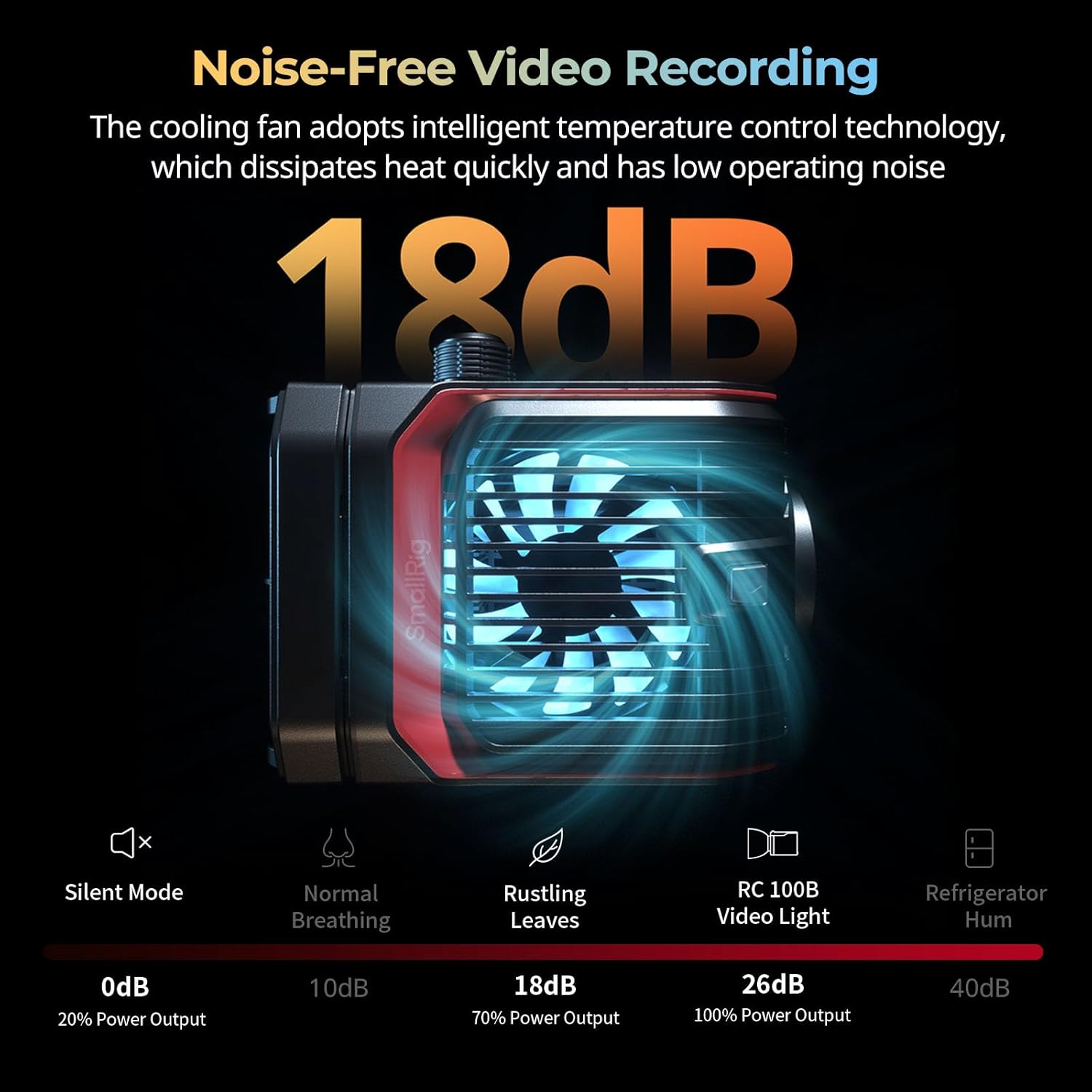
Figure 6.1: Detailed product specifications and package contents.
7. Maintenance
- Keep the device dry. Do not touch with wet hands.
- Clean the surface with a soft, dry cloth. Avoid using harsh chemicals or abrasive materials.
- Ensure the cooling fan vents are clear of obstructions to maintain optimal performance and prevent overheating.
- Store the light in a cool, dry place when not in use, preferably in its original packaging or a protective case.
8. Troubleshooting
| Problem | Possible Cause | Solution |
|---|---|---|
| Light does not turn on. | No power, low battery, or incorrect power connection. | Check power source (V-mount battery, USB-C, DC adapter). Ensure battery is charged or power cable is securely connected. |
| Light flickers or output is inconsistent. | Unstable power supply or loose connection. | Verify power connections. If using a battery, ensure it has sufficient charge. Try a different power source. |
| Fan noise is too loud. | Operating in normal mode or vents are obstructed. | Switch to ECO mode for reduced fan noise. Ensure cooling vents are clear. |
| App control not working. | Bluetooth not enabled, app not paired, or app issue. | Ensure Bluetooth is enabled on your device. Re-pair the light with the SmallRig GOGO app. Restart the app or your device. |
9. Warranty and Support
For warranty information and technical support, please refer to the official SmallRig website or contact their customer service directly. Keep your purchase receipt as proof of purchase for warranty claims.
Official SmallRig Website: www.smallrig.com
Related documentsStandard Version 4893 (without battery)


Ask a question about this manual
Ask about setup, troubleshooting, compatibility, parts, safety, or missing instructions. Manuals+ will review the question and use this page’s manual context to help answer it.