
1. Introduction
Thank you for choosing the Polibi 55.5 inch Multifunctional Oversized Lounge Chair. This manual provides essential information for the safe and efficient use, assembly, and maintenance of your new lounge chair. Please read these instructions carefully before use and retain them for future reference.
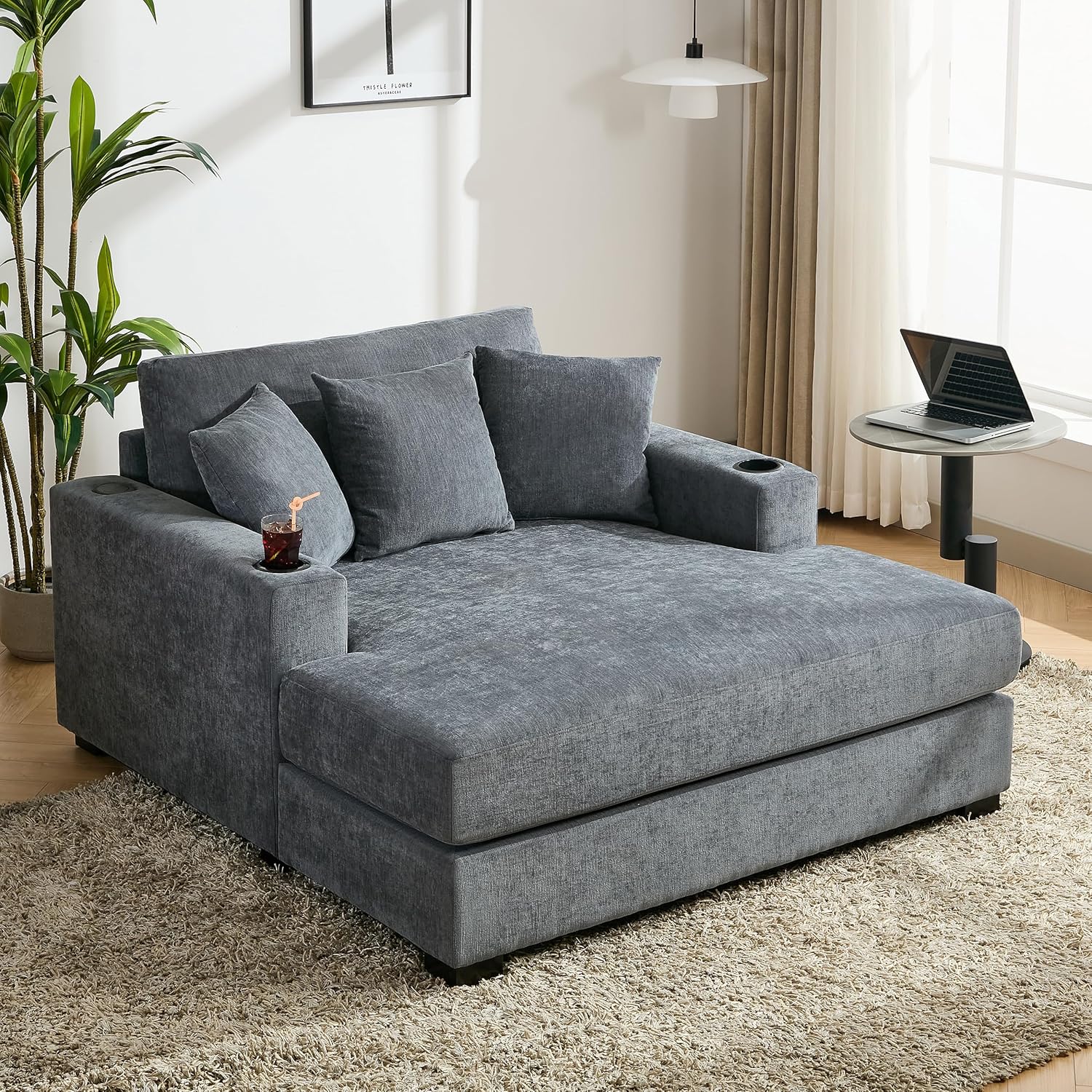
Image 1.1: The Polibi 55.5 inch Multifunctional Oversized Lounge Chair, showcasing its design and size in a living room environment.
2. Safety Information
To ensure safe operation and prevent damage, please observe the following safety guidelines:
- Keep the lounge chair away from open flames or high heat sources to prevent fire hazards.
- Do not place heavy objects on the lounge chair that could damage the fabric or cause it to tip over.
- Supervise children and pets to prevent entrapment risks or injury.
- Unplug the charging station when not in use and follow the manufacturer's instructions for proper care and maintenance of electronic components.
- Ensure all components are securely assembled before use.
3. Package Contents
Your Polibi 55.5 inch Multifunctional Oversized Lounge Chair is delivered in multiple boxes. Please verify that all components are present before beginning setup.
- Lounge Chair Base Unit
- Back Cushions (Quantity: 3)
- Seat Cushions (Quantity: 2)
- Accent Pillows (Quantity: 2)
- Legs (Quantity: 4)
- Hardware Pack (Screws, Allen Wrench)
- Instruction Manual

Image 3.1: A diagram illustrating the dimensions of the lounge chair and confirming that it is delivered in three separate boxes.
4. Setup Instructions
The Polibi lounge chair requires minimal assembly. Follow these steps to set up your chair:
- Unpack Components: Carefully remove all parts from the packaging. Place them on a clean, soft surface to prevent scratches.
- Attach Legs: Locate the four legs and the hardware pack. Align each leg with the pre-drilled holes on the underside of the lounge chair base. Secure them using the provided screws and Allen wrench. Ensure all legs are tightened firmly.
- Position Cushions: Place the seat cushions onto the base. Arrange the back cushions and accent pillows as desired for comfort and aesthetic appeal.
- Connect Charging Station: Ensure the charging station is properly seated in its designated slot on the armrest. Plug the power cord into a standard wall outlet.
5. Operating Instructions
5.1. Built-in Charging Station
The lounge chair features a convenient built-in charging station located on one of the armrests. This station includes:
- Two (2) three-prong AC outlets
- One (1) USB-A port
- One (1) USB-C port
To use, simply plug your electronic devices into the appropriate port. Ensure the lounge chair's power cord is connected to a live electrical outlet.

Image 5.1: A detailed view of the integrated charging station, highlighting its various power outlets and USB ports.
5.2. Armrest Cup Holders
Two cup holders are integrated into the armrests, providing convenient storage for beverages. These holders are designed to keep your drinks stable and within easy reach while you relax.

Image 5.2: A close-up of the armrest cup holders, showing their design and functionality for holding beverages.
6. Maintenance and Care
Proper care will extend the life and appearance of your lounge chair.
6.1. Fabric Care (Removable Washable Covers)
The lounge chair features removable and washable covers for the pillows, backrest, and seat cushions. This allows for easy cleaning and maintenance.
- Removal: Unzip the covers from the cushions and pillows.
- Washing: Machine wash the covers in cold water on a gentle cycle with a mild detergent. Do not use bleach.
- Drying: Tumble dry on low heat or air dry. Avoid high heat to prevent shrinking or damage to the fabric.
- Re-installation: Once dry, carefully place the covers back onto the cushions and pillows, ensuring a snug fit.

Image 6.1: Visual representation of the removable and washable covers, showing a washing machine and a cushion zipper.
6.2. General Cleaning
- Dusting: Regularly dust the lounge chair with a soft, dry cloth.
- Spot Cleaning: For small spills or stains on non-removable parts, blot immediately with a clean, damp cloth. Use a mild fabric cleaner if necessary, testing on an inconspicuous area first.
- Vacuuming: Use a vacuum cleaner with an upholstery attachment to remove crumbs and debris from crevices.
6.3. Charging Station Care
- Ensure the charging station is unplugged from the wall outlet before cleaning.
- Wipe the surface of the charging station with a dry or slightly damp cloth. Do not use abrasive cleaners or immerse in water.
7. Troubleshooting
If you encounter any issues with your lounge chair, refer to the following common problems and solutions:
| Problem | Possible Cause | Solution |
|---|---|---|
| Charging station not working. | Power cord unplugged; outlet not active; device issue. | Ensure the lounge chair's power cord is securely plugged into a functional wall outlet. Test the outlet with another device. Try a different device with the charging station. |
| Lounge chair feels unstable. | Legs not securely tightened. | Check and tighten all four legs using the provided Allen wrench. Ensure the chair is on a level surface. |
| Fabric appears stained or dirty. | Spill or accumulated dirt. | Refer to Section 6.1 for instructions on cleaning removable covers. For non-removable areas, spot clean as described in Section 6.2. |
8. Specifications
Detailed specifications for the Polibi 55.5 inch Multifunctional Oversized Lounge Chair:
- Brand: Polibi
- Model: 55.5 inch Multifunctional Oversized Lounge Chair
- Product Dimensions: 60.6"D x 55"W x 35"H
- Upholstery Fabric Type: Plush Chenille Fabric
- Color: Blue Gray
- Special Features: Built-in Charging Station (2 AC outlets, 1 USB-A, 1 USB-C), 2 Cup Holders
- Assembly Required: No (Minimal setup)
- Product Care Instructions: Washable Covers, Machine Washable
- Seat Fill Material: Polyester
- Back Fill Material: Polyester
- Item Firmness Description: Soft
- Indoor/Outdoor Usage: Indoor
- Cushion Construction: Plush foam cushions
- Min. Required Door Width: 55 Inches

Image 8.1: A detailed view highlighting the high-density chenille fabric, thick seat cushion, and the zipper for removable, washable covers.
9. Warranty and Support
For warranty information or technical support, please contact Polibi customer service. Refer to your purchase documentation for specific warranty terms and contact details.
You can typically find support information on the official Polibi website or through the retailer where the product was purchased.
Polibi Store Link: Visit the Polibi Store on Amazon


