
1. Introduction
This manual provides detailed instructions for the safe installation, operation, and maintenance of your artika Imperium 25W 1-Light Pendant Light Fixture. Please read all instructions carefully before beginning installation and retain this manual for future reference.
The artika Imperium pendant light features a modern geometric design with a matte black and gold finish, suitable for various indoor settings such as kitchens, dining rooms, and living areas. It is designed for use with one T8-E12 / 25W incandescent bulb (not included).

Image 1.1: The artika Imperium 1-Light Pendant Light Fixture.
2. Safety Information
WARNING: RISK OF ELECTRIC SHOCK. Turn off power at the circuit breaker or fuse box before installation or servicing.
- All electrical connections must be in accordance with local and National Electrical Code (NEC) standards.
- Consult a qualified electrician if you are unsure about proper installation.
- Use only the specified bulb type and wattage (T8-E12 / 25W max. incandescent).
- Do not exceed the maximum wattage.
- Ensure the fixture is securely mounted to a structural element of the ceiling.
- This fixture is for indoor use only and is not water resistant.
3. What's in the Box
Verify that all components are present before beginning installation:
- 1 x Imperium Pendant Light Fixture
- 1 x Instruction Manual
- Mounting Hardware (screws, wire nuts, mounting plate)
Bulb is not included.

Image 3.1: Product packaging for the artika Imperium pendant light.
4. Tools Required (Not Included)
- Phillips head screwdriver
- Wire strippers
- Electrical tape
- Ladder
5. Setup and Installation
Follow these steps for proper installation of your pendant light fixture:
- Turn off Power: Before starting, ensure the power to the circuit is turned off at the main electrical panel to prevent electric shock.
- Prepare Mounting: Attach the mounting plate to the junction box in the ceiling using the provided screws. Ensure it is securely fastened.
- Adjust Height: The pendant light features an adjustable height. Determine the desired hanging length before wiring. The minimum height is 60.7 cm (23.9 in) and the maximum height is 210 cm (82.68 in). Adjust the cable length by pushing the cable into the canopy or pulling it out as needed.
- Wire Connections: Connect the fixture's wires to the household electrical wires. Typically, black to black (live), white to white (neutral), and green or bare copper to green or bare copper (ground). Secure connections with wire nuts and electrical tape.
- Mount Fixture: Carefully push the excess wiring into the junction box. Align the fixture canopy with the mounting plate and secure it with the provided screws.
- Install Bulb: Screw one T8-E12 / 25W max. incandescent bulb (not included) into the socket.
- Restore Power: Once installation is complete, restore power at the circuit breaker and test the light fixture.
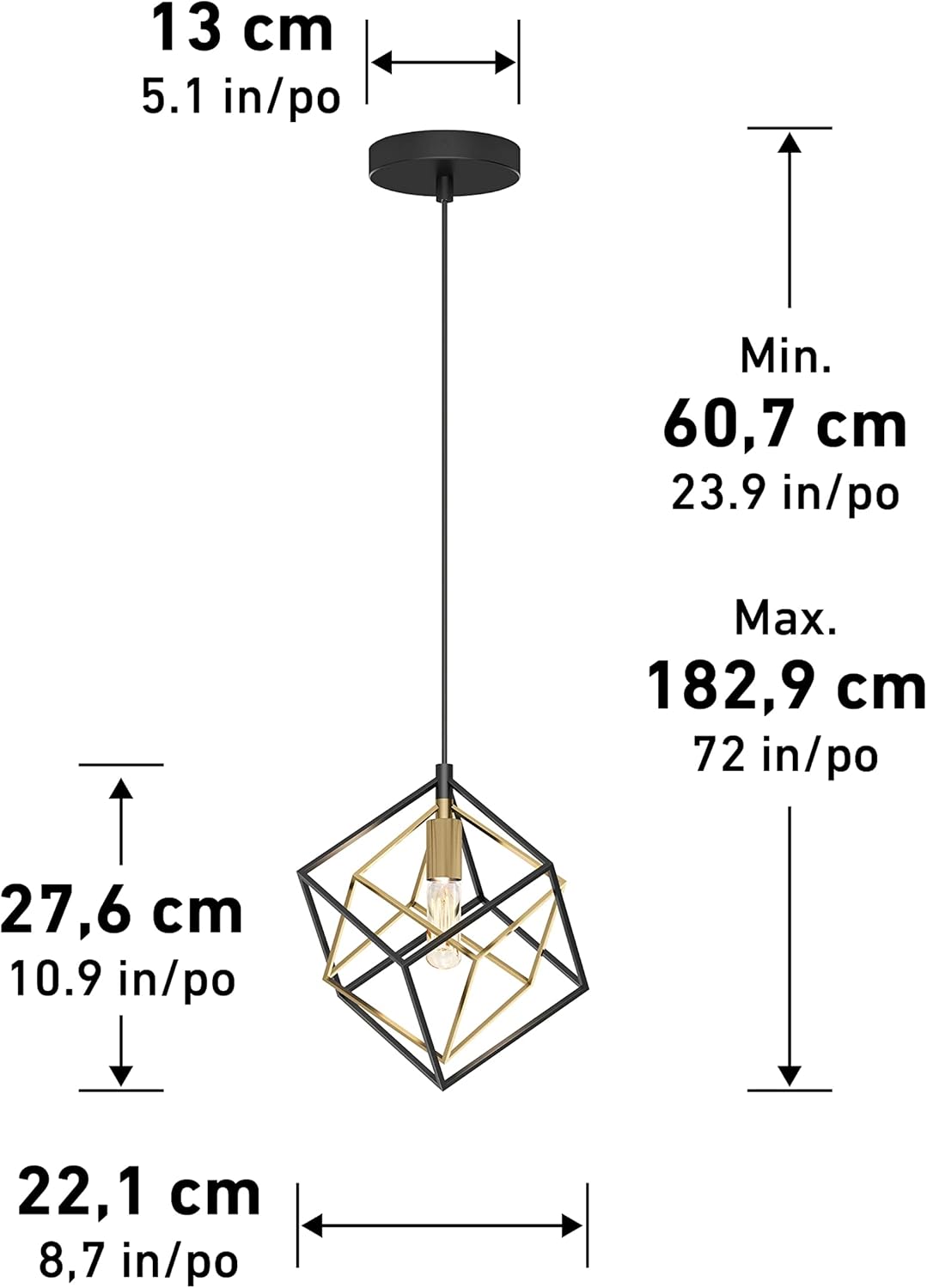
Image 5.1: Dimensions and adjustable height of the pendant light.

Image 5.2: Close-up view of the bulb socket, showing the E12 base.
For visual guidance, please refer to the official product video below:
Video 5.1: Official product video demonstrating the artika Imperium 1-Light Black and Gold pendant light.
6. Operating Instructions
The artika Imperium pendant light operates via a standard wall switch (not included). Once installed and powered, simply use your wall switch to turn the light on or off.
7. Maintenance
To maintain the appearance and functionality of your fixture:
- Cleaning: Disconnect power before cleaning. Wipe the fixture with a soft, dry cloth. Do not use abrasive cleaners or solvents, as they may damage the finish.
- Bulb Replacement: Ensure power is off before replacing the bulb. Allow the bulb to cool completely before touching. Replace with a T8-E12 / 25W max. incandescent bulb.
8. Troubleshooting
| Problem | Possible Cause | Solution |
|---|---|---|
| Light does not turn on | 1. Power is off 2. Loose wire connections 3. Faulty bulb | 1. Check circuit breaker/fuse 2. Verify all wire connections are secure (power off first) 3. Replace bulb |
| Light flickers | 1. Loose bulb 2. Loose wire connections 3. Incompatible dimmer switch (if applicable) | 1. Tighten bulb 2. Check wire connections (power off first) 3. Ensure dimmer is compatible with incandescent bulbs |
9. Specifications
- Brand: artika
- Model: IMPERIUM
- Color: Black and Gold
- Material: Metal (Alloy Steel)
- Light Fixture Form: Pendant
- Room Type: Kitchen, Dining Room, Living Area
- Indoor/Outdoor Usage: Indoor
- Power Source: Corded Electric
- Voltage: 120 Volts (AC)
- Wattage: 25 watts (max)
- Bulb Base: E12
- Number of Light Sources: 1
- Light Source Type: Incandescent (Bulb Not Included)
- Brightness: 2000 lumen (with appropriate bulb)
- Adjustable Height: Yes (Min. 60.7 cm / 23.9 in, Max. 210 cm / 82.68 in)
- Item Dimensions (L x W x H): 8.66"L x 8.66"W x 82.68"H (maximum extended height)
- Required Assembly: Yes
- Certification: ETL
- UPC: 846979036837
10. Warranty
This artika product is covered by a 5-year limited warranty. For detailed warranty terms and conditions, please refer to the official artika website or contact customer support.
11. Support
For technical assistance, missing parts, or any questions regarding your artika Imperium pendant light, please visit the official artika website or contact their customer service department. Contact information can typically be found on the product packaging or the manufacturer's website.
You can also visit the artika Store on Amazon for more information and products.

