
JTLB JTLBodyz50mabv-54
JTLB NTG5 S1 CarPlay/Android Auto Activation Tool User Manual
Model: JTLBodyz50mabv-54
1. Introduction
This manual provides instructions for the JTLB NTG5 S1 CarPlay/Android Auto Activation Tool. This device is designed to activate Apple CarPlay and Android Auto functionalities in compatible Mercedes-Benz vehicles equipped with the NTG5.1 infotainment system. It offers a plug-and-play solution via the OBD2 port, enabling seamless smartphone integration with your car's entertainment system.
2. Safety Information
- Ensure the vehicle's ignition is off before connecting or disconnecting the tool.
- Do not force the tool into the OBD2 port. It should fit snugly.
- Keep the device away from water, extreme temperatures, and direct sunlight.
- This tool is intended for use by individuals familiar with basic automotive procedures. If unsure, consult a professional.
- Only use this tool with compatible vehicles as specified in the compatibility section. Using it with unsupported vehicles may cause damage.
3. Package Contents
- 1 x JTLB NTG5 S1 Activation Tool
- 1 x User Manual (this document)
4. Product Overview
The JTLB NTG5 S1 Activation Tool is a compact, blue-colored device designed for easy handling and direct connection to your vehicle's OBD2 port. It features a standard OBD2 connector on one end and a USB port on the side, which may be used for firmware updates (check manufacturer's website for details).

Figure 1: Front view of the JTLB NTG5 S1 Activation Tool. The device is blue with a black OBD2 connector and a white label indicating "NTG5S1 -Apple Carplay- -Android Auto- Activation Tool".
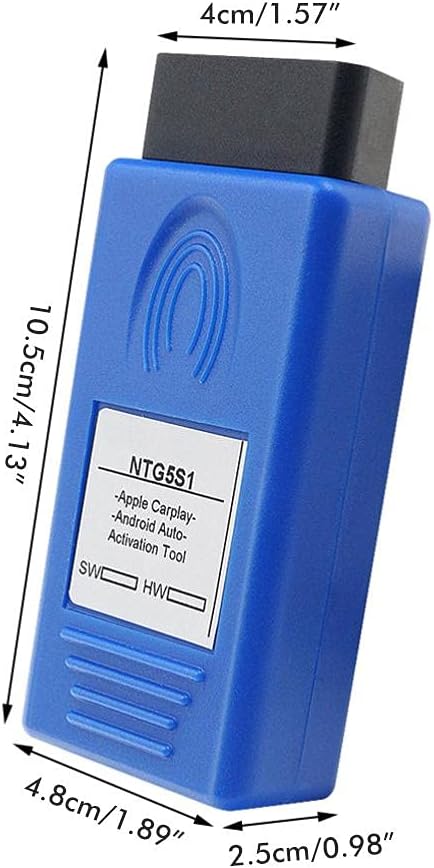
Figure 2: Side view of the JTLB NTG5 S1 Activation Tool showing its dimensions: approximately 10.5 cm (4.13 inches) in length, 4.8 cm (1.89 inches) in width, and 4 cm (1.57 inches) in thickness.
5. Specifications
| Feature | Detail |
|---|---|
| Brand | JTLB |
| Model Number | JTLBodyz50mabv-54 |
| Item Weight | 2.72 ounces |
| Package Dimensions | 4.72 x 2.36 x 1.57 inches |
| Connectivity | OBD2 Plug and Play |
| Supported Features | Apple CarPlay, Android Auto |
| Compatibility | Mercedes-Benz NTG5.1 systems (specific models/years listed below) |
6. Compatibility
This activation tool is compatible with Mercedes-Benz vehicles equipped with the COMAND NTG5s1 infotainment system. Please verify your vehicle's head unit version before use. Android Auto support is available for car firmware versions from 2016.9 onwards.
Compatible Models (Date of Manufacture):
- A-Class W176: 12.2015+
- B-Class W246: 12.2015+
- E-Class W213: 01.2016+
- CLA-Class W117: 12.2015+
- GLA-Class W156: 12.2015+
- GLE-Class W166: 01.2016+
- GLE Coupe W292: 01.2016+
- GLS-Class X166: 01.2016+
- CLS-Class W218: 01.2016+
Important Note:
- C/GLC/S Series NTG5.0 and NTG5E are not supported by this tool. These systems typically require a video interface and a separate iPhone box for similar functionality.
- If your head unit is an older version, the function may not work correctly or may not activate. An update to the latest firmware version online may be required.
- Do not insert this OBD tool into unsupported vehicles to avoid potential damage.
7. Setup & Operating Instructions
7.1. Preparation
- Ensure your vehicle is parked safely with the ignition off.
- For Apple CarPlay: Ensure the Siri option on your compatible iPhone is enabled.
- Use the original charging cable for your compatible smartphone for optimal connection.
7.2. Activation Steps
- Locate your vehicle's OBD2 port. This is typically found under the dashboard on the driver's side.
- With the vehicle's ignition off, firmly plug the JTLB NTG5 S1 Activation Tool into the OBD2 port.
- Turn the vehicle's ignition to the ON position (do not start the engine).
- The tool will begin the activation process automatically. This may take a few minutes.
- Once the activation is complete, the tool may display a confirmation message or the vehicle's infotainment system may restart.
- Remove the activation tool from the OBD2 port.
- Start your vehicle.
- Connect your compatible smartphone to the vehicle's USB port using its original cable.
- Follow any on-screen prompts on your vehicle's infotainment system to set up CarPlay or Android Auto.

Figure 3: The JTLB NTG5 S1 Activation Tool plugged into a vehicle's OBD2 port, located under the dashboard.

Figure 4: Close-up view of the JTLB NTG5 S1 Activation Tool, highlighting its OBD2 connector and the USB port on its side.
8. Maintenance
- Keep the tool clean and free from dust and debris. Use a soft, dry cloth for cleaning.
- Store the tool in a cool, dry place when not in use.
- Avoid dropping the tool or subjecting it to strong impacts.
9. Troubleshooting
Common Issues and Solutions:
- Tool does not power on: Ensure it is firmly plugged into the OBD2 port and the vehicle's ignition is in the ON position.
- CarPlay/Android Auto does not activate:
- Verify your vehicle's compatibility (NTG5s1 system and correct manufacture date).
- Check if your car's firmware version supports Android Auto (2016.9+).
- For Apple CarPlay, confirm Siri is enabled on your iPhone.
- Ensure you are using the original charging cable for your smartphone.
- Try restarting the vehicle and repeating the activation steps.
- Connection issues with smartphone: Ensure the USB cable is securely connected to both the phone and the vehicle's USB port. Try a different USB port if available.
- "Original Protocol Communication, not effect dealer warranty": This is a feature, not an issue. The tool is designed to use the original vehicle protocol, which should not void your dealer warranty.
If you encounter persistent issues, please refer to the manufacturer's support resources or consult a qualified automotive technician.
10. Warranty and Support
Specific warranty details for the JTLB NTG5 S1 Activation Tool are not provided in this manual. Please refer to the product packaging or the official JTLB website for comprehensive warranty information and customer support contacts.
Ask a question about this manual
Ask about setup, troubleshooting, compatibility, parts, safety, or missing instructions. Manuals+ will review the question and use this page’s manual context to help answer it.