
Uwell Caliburn G3 Pro
Uwell Caliburn G3 Pro Pod System Kit User Manual
Model: Caliburn G3 Pro | Brand: Uwell
1. Introduction
The Uwell Caliburn G3 Pro is a groundbreaking device, being the first in the VAPE industry to feature a full-screen design. This innovative device offers both visual appeal and advanced functionality. It delivers a maximum output of 35W and utilizes newly developed 0.4Ω, 3ml integrated cartridges, providing exceptional flavor and extended usage. The adjustable airflow control allows for a customizable draw, catering to individual preferences. Compatible with all CALIBURN G3 cartridges, it supports a wide range of vaping styles from low to high resistance. Equipped with a 1000mAh large-capacity battery and Type-C fast charging, the Caliburn G3 Pro ensures a convenient and satisfying vaping experience.

Image: The Uwell Caliburn G3 Pro showcasing its full-screen display and sleek design.
2. Package Contents
Please verify that all items listed below are included in your package:
- Caliburn G3 Pro Device x 1
- 0.4Ω Caliburn G3 Integrated Coil Cartridge (Side Fill) x 1 (3.0ml)
- 0.9Ω Caliburn G3 Integrated Coil Cartridge (Side Fill) x 1 (2.5ml)
- User Manual x 1
- Type-C Charging Cable x 1
- FlavorKitchen Original Mini Pouch x 1

Image: All components included in the Caliburn G3 Pro starter kit.
3. Product Overview
The Caliburn G3 Pro features a sleek, ergonomic design with a prominent full-screen display that provides all necessary information at a glance. Its robust construction ensures durability, while the intuitive controls make it easy to operate.
Key Features:
- Full-Screen Display: Provides clear visibility of wattage, resistance, battery level, and puff count.
- Adjustable Airflow Control: A slider on the side of the device allows precise adjustment of the airflow, customizing your draw from tight to loose.
- High Power Output: Capable of up to 35W, offering versatile vaping experiences.
- PRO-FOCS Flavor Technology: Ensures consistent and authentic flavor delivery from your e-liquid.
- Large E-liquid Capacity: The 0.4Ω cartridge holds 3ml of e-liquid, reducing the frequency of refills.

Image: Detailed view of the device's airflow control and screen interface.
Video: An official product video demonstrating the features and design of the Uwell Caliburn G3 Pro Pod System Kit.
4. Setup Guide
4.1. Charging the Device
Before first use, fully charge your Caliburn G3 Pro device.
- Connect the provided Type-C charging cable to the charging port at the bottom of the device.
- Plug the other end of the cable into a suitable USB power source (e.g., wall adapter, computer USB port).
- The screen will display the charging status. The battery icon will animate, and the percentage will increase as it charges.
- Once fully charged, the battery indicator will show full, and the animation will stop. Disconnect the device.
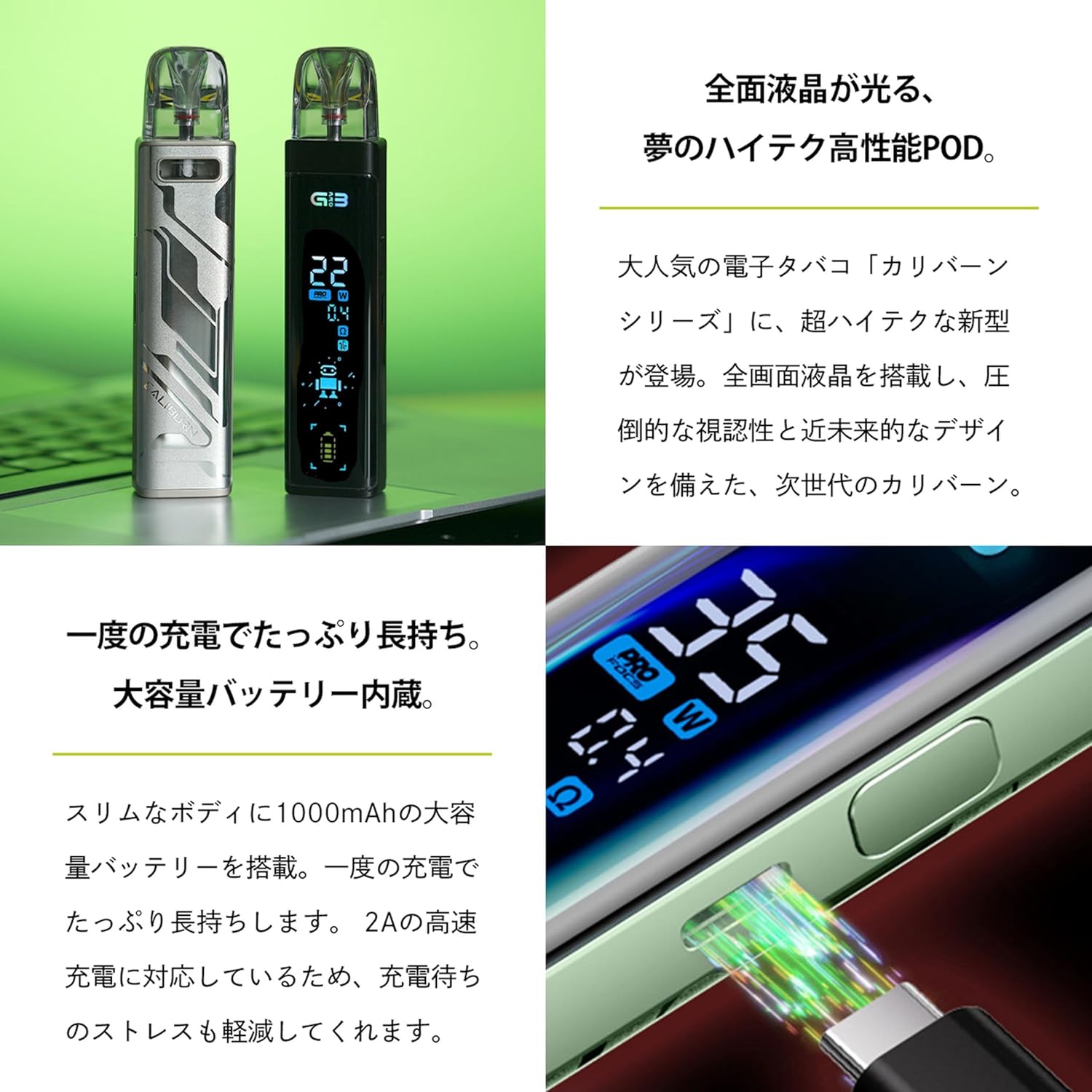
Image: The Caliburn G3 Pro device being charged via its Type-C port.
4.2. Filling the Pod Cartridge
The Caliburn G3 Pro uses integrated coil cartridges. Choose between the 0.4Ω (3ml) or 0.9Ω (2.5ml) pod.
- Remove the pod cartridge from the device by pulling it upwards.
- Locate the silicone stopper on the side of the pod. Open the stopper to reveal the filling port.
- Insert the nozzle of your e-liquid bottle into the filling port and slowly fill the pod. Do not overfill.
- Securely close the silicone stopper.
- For first-time filling or with a new pod, wait at least 5-10 minutes after filling to allow the e-liquid to fully saturate the coil. This prevents dry hits and extends coil life.

Image: A transparent view of the Caliburn G3 Pro pod, highlighting the integrated coil.
4.3. Installing the Pod Cartridge
Once filled and saturated, insert the pod back into the device.
- Align the filled pod with the pod slot on the device.
- Push the pod firmly downwards until it clicks into place.
- Ensure the pod is securely seated to prevent leaks and ensure proper connection.
5. Operating Instructions
5.1. Power On/Off
- To turn the device ON: Press the fire button 5 times rapidly. The screen will light up.
- To turn the device OFF: Press the fire button 5 times rapidly. The screen will turn off.
5.2. Vaping
The Caliburn G3 Pro supports both button-activated and auto-draw vaping.
- Button-Activated: Press and hold the fire button while inhaling from the mouthpiece.
- Auto-Draw: Simply inhale from the mouthpiece without pressing any buttons. The device will automatically activate.
5.3. Adjusting Wattage
The device allows wattage adjustment from 5W to 35W.
- Press the fire button 3 times rapidly to enter wattage adjustment mode. The wattage value on the screen will blink.
- Use the adjustment buttons (usually located below the screen, if present, or the fire button itself for cycling) to increase or decrease the wattage. Refer to the screen for current wattage.
- Once the desired wattage is set, wait a few seconds, and the device will automatically confirm the setting.
5.4. Airflow Adjustment
Customize your draw by adjusting the airflow.
- Locate the airflow slider on the side of the device.
- Slide it up or down to open or close the airflow intake.
- Adjust to your preference for a tighter (less airflow) or looser (more airflow) draw.
6. Maintenance
6.1. Cleaning the Device
- Regularly wipe down the device with a clean, dry cloth to remove any dust or e-liquid residue.
- If e-liquid leaks into the pod connection area, remove the pod and clean the contacts inside the device and on the bottom of the pod with a cotton swab lightly dampened with isopropyl alcohol. Ensure it is completely dry before reassembling.
6.2. Replacing the Pod Cartridge
Pod cartridges have a limited lifespan and should be replaced when you notice a burnt taste, reduced vapor production, or diminished flavor.
- Remove the old pod cartridge from the device.
- Dispose of the old pod responsibly.
- Take a new pod cartridge and fill it with your desired e-liquid (refer to Section 4.2).
- Allow the new pod to sit for 5-10 minutes after filling to ensure the coil is fully saturated.
- Insert the new pod into the device until it clicks into place.
7. Troubleshooting
| Problem | Possible Cause | Solution |
|---|---|---|
| No vapor/Device not firing |
|
|
| Leaking from pod |
|
|
| Burnt taste |
|
|
| Device not charging |
|
|
8. Specifications
| Feature | Detail |
|---|---|
| Dimensions | 123mm x 27mm x 17mm |
| Output Wattage | Max 35W |
| E-liquid Capacity | 3ml (0.4Ω pod), 2.5ml (0.9Ω pod) |
| Coil Resistance | 0.4Ω, 0.9Ω |
| Filling Type | Side Fill |
| Battery Capacity | 1000mAh |
| Charging Port | Type-C |
| Product Features | Airflow Control Function, Full Screen Design |
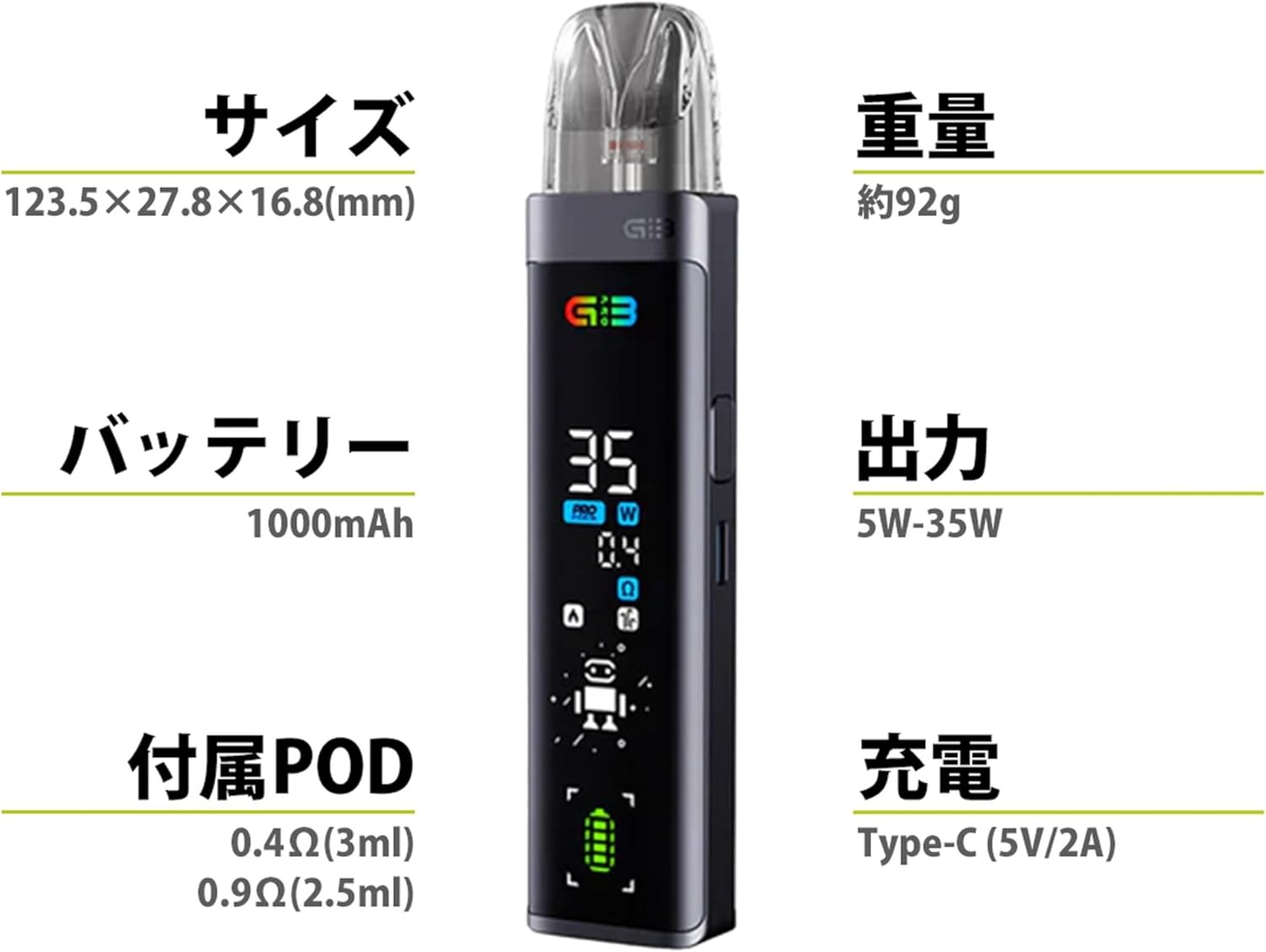
Image: Visual representation of the Caliburn G3 Pro's key specifications.
9. Warranty and Support
For warranty information and customer support, please refer to the warranty card included in your package or contact the seller/manufacturer directly. Keep your proof of purchase for any warranty claims.
For further assistance or inquiries, please visit the official Uwell website or contact their customer service department.
Related documentsCaliburn G3 Pro


Ask a question about this manual
Ask about setup, troubleshooting, compatibility, parts, safety, or missing instructions. Manuals+ will review the question and use this page’s manual context to help answer it.