
1. Introduction
This manual provides detailed instructions for the safe installation, operation, and maintenance of your new Conciseer 52-inch modern ceiling fan with integrated light. Please read all instructions carefully before beginning installation and retain this manual for future reference.
2. Safety Information
WARNING: To reduce the risk of fire, electric shock, or personal injury, always turn off the main power supply at the circuit breaker before installation, servicing, or cleaning.
- All wiring must be in accordance with national and local electrical codes.
- Installation should be performed by a qualified electrician.
- The mounting bracket must be securely fastened to a building structure capable of supporting the fan's weight.
- Ensure the fan blades are installed at a minimum of 7 feet (2.1 meters) from the floor.
- Do not operate the fan if any part is damaged.
3. Package Contents
Carefully unpack your ceiling fan and inspect the contents to ensure all parts are present and undamaged. If any parts are missing or damaged, contact Conciseer customer support.
- Fan Motor Assembly
- Fan Blades (5)
- Downrods (various lengths: 4.92 inches, 9.84 inches)
- Mounting Bracket
- Canopy and Canopy Cover
- LED Light Kit
- Remote Control with Wall Mount
- Hardware Pack (screws, wire nuts, etc.)
- Instruction Manual

Image: Fan components including 5 blades and two downrod lengths (4.92 and 9.84 inches).
4. Setup and Installation
Follow these steps for proper installation. Refer to the detailed instructions provided in the included manual for specific diagrams and safety precautions.
4.1 Pre-Installation
- Turn off power at the circuit breaker.
- Ensure the mounting location can support the fan's weight (13.6 pounds / 6.18 kg).
- Identify the live, neutral, and ground wires from your ceiling junction box.
4.2 Assembling the Fan
- Select the appropriate downrod length for your ceiling height.
- Feed the fan's electrical wires through the chosen downrod and the canopy cover.
- Secure the downrod to the fan motor assembly using the provided pins and screws.
- Attach the fan blades to the motor housing.
4.3 Mounting and Wiring
- Secure the mounting bracket to the ceiling junction box.
- Hang the fan motor assembly onto the mounting bracket.
- Connect the fan's wires to the household wiring (live to live, neutral to neutral, ground to ground) using wire nuts.
- Connect the remote receiver wires as per the diagram in the manual.
- Tuck all wires neatly into the junction box and secure the canopy cover.
4.4 Light Kit Installation
- Connect the LED light kit wires to the fan motor assembly wires.
- Secure the light kit to the bottom of the fan motor assembly.
For a visual guide on the installation process, please refer to the video below:
Video: Detailed installation guide for the ceiling fan, including unboxing, assembly, and wiring connections.
5. Operating Instructions
Your Conciseer ceiling fan is operated using the included remote control. Ensure the remote has working batteries.
5.1 Remote Control Functions

Image: Remote control layout with all functions clearly labeled.
- Power Button (Red): Turns the fan and light on/off simultaneously.
- Fan On/Off: Turns the fan on or off independently.
- Light On/Off: Turns the light on or off independently.
- Speed Control (+/-): Adjusts fan speed through 6 settings.
- Dimmer Control (+/-): Adjusts light brightness (10% to 100%).
- Fan Forward (F): Sets blades to rotate counter-clockwise for downward airflow (summer mode).
- Fan Reverse (R): Sets blades to rotate clockwise for upward airflow (winter mode).
- Timer (2H, 4H, 8H): Sets the fan to turn off automatically after 2, 4, or 8 hours.
- Natural Wind: Simulates a natural breeze by varying fan speed.
- Mute: Silences remote control beeps.
5.2 Fan Speed Settings

Image: Visual representation of 6 fan speed settings and their corresponding wind intensity.
- Speed 1-2: Soft and comfortable airflow, ideal for gentle circulation.
- Speed 3-4: Medium and natural airflow, suitable for everyday use.
- Speed 5-6: Strong and cool airflow, perfect for maximum cooling.
5.3 Light Color Temperature (CCT)
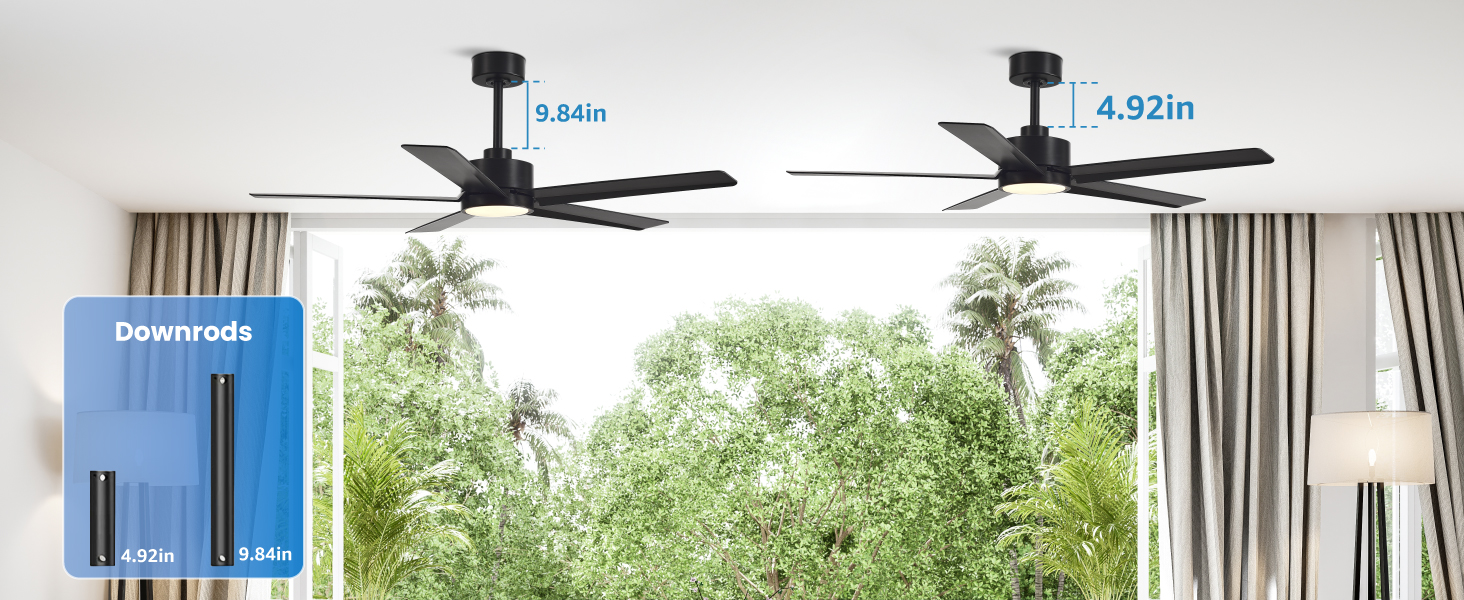
Image: Examples of the three adjustable light color temperatures (3000K, 4500K, 6500K).
The integrated LED light offers 3 color temperature options (3000K, 4500K, 6500K) to match your preference and room ambiance. Use the light on/off button to cycle through the color temperatures.
5.4 Reverse Function

Image: Illustration of summer mode (downward airflow) and winter mode (upward airflow) for air circulation.
The reversible DC motor allows you to change the direction of the fan blades. In summer, set the fan to rotate counter-clockwise for a cooling downward breeze. In winter, set it to rotate clockwise to circulate warm air near the ceiling, promoting better heat distribution.
Watch the remote control in action to see how to operate the fan and light features:
Video: Demonstration of the remote control functions for the 52-inch ceiling fan, including speed and light adjustments.
6. Maintenance
Regular maintenance ensures optimal performance and longevity of your ceiling fan.
- Cleaning: Periodically clean the fan blades and motor housing with a soft, damp cloth. Do not use abrasive cleaners or solvents.
- Tightening Screws: Check all screws on the fan and mounting bracket annually to ensure they are secure.
- Blade Balance: If the fan wobbles, check that all blades are securely attached and balanced. A balancing kit (not included) may be used if necessary.
7. Troubleshooting
If you encounter any issues with your fan, refer to the following common problems and solutions:
| Problem | Possible Cause | Solution |
|---|---|---|
| Fan does not start | No power to the fan; Loose wire connections; Remote control battery low. | Check circuit breaker; Verify all wire connections are secure; Replace remote control batteries. |
| Fan wobbles | Loose blade screws; Unbalanced blades; Loose mounting bracket. | Tighten all blade screws; Use a balancing kit; Ensure mounting bracket is securely fastened. |
| Light does not work | Loose light kit wiring; Faulty LED driver. | Check light kit wire connections; Contact customer support for replacement parts. |
| Remote not working | Low battery; Remote not paired. | Replace remote battery; Refer to manual for remote pairing instructions. |
If the problem persists after trying these solutions, please contact Conciseer customer support.
8. Specifications
- Brand: Conciseer
- Model Name: CS5202
- Size: 52 Inch
- Color: Black
- Electric Fan Design: Ceiling Fan
- Number of Blades: 5
- Motor Type: DC (Quiet Operation, High Efficiency)
- Number of Speeds: 6
- Control Method: Remote Control
- Light Wattage: 18 watts
- Light Features: 3 CCT Dimmable (3000K, 4500K, 6500K)
- Special Features: Quiet Operation, Remote Controlled, Timer, Reversible Airflow, Natural Wind Mode
- Indoor/Outdoor Usage: Indoor
- Item Weight: 13.6 pounds (6.18 Kilograms)
- Product Dimensions: 8 x 51.97 x 8 inches
9. Warranty and Support
Conciseer provides professional after-sales support. If you have any questions during the installation or usage of your ceiling fan, please feel free to contact us. Specific warranty details may be available on the product packaging or the official Conciseer website.
For further assistance, please visit the Conciseer Store on Amazon.