
Introduction
This manual provides detailed instructions for the assembly, operation, and maintenance of your HOOBRO TV Stand with Power Outlets, Model BB80DS01. Please read all instructions carefully before assembly and use to ensure safe and proper functionality.
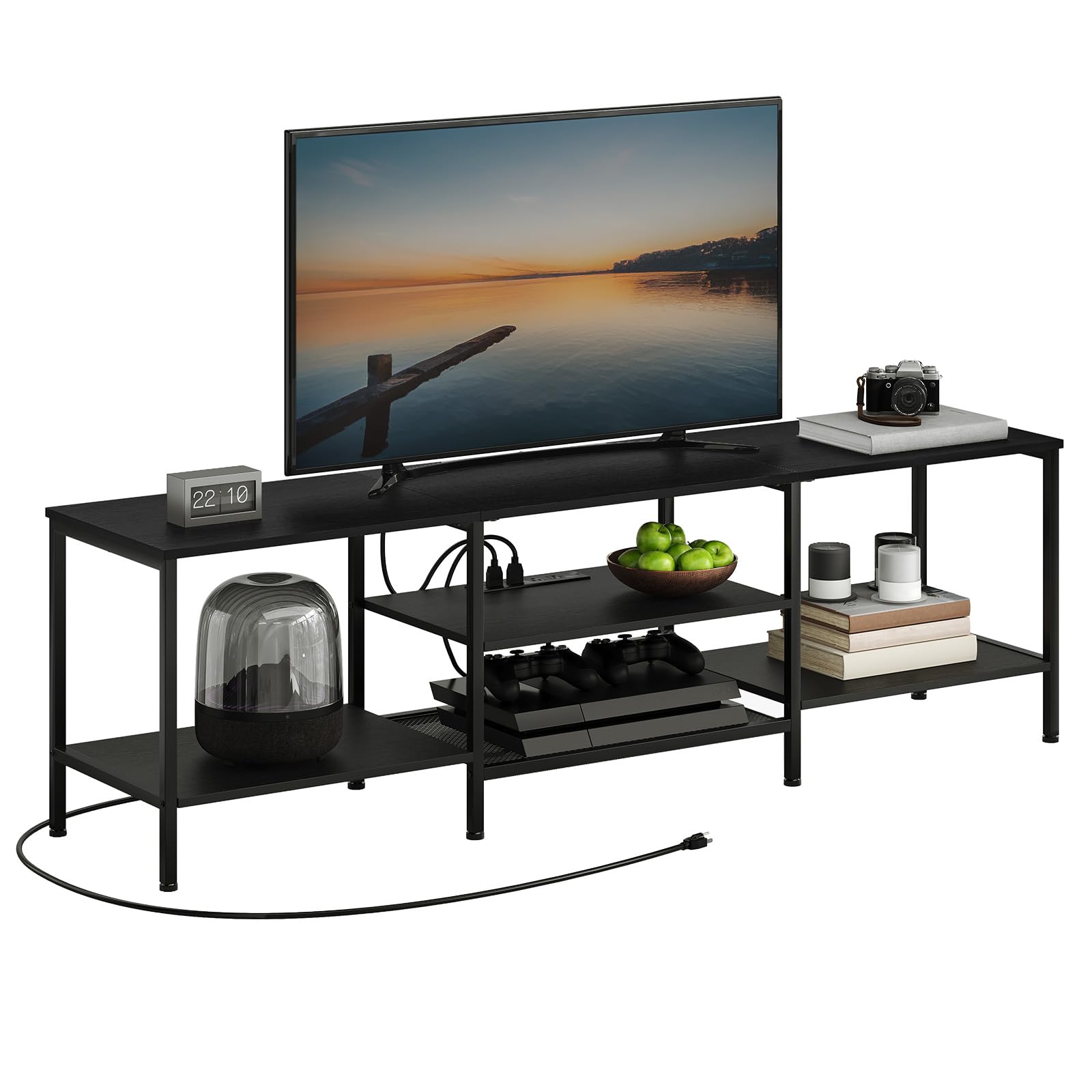
Image: The HOOBRO TV Stand (BB80DS01) in a living room, showcasing its design and capacity for a large TV and various media components.
Important Safety Information
Always follow the assembly instructions provided. Do not exceed the maximum load capacity of 130 lb (59 kg) on the top shelf and 22 lb (10 kg) on each lower shelf. To prevent tip-over, secure the furniture to the wall using the appropriate hardware provided. Keep the area around the furniture clear of items that could cause it to tip over. This product is intended for use with TVs up to 75 inches. Always ensure the TV is properly secured to the furniture.
Setup and Assembly
The HOOBRO TV Stand is designed for straightforward assembly. Please ensure all parts are present before beginning. A detailed instruction manual and necessary accessories are included in the package.
Assembly Steps:
- Unpack all components and verify against the parts list in the included manual.
- Identify each part and hardware.
- Follow the step-by-step diagrams in the provided assembly instructions.
- Ensure all screws and fasteners are tightened securely, but do not overtighten.
- Attach the anti-tip hardware to the wall as instructed to prevent accidental tipping.
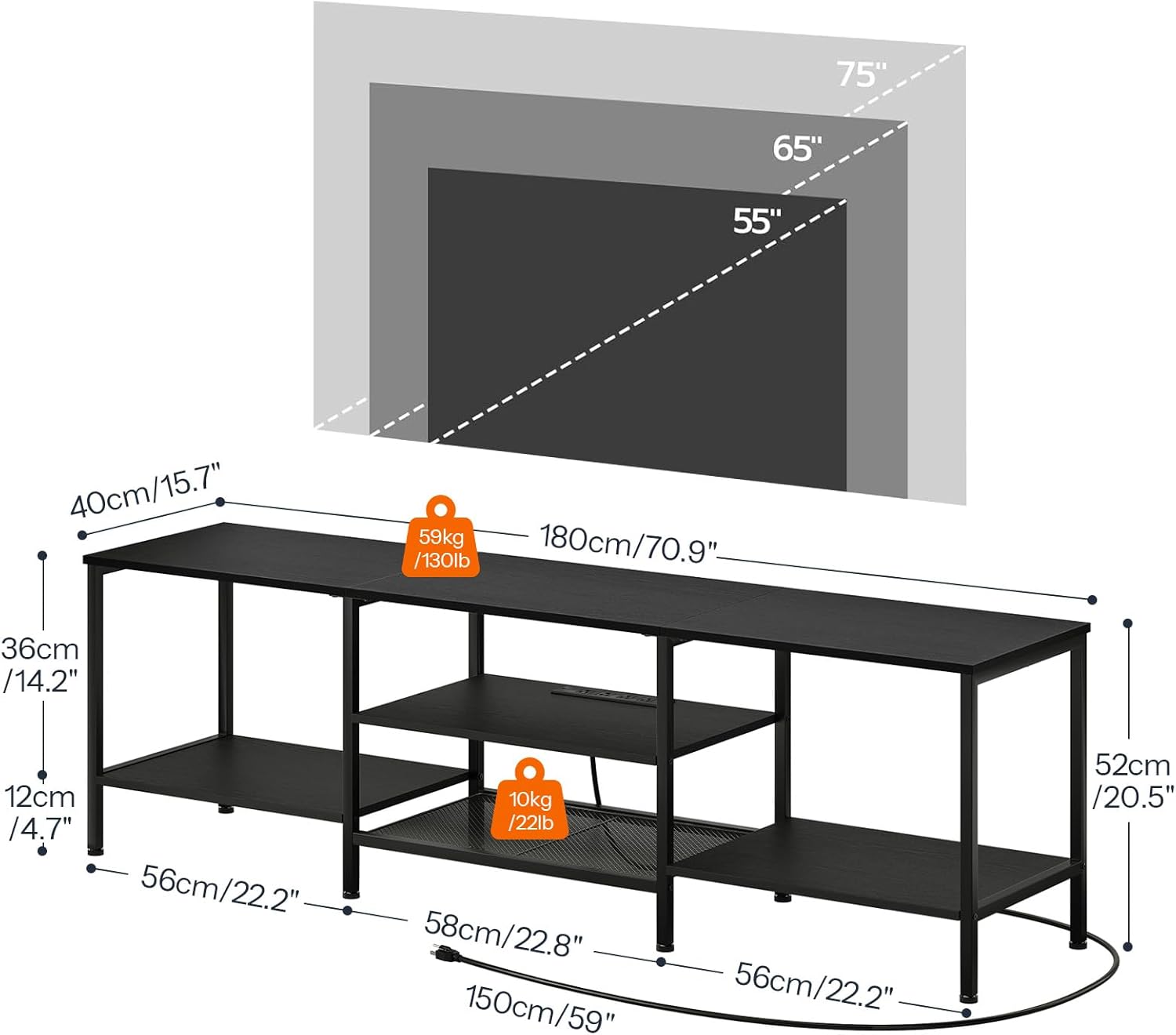
Image: Detailed dimensions and weight limits for the HOOBRO TV Stand, indicating support for TVs up to 75 inches and shelf capacities.
Assembly Tips:
- It is recommended to assemble the unit on a soft, clean surface to prevent scratches.
- Having a second person for assembly can be beneficial, especially for larger components.
- Use a proper screwdriver for tightening screws to ensure a secure fit.
Operation and Features
The HOOBRO TV Stand is designed for convenient organization and power management of your entertainment devices.
Power Outlets:
The integrated power strip features 4 standard AC outlets (125V/12A) and a 4.9-foot power cord. This allows for easy connection and charging of your television, game consoles, DVD players, sound systems, and other electronic devices directly on the stand, reducing cable clutter.

Image: A close-up view of the 4 integrated power outlets on the TV stand, showing connected plugs and the power cord specifications.
Open Storage Design:
The 3-tier open storage design provides ample space for media equipment and decorative items. The 70.9-inch wide top shelf accommodates TVs up to 75 inches. The middle and bottom shelves are ideal for media gear, books, magazines, CDs, and remote controls, helping to keep your living space organized.

Image: The HOOBRO TV Stand's open shelves, demonstrating its capacity to store various media components and decorative items, making them easily accessible.
Care and Maintenance
Proper care will ensure the longevity and appearance of your HOOBRO TV Stand.
- Cleaning: Wipe surfaces with a soft, damp cloth. Avoid harsh chemicals or abrasive cleaners, which can damage the finish.
- Dusting: Regularly dust the stand with a dry, soft cloth to prevent buildup.
- Spills: Immediately wipe up any spills to prevent staining or damage to the particleboard.
- Heat and Moisture: Avoid placing hot items directly on the surface. Use coasters or protective pads. Keep the stand away from excessive moisture or direct sunlight to prevent warping or fading.
- Inspections: Periodically check all fasteners and retighten if necessary to maintain stability.
Troubleshooting
If you encounter any issues with your HOOBRO TV Stand, refer to the following common solutions:
| Problem | Possible Cause | Solution |
|---|---|---|
| Stand feels wobbly or unstable. | Loose fasteners or uneven floor. | Ensure all screws are securely tightened. Adjust the leveling feet on the bottom of the stand to compensate for uneven surfaces. |
| Parts do not align during assembly. | Incorrect orientation of parts or manufacturing variation. | Double-check the assembly diagrams. If a part is slightly bent (e.g., metal frame), gently adjust it if possible. Contact customer support if parts are significantly damaged or misaligned. |
| Power outlets are not working. | Not plugged into a wall outlet, tripped circuit breaker, or faulty device. | Ensure the stand's power cord is fully plugged into a functional wall outlet. Check your home's circuit breaker. Test the outlets with a different device. |
| Scratches or damage to surfaces. | Impact during assembly or use. | Use touch-up pens for minor scratches. For deeper damage, consider contacting customer support for advice or replacement parts if within warranty. |
Product Specifications
| Feature | Detail |
|---|---|
| Brand | HOOBRO |
| Model Number | BB80DS01 |
| Color | Black |
| Material | Particleboard and Metal |
| Overall Dimensions (L x W x H) | 70.9" x 15.7" x 20.5" (180cm x 40cm x 52cm) |
| Top Shelf Weight Capacity | 130 lb (59 kg) |
| Lower Shelf Weight Capacity (each) | 22 lb (10 kg) |
| Number of Shelves | 3 |
| Power Outlets | 4 AC Outlets (125V/12A) |
| Power Cord Length | 4.9 feet |
| Compatible TV Size | Up to 75 inches |
| Mounting Type | Floor Mount |
| Assembly Required | Yes, with detailed instructions and accessories provided. |
Warranty and Support
Warranty Information:
HOOBRO products are manufactured with quality and durability in mind. For specific warranty details regarding your BB80DS01 TV Stand, please refer to the warranty card included in your product packaging or visit the official HOOBRO website. Keep your purchase receipt as proof of purchase for any warranty claims.
Return Policy:
This product is eligible for a refund or replacement within 30 days of purchase, subject to the retailer's return policy.
Customer Support:
If you have any questions, require assistance with assembly, or need to report missing/damaged parts, please contact HOOBRO customer support. Contact information can typically be found on the HOOBRO brand store page or within your product documentation.
For online support, visit the HOOBRO Brand Store on Amazon.
