
Introduction
This manual provides comprehensive instructions for the safe and effective use of your ORDRO G730 4K Digital Camera. Please read this manual thoroughly before operating the camera and retain it for future reference.
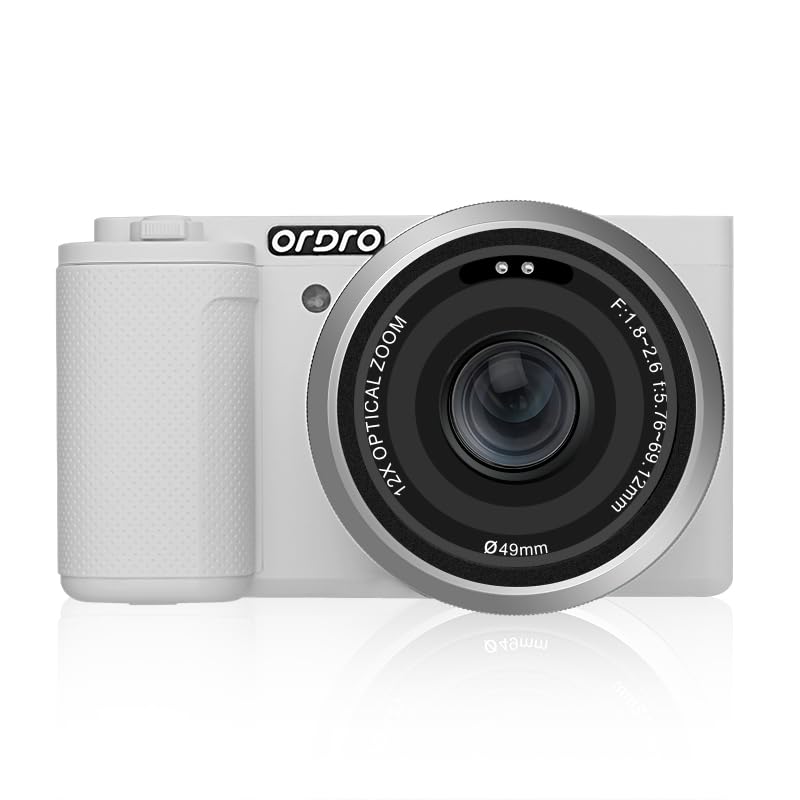
The ORDRO G730 4K Digital Camera, a compact device designed for high-quality photography and videography.
What's in the Box
Verify that all items listed below are included in your package:
- ORDRO G730 Digital Camera
- Remote Control
- 64GB Memory Card
- 1400mAh Battery x2
- User Manual
- USB Cable (Type-C)
- Camera Strap
- Card Reader

An overview of all components included in the ORDRO G730 camera package, neatly arranged.
Setup
1. Battery Installation
- Open the battery compartment cover located on the bottom of the camera.
- Insert the 1400mAh Lithium-Ion battery, ensuring the correct orientation as indicated inside the compartment.
- Close the battery compartment cover securely.
2. Memory Card Installation
- Locate the SD card slot, typically on the side or bottom of the camera.
- Insert the provided 64GB SD memory card into the slot until it clicks into place. Ensure the card is inserted with the correct orientation.
- To remove, gently press the card until it springs out.
3. Charging the Battery
- Connect the camera to a power source using the supplied USB Type-C cable.
- The charging indicator light will illuminate. It will turn off or change color once charging is complete.
- A full charge typically takes approximately 2-3 hours.
4. Initial Power On
- Press and hold the power button until the screen illuminates.
- Follow any on-screen prompts to set the date, time, and language.
Operating Instructions
Basic Controls and Display
The ORDRO G730 features a 3.2-inch 270-degree rotatable touchscreen for intuitive navigation and control. Most settings can be adjusted directly on the screen.

The camera's 270-degree flip screen allows for flexible viewing angles, ideal for vlogging and self-portraits.
Shooting Modes
The camera offers 9 distinct shooting modes to adapt to various scenarios:
- Manual Exposure (M): Full control over aperture and shutter speed.
- Program Auto (P): Camera sets aperture and shutter speed for optimal exposure.
- Aperture Priority (A): You set the aperture, camera sets shutter speed.
- Shutter Priority (S): You set the shutter speed, camera sets aperture.
- Video Recording: Dedicated mode for capturing video.
- Scene Selection (SCN): Pre-set modes for specific scenes like Landscape, Sports, etc.
- Macro: For close-up photography.
- Infrared Night Vision: For shooting in low-light or dark conditions.
- Automatic: Camera automatically adjusts all settings.

The camera's mode dial and screen display the range of versatile shooting modes available for different photographic needs.
Focusing
The G730 supports both Autofocus (AF) and Manual Focus (MF). You can switch between these modes based on your shooting requirements.
- Autofocus: Press the shutter button halfway down to allow the camera to automatically focus on your subject.
- Manual Focus: Use the focus ring on the lens or the touchscreen controls to adjust focus manually.

Demonstration of the camera's autofocus capability, showing a clear difference between an unfocused and a sharply focused image.
Zoom Functionality
The camera features a 12X optical zoom lens (5.76-69.12mm) for bringing distant subjects closer without loss of quality. Digital zoom may also be available for further magnification.

An illustration of the camera's zoom capabilities, comparing 12X optical zoom with a higher hybrid zoom level.
Video Recording
Record high-quality videos in 4K (3840p) resolution at 30 or 60 frames per second. The camera uses MP4 format for video capture.
Photo Capture
Capture still images up to 56MP (effective still resolution of 64MP) with the CMOS sensor. The camera supports various image settings including ISO 100-3200 and adjustable color temperature (3000K-9000K).
Creative Filters
Enhance your photos and videos with 15 built-in creative filters. Access these filters through the camera's menu or touchscreen interface.

A visual representation of different creative filters that can be applied to images using the ORDRO G730 camera.

An example demonstrating the effect of a beauty filter, showing a subtle enhancement to a portrait.
Webcam Functionality
Connect the ORDRO G730 to your personal computer via USB to use it as a high-quality webcam for video calls or streaming.
Compact and Portable Design
The G730 is designed to be lightweight and compact, making it suitable for travel and on-the-go content creation.

The ORDRO G730 camera easily fits into a small bag, emphasizing its portability.
Official Product Video
An official video showcasing the features and usage of the ORDRO G730 Digital Camera.
Maintenance
Cleaning the Camera
- Use a soft, dry cloth to clean the camera body.
- For the lens, use a lens brush or a specialized lens cleaning cloth and solution. Avoid touching the lens surface with your fingers.
- Do not use organic solvents or strong chemicals to clean the camera.
Battery Care
- Store batteries in a cool, dry place when not in use.
- Avoid fully discharging the battery frequently to prolong its lifespan.
- If the camera will not be used for an extended period, remove the battery.
Storage
- Store the camera in a dry, dust-free environment.
- Use a camera bag or case to protect it from impacts and scratches.
Troubleshooting
If you encounter issues with your ORDRO G730 camera, refer to the following common problems and solutions:
| Problem | Possible Solution |
|---|---|
| Camera does not power on | Ensure the battery is fully charged and correctly inserted. Try using the second battery provided. |
| Memory card error | Ensure the SD card is inserted correctly. Try reformatting the card (this will erase all data). Use a compatible SD card (up to 64GB). |
| Images are blurry | Check focus mode (AF/MF). Ensure autofocus is engaged or adjust manual focus. Clean the lens. Ensure sufficient lighting. |
| Video recording stops unexpectedly | Ensure the memory card has sufficient free space and is a high-speed card (Class 10 or higher recommended for 4K). |
| Screen is unresponsive | Restart the camera. Ensure the screen is clean and dry. |
Specifications
| Feature | Detail |
|---|---|
| Model Name | ORDRO G730 |
| Photo Sensor Technology | CMOS |
| Photo Sensor Resolution | 56 MP (Effective Still Resolution: 64 MP) |
| Video Resolution | 3840p (4K) |
| Frame Rate | 30 FPS, 60 FPS |
| Optical Zoom | 12x |
| Lens Focal Length | 5.76-69.12mm |
| Aperture Range | F1.8-F2.6 |
| Image Stabilization | Digital |
| Screen Size | 3.2 inches (270° Flip Touchscreen) |
| Focus Type | Auto and Manual Focus (AF/MF) |
| ISO Sensitivity | 100~3200 |
| Color Temperature | 3000K-9000K |
| Supported File Format | MP4 (Video) |
| Compatible Flash Memory | SD (64GB Memory Card included) |
| Battery Type | Lithium Ion (1400mAh x2) |
| Connectivity | USB (Type-C) |
| Special Feature | Night Vision Function, Webcam Function |
Warranty Information
The ORDRO G730 Digital Camera comes with a one-year warranty from the date of purchase. This warranty covers manufacturing defects and malfunctions under normal use. Please retain your proof of purchase for warranty claims. For detailed terms and conditions, refer to the warranty card included in your product packaging or contact customer support.
Customer Support
For technical assistance, troubleshooting not covered in this manual, or warranty inquiries, please contact ORDRO customer support. You can find contact information on the official ORDRO website or through the retailer where you purchased the product.
Manufacturer: Ordro US
Visit the ORDRO Store on Amazon for more information and products.


