
Anpro ACANUU0803
Anpro Electric Drum Set (Model ACANUU0803) User Manual
Your guide to setting up, operating, and maintaining your Anpro Electric Drum Set.
Introduction
The Anpro Electric Drum Set is a portable and versatile electronic drum kit designed for both beginners and experienced players. Featuring 9 responsive drum pads, built-in stereo speakers, and extensive connectivity options including Bluetooth and MIDI, this roll-up drum set offers a comprehensive drumming experience. This manual provides detailed instructions to help you get the most out of your new instrument.
Package Contents
Please verify that all items listed below are included in your package:
- 1x Anpro Electric Drum Set (main unit with 9 drum pads and control panel)
- 2x Drum Pedals (for Bass Drum and Hi-hat control)
- 2x Drum Sticks
- 1x USB Cable (for power and charging)
- 1x 3.5mm AUX Input Cable
- 1x User Manual (this document)

Product Overview
The Anpro Electric Drum Set features 9 distinct drum pads and a central control panel. Understanding the layout and functions is key to operation.
Drum Pad Layout

- Bass Drum: Produces a low-frequency kick drum sound.
- Tom 1, Tom 2, Floor Tom: Provide various tom-tom sounds.
- Snare Drum: Generates a sharp, percussive snare sound.
- Open/Close Hi-hat: Offers open and closed hi-hat sounds.
- Crash Cymbal 1, Crash Cymbal 2: For accentuating beats with a crash sound.
- Ride Cymbal: Provides a sustained cymbal sound.
Control Panel Functions

- DEMO: Plays 10 pre-recorded demo songs in a loop.
- REC: Initiates recording of your drumming.
- PLAY: Plays back the recorded performance.
- STYLE: Switches between 7 different drum styles/tones.
- START/STOP: Controls DEMO and RHY (Rhythm) functions.
- RHY: Plays rhythm in a loop.
- T-/T+: Decreases/Increases tempo.
- V-/V+: Decreases/Increases volume.
- Blue Light: Indicates power on status.
- Green Light: Indicates recording status.
- Red Light: Indicates charging status.
Setup
Follow these steps to set up your Anpro Electric Drum Set for the first time:
- Unpack: Carefully remove all components from the packaging.
- Charge Battery: Connect the drum set to a power source using the provided USB cable. The Red Light on the control panel will indicate charging. A full charge provides up to 5 hours of playtime.
- Place Drum Set: Unroll the silicone drum pad and place it on a flat, stable, and hard surface. This ensures optimal pad responsiveness.
- Connect Pedals: Plug the two drum pedals into the designated pedal jacks on the back of the control panel. One pedal typically controls the Bass Drum, and the other controls the Hi-hat (open/close).
- Power On: Press the power button on the control panel. The Blue Light will illuminate, indicating the device is on.
Operating Instructions
Basic Drumming
Use the provided drum sticks to strike the individual drum pads. Experiment with different pads and the foot pedals to create various drum patterns and rhythms.
Control Panel Usage
- Playing Demos: Press the DEMO button to cycle through the built-in demo songs. Use START/STOP to pause or resume.
- Changing Styles: Press the STYLE button to switch between the 7 available drum styles.
- Adjusting Tempo: Use the T- and T+ buttons to decrease or increase the tempo of demo songs or rhythms.
- Adjusting Volume: Use the V- and V+ buttons to decrease or increase the overall volume.
- Recording: Press REC to start recording your performance. The Green Light will turn on. Press REC again to stop recording.
- Playback: After recording, press PLAY to listen to your recorded drum track.
Connectivity
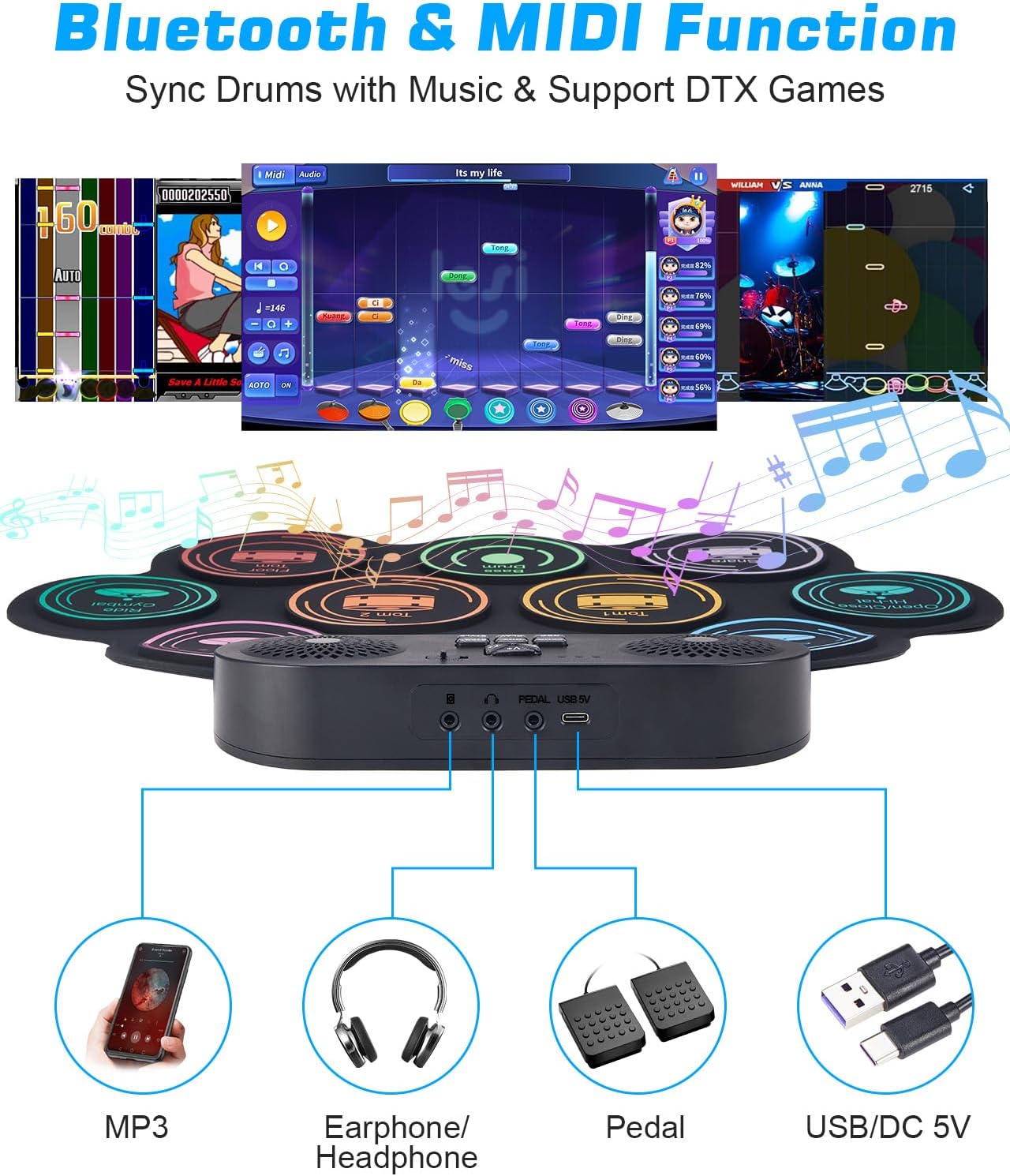
- Headphone Jack: For private practice, connect standard 3.5mm headphones to the headphone output jack. This mutes the built-in speakers.
- AUX Input: Connect an external audio device (e.g., smartphone, MP3 player) to the AUX input jack using the provided 3.5mm AUX cable to play along with your favorite music.
- Bluetooth Connection:
- Ensure the drum set is powered on.
- On your external device (e.g., smartphone, tablet), enable Bluetooth and search for available devices.
- Select either GZUT-MUSIC (for audio playback) or GZUT-MIDI (for MIDI data transfer) from the list of devices.
- Once connected, you can stream audio to the drum set's speakers or use MIDI functionality with compatible applications.
- MIDI Integration: The drum set supports MIDI connectivity via Bluetooth (GZUT-MIDI) or USB. This allows you to connect to computers or other MIDI-compatible devices for advanced music production or drumming software.

Maintenance
Cleaning
The drum set is made of durable silicone. To clean, gently wipe the pads and control panel with a soft, damp cloth. Avoid using harsh chemicals or abrasive cleaners. Ensure the device is powered off and disconnected from power before cleaning.
Storage
When not in use, the silicone drum pad can be rolled up for compact storage. Store in a cool, dry place away from direct sunlight and extreme temperatures. Keep drum sticks and pedals together with the main unit to prevent loss.

Battery Care
To prolong battery life, avoid fully discharging the battery frequently. Charge the device regularly, even if not in constant use. If storing for an extended period, ensure the battery is partially charged (around 50%) and recharge every few months.
Troubleshooting
| Problem | Possible Cause | Solution |
|---|---|---|
| No sound from speakers. | Volume too low; headphones connected; device off. | Increase volume (V+); disconnect headphones; ensure device is powered on. |
| Drum pads not responding. | Drum set on a soft surface; low battery. | Place on a hard, flat surface; charge the battery. |
| Bluetooth connection fails. | Device not in pairing mode; incorrect device selected; interference. | Ensure drum set is on; select 'GZUT-MUSIC' or 'GZUT-MIDI'; try reconnecting; move closer to the drum set. |
| Device not charging. | USB cable or adapter faulty; power source issue. | Check USB cable and adapter; try a different power source. |
Specifications
| Feature | Detail |
|---|---|
| Model Number | ACANUU0803 |
| Drum Pads | 9 (Bass Drum, Tom 1, Snare Drum, Hi-hat (Open/Close), Crash Cymbal 1, Crash Cymbal 2, Ride Cymbal, Floor Tom, Tom 2) |
| Speakers | Built-in Dual Stereo Speakers |
| Connectivity | Bluetooth (GZUT-MUSIC, GZUT-MIDI), MIDI (via USB), 3.5mm Headphone Output, 3.5mm AUX Input |
| Battery | 1200mAh Lithium Ion (included) |
| Playtime | Up to 5 hours on a single charge |
| Material | Silicone Rubber |
| Item Weight | 2.44 pounds (approx. 1.1 kg) |
| Product Dimensions | 193.68 x 12.6 x 17.52 inches (unrolled, approx. 492 x 32 x 44.5 cm) |
Warranty and Support
For information regarding warranty coverage, please refer to the documentation included with your purchase or contact Anpro customer support directly. Keep your purchase receipt as proof of purchase.
For further assistance or technical support, please visit the official Anpro website or contact their customer service department. Contact details are typically found on the product packaging or the brand's official online presence.
Ask a question about this manual
Ask about setup, troubleshooting, compatibility, parts, safety, or missing instructions. Manuals+ will review the question and use this page’s manual context to help answer it.