
DMK SUP20S/T
SUP20S/T Fiber Laser Welding Head User Manual
Model: SUP20S/T | Brand: DMK
1. Introduction
This manual provides essential information for the safe and efficient operation, setup, and maintenance of the DMK SUP20S/T Fiber Laser Welding Head. Designed for precision welding tasks, this handheld laser welding head offers multiple functions including continuous welding, spot welding, and integrated manual/automatic modes.
Its ergonomic and lightweight design ensures ease of use and control, enhancing productivity and weld quality. Please read this manual thoroughly before operating the device.
2. Safety Information
Operating laser equipment requires strict adherence to safety protocols to prevent injury. The SUP20S handheld laser welding gun incorporates a self-developed safety detection system with real-time temperature monitoring to ensure safe operation.
- Always wear appropriate personal protective equipment (PPE), including laser safety glasses, gloves, and protective clothing, when operating the welding head.
- Ensure the work area is well-ventilated and free from flammable materials.
- Never look directly into the laser beam or allow it to strike reflective surfaces.
- Verify all connections are secure before powering on the laser system.
- Familiarize yourself with the emergency stop procedures of your laser welding machine.
- Do not attempt to disassemble or repair the welding head beyond the scope described in this manual. Refer to qualified service personnel for complex repairs.
3. Product Overview and Components
The DMK SUP20S/T Fiber Laser Welding Head is designed for ergonomic handling and efficient performance. Below is an overview of its key components.

Figure 3.1: Labeled diagram of the SUP20S Handheld Laser Welding Gun, showing the Copper Nozzle, Scale Tube, Wire Feeding Bracket, ON/OFF Switch Button, and QBII Protective Cover.
Key components include:
- Copper Nozzle: Directs the shielding gas and provides a stable contact point for welding.
- Scale Tube: Aids in precise positioning and measurement during welding.
- Wire Feeding Bracket: Supports the welding wire feed mechanism (if applicable to your setup).
- ON/OFF Switch Button: Controls the laser emission during operation.
- QBH Protective Cover: Protects the QBH fiber optic connector, ensuring secure and clean connection to the laser source.

Figure 3.2: Overall view of the DMK SUP20S Handheld Laser Welding Head, highlighting its compact and ergonomic design.
4. Specifications
The following table details the technical specifications of the SUP20S Laser Welding Head:
| Parameter | Value |
|---|---|
| Product Name | SUP20S Laser Welding Head |
| Applicable Power Range | ≤2000W |
| Collimated Focal Length | D16 F60mm |
| Focus Focal Length | D20 F150mm |
| Maximum Air Pressure | 15 Bar |
| Vertical Focal Length Adjustment | ±10mm |
| Light Spot Adjustment Range | Line 0-5mm |
| Applicable Wavelength | 1070nm |
| Weight | 0.7kg (approx. 0.8kg as per some diagrams) |
| Supply Voltage | 220±10%V AC 50/60Hz |
| Placement Environment | Smooth, free from vibration and impact |
| Temperature of Working Environment | 10-40°C |
| Humidity of Working Environment | <70% |
| Cooling Method | Water-Cooling |
| Collimating Lens | D20*5/F60 |
| Focusing Lens | D20*4.5/F150 |
| Reflective Mirrors | 30*14 T2 |
| Specifications of Protective Windows | 18*2 |
| Maximum Support Pressure | 10bar |

Figure 4.1: Dimensions and a summary of key specifications for the SUP20S Handheld Laser Welding Gun.
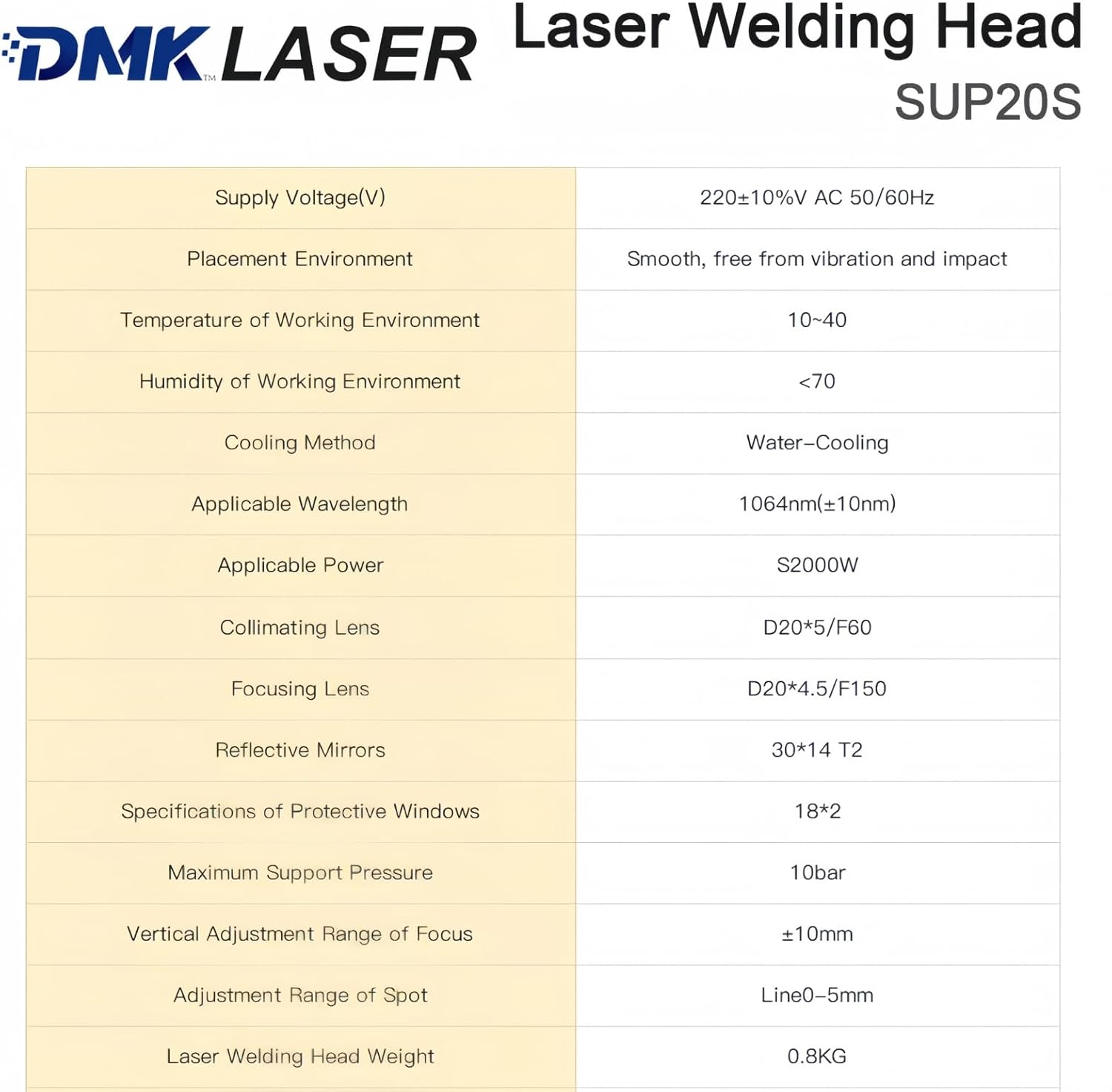
Figure 4.2: Comprehensive technical specifications for the DMK Laser Welding Head SUP20S, including environmental conditions and optical components.
5. Setup
Proper setup is crucial for optimal performance and safety. The SUP20S/T welding head is designed for integration with compatible fiber laser welding machines.
- Connection to Laser Source: Connect the QBH fiber optic cable from your laser welding machine to the QBH connector on the welding head. Ensure the connection is clean and secure. The collimating lenses are integrated with the QBH for easy field replacement.
- Gas Supply: Connect the appropriate shielding gas supply (e.g., Argon, Nitrogen) to the gas inlet on the welding head. Ensure the gas pressure is within the recommended range (Max 15 Bar).
- Cooling System: Verify that your laser welding machine's water-cooling system is properly connected and functioning, as the welding head relies on water-cooling for temperature management.
- Electrical Connections: Ensure all electrical connections for control signals and power (if applicable) are correctly made according to your laser welding machine's manual.
- Nozzle Installation: Attach the appropriate copper nozzle for your welding application.
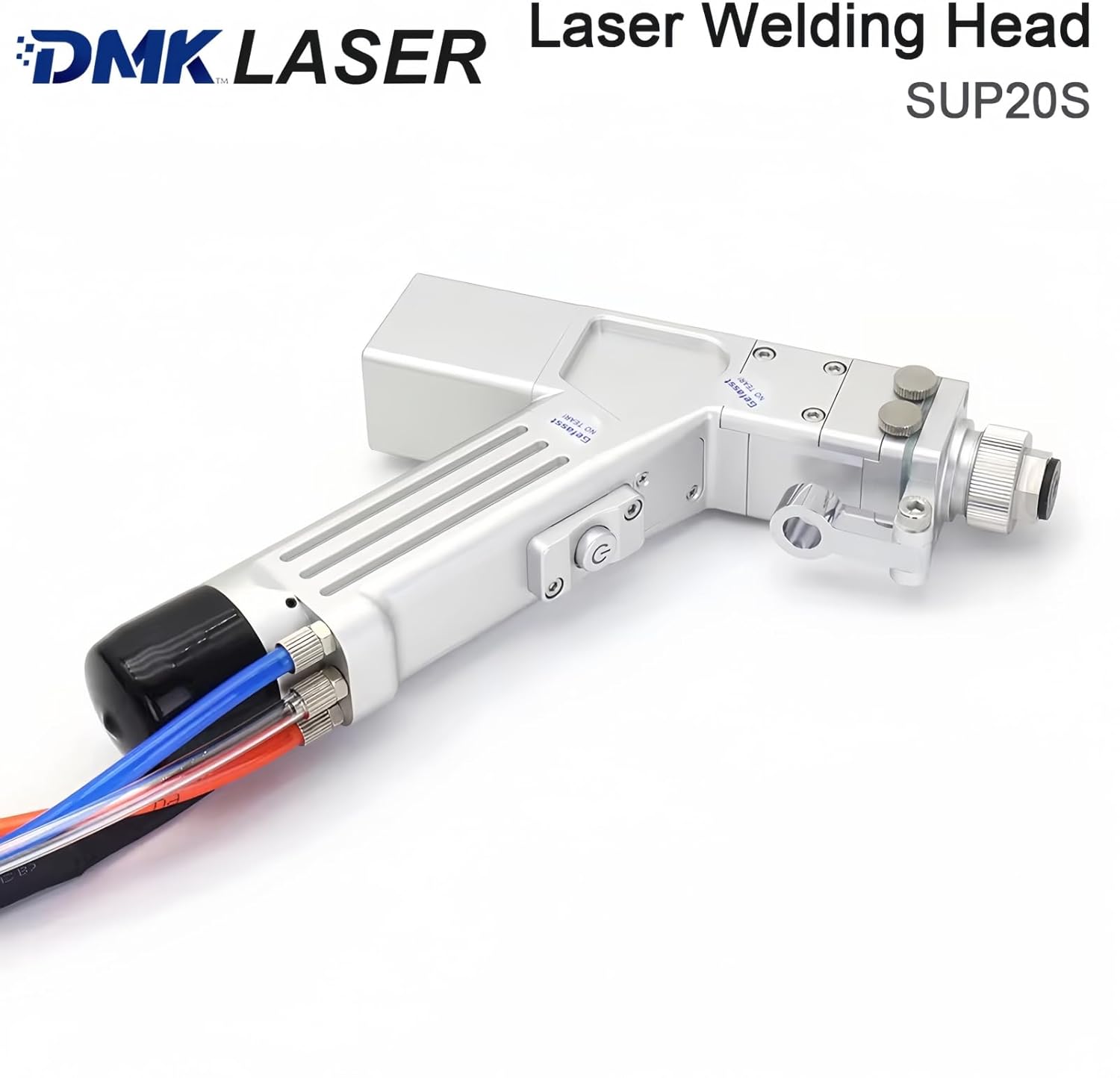
Figure 5.1: Rear view of the DMK Laser Welding Head SUP20S, illustrating the various cable connections for power, control, and fiber optic input.
6. Operating Instructions
The SUP20S/T welding head supports various welding modes for versatile applications.
- Power On: Ensure all safety checks are complete and the laser welding machine is powered on.
- Mode Selection: The system supports handheld continuous welding, spot welding, and integrated manual/automatic modes. Select the desired mode via the control interface of your main laser welding machine.
- Parameter Adjustment: Adjust laser power, pulse width, welding speed, and gas flow according to the material and thickness being welded. The light spot adjustment range is 0-5mm.
- Password Authentication: If enabled, perform password authentication as required by your system for secure operation.
- Welding Operation: Position the welding head at the desired welding point. Press the ON/OFF switch button to initiate the laser. Maintain a consistent distance and angle for optimal weld quality.
- Monitoring: The system provides real-time monitoring of all interfaces, which is convenient for on-site maintenance and remote technical support.

Figure 6.1: An operator demonstrating the use of the SUP20S Handheld Laser Welding Gun, showing the emitted laser beam during operation.
7. Maintenance
Regular maintenance ensures the longevity and optimal performance of your welding head.
- Lens Replacement: The focusing and protective lenses feature a pull-out design for easy replacement. Regularly inspect these lenses for dust, debris, or damage and replace them as needed to maintain weld quality and prevent laser power loss.
- Motor Maintenance Window: The welding head includes a motor maintenance window for easy centering. Refer to your main laser welding machine's manual for specific procedures related to motor maintenance and alignment.
- Nozzle Cleaning/Replacement: Clean the copper nozzle regularly to prevent spatter buildup. Replace the nozzle if it becomes worn or damaged.
- General Cleaning: Keep the exterior of the welding head clean and free from dust and contaminants. The SUP20S welding gun has excellent dustproof and anti-interference performance, but regular cleaning is still recommended.
- Storage: When not in use, store the welding head in a clean, dry environment, protected from dust and physical damage.

Figure 7.1: The SUP20S Welding Gun is designed with excellent dustproof and anti-interference performance to ensure high work efficiency and reduce maintenance frequency.
8. Troubleshooting
This section provides general guidance for common issues. For detailed troubleshooting or complex problems, always refer to the comprehensive manual of your main fiber laser welding machine or contact technical support.
- No Laser Output:
- Check all fiber optic and electrical connections.
- Verify the laser source is powered on and functioning correctly.
- Ensure safety interlocks are engaged and no error codes are displayed on the main machine.
- Check for any obstructions or damage to the protective or focusing lenses.
- Poor Weld Quality:
- Inspect the copper nozzle for spatter buildup or damage.
- Verify shielding gas flow and purity.
- Check the condition of the focusing and protective lenses; replace if dirty or damaged.
- Adjust welding parameters (power, speed, focus) according to material specifications.
- Overheating:
- Ensure the water-cooling system is operating effectively and coolant levels are adequate.
- Check for any blockages in the cooling lines.
- The SUP20S has real-time temperature monitoring; if an alarm triggers, cease operation and investigate the cause.
For issues requiring in-depth diagnostics, leverage the real-time monitoring capabilities of the system for convenient on-site maintenance or remote technical support.
9. Warranty and Support
For specific warranty terms and conditions related to your DMK SUP20S/T Fiber Laser Welding Head, please refer to the documentation provided at the time of purchase or contact the seller directly. The product is sold by DMK Laser.
For technical support, spare parts, or service inquiries, please contact DMK Laser through their official channels. Real-time monitoring features of the welding head facilitate remote technical assistance.
Seller Information: DMK Laser (Seller ID: A7N8YHNANDA33)
Related documentsSUP20S/T


Ask a question about this manual
Ask about setup, troubleshooting, compatibility, parts, safety, or missing instructions. Manuals+ will review the question and use this page’s manual context to help answer it.