
1. Introduction
Thank you for choosing the WELLFIT Pink Walking Pad Treadmill. This manual provides essential information for the safe and efficient use, setup, operation, and maintenance of your new fitness equipment. Please read this manual thoroughly before first use and retain it for future reference.
The WELLFIT Pink Walking Pad Treadmill is designed for home and office use, offering a versatile workout experience with its 2-in-1 foldable design, 10% manual incline, and smart app connectivity. It features a powerful yet quiet 3.0HP motor and a spacious running area with enhanced shock absorption for user comfort and safety.

Image: The WELLFIT Pink Walking Pad Treadmill in both walking (under desk) and running (handle up) configurations.
2. Safety Information
WARNING: To reduce the risk of serious injury, read all important precautions and instructions in this manual before using the treadmill.
- Always place the treadmill on a level surface.
- Keep children and pets away from the treadmill during operation.
- Ensure adequate space around the treadmill (at least 2 feet on sides, 6 feet behind).
- Wear appropriate athletic footwear.
- Do not operate the treadmill if it has a damaged cord or plug, or if it is not working properly.
- Use the safety key at all times. Attach the clip to your clothing before starting your workout.
- Do not step on or off the treadmill while the belt is moving.
- Consult a physician before starting any exercise program.
- Maximum user weight capacity: 350 lbs.
3. What's in the Box
Upon unpacking, please verify that all components are present:
- WELLFIT Pink Walking Pad Treadmill (Main Unit)
- Power Cord
- Safety Key
- Tool Kit
- User Manual (This document)
4. Setup
The WELLFIT Pink Walking Pad Treadmill comes fully assembled. Follow these steps to prepare it for use:
- Unboxing: Carefully remove the treadmill from its packaging.
- Placement: Place the treadmill on a flat, stable surface. Ensure there is sufficient clear space around the unit for safe operation.
- Unfolding the Handle (if applicable): If using in running mode, lift the handle bar until it locks securely into place.
- Connecting Power: Plug the power cord into a grounded electrical outlet.
- Attaching Safety Key: Attach the safety key to the designated slot on the console and clip the other end to your clothing. The treadmill will not operate without the safety key in place.
- Setting Incline: The treadmill features a 10% manual incline. To activate, simply adjust the incline mechanism at the rear of the treadmill. No tools are required for this one-step setup.
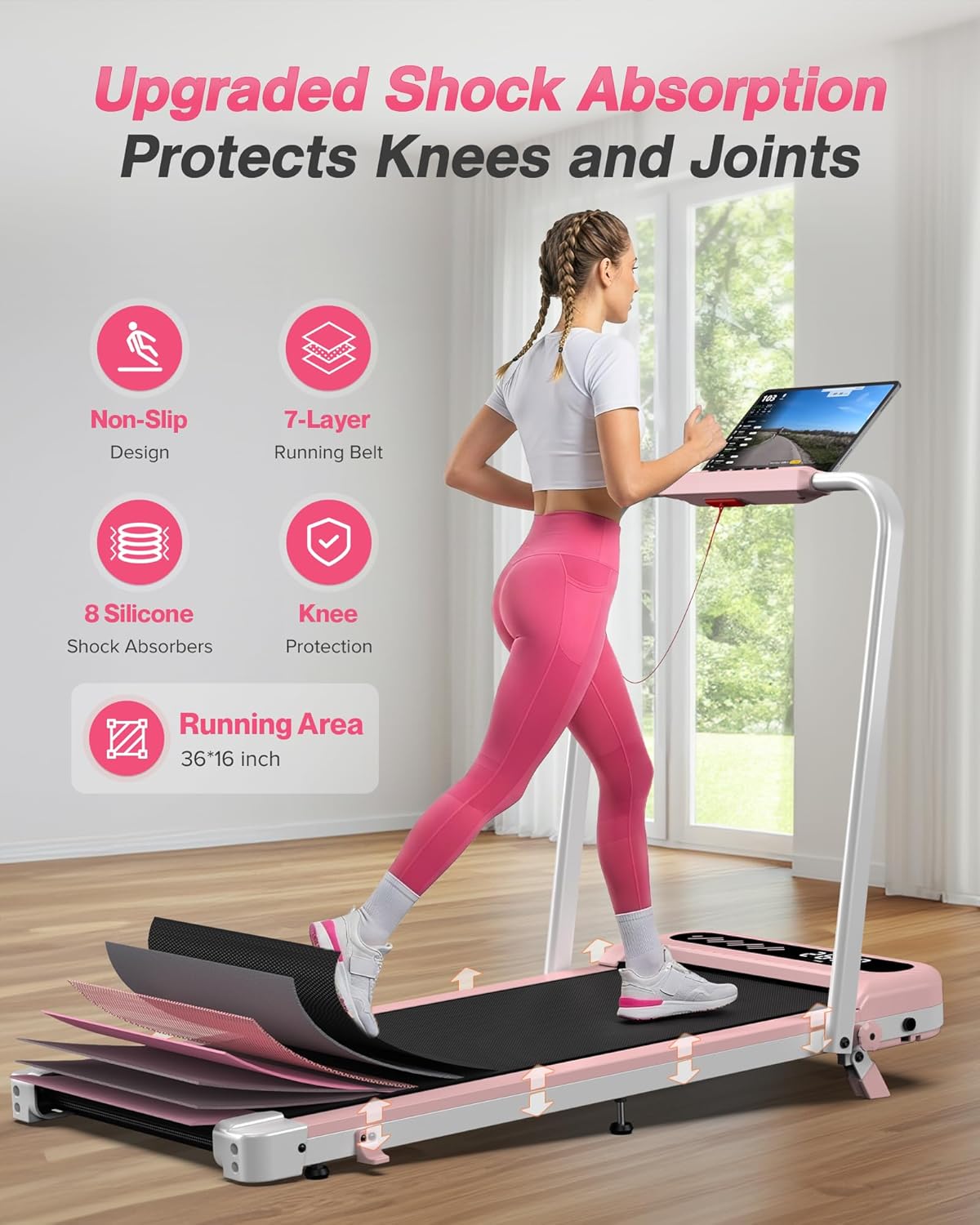
Image: The treadmill in its folded, space-saving configuration, highlighting its compact dimensions and portability.

Image: The treadmill with the handle bar raised, demonstrating the 10% manual incline for running workouts.
Video: Demonstrates the setup and folding of the Wellfit Foldable Treadmill in Pink.
5. Operating Instructions
The WELLFIT Pink Walking Pad Treadmill offers multiple control options for your convenience.
5.1 Basic Operation
- Power On/Off: Press the power button on the console or remote control.
- Start/Stop: Press the Start/Stop button to begin or end your workout.
- Speed Adjustment: Use the +/- buttons on the console or remote to adjust speed.
- Walking/Jogging Mode (handle down): 0.6 - 3.8 mph
- Running Mode (handle up): 0.6 - 6.2 mph
- Pause Function: The remote control includes a pause option.
- Safety Key: Always ensure the safety key is attached to the treadmill and your clothing. Removing the safety key will immediately stop the treadmill.
5.2 LED Display
The integrated LED display shows key workout metrics:
- Speed
- Time
- Distance
- Calories Burned
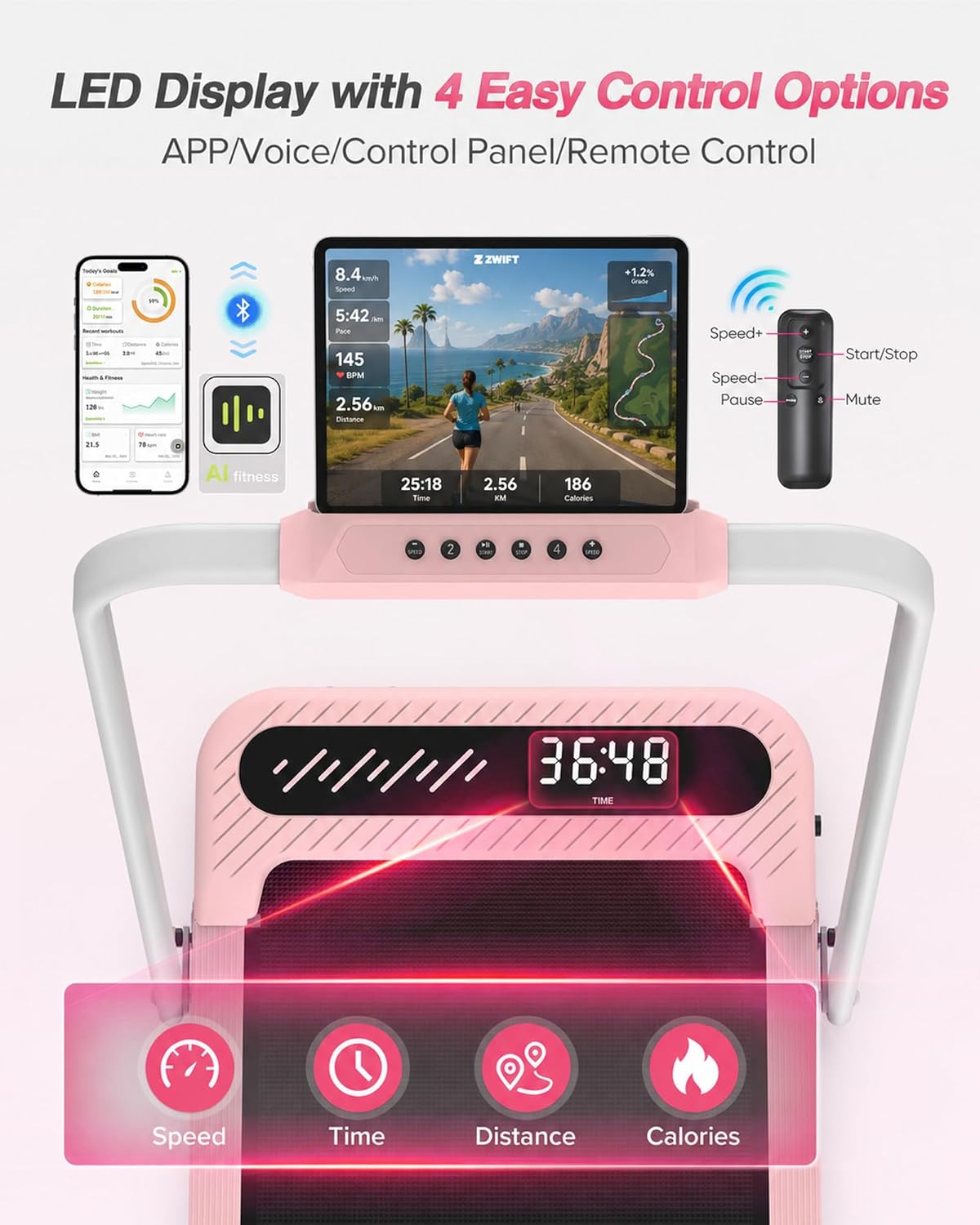
Image: The LED display and control options, including app, voice, control panel, and remote control.
5.3 Smart App & Voice Control
Enhance your workout experience by connecting to the WELLFIT App and other compatible fitness applications.
- WELLFIT App: Download the official WELLFIT App. It offers voice control features and a variety of preset workout programs without a subscription fee.
- Third-Party Apps: The treadmill is compatible with popular fitness apps like Zwift and Kinomap.
- Connectivity: Connect your device via Bluetooth to the treadmill.

Image: Demonstrates the treadmill's compatibility with fitness apps, showing a user exercising while connected to an app.
Video: Explains how to maximize your workout using the Wellfit App, including voice control and preset programs.
6. Maintenance
Regular maintenance ensures the longevity and optimal performance of your treadmill.
- Cleaning: Wipe down the treadmill with a damp cloth after each use to remove sweat and dust. Avoid abrasive cleaners.
- Lubrication: Periodically lubricate the running belt according to the instructions provided in the separate lubrication guide (if included) or as recommended by WELLFIT. Proper lubrication reduces friction and extends belt life.
- Belt Tension & Alignment: Check the running belt tension and alignment regularly. Adjust if necessary using the included tool kit, following specific instructions in the full user manual.
- Storage: When not in use, the treadmill can be folded and stored under a couch, bed, or in a corner to save space. Use the built-in transport wheels for easy movement.
Image: The treadmill folded for storage, demonstrating its space-saving design and ease of movement.
7. Troubleshooting
If you encounter issues with your treadmill, refer to the following common problems and solutions:
| Problem | Possible Cause | Solution |
|---|---|---|
| Treadmill does not start | Power cord not plugged in; Safety key not in place; Power switch off. | Ensure power cord is securely plugged in. Insert safety key fully. Turn on the power switch. |
| Running belt slips or hesitates | Belt too loose; Lack of lubrication. | Adjust belt tension (refer to full manual). Lubricate the running belt. |
| Unusual noise during operation | Loose components; Belt friction; Motor issue. | Check for loose screws and tighten. Lubricate belt. If noise persists, contact customer service. |
| Display not working | Loose connection; Power issue. | Check power connections. Restart the treadmill. If problem continues, contact customer service. |
For issues not listed here or if solutions do not resolve the problem, please contact WELLFIT customer service.
8. Specifications
| Feature | Detail |
|---|---|
| Brand | WELLFIT |
| Model Number | TM037 |
| Color | Pink |
| Motor Horsepower | 3.0 HP |
| Speed Range | 0.6 - 6.2 mph |
| Maximum Incline | 10% (Manual) |
| Weight Capacity | 350 lbs |
| Running Area | 36" x 16" |
| Product Dimensions (L x W x H) | 41"D x 19.5"W x 4.4"H |
| Folded Size | 41" x 19.5" x 4.4" |
| Item Weight | 42.2 lbs |
| Material | Alloy Steel |
| Display Type | LED |
| Connectivity | Bluetooth (for App control) |
| Special Features | Smart APP, Voice Control, Portable, Shock Absorbent, Compact Design, Wheeled |

Image: Details of the 3.0HP motor, weight capacity, low noise level, and speed range.

Image: Features of the upgraded shock absorption system and 7-layer running belt for knee and joint protection.
9. Warranty & Support
Warranty: The WELLFIT Pink Walking Pad Treadmill comes with a 60-day warranty. Please refer to the warranty card included in your package for full terms and conditions.
Customer Service: For any questions, assistance, or troubleshooting not covered in this manual, please contact WELLFIT INC. customer service. Your satisfaction is our top priority.
Contact Information: Please refer to the contact details provided on the WELLFIT official website or your purchase documentation.

