
Yaheetech 592414
Yaheetech Ergonomic Office Chair User Manual (Model 592414)
Brand: Yaheetech | Model: 592414
Safety Information
Please observe the following safety guidelines:
- Do not stand on the chair.
- Allow ±1.5 cm/0.6" measurement tolerance for dimensions.
- The maximum weight capacity for this chair is 300 lb.
Product Overview
The Yaheetech Ergonomic Office Chair is designed for comfort and support during extended periods of sitting. It features multiple adjustment options to customize your seating experience.

Image: Yaheetech Ergonomic Office Chair (White/Pink variant).
Key Features:
- 90° Flip-up Armrests: Allows for easy storage under desks and unrestricted movement.
- Cushioned Seat & Mesh Backrest: Provides comfort and breathability for prolonged sitting.
- Sturdy Construction: Built with a durable plywood frame and strong nylon base, supporting up to 300 lbs.
- Adjustable Comfort: Features height-adjustable headrest and 2-inch adjustable lumbar support for proper spinal alignment.
- Stable & Durable: Equipped with an SGS-certified gas lift for reliable height adjustment.
Setup and Assembly
Follow these steps to assemble your Yaheetech Ergonomic Office Chair. An assembly instruction video is also provided for visual guidance.
Video: Official installation guide for the Yaheetech Ergonomic Mesh Office Chair.
Assembly Steps:
- Attach Casters to Base: Insert the five casters (H) into the holes at the ends of the star base (F). Press firmly until you hear a "click" to ensure they are securely installed.
- Install Gas Lift: Remove the black plastic cap from the gas lift (G). Insert the gas lift into the center hole of the star base.
- Attach Armrests to Backrest: Secure the armrests (C and D) to the backrest (A) using the provided screws (2) and Allen wrench. Ensure they are tightly fastened.
- Attach Mechanism to Seat: Fasten the seat mechanism (E) to the underside of the seat cushion (B) using the appropriate screws (3) and washers (4). Ensure the "FRONT" marking on the mechanism faces the front of the seat.
- Connect Seat to Backrest: Align the seat cushion (B) with the backrest (A) and secure them together using the remaining screws (3) and washers (4).
- Assemble Headrest: Attach the headrest (D) to the top of the backrest using the designated screws (2). Cover the screw holes with the provided caps (5).
- Final Assembly: Place the assembled seat and backrest onto the gas lift. Ensure it is seated firmly.
Operating Instructions
Your Yaheetech Ergonomic Office Chair offers several adjustable features to enhance your comfort.
Adjusting Chair Height:
Locate the lever on the right side beneath the seat. Pull the lever upwards while seated to lower the chair, or pull it upwards while standing to raise the chair. Release the lever at your desired height.

Image: Detailed view of the chair's adjustment levers.
Adjusting Lumbar Support:
The lumbar support can be adjusted vertically by sliding it up or down to match the curve of your lower back. The adjustable range is 2 inches.
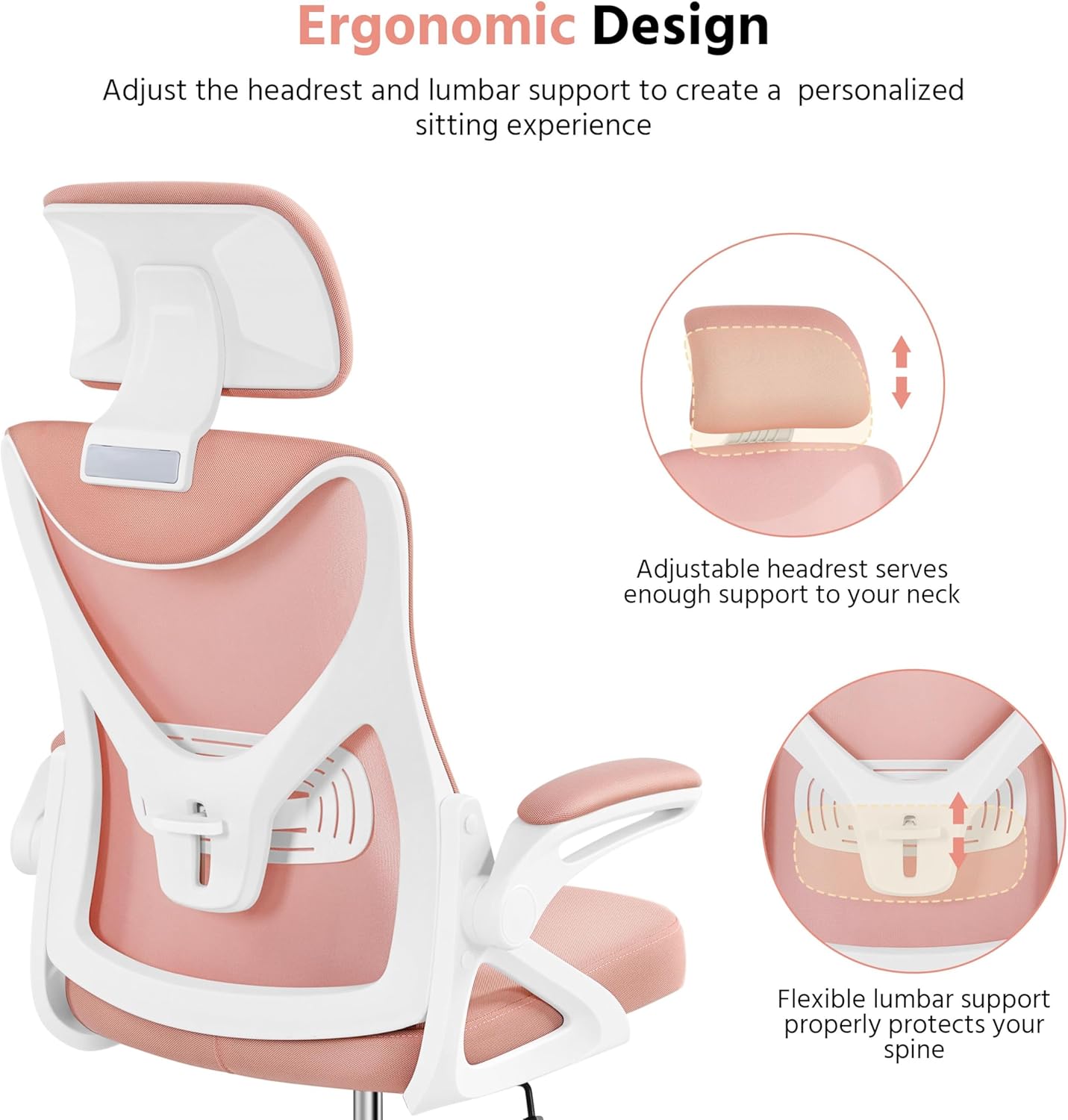
Image: Illustration of adjustable headrest and flexible lumbar support.
Using Flip-up Armrests:
The armrests can be flipped up 90 degrees to allow the chair to be pushed closer to a desk or to provide more space when not needed. Simply lift the armrests upwards until they lock into a vertical position.

Image: Overview of chair adjustments, highlighting flip-up armrests.
Rocking Function:
To activate the rocking function, pull out the height adjustment lever. To lock the chair in an upright position, push the lever inwards. The chair can recline between 90° and 110°.
Adjust the tilt tension by rotating the round knob located beneath the seat. Turn clockwise to increase tension (making it harder to recline) and counter-clockwise to decrease tension (making it easier to recline).
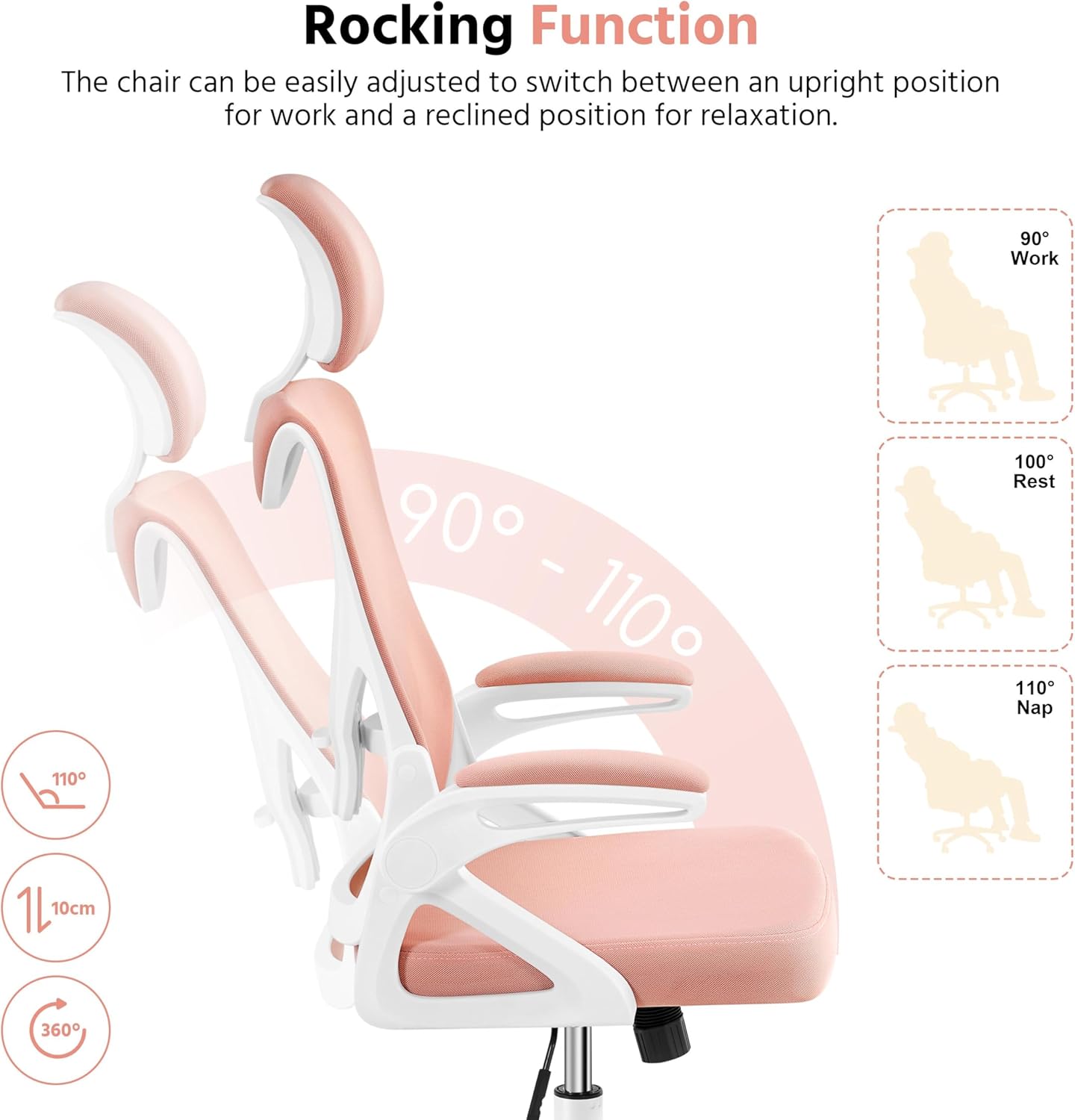
Image: Diagram illustrating the rocking function and its range.
Maintenance
To maintain the longevity and appearance of your office chair, follow these simple care instructions:
- Cleaning: Wipe clean with a damp cloth. Avoid harsh chemicals or abrasive cleaners.
- Regular Checks: Periodically check all screws and bolts to ensure they are tight. Re-tighten if necessary.
- Caster Care: Keep casters free of debris (hair, dust) to ensure smooth movement.
Troubleshooting
If you encounter any issues with your chair, refer to the following common troubleshooting tips:
- Chair not adjusting height: Ensure the gas lift's black plastic cap was removed during assembly. Check if the height adjustment lever is fully engaged.
- Chair feels unstable: Verify that all assembly screws are securely tightened. Ensure the casters are fully inserted into the base.
- Casters not rolling smoothly: Check for any hair or debris wrapped around the caster wheels and remove them.
- Rocking function not working: Ensure the height adjustment lever is pulled outwards to enable rocking. Adjust the tilt tension knob to your preference.
Specifications
| Feature | Detail |
|---|---|
| Brand | Yaheetech |
| Model Name | Charles (Model 592414) |
| Color | White/Pink |
| Product Dimensions | 25.5"D x 25"W x 52"H |
| Maximum Weight Recommendation | 300 Pounds |
| Back Style | Solid Back (Mesh) |
| Special Features | Adjustable Height, Adjustable Lumbar, Ergonomic, Rolling, Flip-up Armrests |
| Material | Mesh, Foam (Seat Fill) |
| Reclining Position Count | 3 (90°-110° rocking) |
| Item Weight | 25 pounds |
Warranty and Support
For warranty information, product support, or to purchase replacement parts, please visit the official Yaheetech store or contact customer service.
Official Yaheetech Store: Yaheetech Store on Amazon
Related documents592414


Ask a question about this manual
Ask about setup, troubleshooting, compatibility, parts, safety, or missing instructions. Manuals+ will review the question and use this page’s manual context to help answer it.