
1. Product Overview
The APPECK C6612-E RGBW Landscape Spotlights are designed to enhance your outdoor spaces with versatile and vibrant lighting. These low-voltage lights feature RGBW color-changing capabilities, app control, and an IP65 waterproof rating, making them suitable for various outdoor decoration needs.

Image: The APPECK C6612-E RGBW Landscape Spotlights package contents, including the lights, remote control, and a smartphone displaying the control app.
Package Contents:
- APPECK C6612-E RGBW Landscape Spotlights (8 units)
- Remote Control
- Control Box
- Ground Stakes
- User Manual (this document)
2. Safety Information
- Ensure the power supply is disconnected before installation or maintenance.
- Use only the provided power adapter and control box.
- Do not attempt to modify or repair the product. Contact customer support for assistance.
- Keep children and pets away from electrical components during installation.
- Ensure all connections are secure and waterproof where applicable.
- Operating temperature range: -4°F to 140°F (-20°C to 60°C).
3. Setup and Installation
Component Identification:

Image: A technical diagram illustrating the dimensions of the spotlight units and the cable lengths for the power supply and control box connections.
Installation Steps:
- Choose Location: Select desired locations for your spotlights in your garden, yard, or along pathways. Consider areas that will benefit from accent lighting or color effects.
- Mounting Options:
- Ground Stake: Attach the ground stake to the bottom of each spotlight. Firmly push the stake into the soil at your chosen location.
- Wall Mount: For mounting on walls or fences, use appropriate screws (not included) to secure the spotlight bracket. The spotlights can be rotated to adjust the light angle.
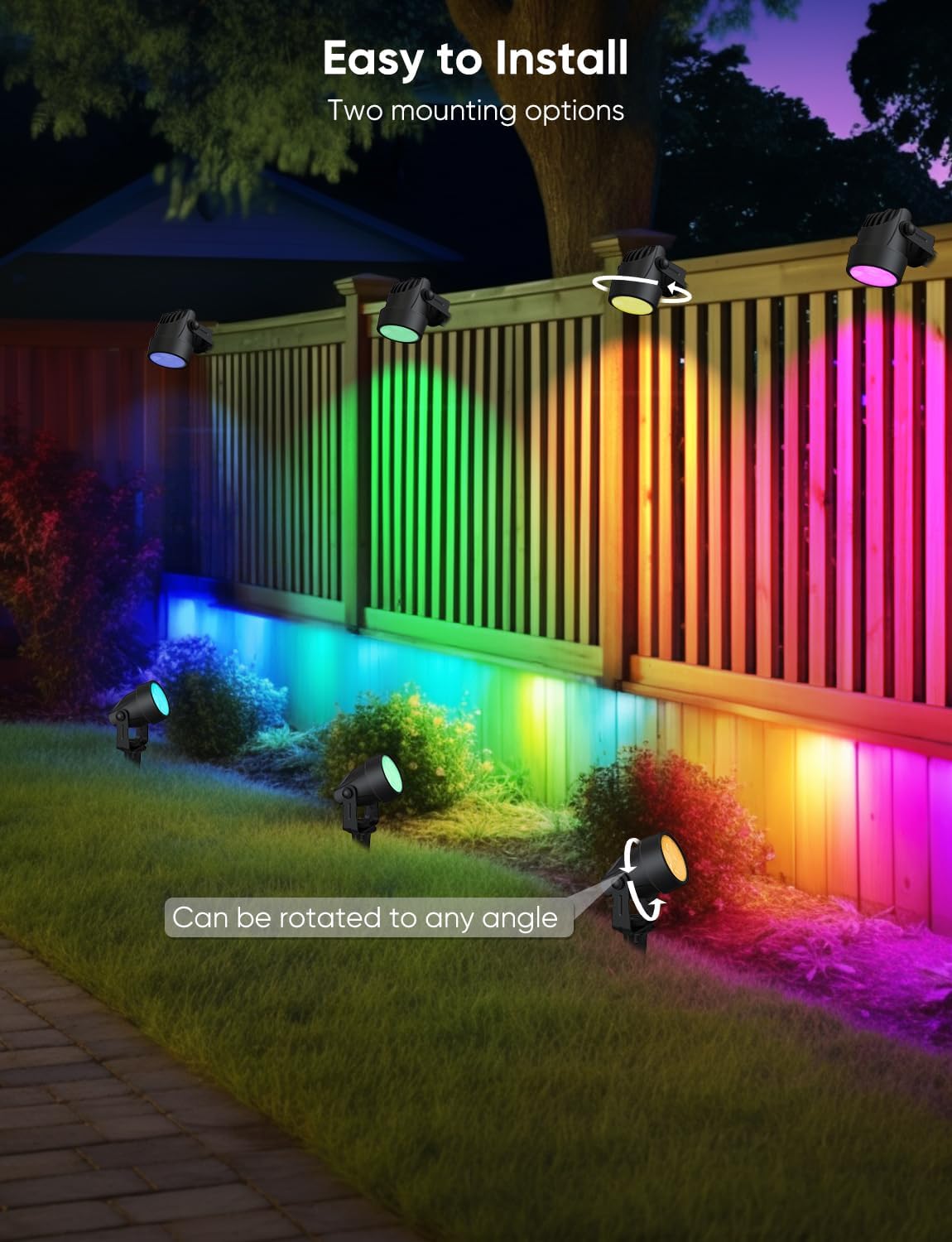
Image: APPECK spotlights installed in an outdoor setting, showcasing both ground stake and wall mounting methods, with lights illuminating a fence and garden bed.
- Connect Lights: Connect each spotlight to the main cable from the control box. Ensure connections are secure.
- Connect Control Box: Connect the control box to the power supply adapter.
- Power On: Plug the power supply adapter into a suitable outdoor power outlet. The lights should illuminate.
App Connection:
The APPECK C6612-E lights are controlled via the "Smart Life" app. Ensure your Wi-Fi network is 2.4 GHz, as 5 GHz networks are not supported for initial setup.
- Download App: Download the "Smart Life" app from your device's app store. Turn on Wi-Fi and Bluetooth on your smartphone. Log in or create a user account.
- Start Pairing: Ensure the lights are powered on. Press and hold the on/off button on the control box for more than 5 seconds until the lights blink red, indicating pairing mode.
- Add Device: In the Smart Life app, navigate to the home page, tap the "+" icon in the top right corner, and search for "C6612".
- Enter Wi-Fi Information: Select your 2.4 GHz Wi-Fi network and enter the password. The app will then add the device.

Image: A visual guide showing the four steps to connect the APPECK C6612-E spotlights to the Smart Life app, including downloading the app, initiating pairing, adding the device, and entering Wi-Fi details.
4. Operating Instructions
The APPECK C6612-E spotlights offer multiple control options for flexibility.
Control Methods:
- Smart Life App: Provides comprehensive control over individual lights, scenes, timing, and music sync.
- Remote Control: Included remote for basic functions like on/off, color changes, and scene selection.
- Control Box: Physical buttons on the control box for basic on/off and mode cycling.
- Voice Control: Integrate with Amazon Alexa or Google Assistant for hands-free commands (requires app setup).

Image: An outdoor patio scene demonstrating voice control functionality with APPECK spotlights, showing speech bubbles for "Alexa, turn on the spotlight" and "Okay" from Google Assistant.

Image: A hand holding the remote control for the APPECK spotlights, with the lights illuminating a garden in different colors.
App Functions:
- RGBW Color Changing: Access 16 million RGB colors and tunable warm white (3000K) to cool white (2200K-2700K) options. Adjust brightness from 1% to 100%.

Image: An outdoor scene with APPECK spotlights set to various shades of white light, demonstrating the adjustable color temperature from cool white (2200K) to warm white (2700K).
- Individual Light Control: Change the color and brightness of each spotlight independently for customized ambiance.

Image: A house exterior at night, illuminated by APPECK spotlights, each displaying a different color, highlighting the individual control feature.
- Customized Scenes: Utilize 111 built-in scene modes or create and save your own custom scenes. Supports scene programming, saving, favoriting, cycling, timing, and length settings (up to 8 lights).

Image: A garden path illuminated by APPECK spotlights, showcasing different color schemes for various occasions like Dazzling, Gorgeous, Halloween, and Christmas.
- Timing Function: Set schedules for automatic on/off times. Different switching times can be set for different days. Note: The timer function must be set within the Smart Life app and does not activate automatically without app configuration.

Image: A split image of a house, showing APPECK lights on at 6:00 PM (night) and off at 7:00 AM (day), illustrating the timer and schedule feature.
- Music Sync: Lights can change color and rhythm in sync with music played through the app.

Image: An outdoor patio area with APPECK spotlights displaying dynamic color changes, synchronized with music rhythms shown on a smartphone screen.

Image: A visual representation of four different control modes within the Smart Life app for APPECK spotlights: changing individual light colors, changing all light colors, customizing scenes, and collecting/looping scenes.
5. Maintenance
The APPECK C6612-E spotlights are designed for durability and weather resistance.
Cleaning:
- Ensure the power is off before cleaning.
- Wipe the light fixtures with a soft, damp cloth. Do not use abrasive cleaners or solvents.
- Regularly remove any debris (leaves, dirt) that may accumulate around the lights to ensure optimal performance and heat dissipation.
Weather Resistance:
These outdoor landscape lights feature an IP65 waterproof rating, ensuring reliable operation in various weather conditions, including heavy rain and snow. They are designed to withstand extreme temperatures from -4°F to 140°F (-20°C to 60°C).

Image: A close-up view of an APPECK spotlight shining brightly amidst falling rain, with icons indicating 104°F high temperature resistance, -4°F low temperature resistance, IP65 fully waterproof, and +30% enhanced brightness.
6. Troubleshooting
If you encounter issues with your APPECK C6612-E spotlights, refer to the following common solutions:
| Problem | Possible Cause | Solution |
|---|---|---|
| Lights do not turn on. | No power, loose connection, faulty power adapter. | Check power outlet. Ensure all cables are securely connected. Test the power adapter if possible. |
| Lights flicker or change colors randomly. | Unstable power, Wi-Fi interference, app programming issue. | Ensure stable power supply. Check Wi-Fi signal strength. Re-pair the device with the app and re-configure settings. |
| Cannot connect to Smart Life app. | Incorrect Wi-Fi band, incorrect password, lights not in pairing mode. | Ensure your router is broadcasting a 2.4 GHz Wi-Fi signal. Double-check Wi-Fi password. Follow app pairing steps (hold control box button for 5+ seconds). |
| Voice control (Alexa/Google Assistant) not working. | Incorrect integration setup, device offline in app. | Verify the Smart Life skill/service is linked correctly in your voice assistant app. Ensure the lights are online and controllable via the Smart Life app. |
| Remote control not responding. | Battery depleted, remote out of range, obstruction. | Replace remote battery. Ensure direct line of sight to the control box. Reduce distance between remote and control box. |
7. Specifications
| Feature | Detail |
|---|---|
| Model Name | C6612-E |
| Brand | APPECK |
| Light Source Type | LED |
| Light Color | Multicolor (RGBW) |
| Color Temperature | Tunable White (2200K-2700K) |
| Brightness | 900 Lumens (Max) |
| Wattage | 24 Watts |
| Voltage | 24 Volts (DC) |
| Control Method | App (Smart Life), Remote Control, Control Box, Voice (Alexa/Google Assistant) |
| Connectivity | 2.4 GHz Wi-Fi, Bluetooth |
| Water Resistance Level | IP65 Waterproof |
| Material | Plastic |
| Product Dimensions | 22"L x 19"W x 14"H (Overall package dimensions) |
| Item Weight | 5.88 pounds |
| Installation Type | Stake/Mount (Floor Mount, Wall Mount) |
| Operating Temperature | -4°F to 140°F (-20°C to 60°C) |
8. Warranty and Support
Warranty Information:
For specific warranty details, please refer to the product packaging or contact APPECK customer support directly. Warranty terms typically cover manufacturing defects under normal use.
Customer Support:
If you require further assistance, have questions, or encounter any issues not covered in this manual, please contact APPECK customer support. Our support team is available 24/7 to provide assistance.
Contact information can typically be found on the product packaging, the official APPECK website, or through your purchase platform.