
1. Introduction
Thank you for choosing the SAFEBUILDER Bluetooth Hard Hat Ear Muffs, Model EM-C919B-E. This device is designed to provide effective hearing protection in noisy work environments while allowing for Bluetooth audio connectivity. Please read this manual thoroughly before using the product to ensure proper operation and safety.
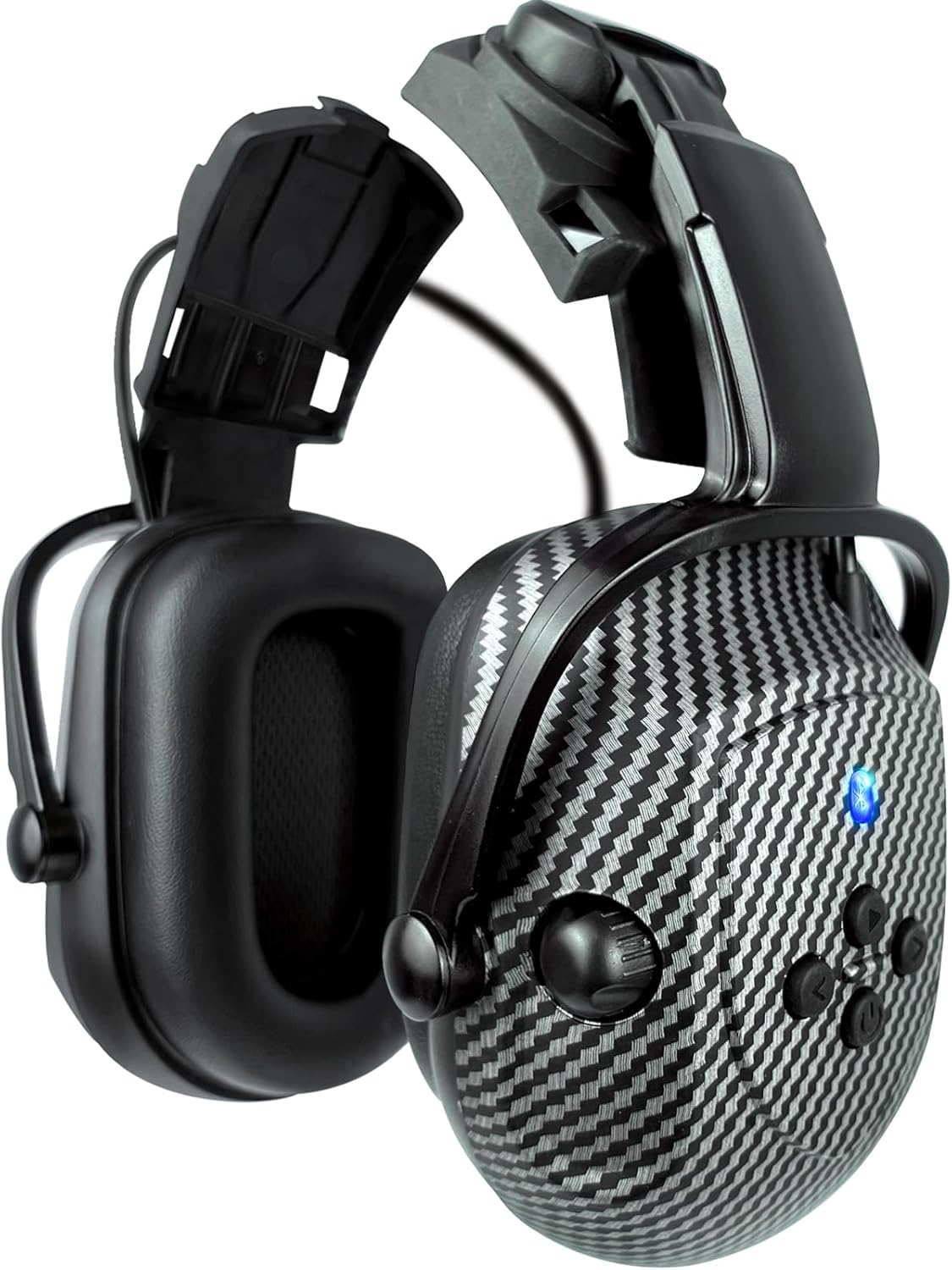
Image 1.1: SAFEBUILDER Bluetooth Hard Hat Ear Muffs (Model EM-C919B-E). This image displays the ear muffs in a folded position, showcasing their design and compact form.
2. Product Overview
Key Features:
- Hearing Protection: Designed for industrial work environments, offering noise reduction.
- Bluetooth 4.0 Connectivity: Connects wirelessly to smartphones and other Bluetooth-enabled devices for audio playback and calls.
- Hard Hat Compatibility: Specifically designed to attach to compatible hard hats.
- Long Battery Life: Up to 30 hours of working time on a single charge.
- Lightweight Design: Weighs approximately 450g for comfortable extended wear.
Components:
- Left Earcup (with controls and charging port)
- Right Earcup
- Hard Hat Attachment Arms
- Integrated Rechargeable Lithium Polymer Battery
- Charging Cable

Image 2.1: Ear Muffs with Controls. This image highlights the ear muffs, showing the power button and other control buttons on the side of one earcup, along with the Bluetooth indicator light.
3. Setup
3.1 Attaching to a Hard Hat
These ear muffs are designed for attachment to compatible hard hats. To ensure proper fitment, your hard hat should have attachment holes with the following dimensions:
- Hole Length: 30mm
- Hole Width: 5mm
SAFEBUILDER hard hat models CR06, CR06X, CR08, CR08X, and SBD-1P are confirmed to be compatible. If your hard hat does not meet these specifications, compatibility cannot be guaranteed.

Image 3.1: Ear Muffs Attached to Hard Hat. This image shows a person wearing a hard hat with the SAFEBUILDER ear muffs properly attached, demonstrating the intended use.
3.2 Charging the Ear Muffs
The ear muffs are equipped with a built-in rechargeable Lithium Polymer battery. Before first use, fully charge the device.
- Locate the charging cable insertion port on one of the earcups.
- Connect the provided charging cable to the port and a suitable USB power source.
- A full charge typically takes approximately 4 hours.
- The battery provides a standby time of up to 12-30 hours, depending on usage.

Image 3.2: Charging and Audio Ports. This image illustrates the location of the charging cable insertion port and an optional headphone cable position on the ear muffs.
4. Operating Instructions
4.1 Power On/Off
- To Power On: Press and hold the Power button (refer to Image 2.1) until the indicator light illuminates.
- To Power Off: Press and hold the Power button until the indicator light turns off.
4.2 Bluetooth Pairing
After powering on, the ear muffs will automatically enter pairing mode if not already connected to a device. The Bluetooth indicator light will flash.
- Ensure the ear muffs are powered on and in pairing mode.
- On your smartphone or Bluetooth-enabled device, go to the Bluetooth settings.
- Search for available devices and select "SAFEBUILDER EM-C919B-E" (or similar name).
- Once paired, the indicator light will stop flashing and remain solid.
- The wireless range is up to 25 meters (82 feet).
4.3 Audio Playback and Call Management
Use the control buttons on the earcup (refer to Image 2.1) for the following functions:
- Play/Pause: Press the Play/Pause button once.
- Next Track: Press the Next Track button.
- Previous Track: Press the Previous Track button.
- Answer/End Call: Press the Call button once.
- Reject Call: Press and hold the Call button.
4.4 Volume Control
Adjust the volume using the dedicated volume knob or buttons on the earcup (refer to Image 2.1). Rotate the knob or press the buttons to increase or decrease the audio level.
5. Maintenance
5.1 Cleaning
Clean the ear muffs by hand using a soft, damp cloth. Do not immerse the device in water or use harsh cleaning agents.
5.2 Battery Care
- Charge the battery fully before long periods of storage.
- Avoid exposing the device to extreme temperatures.
- Do not attempt to replace the internal battery yourself.
6. Troubleshooting
- No Power: Ensure the device is fully charged. Connect to a power source and allow it to charge for at least 30 minutes before attempting to power on.
- Cannot Pair Bluetooth: Ensure the ear muffs are in pairing mode (flashing indicator light). Turn off and on your device's Bluetooth, then try searching again. Make sure the ear muffs are within the 25-meter range of your device.
- Poor Audio Quality: Check the Bluetooth connection. Move closer to your paired device. Ensure the volume is adjusted correctly on both the ear muffs and your connected device.
- Hearing Protection Effectiveness: A fitting test of the hearing protector is strongly recommended. The noise reduction effect can vary based on proper wear and environmental factors. Ensure the ear cups form a tight seal around your ears.
If you encounter persistent issues, please refer to the Support section for contact information.
7. Specifications
| Model Number | EM-C919B-E |
| Noise Reduction Rating (NRR) | 28dB (SNR 26dB, SLC(80) 22dB) |
| Bluetooth Version | 4.0 |
| Wireless Range | Up to 25 meters (82 feet) |
| Battery Type | 1 Lithium Polymer (included) |
| Charging Time | Approximately 4 hours |
| Working/Standby Time | 12-30 hours (depending on usage) |
| Product Dimensions | 20 x 15 x 10 cm |
| Weight | 450 g |
| Fabric Type | 80% ABS, 20% Foam |

Image 7.1: Certification Details. This image displays the approved certifications for the ear muffs, including SNR 26dB and SLC(80) 22dB ratings.
8. Safety Information
- Proper Fit: Ensure the ear muffs are worn correctly to achieve the stated noise reduction. A fitting test is highly recommended.
- Usage Duration: To prevent discomfort and allow ears to breathe, it is recommended to take off the ear muffs every 2 hours for a short break.
- Environmental Factors: The actual noise reduction effect may vary depending on how the hearing protectors are worn and the specific environment.
9. Warranty and Support
For any issues or questions regarding your SAFEBUILDER Bluetooth Hard Hat Ear Muffs, please contact SAFEBUILDER customer support. We aim to provide a satisfactory solution within 24 hours for any problems you may encounter.
Please refer to your purchase documentation or the SAFEBUILDER official website for specific warranty terms and contact details.
