
1. Introduction
This manual provides detailed instructions for the setup, operation, and maintenance of your EYTSE 88-Key Folding Piano, Model EY800. Please read this manual thoroughly before using the instrument to ensure proper function and longevity.
2. Package Contents
Verify that all items are present in the package:
- EYTSE 88-Key Folding Piano
- Padded Carry Bag
- Sustain Pedal
- Music Rest
- Power Adapter & USB Cable
- User Manual (this document)

Figure 2.1: EYTSE 88-Key Folding Piano with all accessories.
3. Setup
3.1 Unfolding the Piano
- Place the folded piano on a flat, stable surface.
- Locate the hinge mechanism in the center of the piano.
- Gently unfold the two halves of the piano until they lock into place, forming a full 88-key keyboard.

Figure 3.1: Unfolding the EYTSE 88-Key Folding Piano.
3.2 Attaching the Music Rest
Insert the music rest into the designated slots on the top panel of the piano. Ensure it is securely seated to hold sheet music or a tablet.
3.3 Connecting the Sustain Pedal
Plug the sustain pedal cable into the "SUS" jack located on the rear panel of the piano. The sustain pedal allows for extended note duration, similar to an acoustic piano.

Figure 3.2: Sustain pedal and MIDI wireless connection.
3.4 Powering the Piano
The piano can be powered via the included power adapter or its built-in rechargeable lithium battery. A full charge provides up to 12 hours of playtime and takes approximately 5 hours.
- Charging: Connect the USB cable to the piano and a power source (power bank, computer USB, or power strip).
- Battery Life: The built-in battery offers extended portability for outdoor practice or travel.

Figure 3.3: Battery life and charging options.
4. Operating Instructions
4.1 Power On/Off
Press the ON/OFF button on the control panel to power the piano on or off. The display will illuminate upon activation.

Figure 4.1: Control panel with ON/OFF button and volume knob.
4.2 Adjusting Volume
Rotate the Volume Knob on the control panel to increase or decrease the sound output. For silent practice, connect headphones to the 1/8" headphone jack.
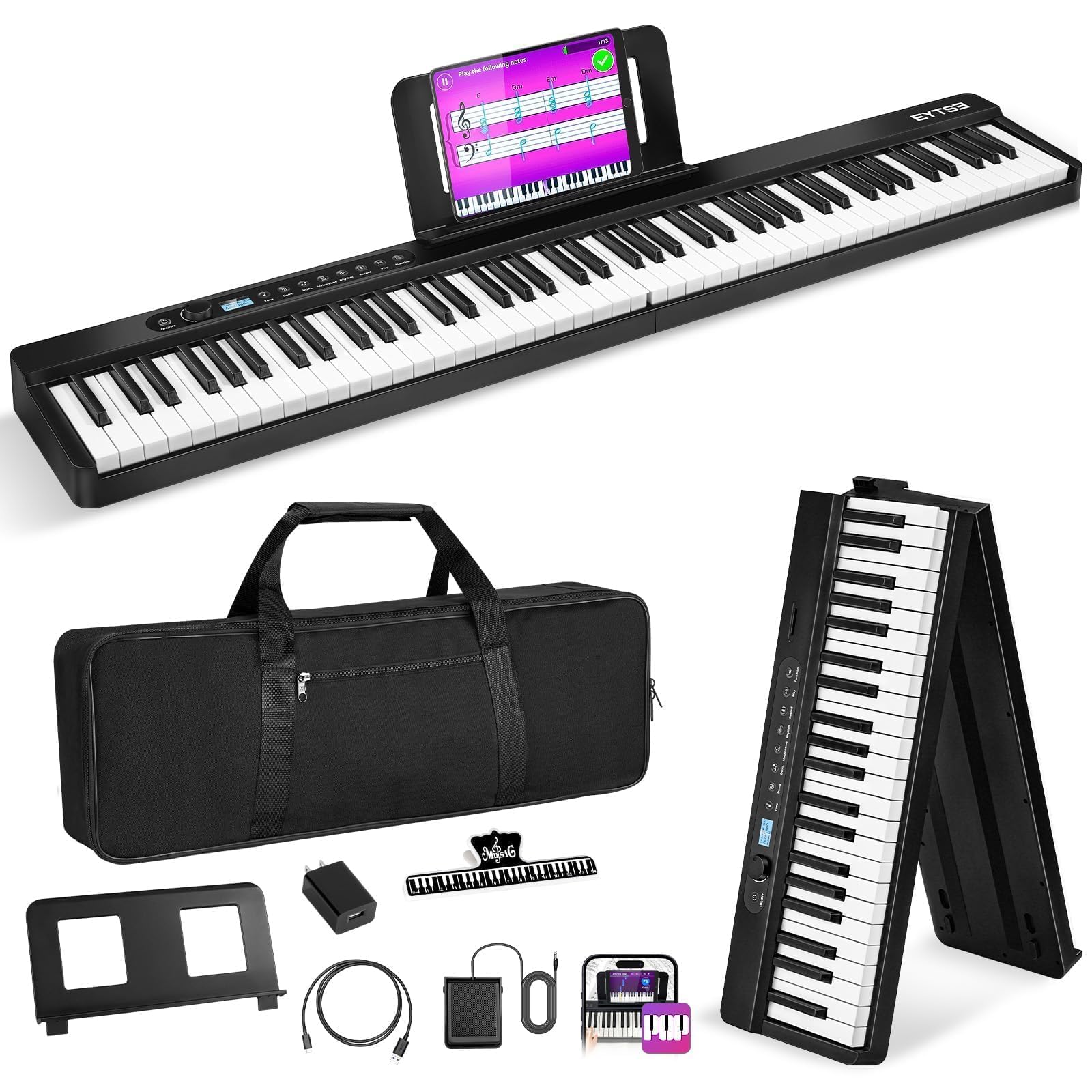
Figure 4.2: Volume control and function buttons.
4.3 Selecting Tones, Rhythms, and Demo Songs
Use the dedicated Tone, Rhythm, and Demo buttons on the control panel to browse and select from 128 tones, 128 rhythms, and 21 demo songs. The display will show your current selection.
4.4 Bluetooth and MIDI Connectivity
The piano supports wireless Bluetooth connectivity for interactive learning and music editing. Connect to apps like GarageBand, Perfect Piano, or Pop Piano. It also features USB MIDI connectivity for advanced music production and gaming.

Figure 4.3: Wireless MIDI connectivity with music apps.
4.5 Advanced Functions
The piano includes various advanced functions accessible via the control panel:
- Split Mode: Divides the keyboard into two sections, allowing two players or different instrument sounds on each half.
- Teaching Mode: Provides guided lessons for beginners.
- Dual Voice: Layers two different instrument sounds simultaneously.
- Record/Playback: Record your performances and play them back.
- Chord: Automatic chord accompaniment.
- Drum Kit: Access various drum sounds.
- Metronome: Built-in metronome for timing practice.
- Transpose: Shift the pitch of the keyboard up or down.

Figure 4.4: Overview of piano functions.
5. Maintenance
5.1 Cleaning
Wipe the piano's surface with a soft, dry cloth. Avoid using abrasive cleaners or solvents, which may damage the finish. For keys, a slightly damp cloth can be used, ensuring no moisture enters the internal components.
5.2 Storage
When not in use, fold the piano and store it in the provided padded carry bag. This protects the instrument from dust, scratches, and impacts, making it ideal for travel or compact storage.

Figure 5.1: Portable design with carry bag.
6. Troubleshooting
- No Sound:
- Ensure the piano is powered on and the volume is turned up.
- Check if headphones are plugged in; unplug them if you want sound from the built-in speakers.
- Poor Sound Quality from Built-in Speakers:
- While the piano offers good sound, for optimal audio, consider connecting external speakers or high-quality headphones.
- Settings Not Saving / Loud Startup:
- The piano may reset to default settings and a loud volume upon power-on after inactivity. Adjust volume immediately after powering on.
- Velocity Curve / Touch Response Issues:
- The semi-weighted keys are designed to simulate an acoustic piano feel. If experiencing issues with touch response or velocity, ensure proper playing technique. Some users report a limited velocity range; this is a characteristic of the instrument.
- Bluetooth Connectivity Issues:
- Ensure Bluetooth is enabled on both the piano and your device.
- Check that the piano is not already connected to another device.
- Restart both the piano and your device.
7. Specifications
| Feature | Detail |
|---|---|
| Model Name | EY800 |
| Number of Keys | 88 |
| Key Type | Full-Size Semi-Weighted with Wood-Grain Finish |
| Dimensions (Unfolded) | 49.6"D x 8.6"W x 2.5"H (126 cm x 21 cm x 6.35 cm) |
| Dimensions (Folded) | 24.8" x 8" x 4.7" (63 cm x 20.3 cm x 11.9 cm) |
| Item Weight | 10.05 lbs (4.56 kg) |
| Tones | 128 |
| Rhythms | 128 |
| Demo Songs | 21 |
| Connectivity | Bluetooth Wireless, USB MIDI, 3.5mm Headphone Jack, 3.5mm MP3 Input, MIC Input, Sustain Pedal Input |
| Power Source | Battery Powered (Rechargeable Lithium Battery) / Corded Electric |
| Battery Life | Up to 12 hours playtime (5-hour charge) |
| Special Features | Built-In Speaker, Foldable, Lightweight, Rechargeable, Semi Weighted Keys, Split Mode, Teaching Mode, Dual Voice, Record/Playback, Chord, Drum Kit, Metronome, Transpose |
| Supported Software | POP Piano, Garage Band, Simple Piano, Flowkey, Perfect Piano, etc. |
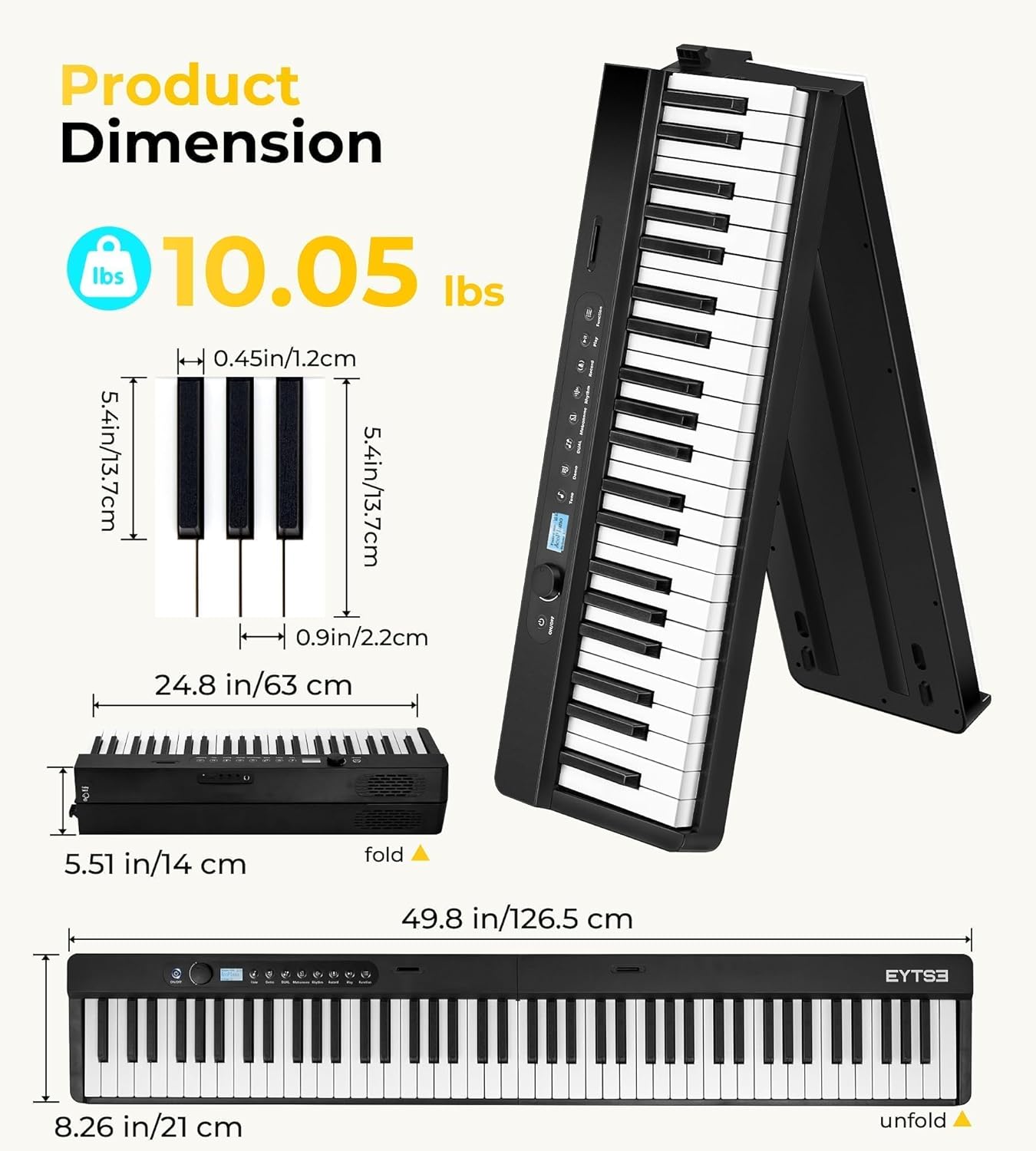
Figure 7.1: Product dimensions and weight.
8. Warranty and Support
8.1 Warranty Information
Please refer to the product packaging or the official EYTSE website for detailed warranty information, including coverage period and terms.
8.2 Customer Support
For technical assistance, troubleshooting, or any other inquiries, please contact EYTSE customer support through the contact information provided in your product packaging or visit the official EYTSE website: EYTSE Store on Amazon.
9. Product Overview Video
Video 9.1: An overview of the EYTSE 88 Keys Folding Piano Keyboard, demonstrating its features and portability.