
Introduction
This manual provides essential information for the assembly, operation, and maintenance of your FiveWillowise 31.5" Black Storage Cabinet. Please read these instructions carefully before assembly and use to ensure safe and proper functionality. Retain this manual for future reference.

Image: The 31.5 inch black storage cabinet featuring two drawers, an open shelf, and two cabinet doors with a farmhouse-style design. It is shown in a living room setting with decorative items on top and inside.
Safety Information
Adherence to the following safety guidelines is crucial for preventing injury and damage to the product.
- Always assemble the cabinet on a stable, flat surface to prevent tipping.
- Use appropriate tools and safety gear, such as gloves, when assembling.
- Do not exceed the maximum weight capacity of the cabinet, which is 110 pounds (50 kg) for the tabletop.
- Keep the cabinet away from direct heat sources, open flames, and excessive moisture.
- Avoid placing heavy objects on the cabinet doors or drawers when they are open, as this can cause instability.
- Supervise children when they are near the cabinet to prevent accidents.
- Ensure all screws and fasteners are securely tightened during assembly and periodically check for looseness.
Setup and Assembly
This section outlines the general steps for assembling your storage cabinet. A detailed step-by-step instruction manual with diagrams is included in the product packaging. Please refer to that document for specific part identification and assembly sequences.
Unboxing and Preparation
- Carefully open the packaging and remove all components.
- Verify that all parts and hardware listed in the included instruction manual are present. Contact customer support if any parts are missing or damaged.
- Lay out all components on a clean, soft, and flat surface (e.g., a blanket or cardboard) to prevent scratches during assembly.
Assembly Steps (General)
- Assemble the Base: Attach the side panels to the bottom panel using the specified hardware.
- Install Back Panel: Secure the back panel to the assembled frame.
- Construct Drawers: Assemble the drawer boxes and install the drawer slides onto the cabinet frame.
- Install Shelves: Insert the fixed shelf and adjustable shelf supports. Place the adjustable shelf at your desired height.
- Attach Doors: Mount the cabinet doors using the provided hinges and adjust for proper alignment.
- Install Top Panel: Secure the top panel to complete the main structure.
- Attach Handles/Knobs: Fasten the handles or knobs to the drawers and doors.
- Connect Power Cord: If applicable, ensure the power cord for the built-in charge station is accessible and can be safely plugged into a wall outlet.
Note: Always follow the specific instructions and diagrams provided in your product's assembly manual for the most accurate and safe assembly process.
Operating Instructions
Your storage cabinet is designed for versatile use in various rooms, offering organized storage and a convenient charging station.
Storage Compartments
- Drawers: The two top drawers provide enclosed storage for smaller items. Pull the knobs to open and push to close.
- Open Shelf: The open shelf above the drawers is suitable for frequently accessed items or decorative displays.
- Cabinet Doors: The two lower cabinet doors open to reveal internal storage. The interior includes one fixed shelf and one adjustable shelf, allowing you to customize the storage space for items of different heights.

Image: The black storage cabinet with its lower doors open, revealing an interior shelf and various kitchen items stored within.
Adjustable Shelf
To adjust the height of the internal shelf:
- Empty the shelf of all contents.
- Carefully lift the shelf and remove it from its current supports.
- Relocate the shelf supports to the desired peg holes inside the cabinet.
- Place the shelf back onto the supports, ensuring it is level and secure.
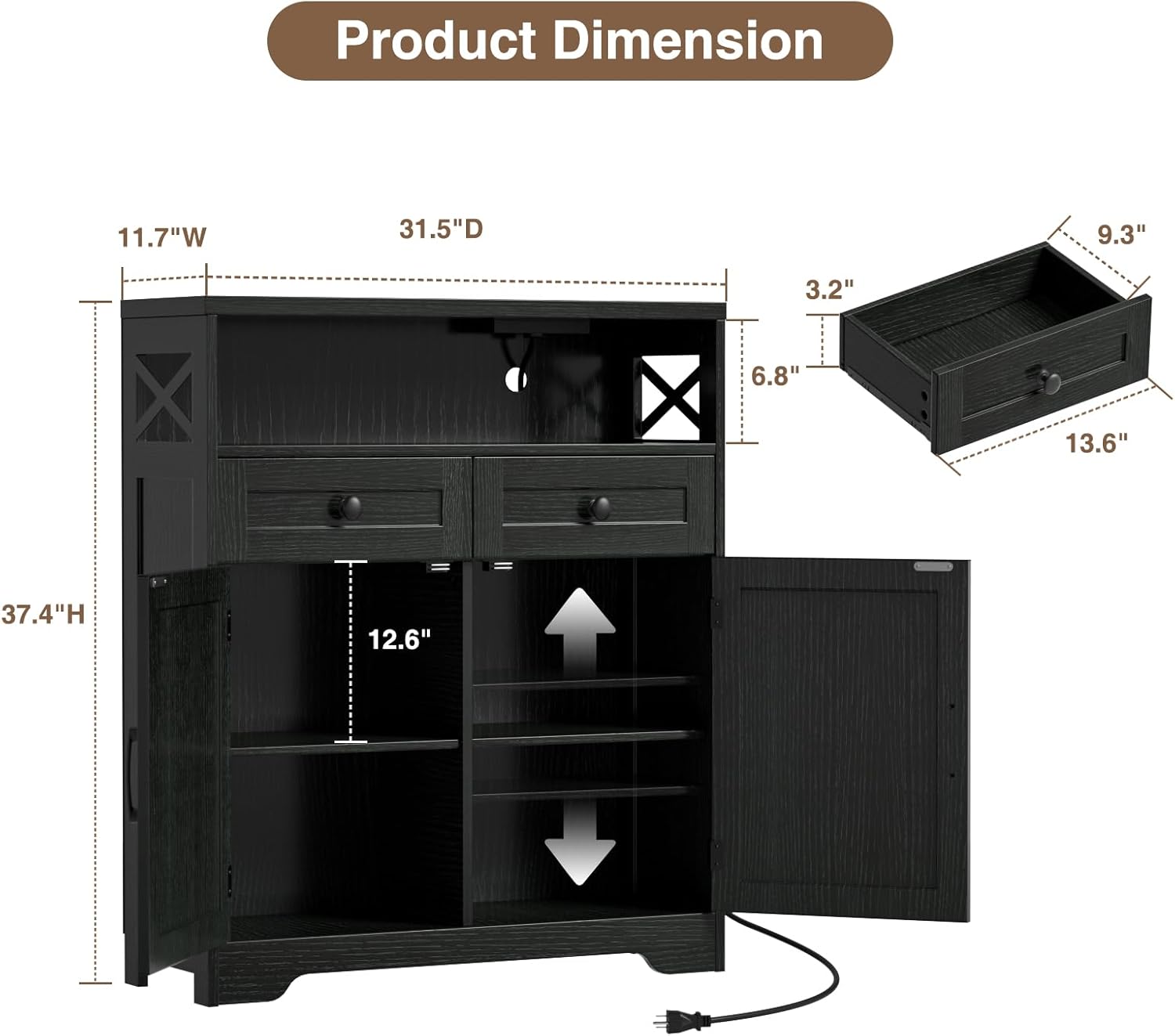
Image: A diagram illustrating the product dimensions, including the overall height, width, and depth, as well as the internal dimensions of the drawers and the adjustable shelf within the cabinet.
Built-in Charge Station
The cabinet features a built-in charge station on the countertop for convenient power access.
- The charge station includes 3 power outlets and 2 USB ports.
- Plug the cabinet's main power cord into a standard wall outlet.
- Use the outlets and USB ports to power or charge small appliances such as coffee makers, blenders, microwaves, or mobile devices.
- Ensure that the total power draw of connected devices does not exceed the maximum capacity of the charge station. Refer to the label on the power cord or charge station for specific electrical ratings.
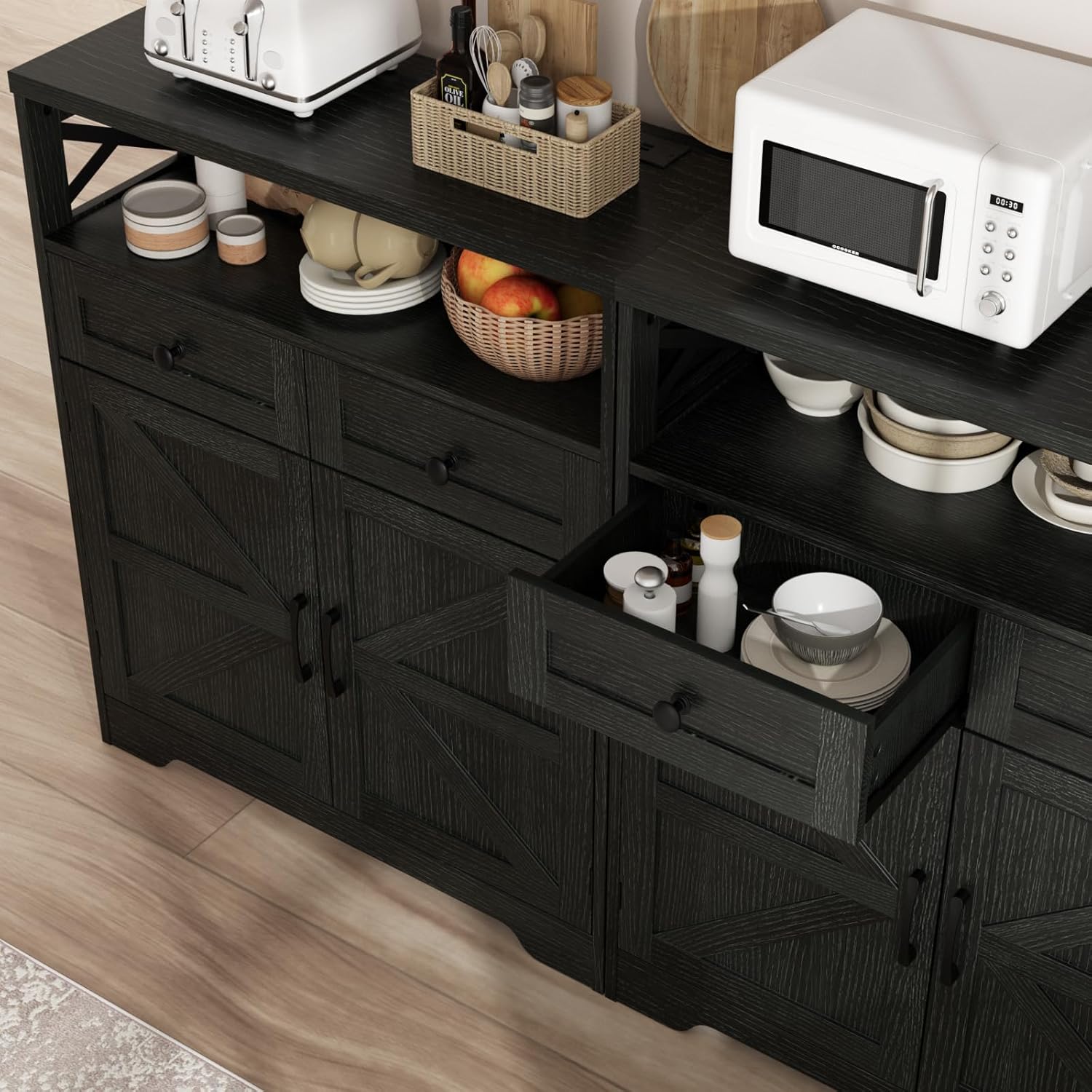
Image: A close-up view of the cabinet's countertop, showing a microwave and a built-in power strip with three electrical outlets and two USB ports, along with its power cord.
Maintenance
Proper care and maintenance will extend the life and appearance of your storage cabinet.
- Cleaning: Wipe surfaces with a soft, damp cloth. Avoid using harsh chemicals, abrasive cleaners, or polishes that may damage the finish.
- Spills: Immediately wipe up any spills to prevent moisture damage or staining.
- Hardware: Periodically check all screws, bolts, and fasteners to ensure they remain tight. Tighten as necessary to maintain stability.
- Avoid Overloading: Do not overload drawers or shelves beyond their recommended weight limits to prevent structural damage.
- Sunlight Exposure: Avoid prolonged exposure to direct sunlight, which can cause fading or discoloration of the finish.
Troubleshooting
This section addresses common issues you might encounter with your storage cabinet.
Cabinet is Wobbly or Unstable
- Check Fasteners: Ensure all assembly screws and bolts are fully tightened.
- Level Surface: Verify that the cabinet is placed on a flat, level surface. If the floor is uneven, use shims under the cabinet feet to stabilize it.
- Re-assembly: If wobbling persists, carefully disassemble and re-assemble the unit, paying close attention to the alignment of all parts.
Drawers Do Not Slide Smoothly
- Check Alignment: Ensure the drawer slides are correctly installed and aligned on both the drawer box and the cabinet frame.
- Obstructions: Look for any debris or objects obstructing the drawer slides.
- Lubrication: Apply a small amount of silicone-based lubricant to the drawer slides if they are stiff.
Cabinet Doors Are Misaligned
- Adjust Hinges: Most cabinet hinges have adjustment screws that allow for vertical, horizontal, and depth adjustments. Refer to the hinge manufacturer's instructions or a general guide for hinge adjustment.
- Check Frame Squareness: Ensure the main cabinet frame is square and level, as a twisted frame can affect door alignment.
Charge Station Not Working
- Power Connection: Verify that the cabinet's main power cord is securely plugged into a functional wall outlet.
- Circuit Breaker: Check if the wall outlet's circuit breaker has tripped.
- Overload: Ensure that the total power draw of connected devices does not exceed the charge station's capacity. Unplug some devices and try again.
Specifications
Detailed product specifications for the FiveWillowise 31.5" Black Storage Cabinet.
| Feature | Detail |
|---|---|
| Brand | FiveWillowise |
| Model Number | J1S053 |
| Colour | Black |
| Product Dimensions (Overall) | 31.5" W x 11.8" D x 37.4" H (80 cm W x 30 cm D x 95 cm H) |
| Item Weight | 28.1 kg (61.9 lbs) |
| Maximum Weight Capacity (Tabletop) | 110 Pounds (50 kg) |
| Material | Engineered Wood |
| Special Features | Lined, Built-in Charge Station (3 Outlets, 2 USB Ports) |
| Mounting Type | Floor Mount |
| Style | Country Rustic / Farmhouse |
| Room Type Recommendation | Kitchen, Living Room, Dining Room |