
1. Introduction
The VIHELM YET-620L is a professional dual-channel digital temperature data logger designed for precise temperature measurement using K-type, T-type, and J-type thermocouples. This device offers high accuracy, data logging capabilities, and a clear LCD display, making it suitable for various industrial and scientific applications. This manual provides detailed instructions for the proper setup, operation, and maintenance of your YET-620L instrument.
2. Key Features
- Dual-Channel Measurement: Simultaneously measure and display temperatures from two independent thermocouple probes.
- Wide Temperature Range: Supports K, T, and J type thermocouples for diverse measurement needs.
- High Precision: Offers a resolution of 0.01°C for accurate readings.
- Data Logging: Stores up to 20,000 sets of measured values with adjustable sampling intervals.
- Multiple Display Modes: View current, maximum (MAX), minimum (MIN), and average (AVG) temperature values.
- Fast Refresh Rate: Temperature readings refresh 2 times per second.
- User Calibration: Multi-point calibration method for enhanced accuracy.
- LCD Backlight: Ensures readability in various lighting conditions.
- Automatic Shutdown: Power-saving feature.
- Over-limit Alarm: Alerts users to temperature excursions.
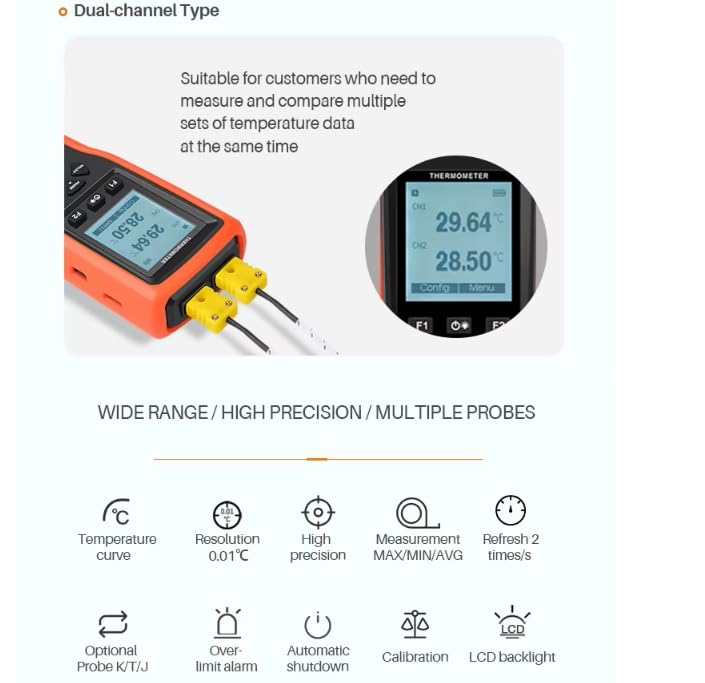
Image: Overview of the YET-620L's key features, including dual-channel capability, high precision, and various functions like temperature curve, resolution, and backlight.
3. Package Contents
Upon unpacking, please verify that all items listed below are present and in good condition:
- 1 x VIHELM YET-620L Digital Temperature Data Logger Unit
- 2 x K-Type Thermocouple Probes
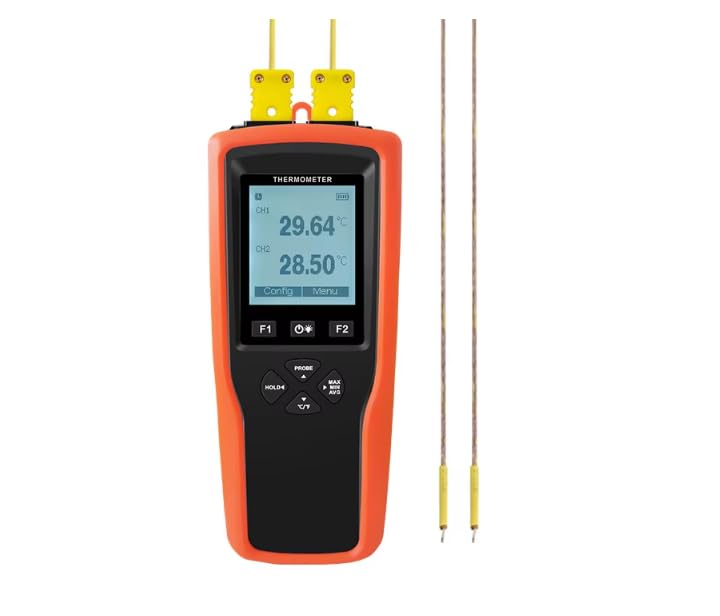
Image: The YET-620L device shown with two K-type thermocouple probes, illustrating the typical package contents.
4. Setup
4.1. Battery Installation
- Locate the battery compartment on the back of the YET-620L unit.
- Open the battery compartment cover.
- Insert 3 x 1.5V AAA alkaline batteries, ensuring correct polarity (+/-). Rechargeable 1.2V AAA batteries can also be used.
- Close the battery compartment cover securely.
Note: While a 5V USB power supply can be connected, it is not recommended for continuous power supply during operation as it may affect measurement stability or battery life if rechargeable batteries are installed.
4.2. Connecting Thermocouple Probes
- Identify the thermocouple input jacks at the top of the YET-620L unit, labeled CH1 and CH2.
- Connect the K-type thermocouple probes (or other compatible K, T, J type probes) into the CH1 and/or CH2 jacks. Ensure the probe connectors are fully inserted and correctly oriented.
- The device will automatically detect the connected probes and display their respective temperature readings.
5. Operating Instructions
5.1. Power On/Off
- To power on the device, press and hold the power button (usually marked with a power symbol) until the LCD screen illuminates.
- To power off, press and hold the power button again until the screen turns off. The device also features an automatic shutdown function to conserve battery life.
5.2. Basic Temperature Measurement
- Once powered on and probes are connected, the current temperature readings for CH1 and CH2 will be displayed on the LCD screen.
- Ensure the probes are placed in the environment or on the object whose temperature you wish to measure.
5.3. Function Buttons
- Config: Press this button to enter the configuration menu for settings such as unit selection, alarm limits, and data logging parameters.
- Menu: Use this button to navigate through menu options or confirm selections within the configuration menu.
- HOLD: Press to freeze the current temperature readings on the display. Press again to resume live measurement.
- MAX/MIN/AVG: Press to cycle through maximum, minimum, and average temperature values recorded since the device was powered on or the function was reset.
- °C/°F: Press to switch between Celsius and Fahrenheit temperature units.
- Backlight Button (often represented by a light bulb icon): Press to toggle the LCD backlight on or off.
5.4. Data Logging
The YET-620L supports data logging for long-term monitoring.
- Enter the configuration menu using the 'Config' button.
- Navigate to the data logging settings to set the sampling interval (1-86399 seconds).
- Initiate data logging. The device can store up to 20,000 sets of measured values.
- To retrieve logged data, connect the device to a compatible Windows PC (XP/Vista/7/8/10). Data can be output in txt, csv, xls, or dlg formats.
6. Specifications
Detailed technical specifications for the VIHELM YET-620L:
| Feature | Specification |
|---|---|
| Model | YET-620L |
| Channel | 2 |
| Record Function | Yes |
| Support Probe Type | K, T, J type thermocouple |
| Unit | °C, °F |
| Measuring Range (K type) | -200~1370°C |
| Measuring Range (T type) | -200~400°C |
| Measuring Range (J type) | -200~1200°C |
| Resolution | 0.01°C (-200.00°C~+999.99°C), 0.1°C (+1000.0°C~+1370.0°C) |
| Native Accuracy | ±(0.3%|t|+0.40)°C |
| Measuring Rate | 2 times/second |
| User Calibration Method | Multi-point calibration |
| Storage Capacity | 20000 sets of measured values |
| Record Sampling Interval | 1-86399 seconds adjustable |
| Output File Format | txt, csv, xls, dlg |
| Compatible System | Windows XP/Vista/7/8/10 |
| Display | Dot matrix LCD screen with backlight |
| Operating Temperature | -10~50°C (non-condensing) |
| Storage Temperature | -20~60°C (without battery) |
| Power Supply | 3 pcs of 1.5V AAA alkaline batteries, 3 pcs of 1.2V AAA rechargeable batteries, 5V USB (not recommended) |
| Battery Life | Approx. 190 hours (backlight off, 1200mAh capacity, 25°C ambient) |
| Protection Class | IP52 |
| Dimensions | 174 x 73 x 40 mm |
| Weight | Approx. 200g (excluding batteries and probes) |
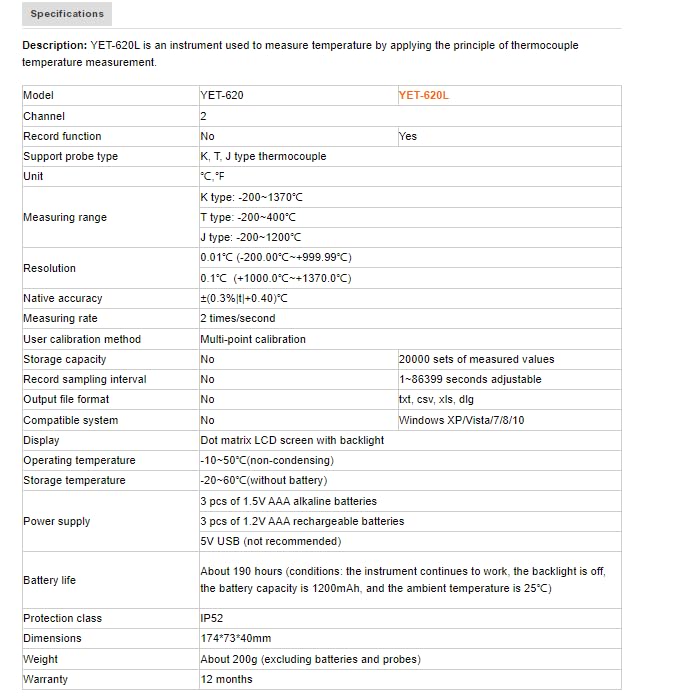
Image: A detailed table outlining the technical specifications of the YET-620L, including measurement ranges, accuracy, and power requirements.
7. Applications
The VIHELM YET-620L is a versatile instrument suitable for a wide range of temperature measurement and monitoring applications, including but not limited to:
- Boiler Equipment monitoring
- Concrete Pouring temperature control
- Metal Processing temperature analysis
- Cold Chain Transportation temperature tracking
- Automobile Market diagnostics
- Food safety and storage temperature checks
- Medicine storage temperature monitoring
- Household temperature checks
- Supermarket refrigeration monitoring
- Laboratory experiments and research
- Animal Husbandry environmental monitoring

Image: A collage depicting various application scenarios for the YET-620L, such as industrial, food, medical, and laboratory settings.
8. Maintenance
- Cleaning: Wipe the device with a soft, dry cloth. Do not use abrasive cleaners or solvents.
- Battery Replacement: Replace batteries when the low battery indicator appears on the display to ensure continuous operation and data integrity.
- Storage: When not in use for extended periods, remove the batteries and store the device in a cool, dry place within the specified storage temperature range (-20~60°C).
- Probe Care: Handle thermocouple probes carefully. Avoid bending or damaging the probe tips. Clean probes as necessary, depending on the application.
9. Troubleshooting
- Device does not power on: Check if batteries are installed correctly and have sufficient charge. Replace batteries if necessary.
- Inaccurate readings: Ensure thermocouple probes are correctly connected and are of the appropriate type (K, T, or J) for the measurement. Consider performing a user calibration if readings are consistently off.
- No temperature display for a channel: Verify the probe is securely plugged into the correct channel (CH1 or CH2). Check the probe for visible damage.
- Data logging issues: Ensure sufficient storage capacity is available. Check the sampling interval settings. Verify PC compatibility and correct software/driver installation for data transfer.
10. Warranty and Support
The VIHELM YET-620L comes with a 12-month warranty from the date of purchase. This warranty covers manufacturing defects and ensures the product meets its specified performance. For warranty claims or technical support, please contact your retailer or the manufacturer directly with your purchase details.