
1. Product Overview
The Morelax Ear Wax Removal Tool is an advanced device designed for safe and effective ear canal cleaning. It features a high-definition camera and smart connectivity to provide a clear visual of the ear canal during use. This tool is compatible with both iOS and Android devices.
- Omnidirectional 360° Field of View & 1080P HD Camera: Built-in high-precision lens with 5 million pixels, 360° wide-angle design, and 6 LED lights for clear 1080P HD resolution viewing of the ear canal.
- Intelligent Visual APP Operation: Connects directly to an exclusive APP via Wi-Fi, allowing for photo taking, video recording, and lag-free viewing with a 20fps transfer rate.
- Integrated Ear Scoop Design: Features a closely combined camera and ear scoop for enhanced safety and ease of use, preventing accidental detachment.
- Long Battery Life: Equipped with a 350mAh rechargeable battery, providing 90 minutes of use on a full charge and up to 30 days of standby time.
- IP67 Waterproof: The otoscope, earplugs, and lenses are IP67 waterproof, allowing for cleaning with water or alcohol swabs. Do not immerse the entire otoscope in water.
2. What's in the Box
Please verify that all components are present upon unboxing:
- Otoscope with light (1)
- Type-C charging cable (1)
- Silicone ear spoons (6)
- Product Manual (1)
- 8-piece ear wax removal tool kit (1)

Figure 2.1: Included components of the Morelax Ear Wax Removal Kit.
3. Setup and APP Connection
Follow these steps to set up your Morelax Ear Wax Removal Tool and connect it to the companion app:
- Charge the Device: Fully charge the device using the provided Type-C charging cable before first use. The indicator light will show red during charging and turn off when fully charged.
- Download the App: Scan the QR code below with your mobile device or visit your mobile browser to download the 'Cooleer' app. The app is compatible with iOS and Android.
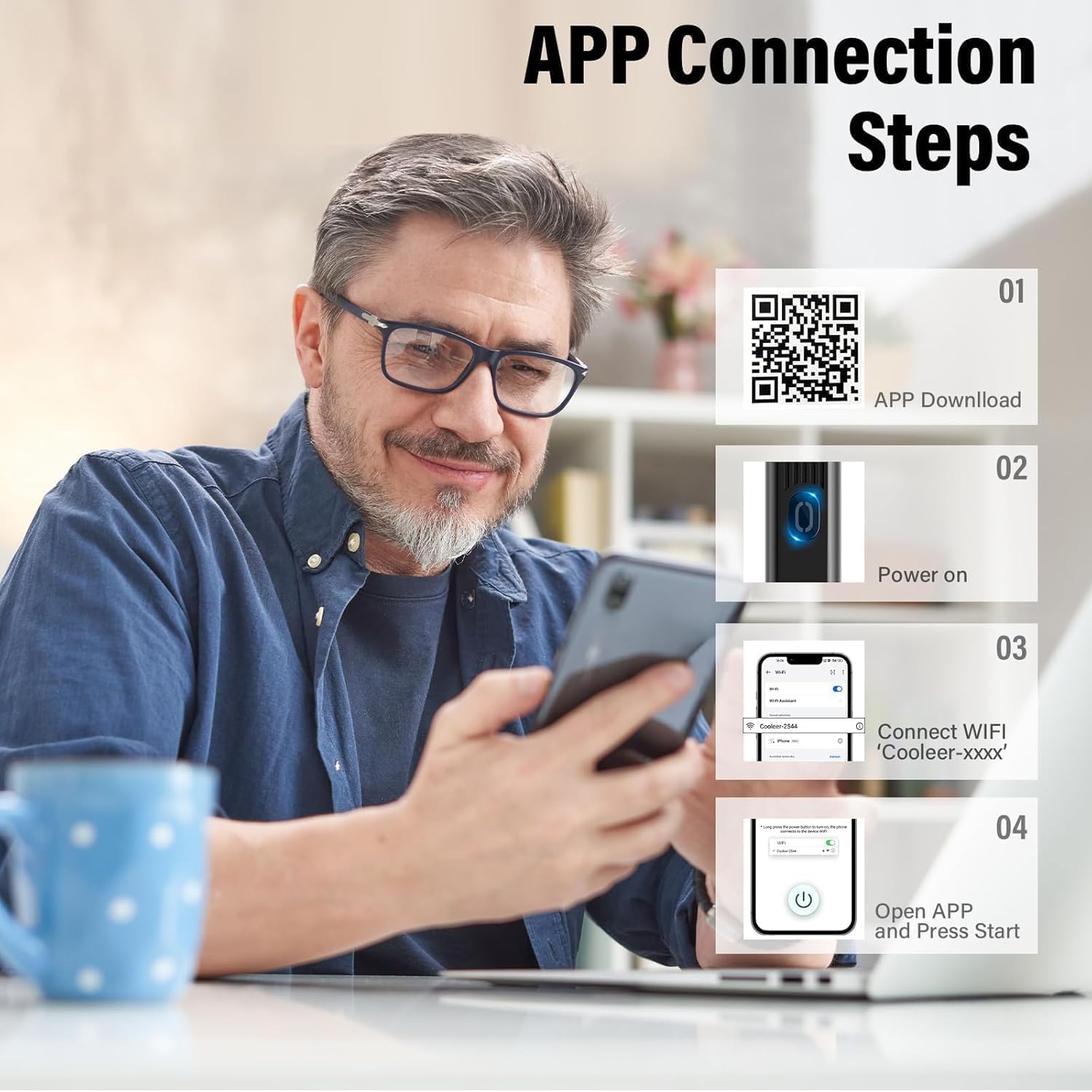
- Power On: Press and hold the power button on the device for 2 seconds to turn it on. The indicator blue light will illuminate.
- Connect to Wi-Fi: Go to your phone's Wi-Fi settings and connect to the device's local Wi-Fi network, typically named 'Cooleer-xxxx'.
- Open the App: Launch the 'Cooleer' app. The device's camera feed should now be visible on your screen. Click the start button within the app to begin using the product.
Video 3.2: Demonstration of connecting the ear wax removal tool to a smartphone via Wi-Fi and viewing the ear canal.
4. Operating Instructions
Once connected, the app will display a real-time view from the ear camera. Carefully insert the ear scoop into the ear canal while observing the live feed on your device. Use gentle movements to remove earwax.
- Visual Guidance: The 1080P HD camera and 6 LED lights provide a clear, illuminated view, allowing precise navigation within the ear canal.
- Safe Ear Scoop: The integrated silicone ear scoop is designed to be soft and secure, minimizing the risk of injury.
- Versatile Use: The tool can be used for examining and cleaning not only ears but also the nose, throat, teeth, and skin.
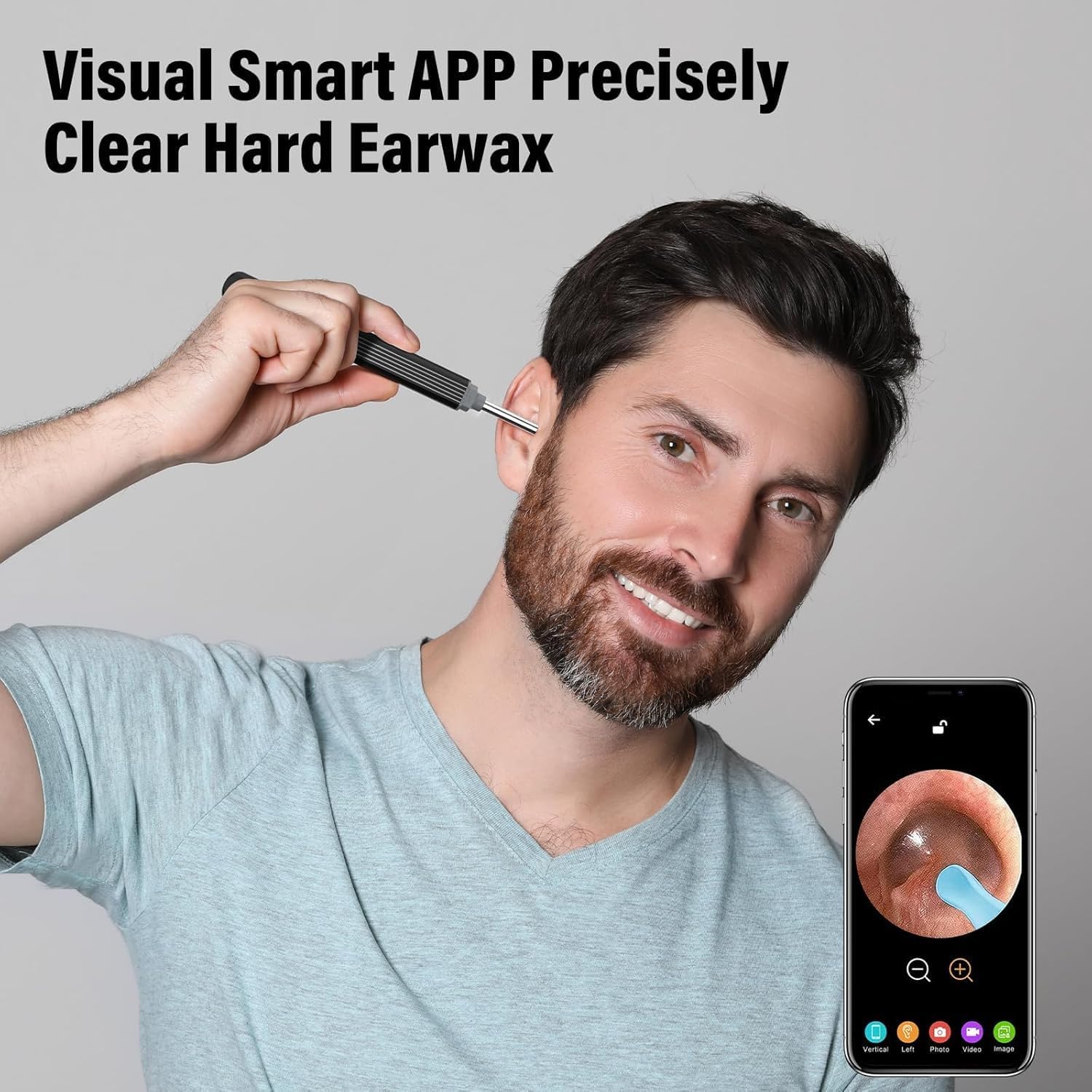
Figure 4.1: Visual Smart APP for precise earwax removal.

Figure 4.2: Versatile applications of the ear wax removal tool.
Video 4.3: Demonstration of the ear wax removal tool in action, showing the clear visuals on a connected smartphone.
5. Maintenance
Proper maintenance ensures the longevity and hygiene of your device:
- Cleaning: After each use, the otoscope, earplugs, and lenses can be cleaned with water or wiped with alcohol swabs. Ensure the device is dry before storage.
- Waterproof Caution: While the lens is IP67 waterproof, do not immerse the entire otoscope in water.
- Silicone Ear Scoop Replacement: The silicone ear scoops are easily replaceable. Ensure they are securely attached before use.

Figure 5.1: IP67 Waterproof Lens for easy cleaning.

Figure 5.2: Integrated Ear Spoon Design for secure and easy replacement.
6. Troubleshooting
Refer to the following common issues and their solutions:
- Device refused to connection?
If the device Wi-Fi is connected to another phone, the phone with the app cannot use the product. If the phone has set Wi-Fi that cannot connect to the Internet or the phone detects abnormal Wi-Fi, it will automatically replace it with its own Wi-Fi, then the Wi-Fi of the product is disconnected and cannot be used. - Wi-Fi connection unstable?
If the Wi-Fi prompts "connected but no Internet access, whether to switch", please click "No". If you click "Yes", it automatically switches to an Internet network and the product cannot be used. If your own Internet Wi-Fi coverage area is strong, the device Wi-Fi will be automatically replaced. At this point, it is recommended to go to areas with weak or no Wi-Fi to connect the product's own Wi-Fi and use it. If you want to surf the Internet while using this product, you can only use your own traffic to surf the Internet, and the Wi-Fi is still connected to their own products. If you frequently connect to the Internet, you can only delete all your connected Internet Wi-Fi. - Why does the device ring off?
This feature reminds you to use the equipment to avoid going too deep into the ear canal, ensuring safety. - Not turn on or light up?
Please charge the item fully first to check. Try another charger to ensure it's not a charging issue. - Is a password required for the default Wi-Fi?
Connect to its Wi-Fi without a password. - The APP connection is unstable.
Close and restart the product, then reconnect to the APP.
7. Specifications
| Product Dimensions | 4.33 x 3.94 x 58.66 inches; 0.63 ounces |
| Item Model Number | Electric ear wax removal Kit |
| Batteries | 1 Lithium Ion battery required (included) |
| Date First Available | October 16, 2024 |
| Manufacturer | Morelax |
| ASIN | B0DDG8CPFC |
8. Warranty and Support
Your Morelax Ear Wax Removal Tool comes with a standard return policy allowing for refunds or replacements within 30 days of purchase.
For customer service and technical support, please contact:
- Email: support@eotoscop.us
- Telephone 1 (U.S.): +1 6264203418 (Mon-Fri: 9:00-17:00 PST)
- Telephone 2 (U.S.): +1 6264203417 (Mon-Fri: 17:00-24:00 PST)